
Genie CK-102S
Contents
Genie CK-102S Automatic Portable Wrist Blood Pressure Monitor User Manual
Model: CK-102S | Brand: Genie
1. Introduction
This user manual provides comprehensive instructions for the Genie CK-102S Automatic Portable Wrist Blood Pressure Monitor. Designed for convenient and accurate blood pressure measurement, this device features smart pressure technology and a memory function to store your readings. Please read this manual thoroughly before use to ensure proper operation and obtain reliable results.
2. Safety Information
- Consult your physician before using this device for medical diagnosis or treatment.
- Do not self-diagnose or self-medicate based on measurement results. Always consult a healthcare professional.
- Keep the device out of reach of children and pets.
- Do not use the device in a wet environment or near strong electromagnetic fields.
- Use only specified batteries. Do not mix old and new batteries or different types of batteries.
- If the device is damaged, do not attempt to repair it yourself. Contact customer support.
3. Package Contents
Upon opening the package, please verify that all items are present and undamaged:
- Genie CK-102S Blood Pressure Monitor Unit
- Wrist Cuff (integrated)
- User Manual

Image: The Genie CK-102S Blood Pressure Monitor alongside its retail packaging, showing the compact design and included wrist cuff.
4. Product Features
- Smart Pressure Technology: Ensures accurate and comfortable measurements.
- Memory Function: Stores up to 90 sets of measurement data for tracking trends.
- Wrist Measurement: Designed for convenient wrist-based blood pressure monitoring.
- Fully Automatic Digital Technology: Provides quick and reliable readings with ease.
- Compact and Portable Design: Ideal for home use and travel.

Image: A detailed view of the monitor's digital display, showing typical blood pressure and pulse readings.
5. Setup
5.1. Battery Installation
- Locate the battery compartment on the back or side of the device.
- Open the battery compartment cover.
- Insert two (2) AAA batteries, ensuring correct polarity (+/-).
- Close the battery compartment cover securely.
5.2. Cuff Placement
- Sit comfortably with your arm resting on a flat surface.
- Slide the wrist cuff onto your left wrist, with the display facing upwards.
- Position the cuff approximately 1-2 cm above your wrist joint.
- Ensure the cuff is snug but not too tight. The wrist circumference range is 13.5-19.5 cm.
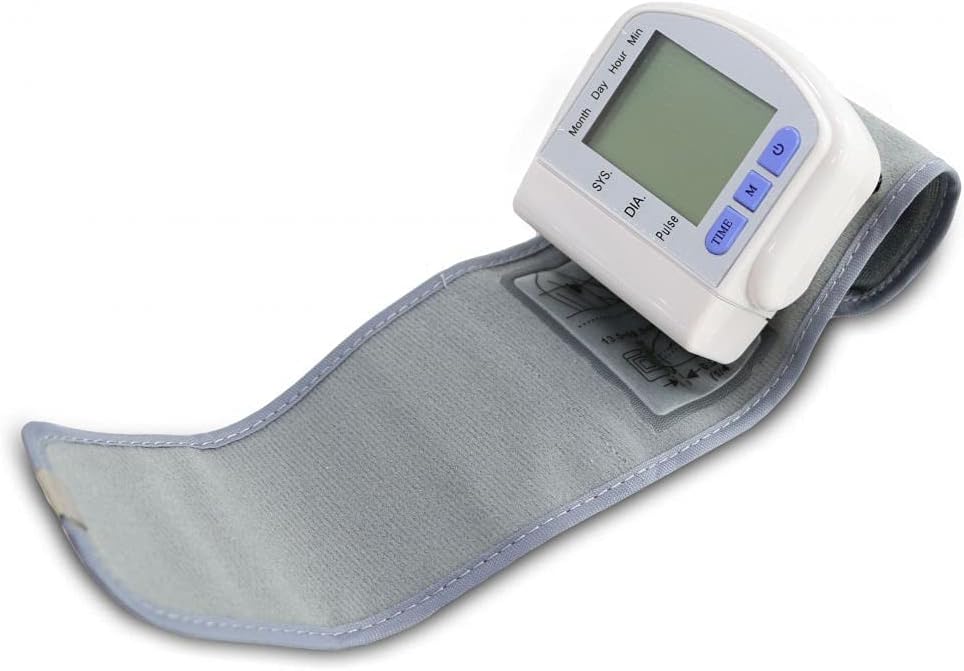
Image: The blood pressure monitor with its integrated wrist cuff laid out, demonstrating its design for wrist application.
6. Operating Instructions
6.1. Taking a Measurement
- Ensure you are relaxed and have been resting for at least 5 minutes before measurement.
- Place your cuffed wrist at heart level. You can support your arm with your other hand or a cushion.
- Press the START/STOP button to begin the measurement. The cuff will inflate automatically.
- Remain still and silent during the measurement.
- Once the measurement is complete, the device will display your systolic pressure, diastolic pressure, and pulse rate.
- The reading will automatically be saved in the device's memory.

Image: The blood pressure monitor correctly positioned on a user's wrist, ready for a measurement.
6.2. Recalling Memory Records
To view previous measurements:
- With the device off, press the M (Memory) button.
- The most recent reading will be displayed.
- Press the M button repeatedly to cycle through older readings.
7. Maintenance
7.1. Cleaning
- Wipe the device and cuff with a soft, dry cloth.
- For stubborn stains, use a slightly damp cloth with mild soap, then wipe dry immediately.
- Do not use abrasive cleaners, solvents, or immerse the device in water.
7.2. Storage
- Store the device in a cool, dry place, away from direct sunlight and extreme temperatures.
- If not in use for an extended period, remove the batteries to prevent leakage.

Image: The blood pressure monitor neatly folded and placed inside its clear protective storage case.
8. Troubleshooting
| Problem | Possible Cause | Solution |
|---|---|---|
| Device does not turn on. | Batteries are low or incorrectly inserted. | Replace batteries or ensure correct polarity. |
| Inaccurate readings. | Incorrect cuff placement, movement during measurement, or speaking. | Re-position cuff, remain still and silent. Ensure wrist is at heart level. |
| Cuff does not inflate. | Air leakage from cuff or hose, or low batteries. | Check cuff for damage, ensure proper connection, replace batteries. |
9. Specifications
- Model: CK-102S
- Measurement Method: Pulse
- Wrist Circumference: 13.5 - 19.5 cm
- Power Source: 2 x AAA Batteries
- Product Dimensions (L x W x H): 9.5 x 6 x 1.7 cm
- Product Weight: 400 grams
- Memory: 90 sets of data
- Age Range: Adult
- Manufacturer Reference: 2724336162086
10. Warranty and Support
For warranty information or technical support, please contact your retailer or the manufacturer directly. Keep your purchase receipt as proof of purchase.
For further assistance, you may visit the product's support page or contact the manufacturer using the details provided in your product packaging.
Documents and downloads
Ask a question about this manual
Ask about setup, troubleshooting, compatibility, parts, safety, or missing instructions. Manuals+ will review the question and use this page’s manual context to help answer it.