
Google G7YPJ; GPQY2; G7T9J
Google Pixel Buds A-Series
User Manual
Model: G7YPJ; GPQY2; G7T9J
1. Introduction
The Google Pixel Buds A-Series are wireless earbuds designed to deliver rich, high-quality audio. Featuring a comfortable, flush-to-ear design with a stabilizer arc and three eartip sizes, they provide a secure fit and excellent sound isolation. These earbuds are compatible with Android and iOS devices, offering seamless connectivity and integrated Google Assistant functionality for hands-free control.

Image: Google Pixel Buds A-Series in their charging case.
2. What's in the Box
Your Google Pixel Buds A-Series package includes the following components:
- Google Pixel Buds A-Series Earbuds
- Charging Case
- USB-C to USB-A Charging Cable
- Eartips (Small, Medium, Large)
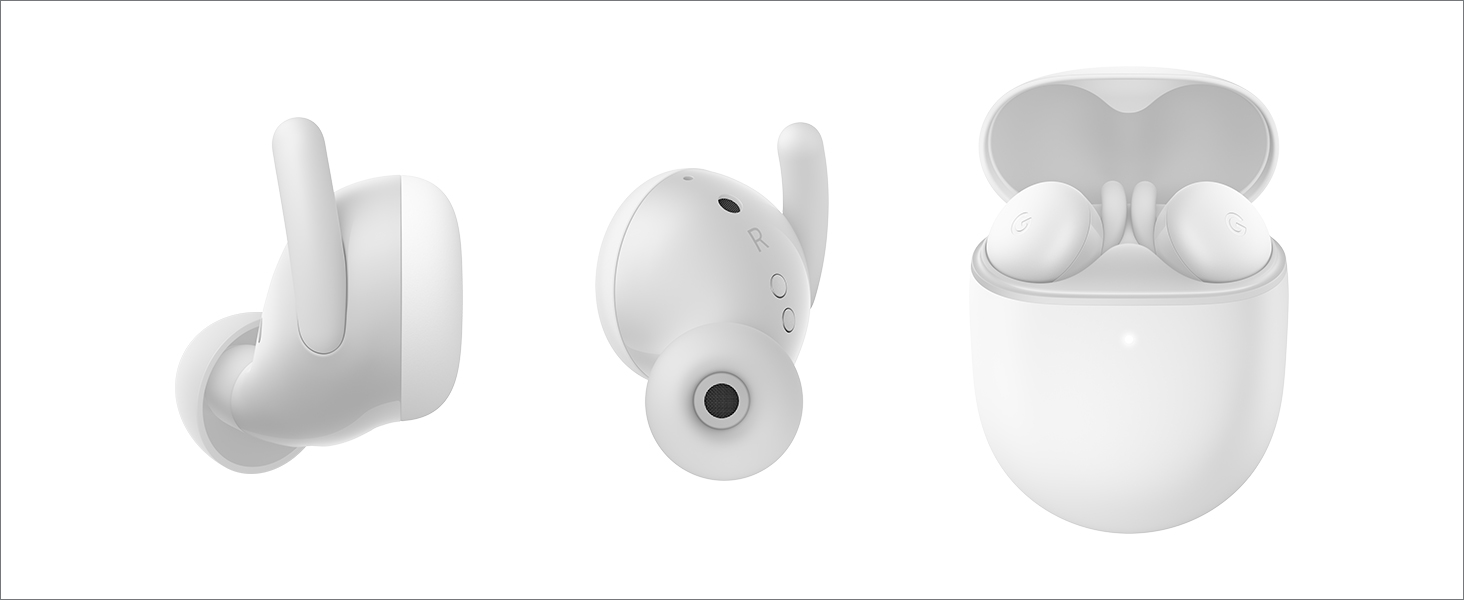
Image: Various views of the Pixel Buds A-Series and their charging case.
3. Setup
Follow these steps to set up your Pixel Buds A-Series:
- Charge the Case: Before first use, fully charge the charging case using the provided USB-C cable. The indicator light on the case will show charging status.
- Insert Earbuds: Place both earbuds into the charging case. Ensure they are seated correctly to begin charging.
- Pairing:
- For Android Devices (Fast Pair): Open the charging case near your Android phone (running Android 6.0 or newer). A notification will appear on your phone for quick pairing. Tap to connect.
- For iOS or Other Bluetooth Devices: Open the charging case. Press and hold the pairing button on the back of the case until the indicator light starts pulsing white. Go to your device's Bluetooth settings and select "Pixel Buds A-Series" from the list of available devices.
- Fit Adjustment: Try the different eartip sizes to find the most comfortable and secure fit. A good seal is essential for optimal sound quality.
4. Operating Your Pixel Buds A-Series
The Pixel Buds A-Series offer intuitive touch controls and seamless integration with Google Assistant.
Touch Controls:
- Play/Pause: Tap either earbud once.
- Next Track: Tap either earbud twice.
- Previous Track: Tap either earbud three times.
- Answer/End Call: Tap either earbud once.
- Decline Call: Tap either earbud twice.
Google Assistant:
Access Google Assistant hands-free by simply saying "Hey Google" or by pressing and holding either earbud. You can use voice commands to:
- Play music
- Get directions
- Check the weather
- Have notifications read aloud
- Make calls

Image: Using Google Assistant with Pixel Buds A-Series.
5. Maintenance
Battery Life:
The Pixel Buds A-Series provide up to 5 hours of listening time or 2.5 hours of talk time on a single charge. With the charging case, you can extend your listening time up to 24 hours. The case also offers a quick charge feature, providing up to 3 hours of listening with just a 15-minute charge.
Cleaning and Care:
- Regularly clean your earbuds and charging case with a soft, dry, lint-free cloth.
- Avoid using abrasive materials or harsh chemicals.
- The earbuds are sweatproof, but they are not waterproof. Avoid submerging them in water.
- Ensure the charging contacts on both the earbuds and the case are clean and dry before charging.
6. Troubleshooting
If you encounter issues with your Pixel Buds A-Series, try the following steps:
- No Sound: Ensure the earbuds are charged and properly connected to your device. Check the volume level on both your device and the earbuds.
- Connection Issues: Try unpairing and re-pairing the earbuds with your device. Ensure Bluetooth is enabled on your device and the earbuds are within range.
- Charging Problems: Verify that the charging cable is securely connected to both the case and a power source. Check if the charging contacts on the earbuds and case are clean.
- Unresponsive Touch Controls: Ensure your fingers are clean and dry. Try restarting the connection by placing the earbuds back in the case and then taking them out again.
- Factory Reset: If problems persist, you may need to perform a factory reset. Refer to the official Google Pixel Buds support page for detailed instructions on how to do this.
7. Specifications
| Feature | Detail |
|---|---|
| Model Name | Pixel Buds A-Series |
| Connectivity Technology | Bluetooth |
| Wireless Communication Technology | Bluetooth |
| Bluetooth Version | 4 |
| Battery Life (Earbuds) | Up to 5 hours listening time |
| Battery Life (with Charging Case) | Up to 24 hours listening time |
| Charging Time | Approx. 2 hours for case |
| Control Type | Media Control, Touch |
| Water Resistance Level | Water Resistant (Sweatproof) |
| Item Weight | 1.9 Ounces |
| Product Dimensions | 0.81 x 1.15 x 0.69 inches |
| Included Components | Earbuds, Cable, Charging Case, Eartips with 3 size options |
| Manufacturer | |
| Color | Dark Olive |
| Ear Placement | In Ear |
| UPC | 193575009735 |
8. Warranty and Support
Your Google Pixel Buds A-Series are covered by a manufacturer's warranty. For detailed information regarding warranty terms, conditions, and duration, please refer to the warranty card included in your product packaging or visit the official Google support website.
For further assistance, technical support, or to view frequently asked questions, please visit the official Google Pixel Buds support page: support.google.com/pixelbuds
Related documentsG7YPJ; GPQY2; G7T9J


Ask a question about this manual
Ask about setup, troubleshooting, compatibility, parts, safety, or missing instructions. Manuals+ will review the question and use this page’s manual context to help answer it.