
CONTEC SP70B
CONTEC SP70B Handheld Spirometer User Manual
Model: SP70B
1. Introduction
The CONTEC SP70B Handheld Spirometer is a portable device designed for checking lung conditions. It utilizes an infrared measurement mode to assess various respiratory parameters. This device is suitable for routine testing in hospitals, clinics, and home environments.
Key features include:
- Measurement of parameters such as FVC (Forced Vital Capacity), FEV1 (Forced Expiratory Volume in 1 second), FEV1/FVC ratio, and PEF (Peak Expiratory Flow).
- Ability to set up personal information including height, age, and gender for accurate readings.
- Health status indication based on measured data.
- Bluetooth transmission for data transfer.
- Data memory and case review functions for tracking progress.

Figure 1: Front view of the CONTEC SP70B Handheld Spirometer, displaying measurement results and control buttons.
2. Setup
2.1 Battery Installation
The SP70B Spirometer requires two AAA batteries for operation. These batteries are typically included with the device.
- Locate the battery compartment on the back of the device.
- Open the battery compartment cover.
- Insert two AAA batteries, ensuring correct polarity (+ and -).
- Close the battery compartment cover securely.
2.2 Mouthpiece Attachment
Attach the disposable mouthpiece to the designated port on the spirometer. Ensure it is firmly seated to prevent air leakage during measurement.
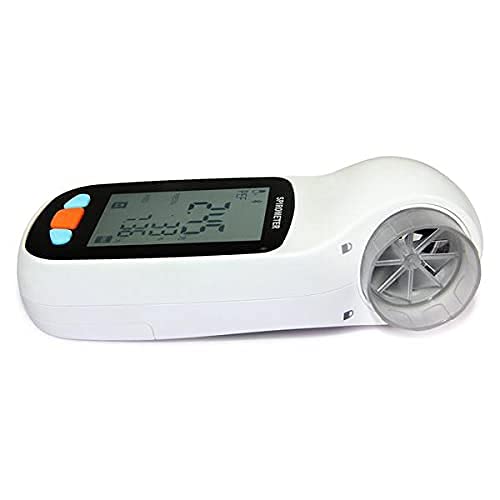
Figure 2: Side view of the spirometer showing the mouthpiece attachment point.
2.3 Personal Information Setup
Before first use, or for a new user, it is essential to input personal information to ensure accurate and personalized readings. This typically includes:
- Height
- Age
- Gender
- Ethnicity (if applicable for specific reference values)
Refer to the on-screen menu of the device to navigate to the personal settings and input the required data.
3. Operating Instructions
3.1 Performing a Spirometry Test
- Ensure the device is powered on and a clean mouthpiece is attached.
- Sit upright in a comfortable position.
- Take a deep breath, filling your lungs completely.
- Place your lips tightly around the mouthpiece, ensuring no air escapes.
- Exhale as hard and as fast as you can, emptying your lungs completely. Continue exhaling for at least 6 seconds, or until instructed by the device.
- Repeat the test as necessary, typically three times, to obtain consistent readings.
The device will display key parameters such as FVC, FEV1, FEV1/FVC, and PEF after each test. It may also provide a health status indication based on these measurements compared to predicted values for your personal information.
3.2 Data Management
The SP70B spirometer features data memory and case review functions. You can browse previous test results directly on the device. For more detailed analysis and long-term tracking, the device supports Bluetooth transmission to compatible software or applications.
Refer to the device's on-screen menu or accompanying software instructions for pairing and data transfer procedures.
4. Maintenance
4.1 Cleaning the Device and Mouthpiece
Regular cleaning is essential for hygiene and accurate operation.
- Device Body: Wipe the main unit with a soft, damp cloth. Do not immerse the device in water or use abrasive cleaners.
- Mouthpiece: The mouthpiece should be cleaned or replaced after each use, especially if used by multiple individuals. Disposable mouthpieces are recommended. If using a reusable mouthpiece, clean it thoroughly with mild soap and water, rinse, and allow it to air dry completely before storage or next use.

Figure 3: Example of a disposable spirometer mouthpiece.
4.2 Storage
Store the spirometer in a clean, dry place away from direct sunlight, extreme temperatures, and humidity. Remove batteries if the device will not be used for an extended period to prevent leakage.
5. Troubleshooting
If you encounter issues with your CONTEC SP70B Spirometer, refer to the following common troubleshooting steps:
| Problem | Possible Cause | Solution |
|---|---|---|
| Device does not power on. | Low or dead batteries; incorrect battery installation. | Replace batteries with new AAA batteries; ensure correct polarity. |
| Inaccurate or inconsistent readings. | Improper mouthpiece attachment; incorrect breathing technique; dirty mouthpiece; incorrect personal information settings. | Ensure mouthpiece is securely attached; review operating instructions for proper technique; clean or replace mouthpiece; verify personal information. |
| Bluetooth connection issues. | Device not in pairing mode; Bluetooth disabled on receiving device; interference. | Ensure spirometer is in Bluetooth pairing mode; enable Bluetooth on your smartphone/computer; move closer to the receiving device; restart both devices. |
If the problem persists after attempting these solutions, please contact CONTEC customer support for further assistance.
6. Specifications
| Parameter | Value |
|---|---|
| Brand | CONTEC |
| Model Number | SP70B |
| Manufacturer | Contec |
| Batteries | 2 AAA batteries (included) |
| Memory Sticks | 1 |
| ASIN | B09773FDCY |
| First Available Date | 14 June 2021 |
| Net Quantity | 1.0 count |
7. Warranty and Support
Specific warranty information for the CONTEC SP70B Handheld Spirometer is typically provided with the product packaging or can be found on the official CONTEC website. Please refer to these resources for details regarding warranty coverage, terms, and conditions.
For technical support, service, or inquiries about your device, please contact CONTEC customer service through their official channels. Contact information can usually be found on the manufacturer's website or in the documentation included with your product.
Related documentsSP70B


Ask a question about this manual
Ask about setup, troubleshooting, compatibility, parts, safety, or missing instructions. Manuals+ will review the question and use this page’s manual context to help answer it.