
1. Introduction
The HanRongDa HRD-308S is a portable stereo FM radio headset designed for personal listening. It integrates a digital FM radio tuner into comfortable over-ear headphones, making it ideal for activities such as walking, jogging, or traveling. Featuring DSP (Digital Signal Processing) technology, it aims to provide clear reception and sound quality across its FM frequency range of 50-108MHz. This manual provides detailed instructions for the proper setup, operation, and maintenance of your HRD-308S headphones.

Figure 1.1: HanRongDa HRD-308S Portable FM Radio Headphones. This image shows the overall design of the black over-ear headphones with an integrated radio control panel on the right earcup and an extendable antenna.
2. Package Contents
Please check the package carefully to ensure all items are present:
- 1 x HRD-308 Radio Headphones
- 1 x Audio Cable (3.5mm)
- 1 x English User Manual

Figure 2.1: Package Contents. This image displays the HRD-308S headphones alongside the included 3.5mm audio cable and the user manual.
3. Product Features
- FM Radio Reception: Wide FM frequency range of 50-108MHz.
- DSP Digital Tuning: Advanced digital signal processing for enhanced reception and reduced interference.
- Portable and Foldable Design: Easy to store and carry, suitable for various outdoor activities.
- Battery Operated: Requires 2 AA batteries (not included), providing up to 30 hours of listening time. Saved stations are retained even after battery replacement.
- Wired Headset Functionality: Connects to external audio devices (smartphones, PCs, tablets) via a 3.5mm audio cable (included).
- Preset Stations: Supports automatic search and memory for up to 10 stations, plus one favorite station accessible via a dedicated button.
- Comfortable Design: Features soft over-ear earmuffs and a telescopic headband for an adjustable and comfortable fit.
- Audio Quality: Equipped with 40mm speakers for clear sound.
- Passive Noise Cancellation: Helps reduce ambient noise for a better listening experience.

Figure 3.1: Key Features. This image highlights the soft earmuffs for comfort, the DSP chip for improved signal processing, and the 40mm speaker for audio output.
4. Controls and Display
The control panel is located on the right earcup of the headphones. Familiarize yourself with the buttons and the LCD display:
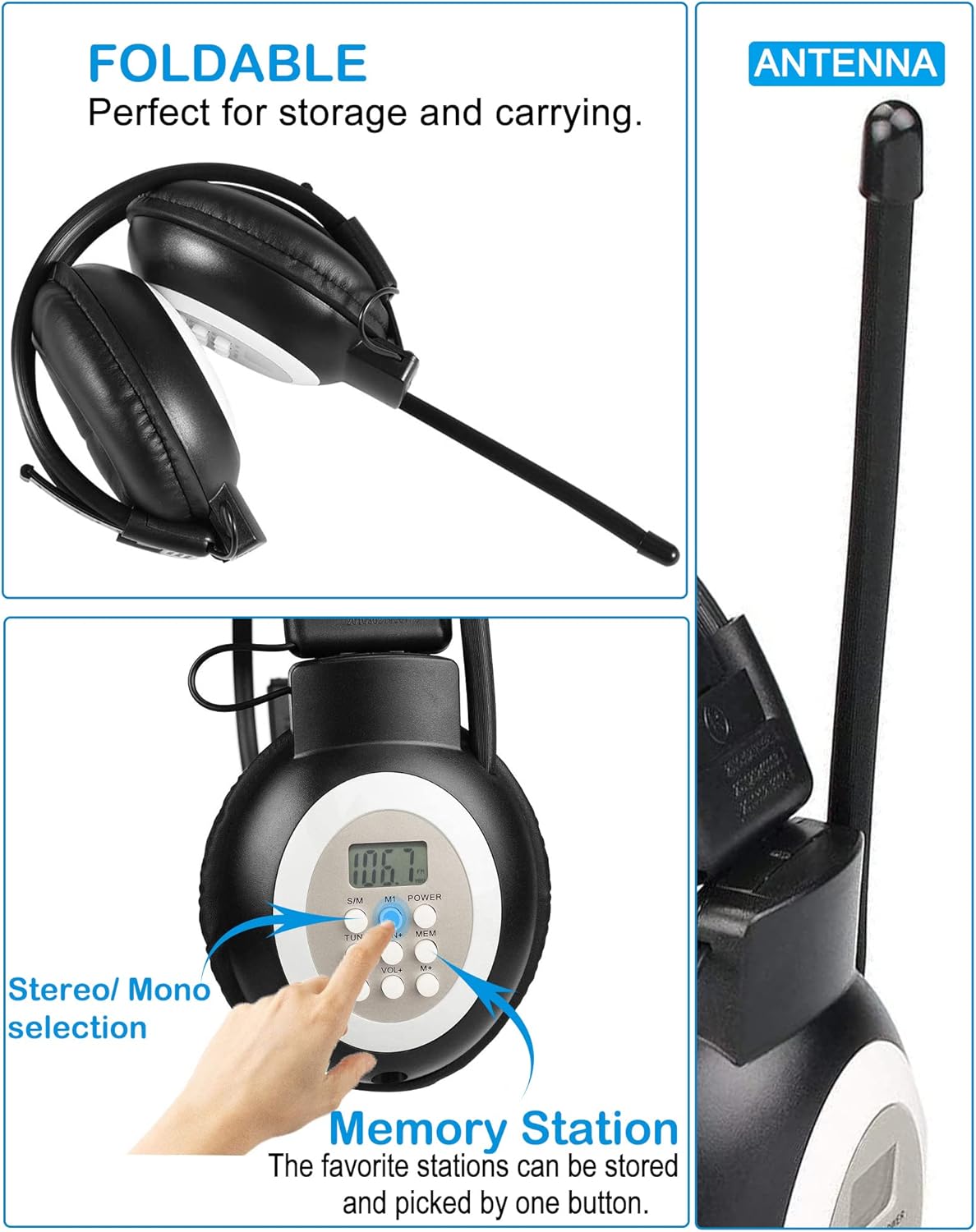
Figure 4.1: Controls and Design Elements. This image shows the control buttons on the earcup, the foldable design of the headphones, and the extendable antenna.
| Button/Feature | Function |
|---|---|
| LCD Display | Shows current FM frequency, battery status, and other indicators. |
| POWER | Press and hold to turn the headphones on or off. |
| TUN+ / TUN- | Press briefly to fine-tune the frequency up/down. Press and hold to auto-scan for the next available station. |
| VOL+ / VOL- | Adjusts the listening volume up or down. |
| MEM (Memory) | Used to save and recall preset radio stations. |
| M1 (Memory 1) | Dedicated button to quickly access your first saved favorite station. |
| S/M (Stereo/Mono) | Switches between stereo and mono audio modes. |
| Antenna | Extendable antenna for improved FM signal reception. |
| 3.5mm Audio Port | Input for connecting external audio sources via the included audio cable. |
5. Setup
5.1 Battery Installation
The HRD-308S headphones require two (2) AA batteries for operation. Batteries are not included.
- Locate the battery compartment on the left earcup.
- Gently open the battery compartment cover.
- Insert two AA batteries, ensuring correct polarity (+ and -) as indicated inside the compartment.
- Close the battery compartment cover securely.

Figure 5.1: Battery Installation. This image shows the open battery compartment on the left earcup, ready for two AA batteries.
5.2 Wired Headset Connection
To use the HRD-308S as a wired headset with an external audio device:
- Locate the 3.5mm audio port on the right earcup.
- Connect one end of the included 3.5mm audio cable to this port.
- Connect the other end of the audio cable to the headphone jack of your smartphone, PC, tablet, or other audio device.
- The headphones will now function as a wired audio output device. The radio function will be disabled when the audio cable is connected.

Figure 5.2: Wired Connection. This image shows the 3.5mm audio port on the right earcup and an audio jack, illustrating how to connect the headphones as a wired headset.
6. Operating Instructions
6.1 Power On/Off
- To turn on: Press and hold the POWER button until the LCD display illuminates.
- To turn off: Press and hold the POWER button again until the display turns off.
6.2 Adjusting Volume
- Press the VOL+ button to increase the volume.
- Press the VOL- button to decrease the volume.
6.3 Tuning to FM Stations
Automatic Search:
- Press and hold the TUN+ or TUN- button. The radio will automatically scan for the next available strong station and stop.
Manual Tuning:
- Press the TUN+ or TUN- button briefly to adjust the frequency step by step.
6.4 Saving and Recalling Preset Stations
The HRD-308S can store up to 10 FM stations in memory, plus one favorite station (M1).
To Save a Station:
- Tune to the desired FM station using the TUN+ or TUN- buttons.
- Press the MEM button. The preset number on the LCD will flash.
- Use the TUN+ or TUN- buttons to select the desired memory slot (P0-P9).
- Press the MEM button again to confirm and save the station.
To Save a Favorite Station (M1):
- Tune to your most frequently listened-to station.
- Press and hold the M1 button until the display confirms it's saved.
To Recall a Station:
- Press the MEM button repeatedly to cycle through the saved preset stations (P0-P9).
- Press the M1 button to instantly recall your favorite station.
6.5 Switching Stereo/Mono Mode
- Press the S/M button to toggle between stereo and mono reception. Mono mode can improve reception clarity in areas with weak signals.
7. Maintenance
- Cleaning: Use a soft, dry cloth to clean the headphones. Do not use liquid cleaners or abrasive materials.
- Battery Care: Remove batteries if the headphones will not be used for an extended period to prevent leakage.
- Storage: Store the headphones in a cool, dry place away from direct sunlight and extreme temperatures. The foldable design allows for compact storage.
- Water Resistance: These headphones are not water-resistant. Avoid exposure to water or high humidity.
8. Troubleshooting
| Problem | Possible Cause | Solution |
|---|---|---|
| No power/Headphones do not turn on. | Batteries are dead or incorrectly inserted. | Replace with fresh AA batteries, ensuring correct polarity. |
| Poor FM reception/Static. | Weak signal, antenna not extended, or interference. | Extend the antenna fully. Try moving to a different location. Switch to mono mode (S/M button). |
| No sound from headphones. | Volume too low, headphones in wired mode, or faulty connection. | Increase volume using VOL+ button. Ensure 3.5mm audio cable is disconnected if using radio. Check if batteries are low. |
| Cannot save preset stations. | Incorrect procedure. | Follow the 'Saving a Station' instructions in Section 6.4 carefully. |
| Headphones uncomfortable or fall off. | Improper adjustment. | Adjust the telescopic headband for a secure and comfortable fit. |
9. Specifications
| Feature | Detail |
|---|---|
| Model Name | HRD-308S |
| Brand | HanRongDa |
| FM Frequency Range | 50-108MHz |
| Connectivity Technology | AUX (3.5mm Audio Jack) |
| Wireless Communication | FM |
| Power Source | 2 x AA Batteries (not included) |
| Battery Life | Up to 30 Hours |
| Control Method | Push Button |
| Earpiece Shape | Over-Ear |
| Noise Control | Passive Noise Cancellation |
| Product Dimensions | 4.72 x 4.72 x 3.54 inches |
| Item Weight | 7 ounces |
| Material | Plastic |
| UPC | 724991586434 |
10. Warranty and Support
For any product-related issues, questions, or support needs, please contact HanRongDa customer service. Refer to the contact information provided with your purchase or on the official HanRongDa website. Please retain your proof of purchase for warranty claims.