
HanRongDa HRD-103
User Manual for HanRongDa HRD-103 Portable AM/FM Radio
Model: HRD-103
Brand: HanRongDa
Introduction
The HanRongDa HRD-103 is a compact and portable AM/FM digital radio receiver designed for excellent reception and stereo sound. It features a built-in rechargeable battery, 58 preset stations, and a clear LCD display, making it ideal for various activities such as walking, jogging, or traveling.
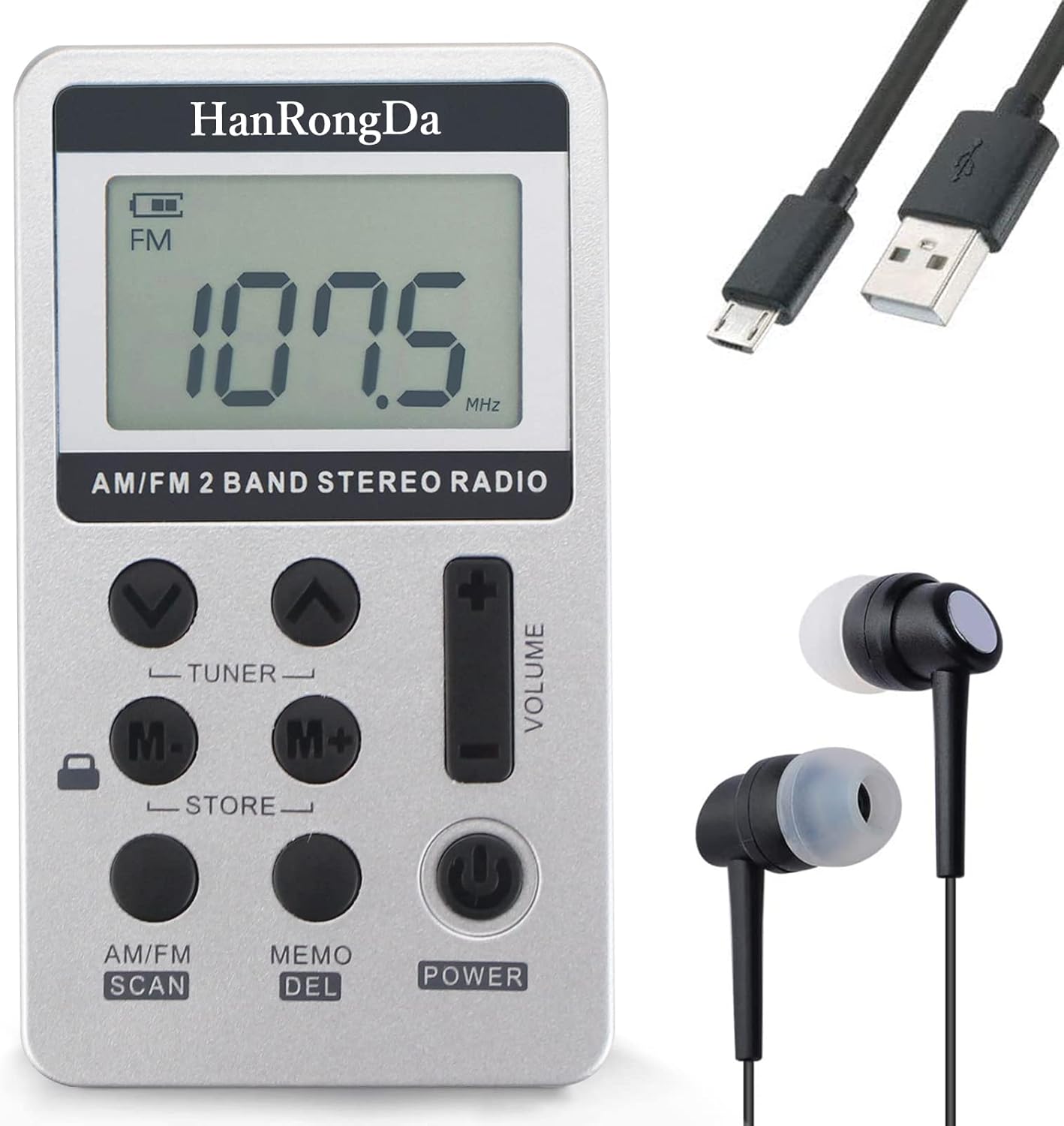
Image: The HanRongDa HRD-103 radio, showing its compact size, digital display, control buttons, and accompanying accessories like earphones and a USB charging cable.
Package Contents
Please check the package to ensure all items are present:
- 1 x HRD-103 Pocket Radio
- 1 x Hand Strap
- 1 x Lanyard Strap
- 1 x USB Charging Cable
- 1 x Waterproof Pouch
- 1 x User Manual (this document)

Image: A visual representation of all items included in the HRD-103 product package.
Product Overview and Controls
Familiarize yourself with the radio's layout and functions:
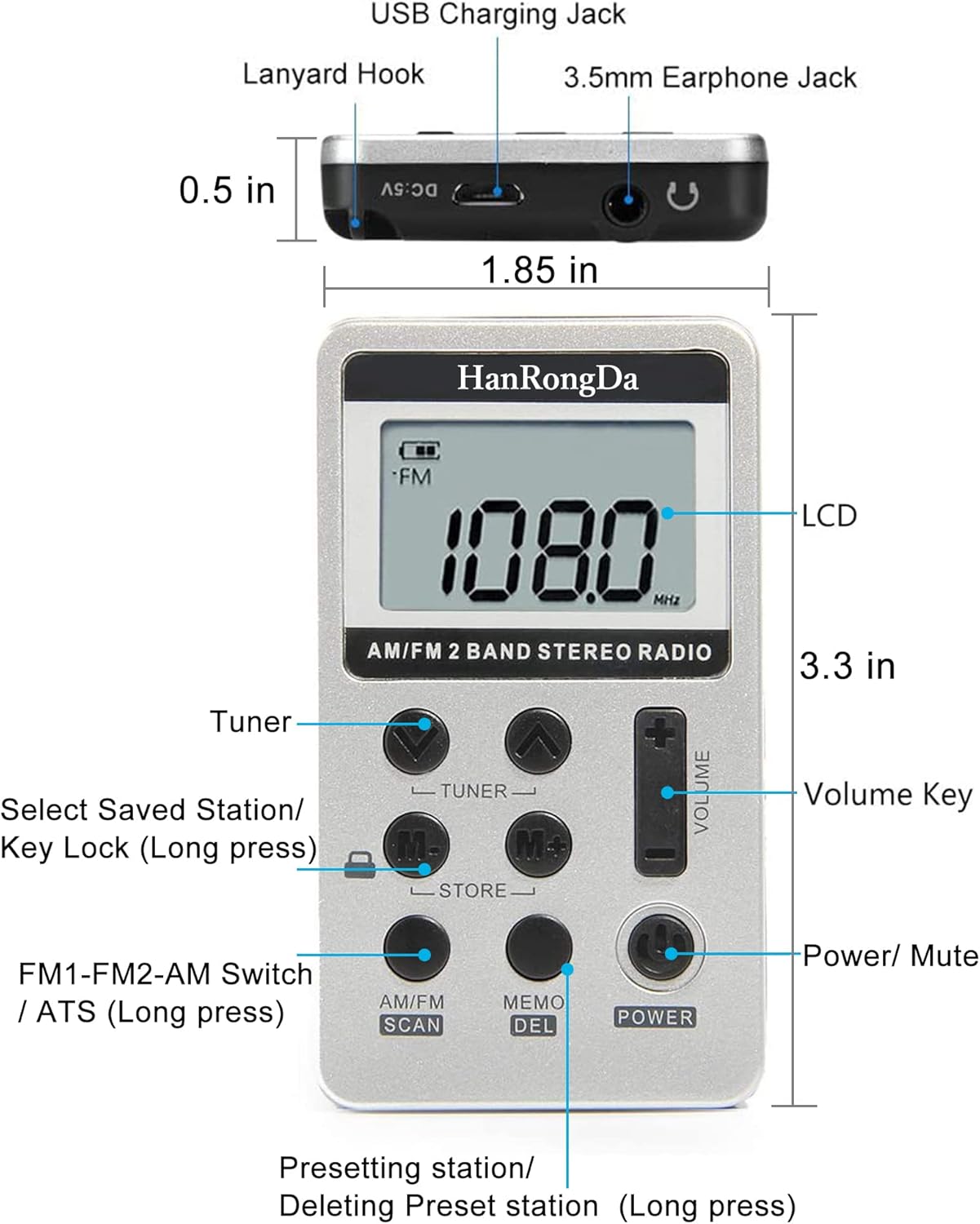
Image: A detailed diagram illustrating the various buttons, ports, and display features of the HRD-103 radio, along with their respective labels and dimensions.
- LCD Display: Shows frequency, battery level, and other indicators.
- Tuner Buttons (Up/Down): Used to manually tune frequencies.
- Volume Keys (+/-): Adjusts the audio output level.
- Power/Mute Button: Short press to mute/unmute, long press to power on/off.
- AM/FM Scan Button: Short press to switch between AM/FM bands. Long press for Automatic Tuning Storage (ATS).
- M-/M+ (Store) Buttons: Short press to select saved stations. Long press M- to lock/unlock keys.
- MEMO/DEL Button: Short press to preset a station. Long press to delete a preset station.
- USB Charging Jack: For charging the built-in battery.
- 3.5mm Earphone Jack: For connecting stereo earphones.
Setup and Initial Use
Charging the Battery
The HRD-103 features a built-in 500mAh rechargeable lithium battery. Before first use, or when the battery indicator shows low power, charge the device.
- Connect the supplied USB charging cable to the USB Charging Jack on the radio.
- Connect the other end of the USB cable to a compatible USB power source (e.g., USB wall adapter, power bank, computer USB port).
- A battery icon will appear on the LCD screen, indicating the charging status.
- Charging typically takes 2-3 hours for a full charge. A full charge provides over 12 hours of continuous playback.

Image: Visual guide for charging the HRD-103 radio, showing the USB connection, charging time, battery indicator, and compatible power sources.
Attaching Straps
You can attach the hand strap or lanyard strap for increased portability.
- Locate the Lanyard Hook on the side of the radio.
- Thread the desired strap through the hook and secure it.
Operating Instructions
Power On/Off and Mute
- To Power On: Long press the POWER button.
- To Power Off: Long press the POWER button again.
- To Mute/Unmute: Short press the POWER button while the radio is on.
Tuning Radio Stations
- Switching Bands (AM/FM): Short press the AM/FM SCAN button to toggle between FM and AM bands.
- Manual Tuning: Use the Tuner Up (∧) and Tuner Down (∨) buttons to manually adjust the frequency.
- Automatic Tuning Storage (ATS): Long press the AM/FM SCAN button. The radio will automatically scan and store up to 58 radio frequencies (29 for FM, 29 for AM).
Managing Preset Stations
- Selecting Saved Stations: Short press the M- or M+ buttons to cycle through your preset stations.
- Presetting a Station:
- Tune to the desired frequency using manual tuning or ATS.
- Short press the MEMO/DEL button. The display will show a flashing preset number.
- Use the Tuner Up (∧) or Tuner Down (∨) buttons to select the desired preset memory location.
- Short press the MEMO/DEL button again to confirm and save the station.
- Deleting a Preset Station:
- Select the preset station you wish to delete using the M- or M+ buttons.
- Long press the MEMO/DEL button. The display will show "DEL" and the station will be removed.
Adjusting Volume
- Press the Volume + button to increase the volume.
- Press the Volume - button to decrease the volume.
Key Lock Function
To prevent accidental button presses, you can lock the radio's keys.
- To Lock Keys: Long press the M- button. A key icon will appear on the display.
- To Unlock Keys: Long press the M- button again. The key icon will disappear.


Images: The M- button with its lock icon, and the LCD display showing the key lock indicator.
Using Earphones
For private listening and to experience FM stereo sound, connect earphones to the 3.5mm Earphone Jack.
- Insert the 3.5mm stereo earphone plug into the earphone jack on the side of the radio.
- The radio's internal speaker will automatically turn off when earphones are connected.

Image: The HRD-103 radio in use, highlighting its stereo sound capability when used with the included 3.5mm earphones.
Maintenance
- Cleaning: Wipe the radio with a soft, dry cloth. Do not use abrasive cleaners or solvents.
- Battery Care: To prolong battery life, avoid fully discharging the battery frequently. Recharge the radio regularly, especially if it will not be used for an extended period.
- Storage: Store the radio in a cool, dry place away from direct sunlight and extreme temperatures.
- Water Resistance: The radio is not waterproof. Avoid exposure to water or high humidity. The included pouch offers some protection against light splashes.
Troubleshooting
| Problem | Possible Cause | Solution |
|---|---|---|
| No power / Radio does not turn on. | Battery is depleted. | Charge the radio using the provided USB cable. Ensure the charging indicator appears. |
| Poor reception / Static. | Weak signal in the area; interference; radio position. |
|
| Buttons are unresponsive. | Key lock function is activated. | Long press the M- button to unlock the keys. The key icon on the display should disappear. |
| No sound from speaker when earphones are unplugged. | Radio is muted. | Short press the POWER button to unmute. |
Specifications
| Feature | Detail |
|---|---|
| Model Number | HRD-103 |
| Product Dimensions | 3.3 x 1.85 x 0.5 inches (84mm L x 12mm W x 48mm H) |
| Item Weight | 3.5 ounces |
| Frequency Range | FM: 64-108 MHz, AM: 520-1710 KHz |
| Preset Stations | Up to 58 (29 FM, 29 AM) |
| Battery | Built-in 500mAh Rechargeable Lithium Battery |
| Charging Time | Approx. 2-3 hours |
| Playback Time | More than 12 hours (on a full charge) |
| Connectivity | USB (for charging), 3.5mm Audio Jack (for earphones) |
| Display Technology | Liquid Crystal Display (LCD) |
| Special Features | Digital Tuner, Key Lock Function, Automatic Tuning Storage (ATS) |
Warranty and Support
HanRongDa is committed to providing quality products and customer satisfaction. If you encounter any product problems or require assistance, please do not hesitate to contact our customer support team. We aim to provide a quick response and satisfactory resolution to your inquiries.
For support, please refer to the contact information provided with your purchase or visit the official HanRongDa store on Amazon: HanRongDa Store.
Related documentsHRD-103


Ask a question about this manual
Ask about setup, troubleshooting, compatibility, parts, safety, or missing instructions. Manuals+ will review the question and use this page’s manual context to help answer it.