1. Product Overview
The Parkside PWSA 12 B1 Cordless Angle Grinder is a compact and ergonomic tool designed for cutting various materials. It features a non-slip handle for secure grip and a 3-stage LED battery status indicator for convenient monitoring. The tool allows for quick adjustment of covers without the need for additional tools and facilitates easy disc changes thanks to its SPINDLE LOCK spindle lock mechanism. It is compatible with commercially available cutting discs with a diameter of 76 mm.
Key Features:
- Compact and ergonomic design with non-slip handle.
- 3-stage LED battery status indicator.
- Tool-free quick adjustment of protective covers.
- Easy disc change with SPINDLE LOCK.
- Compatible with Ø 76 mm cutting discs.
- Part of the "PARKSIDE X 12V Team" battery series (battery and charger not included).
Package Contents:
- 1 x Parkside Cordless Angle Grinder PWSA 12 B1
- 1 x Non-ferrous metal cutting disc
- 1 x Hex key
- 1 x Practical case for storage and transport
Note: Battery and charger are not included and must be purchased separately.
2. Safety Instructions
Always observe the following safety precautions when operating the angle grinder to prevent injury and damage.
- Personal Safety: Always wear appropriate personal protective equipment (PPE) including safety glasses, hearing protection, and gloves. A dust mask is recommended when cutting materials that produce fine dust.
- Work Area Safety: Keep your work area clean and well-lit. Cluttered or dark areas invite accidents. Do not operate power tools in explosive atmospheres, such as in the presence of flammable liquids, gases, or dust.
- Electrical Safety: This is a cordless tool. Ensure the battery is fully charged before use. Do not expose the tool to rain or wet conditions.
- Tool Use and Care: Do not force the power tool. Use the correct power tool for your application. Disconnect the battery pack from the power tool before making any adjustments, changing accessories, or storing power tools.
- Kickback and Related Warnings: Kickback is a sudden reaction to a pinched or snagged rotating wheel. Always maintain a firm grip on the tool and position your body and arm to allow you to resist kickback forces.
- Accessory Safety: Only use cutting discs designed for the tool's specifications (Ø 76 mm). Ensure the disc is correctly mounted and secured before operation.
3. Setup
3.1. Battery Installation
The Parkside PWSA 12 B1 is compatible with all batteries from the "PARKSIDE X 12V Team" series.
- Ensure the angle grinder is switched off.
- Align the battery pack with the battery slot on the tool.
- Slide the battery into the slot until it clicks securely into place.
- To remove, press the battery release button and slide the battery out.

Image: The Parkside angle grinder, illustrating the location for battery insertion. The battery is not shown in this image.
3.2. Disc Installation and Guard Adjustment
The angle grinder uses Ø 76 mm cutting discs.
- Ensure the battery is removed for safety.
- Press and hold the spindle lock button to prevent the spindle from rotating.
- Use the provided hex key to loosen the disc retaining nut.
- Place the cutting disc onto the spindle, ensuring it is correctly seated.
- Tighten the disc retaining nut firmly with the hex key while holding the spindle lock.
- Adjust the protective guard to the desired position for safe operation. The guard can be quickly adjusted without tools.
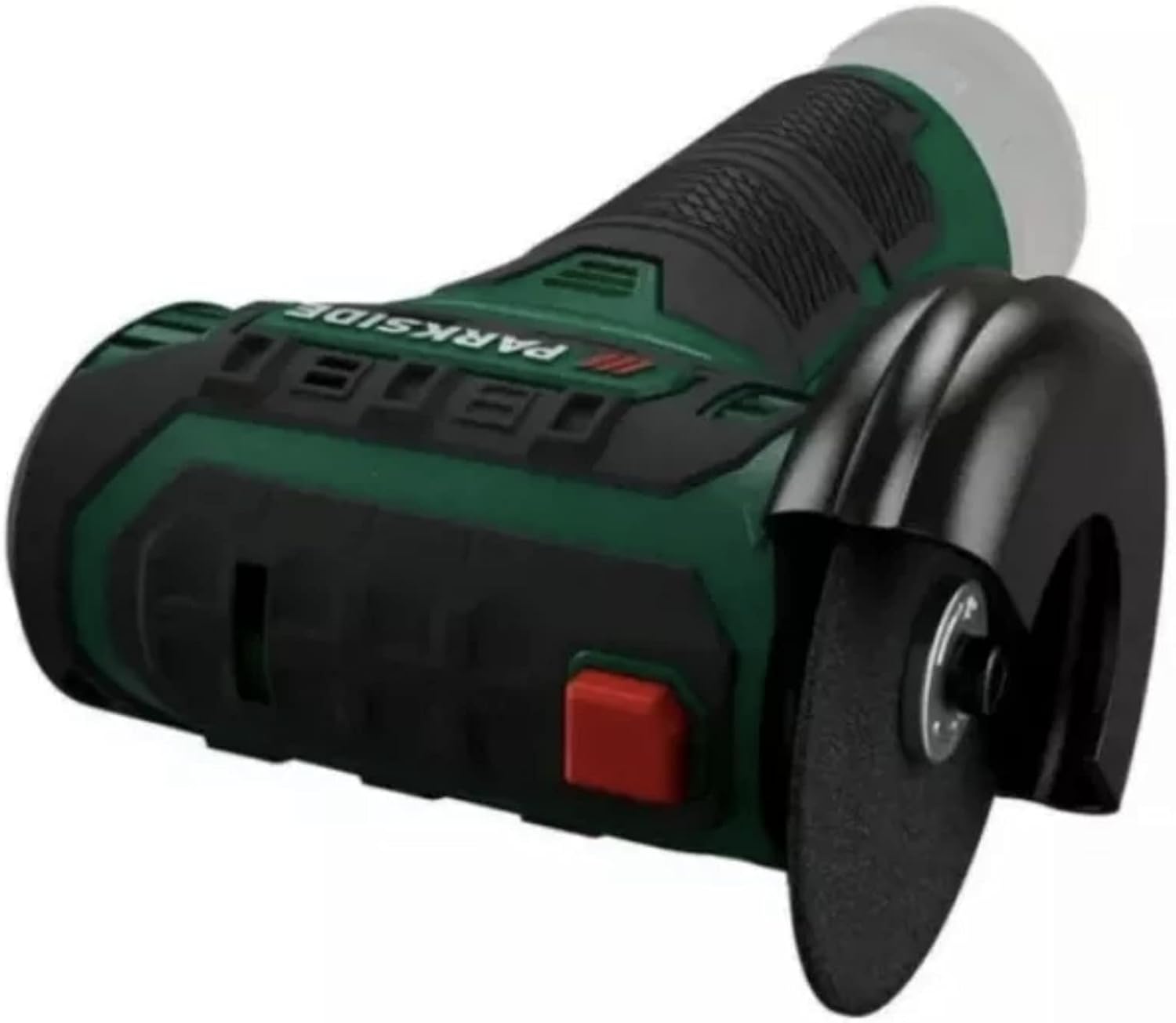
Image: Close-up view of the angle grinder's cutting disc and adjustable protective guard.

Image: A detailed view of a Parkside cutting disc, showing its specifications and safety markings.
4. Operating Instructions
4.1. Powering On/Off
- Ensure the battery is fully charged and securely installed.
- To start the tool, press and hold the power switch.
- To stop the tool, release the power switch.
4.2. Battery Status Indicator
The 3-stage LED indicator on the device provides information about the battery's charge level:
- 3 LEDs lit: Full charge
- 2 LEDs lit: Medium charge
- 1 LED lit: Low charge, recharge battery soon
- No LEDs lit: Battery empty or not installed
4.3. Cutting Operation
When performing cutting tasks:
- Secure the workpiece firmly to prevent movement during cutting.
- Hold the angle grinder firmly with both hands, utilizing the non-slip grip.
- Allow the disc to reach full speed before making contact with the workpiece.
- Apply steady, even pressure. Do not force the tool.
- Maintain a safe distance from the rotating disc and ensure sparks are directed away from yourself and flammable materials.

Image: A user demonstrating the angle grinder in use, cutting a metal pipe. Proper grip and safety distance are shown.

Image: The angle grinder being used to cut a plastic channel, highlighting its versatility for different materials.
5. Maintenance
5.1. Cleaning
Regular cleaning ensures optimal performance and extends the tool's lifespan.
- Always remove the battery pack before cleaning.
- Use a soft, damp cloth to wipe down the exterior of the tool. Do not use harsh chemicals or abrasive cleaners.
- Clean the ventilation slots regularly to prevent overheating. Use compressed air if necessary.
5.2. Disc Replacement
Replace cutting discs when they become worn, damaged, or no longer cut effectively. Refer to section 3.2 for detailed instructions on disc installation.
5.3. Storage
When not in use, store the angle grinder in its practical case.
- Remove the battery pack before storing.
- Store the tool in a dry, secure place, out of reach of children.
- Protect the tool from direct sunlight and extreme temperatures.

Image: The practical carrying case provided with the Parkside angle grinder, designed for storage and transport.
6. Troubleshooting
This section addresses common issues you might encounter.
| Problem | Possible Cause | Solution |
|---|---|---|
| Tool does not start | Battery not installed correctly or discharged. | Ensure battery is fully inserted. Recharge battery if necessary. |
| Reduced cutting performance | Worn or incorrect cutting disc. | Replace the cutting disc. Ensure it is the correct type for the material. |
| Excessive vibration | Disc not properly mounted or damaged. | Check disc mounting. Replace damaged disc immediately. |
| Overheating | Blocked ventilation slots or continuous heavy use. | Clean ventilation slots. Allow tool to cool down during prolonged use. |
7. Specifications
| Parameter | Value |
|---|---|
| Model Number | PWSA12B1 |
| Motor Speed (Idle) | 19,500 min⁻¹ |
| Disc Diameter | Ø 76 mm |
| Housing Material | PA6 + GF30 |
| Dimensions (L x W x H, without battery) | 186 x 118 x 83 mm |
| Weight (approx., without battery) | 667 g |
| Voltage | 12 Volts (compatible with Parkside X 12V Team series) |
| Manufacturer | Kompernass |
8. Warranty and Support
For information regarding warranty coverage and customer support, please refer to the documentation provided with your purchase or contact the retailer where the product was acquired. Specific warranty terms may vary by region and retailer.
9. Official Product Videos
No official product videos from the seller were provided for this model.


