
1. Introduction
This manual provides detailed instructions for the safe and effective use of your Radtel RT12 FRS Two-Way Radio. Please read this manual thoroughly before operating the device and retain it for future reference. The Radtel RT12 is a license-free Family Radio Service (FRS) walkie-talkie designed for reliable communication in various environments.
2. Product Overview
The Radtel RT12 is a compact and user-friendly two-way radio featuring 16 FRS channels, VOX hands-free operation, and USB charging capability. It is designed for ease of use with minimal controls.
2.1 Key Features
- 16 FRS Channels for clear communication.
- Channel Scan function to monitor active channels.
- VOX (Voice Operated Exchange) for hands-free operation with 3 sensitivity levels.
- USB charging for convenience, compatible with standard USB power sources.
- Long-range capability: up to 10 miles in open air, 4-5 miles in woods, 2-3 miles in urban areas (actual range varies by environment).
- CTCSS & DCS (Continuous Tone-Coded Squelch System & Digital Coded Squelch) for interference reduction.
- Monitor function, Emergency alarm, Scanning function, Noise cancel, and Battery Save mode.
- FCC Certified (ID: 2AZSA-RT12) for license-free operation.
2.2 Package Contents
Upon opening the package, verify that all items are present and in good condition:
- Radtel RT12 Two-Way Radio (2 units)
- Lithium-Ion Batteries (2 units)
- USB Charging Cable (2 units)
- Power Adapter (1 unit)
- Belt Clips (2 units)
- Instruction Manual (1 unit)
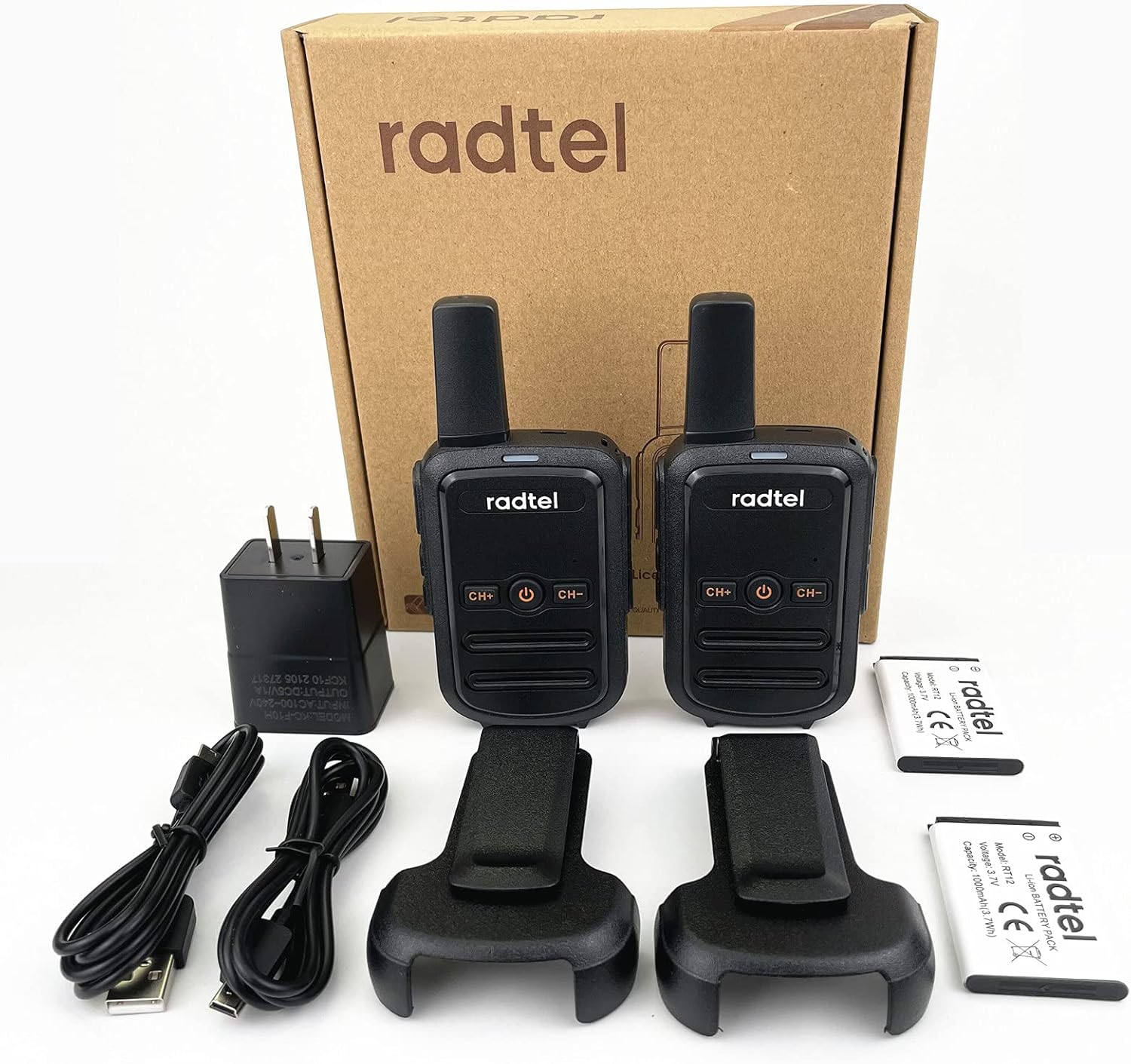
Image: Contents of the Radtel RT12 package, including two radios, batteries, charging cables, power adapter, and belt clips.
2.3 Radio Components

Image: Diagram illustrating the main components of the Radtel RT12 radio, including the fixed antenna, integrated back clip, power switch/PTT button, volume switch, and HD noise-canceling speaker.
- Fixed Antenna: For transmitting and receiving signals.
- Power Switch/PTT Button: Used to turn the radio on/off and to transmit voice.
- CH+ / CH- Buttons: For selecting channels.
- Volume Switch: Adjusts the audio output level.
- HD Noise Cancelling Speaker: Provides clear audio reception.
- Integrated Back Clip: For attaching the radio to clothing or gear.
3. Setup
3.1 Battery Installation
- Ensure the radio is powered off.
- Locate the battery compartment cover on the back of the radio.
- Slide the cover downwards or unlatch it to open.
- Insert the Lithium-Ion battery into the compartment, ensuring the contacts align correctly.
- Replace the battery compartment cover and secure it.

Image: Rear view of the Radtel RT12 radio, showing the battery compartment and regulatory information.
3.2 Charging the Battery
The Radtel RT12 supports convenient USB charging.
- Connect the USB charging cable to the charging port on the side of the radio.
- Connect the other end of the USB cable to the provided power adapter, a computer USB port, a power bank, or a car charger.
- The charging indicator light on the radio will illuminate (typically red) during charging.
- Once fully charged, the indicator light will change color (typically green or turn off).
- Disconnect the charger when charging is complete.

Image: Illustration of the Radtel RT12 being charged via a USB cable connected to various power sources.
Note: A full charge typically takes several hours. The radio will indicate a low battery level with an alarm or voice prompt when power is critically low.
4. Basic Operation
4.1 Power On/Off
- To power on, press and hold the Power/PTT button until you hear a power-on prompt.
- To power off, press and hold the Power/PTT button again until you hear a power-off prompt.
4.2 Adjusting Volume
Use the dedicated Volume Up and Volume Down buttons (often integrated with other controls or a rotary knob) to adjust the listening volume to a comfortable level.
4.3 Channel Selection
- Press the CH+ button to increase the channel number.
- Press the CH- button to decrease the channel number.
- Ensure all radios in your group are set to the same channel for communication.
4.4 Transmitting and Receiving
- To transmit, press and hold the PTT (Push-to-Talk) button. Speak clearly into the microphone, holding the radio approximately 2-3 inches from your mouth.
- Release the PTT button to stop transmitting and listen for a response.
- When receiving, the radio will automatically play incoming audio.
5. Advanced Features
5.1 VOX Function (Hands-Free Operation)
The VOX function allows you to transmit by speaking into the microphone without pressing the PTT button. This feature may require programming via software for full functionality and sensitivity adjustment.
- The RT12 offers 3 sensitivity levels for VOX. A higher sensitivity level means the radio will transmit with softer voice input.
- Refer to the full programming guide (if available) for detailed VOX activation and sensitivity settings.

Image: Graphic illustrating the VOX (Voice Operated Exchange) function, enabling hands-free transmission.
5.2 Channel Scan
The channel scan feature allows the radio to automatically scan through all available channels to detect activity. When a signal is detected, the radio will stop on that channel until the transmission ends.
- To activate scan, typically a dedicated button or a combination of buttons is used. Consult the full manual for specific key presses.
- To exit scan mode, press the same button or the PTT button.
5.3 CTCSS & DCS (Sub-tones)
CTCSS (Continuous Tone-Coded Squelch System) and DCS (Digital Coded Squelch) are sub-audible tones that allow multiple groups to share the same channel without hearing each other's conversations. Only transmissions with the matching tone will be heard.
- The RT12 supports 258 sub-tones.
- Setting CTCSS/DCS usually requires programming software. Ensure all radios in your group are set to the same channel and sub-tone for private communication.

Image: Overview of Radtel RT12 features including Monitor, Emergency Alarm, Scanning, Noise Cancel, VOX, and Battery Save mode.
6. Maintenance
6.1 General Care
- Keep the radio dry. If it gets wet, wipe it immediately.
- Avoid exposing the radio to extreme temperatures (hot or cold).
- Clean the radio with a soft, damp cloth. Do not use harsh chemicals or abrasive cleaners.
- Do not attempt to disassemble the radio. Unauthorized repairs will void the warranty.
6.2 Battery Care
- Charge the battery fully before first use.
- Avoid overcharging or completely draining the battery, as this can reduce its lifespan.
- If storing the radio for an extended period, charge the battery to about 50% and store it in a cool, dry place.
- Replace batteries when their performance significantly degrades.
7. Troubleshooting
If you experience issues with your Radtel RT12, refer to the following common problems and solutions:
| Problem | Possible Cause | Solution |
|---|---|---|
| No power | Battery not installed correctly or discharged. | Ensure battery is properly seated. Charge the battery fully. |
| Cannot transmit or receive | Radios on different channels or out of range. | Verify both radios are on the same channel. Move closer to the other radio. Check for obstructions. |
| Poor audio quality / Static | Weak signal, interference, or low battery. | Move to an open area. Change channels. Charge the battery. |
| Short communication range | Environmental factors (buildings, dense foliage, terrain). | Range is significantly affected by obstructions. Operate in open areas for maximum range. |
| Charging issues (e.g., charger gets hot) | Faulty cable/adapter or battery. | Use only the provided charging accessories. Discontinue use if excessive heat is observed and contact support. |
If the problem persists after attempting these solutions, please contact Radtel customer support.
8. Specifications
| Feature | Detail |
|---|---|
| Model Number | RT12 |
| Brand | Radtel |
| Number of Channels | 16 FRS Channels |
| Frequency Range | 462 MHz |
| Talking Range Maximum | Up to 10 Miles (open air) |
| Battery Type | 2 Lithium Ion batteries (included) |
| Voltage | 3.7 Volts (DC) |
| Product Dimensions | 0.59 x 2.2 x 5.9 inches (1.5 x 5.6 x 15 cm) |
| Item Weight | 12.6 ounces (357 grams) |
| Special Features | VOX function, Channel Scan, CTCSS/DCS, Low Battery Alarm |
| Water Resistance Level | Not Water Resistant |
| FCC ID | 2AZSA-RT12 |
9. Warranty and Support
9.1 Warranty Information
Radtel offers a 1-year warranty for the RT12 Two-Way Radio from the date of purchase. This warranty covers manufacturing defects and malfunctions under normal use. It does not cover damage caused by misuse, accidents, unauthorized modifications, or improper maintenance.
Please retain your proof of purchase for warranty claims.
9.2 Customer Support
For technical assistance, warranty claims, or further inquiries, please contact Radtel customer support through the retailer where the product was purchased or visit the official Radtel website for contact information.


