
1. Introduction and Safety Information
This manual provides essential information for the safe and effective operation, maintenance, and troubleshooting of your Tonka Demolition Hammer, Model TKA-SH3200. Please read this manual thoroughly before operating the tool and keep it for future reference. Failure to follow these instructions may result in electric shock, fire, serious injury, or property damage.
General Power Tool Safety Warnings
- Work Area Safety: Keep the work area clean and well-lit. Cluttered or dark areas invite accidents. Do not operate power tools in explosive atmospheres, such as in the presence of flammable liquids, gases, or dust.
- Electrical Safety: Power tool plugs must match the outlet. Never modify the plug in any way. Do not use any adapter plugs with earthed (grounded) power tools. Avoid body contact with earthed or grounded surfaces such as pipes, radiators, ranges, and refrigerators.
- Personal Safety: Always wear eye protection. Use hearing protection when operating noisy tools. Wear a dust mask if operations create dust. Dress properly; do not wear loose clothing or jewelry. Keep hair, clothing, and gloves away from moving parts.
- Tool Use and Care: Do not force the power tool. Use the correct power tool for your application. Disconnect the plug from the power source before making any adjustments, changing accessories, or storing power tools.
2. Product Overview
The Tonka Demolition Hammer TKA-SH3200 is a robust electric tool designed for heavy-duty demolition tasks, primarily on concrete. It features a powerful 2200W motor and delivers 950 impacts per minute, ensuring efficient material removal. The tool is equipped with an anti-vibration system for user comfort and comes with two chisels (flat and pointed) and a carrying case.
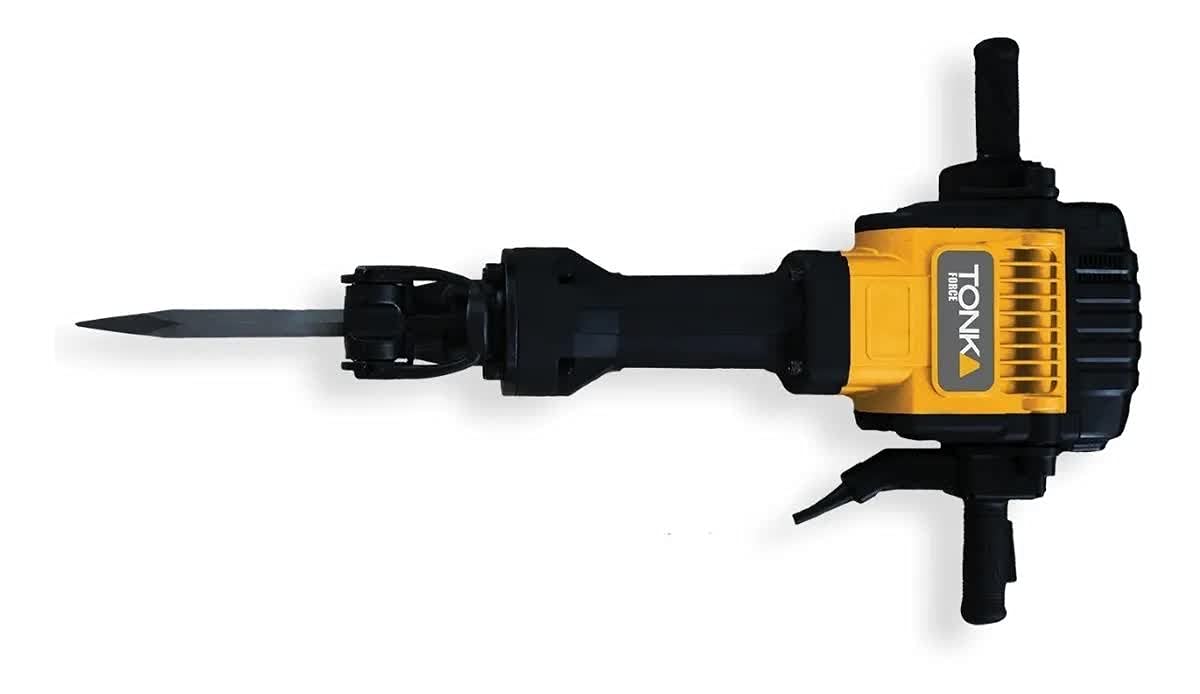
Figure 2.1: Tonka Demolition Hammer TKA-SH3200. This image shows the main unit of the demolition hammer, likely with its included chisels, highlighting its robust construction.
Key Features:
- Power: 2200 W motor for high performance.
- Weight: Approximately 34 kg (75 lbs) for substantial impact force.
- Impact Rate: 950 impacts per minute (IPM).
- Chisel System: Hexagonal 28mm input for secure chisel attachment.
- Anti-Vibration System: Reduces user fatigue during extended operation.
- Included Accessories: Flat chisel, pointed chisel, and a sturdy carrying case.
- Material Compatibility: Optimized for concrete demolition.
3. Setup
Unpacking and Inspection
- Carefully remove the demolition hammer and all accessories from the packaging.
- Inspect the tool for any signs of damage that may have occurred during shipping. Do not operate a damaged tool.
- Verify that all components listed in the packaging contents are present.
Attaching the Chisel
- Ensure the tool is unplugged from the power source before attaching or removing any accessories.
- Clean the shank of the chisel and apply a thin layer of grease (not included) to prevent wear and facilitate removal.
- Insert the chisel into the hexagonal tool holder until it clicks into place. Pull on the chisel to ensure it is securely locked.
- To remove, pull back the locking collar on the tool holder and pull out the chisel.
Connecting to Power
- The Tonka Demolition Hammer operates on 110V AC power. Ensure your power supply matches this requirement.
- Use an extension cord suitable for heavy-duty outdoor use if necessary. The cord should have a sufficient gauge to handle the tool's 2200W power draw.
- Always plug the tool into a grounded outlet.
4. Operating Instructions
Before Operation
- Wear appropriate Personal Protective Equipment (PPE), including safety glasses, hearing protection, heavy-duty gloves, and steel-toe boots.
- Clear the work area of bystanders and obstructions.
- Identify any hidden electrical wires, gas pipes, or water lines in the demolition area.
Starting the Tool
- With the chisel securely attached and the tool plugged in, firmly grip both handles of the demolition hammer.
- Position the chisel tip against the material to be broken.
- Press the ON/OFF switch to start the tool. The tool will begin impacting.
- The tool features a speed lock button. To engage, press the ON/OFF switch and then press the speed lock button. To disengage, press the ON/OFF switch again.
Demolition Technique
- Allow the tool's weight and impact force to do the work. Do not apply excessive downward pressure, as this can reduce efficiency and cause premature wear.
- Work systematically, breaking material into manageable pieces.
- For horizontal demolition, angle the chisel slightly downwards. For vertical demolition, work from top to bottom.
- Take regular breaks to prevent fatigue and allow the tool to cool down.
5. Maintenance
Regular maintenance ensures the longevity and safe operation of your Tonka Demolition Hammer.
Cleaning
- After each use, disconnect the tool from the power supply.
- Clean the exterior of the tool with a damp cloth. Do not use harsh chemicals or abrasive cleaners.
- Remove any dust or debris from the ventilation openings to prevent overheating.
- Clean the tool holder and chisel shank thoroughly.
Lubrication
- The internal mechanism of the demolition hammer requires periodic lubrication. Refer to the service diagram (if available) or consult a qualified service technician.
- Apply a thin layer of grease to the chisel shank before each use to reduce friction and wear.
Inspection
- Before each use, inspect the power cord for cuts, fraying, or exposed wires. Replace a damaged cord immediately.
- Check the chisels for excessive wear or damage. Dull or damaged chisels should be sharpened or replaced.
- Ensure all screws and fasteners are tight.
6. Troubleshooting
| Problem | Possible Cause | Solution |
|---|---|---|
| Tool does not start | No power supply; Damaged power cord; Faulty switch | Check power outlet and circuit breaker; Inspect power cord for damage; Contact service center for switch replacement. |
| Reduced impact force | Worn chisel; Insufficient lubrication; Overheating | Replace or sharpen chisel; Apply grease to chisel shank; Allow tool to cool down. |
| Excessive vibration or noise | Loose components; Internal damage | Check for loose screws; Discontinue use and contact service center. |
| Chisel difficult to insert/remove | Dirty or unlubricated shank; Damaged tool holder | Clean and grease chisel shank; Inspect tool holder for damage. |
7. Specifications
| Feature | Specification |
|---|---|
| Model Number | TKA-SH3200 |
| Brand | Tonka |
| Power Source | Corded Electric |
| Voltage | 110V AC |
| Max Power | 2200 W |
| Impacts Per Minute (IPM) | 950 |
| Chisel Input Type | Hexagonal 28mm |
| Weight | 34 kg (75 lbs) |
| Material | Steel and Rubber |
| Special Features | Speed lock button, Anti-vibration system |
| Included Components | 2 Chisels (flat and pointed), Carrying Case |
Note: Specifications are subject to change without notice for product improvement.
8. Warranty and Support
This Tonka Demolition Hammer is designed for durability and performance. While specific warranty details are not provided in this manual, Tonka products typically come with a manufacturer's warranty against defects in materials and workmanship.
For warranty claims, technical support, or service inquiries, please contact your authorized Tonka dealer or the customer service department at the point of purchase. Please have your model number (TKA-SH3200) and purchase receipt ready when contacting support.
For additional information, you may visit the official Tonka website or contact their customer service line (if available in your region).