1. Introduction
The Movo WMX-7-SP is a versatile wireless microphone system designed for smartphone audio and video recording. This bundle includes a wireless lavalier microphone, a handheld microphone, and a receiver that also functions as a smartphone holder. It provides a comprehensive solution for capturing clear audio in various recording scenarios.

Image 1.1: Movo WMX-7-SP Wireless Microphone System Overview
This manual provides detailed instructions for setting up, operating, and maintaining your WMX-7-SP system to ensure optimal performance.
2. Package Contents
Verify that all items listed below are included in your package:
- 1x Smartphone Receiver (with integrated phone holder)
- 1x Bodypack Transmitter (for lavalier microphone)
- 1x Lavalier Microphone (omnidirectional)
- 1x Handheld Microphone (omnidirectional, acts as a transmitter)
- 1x 3.5mm TRS to TRRS Cable
- 1x Hardshell Carrying Case
- 1x Warranty Card

Image 2.1: Included Components
3. Component Overview
3.1 Smartphone Receiver
The receiver unit integrates a smartphone holder and serves as the central hub for your audio. It receives wireless signals from the microphones and connects to your smartphone.
- Smartphone Holder: Adjustable to accommodate devices up to 4.3 inches wide.
- 3.5mm TRRS Output: Connects to your smartphone's audio jack.
- Headphone Jack: For real-time audio monitoring.
- Volume Controls: Adjust audio output level.
- Shutter Button: Wirelessly controls your phone's camera.
- Power/Pairing Button: For turning on/off and initiating pairing.

Image 3.1: Receiver Controls and Ports
3.2 Bodypack Transmitter & Lavalier Microphone
The bodypack transmitter is used with the lavalier microphone. It captures audio and transmits it wirelessly to the receiver.
- Lavalier Microphone: Small, clip-on microphone with an omnidirectional pickup pattern.
- Dual Mic Ports: The bodypack transmitter features two 3.5mm microphone input ports, allowing for connection of two wired lavalier microphones simultaneously to a single transmitter.
- Power/Pairing Button: For turning on/off and initiating pairing.

Image 3.2: Bodypack Transmitter with Dual Mic Ports
3.3 Handheld Microphone
The handheld microphone is a standalone wireless unit, ideal for interviews or direct vocal capture. It also features an omnidirectional pickup pattern.
4. Setup Instructions
4.1 Charging the Devices
Ensure all components (receiver, bodypack transmitter, handheld microphone) are fully charged before use. Use standard USB charging cables (not included) to connect to a power source. Charging indicators will typically show status and turn off or change color when fully charged.
4.2 Connecting the Receiver to Your Smartphone
- Mount your smartphone securely into the adjustable holder on the receiver.
- Connect one end of the included 3.5mm TRS to TRRS cable to the 'LINE OUT' port on the receiver.
- Connect the other end of the cable to your smartphone's 3.5mm audio jack. If your smartphone does not have a 3.5mm jack, you will need a compatible adapter (e.g., USB-C to 3.5mm or Lightning to 3.5mm, not included).
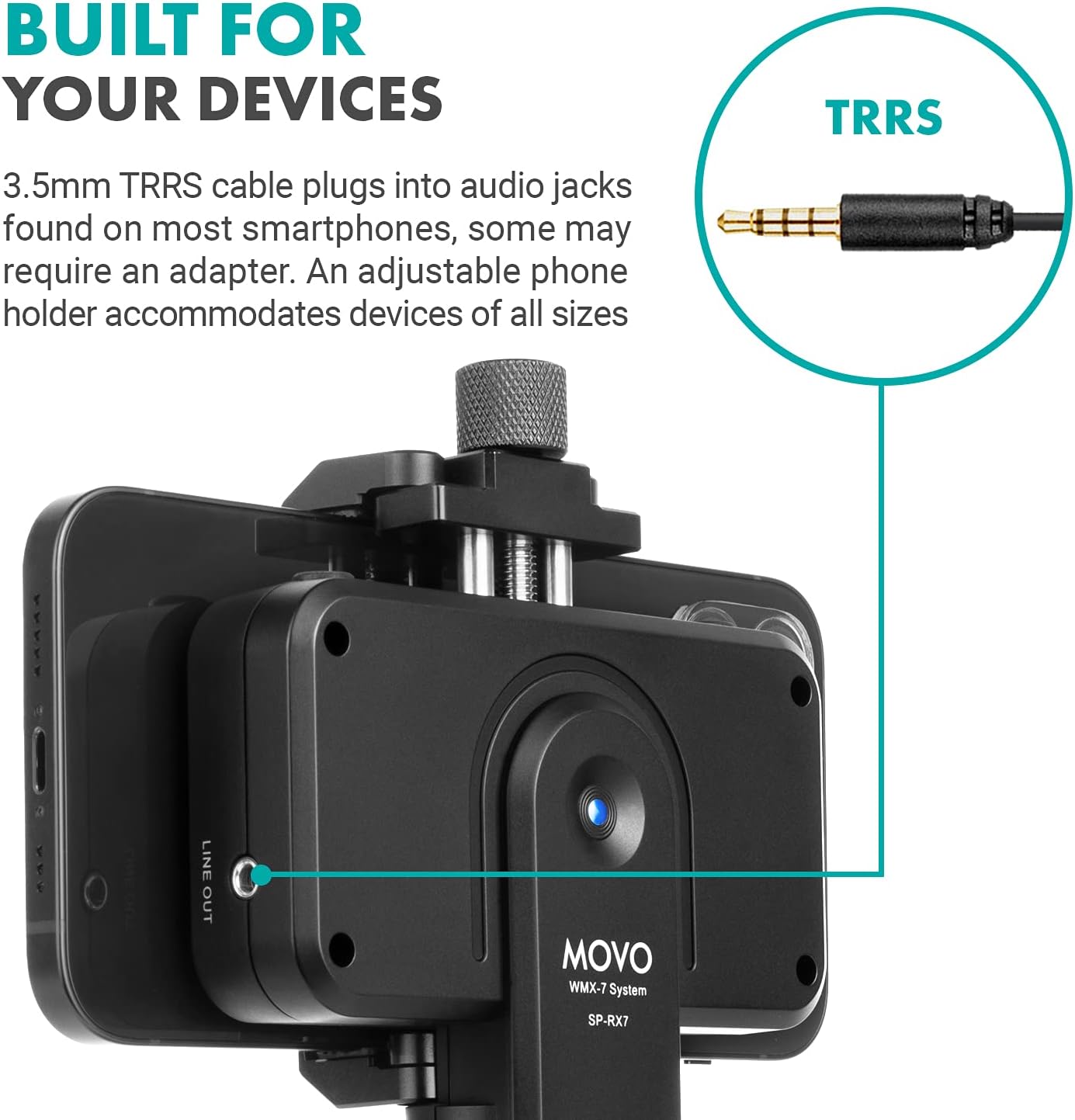
Image 4.1: Connecting Receiver to Smartphone
4.3 Pairing the Microphones with the Receiver
The WMX-7-SP system is designed to operate with one wireless transmitter (either the bodypack transmitter or the handheld microphone) connected to the receiver at a time. Simultaneous use of both wireless transmitters is not supported.
- Power On: Press and hold the power button on the receiver until its indicator light turns on. Do the same for the desired microphone (either the bodypack transmitter or the handheld microphone).
- Initiate Pairing: The devices should automatically attempt to pair. Look for an RF indicator light on the receiver to confirm a successful connection. If pairing does not occur automatically, consult the troubleshooting section.
- Lavalier Microphone Connection: If using the bodypack transmitter, plug the lavalier microphone into one of the 3.5mm mic input ports on the bodypack. Clip the lavalier microphone to your clothing, approximately 6-8 inches from your mouth, for optimal sound capture.
5. Operating Instructions
5.1 Audio Monitoring
To ensure your audio is being recorded correctly, use the built-in headphone jack on the receiver.
- Plug a pair of headphones (not included) into the 3.5mm headphone jack on the receiver.
- Adjust the volume using the '+' and '-' buttons on the receiver.
- Monitor the audio in real-time to check for clarity, levels, and any interference.
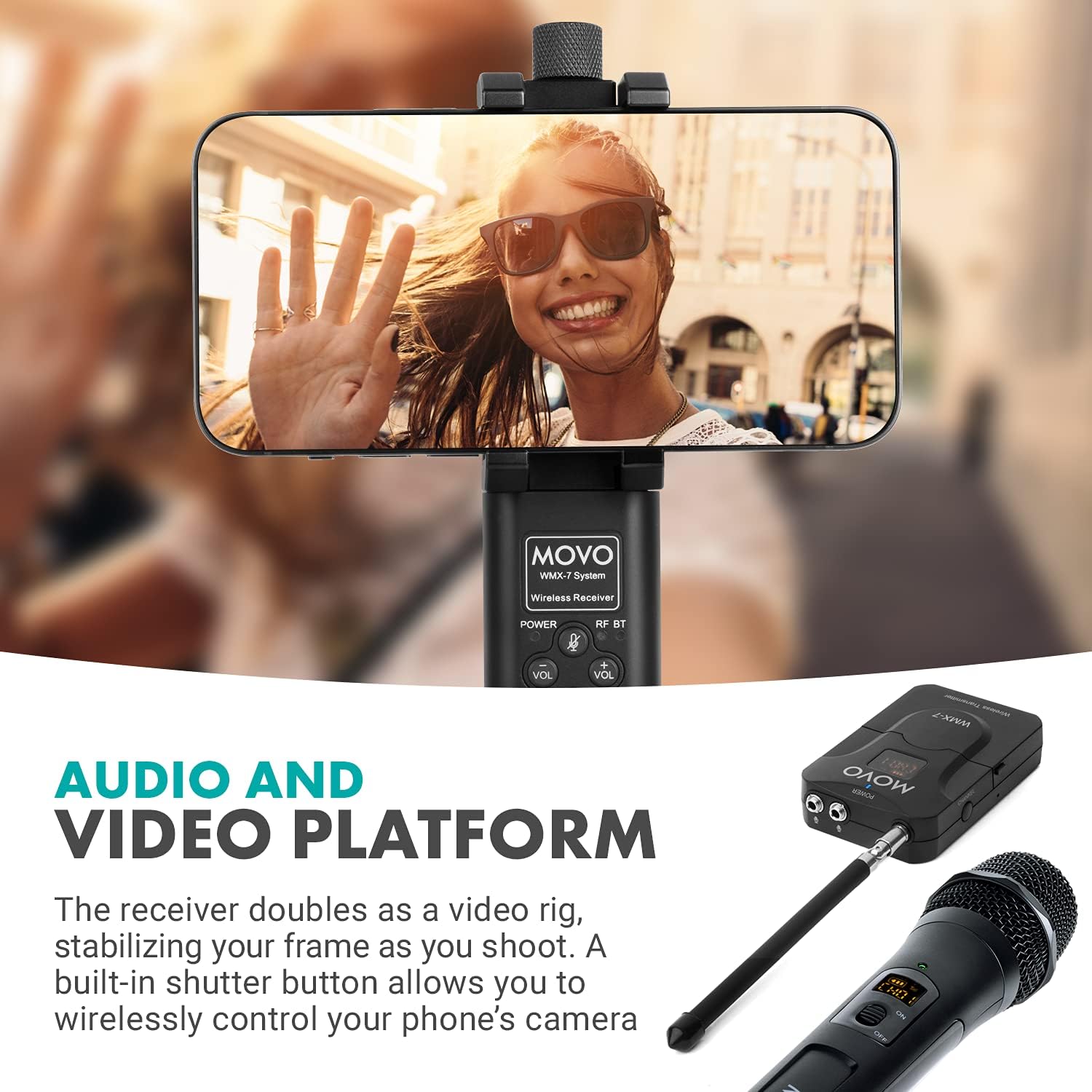
Image 5.1: Receiver as Video Rig with Monitoring Capabilities
5.2 Using the Camera Shutter Button
The receiver features a built-in shutter button that can wirelessly control your smartphone's camera, allowing for convenient start/stop recording or photo capture.
- Ensure your smartphone's camera app is open and active.
- Press the shutter button on the receiver to activate your phone's camera function.
5.3 Microphone Usage and Range
Both the lavalier and handheld microphones feature an omnidirectional pickup pattern, meaning they capture sound equally from all directions. This is ideal for interviews, vlogging, and situations where sound may come from multiple angles.

Image 5.2: Omnidirectional Polar Pattern
The system offers a wireless transmission range of up to 98 feet (30 meters) in open, unobstructed environments. Maintain a clear line of sight between the transmitter and receiver for best performance.

Image 5.3: Wireless Transmission Range
6. Maintenance
Proper care and maintenance will extend the life of your Movo WMX-7-SP system.
- Cleaning: Use a soft, dry cloth to clean the exterior of all components. Avoid using harsh chemicals or abrasive materials.
- Storage: Store the system in its hardshell carrying case when not in use to protect it from dust and physical damage.
- Battery Care: For optimal battery life, avoid fully discharging the devices frequently. Recharge them regularly, especially if storing for extended periods.
- Environmental Conditions: Avoid exposing the devices to extreme temperatures, humidity, or direct sunlight.
7. Troubleshooting
If you encounter issues with your Movo WMX-7-SP system, refer to the following common problems and solutions:
| Problem | Possible Cause | Solution |
|---|---|---|
| No audio recording or weak signal |
|
|
| Handheld microphone or lavalier transmitter not connecting/pairing |
|
|
| Shutter button not working |
|
|
| Poor audio quality (static, dropouts) |
|
|
8. Specifications
| Feature | Specification |
|---|---|
| Brand | Movo |
| Model Number | WMX-7-SP |
| Microphone Form Factor | Microphone System (Lavalier & Handheld) |
| Polar Pattern | Omnidirectional |
| Connectivity Technology | Wireless (Auxiliary 3.5mm Jack for smartphone connection) |
| Connector Type | 3.5 mm Jack |
| Hardware Platform | Smartphone |
| Compatible Devices | Smartphone |
| Signal-to-Noise Ratio | 65 dB |
| Number of Channels | 1 (one active wireless transmitter at a time) |
| Power Source | Battery Powered |
| Wireless Range | Up to 98 feet (30 meters) |
| Item Weight | 2.56 pounds |
| UPC | 817711024450 |
9. Warranty and Support
The Movo WMX-7-SP Wireless Lavalier and Handheld Microphone System is covered by a 1-Year Warranty from the date of purchase. This warranty covers manufacturing defects and ensures the product functions as intended under normal use.
For technical assistance, warranty claims, or any questions regarding your product, please contact Movo customer support. Contact information can typically be found on the Movo website or on the warranty card included in your package.
Please retain your proof of purchase for warranty validation.


