
1. Introduction
Thank you for purchasing the Daewoo DIBT2122 Mini Portable Bluetooth Speaker. This manual provides essential information for the safe and efficient operation of your device. Please read it thoroughly before use and retain it for future reference.

Image 1: Front view of the Daewoo DIBT2122 Mini Portable Bluetooth Speaker in blue, featuring a black speaker grille with the Daewoo logo and an attached carabiner clip.
2. Safety Information
- Do not expose the speaker to extreme temperatures, direct sunlight, or open flames.
- Avoid dropping or subjecting the speaker to strong impacts.
- Do not disassemble, repair, or modify the device yourself. Contact qualified service personnel for assistance.
- Keep the speaker away from water and other liquids to prevent electric shock or damage, unless specifically designed for water resistance (this model is not specified as waterproof).
- Use only the provided or approved charging cable.
- Dispose of the battery and device according to local regulations.
3. Package Contents
Please check the package for the following items:
- Daewoo DIBT2122 Mini Portable Bluetooth Speaker
- USB Charging Cable
- Suction Cup
- Metal Hanging Hook (Carabiner)
- User Manual (this document)

Image 2: The product packaging box for the Daewoo Wireless Shower Speaker, showing the speaker image and brand logo.
4. Setup
4.1 Charging the Speaker
- Locate the USB charging port on the side of the speaker, usually protected by a rubber flap.
- Connect the small end of the provided USB charging cable to the speaker's USB port.
- Connect the larger end of the USB cable to a USB power adapter (not included) or a computer's USB port.
- The LED indicator will illuminate to show charging status. A full charge takes approximately 2.5 hours.
- Once fully charged, disconnect the cable and ensure the rubber flap is securely closed to protect the port.

Image 3: A close-up view of the side of the speaker, showing the micro USB charging port and the SD card slot, both protected by a rubber cover.
4.2 Powering On/Off
- To power on, press and hold the Power button (usually marked with a power symbol) for a few seconds until you hear an audible prompt or see the LED indicator light up.
- To power off, press and hold the Power button again for a few seconds until the device shuts down.
4.3 Bluetooth Pairing
- Ensure the speaker is powered on and within 10 meters (33 feet) of your Bluetooth-enabled device (smartphone, tablet, computer).
- The speaker will automatically enter pairing mode, indicated by a flashing LED light.
- On your device, go to Bluetooth settings and search for available devices.
- Select "DIBT2122" or a similar name from the list.
- Once paired, the LED indicator will stop flashing and remain solid, and you will hear a confirmation tone.
- If pairing fails, turn off the speaker and your device's Bluetooth, then repeat the steps.
4.4 Using the Suction Cup and Hanging Hook
- Suction Cup: The speaker features a full-size suction cup on its back. To attach, ensure the surface is clean, smooth, and dry. Press the speaker firmly against the surface until the suction cup adheres.
- Hanging Hook: Use the integrated metal carabiner hook to hang the speaker from a shower rail, backpack, or any suitable loop.
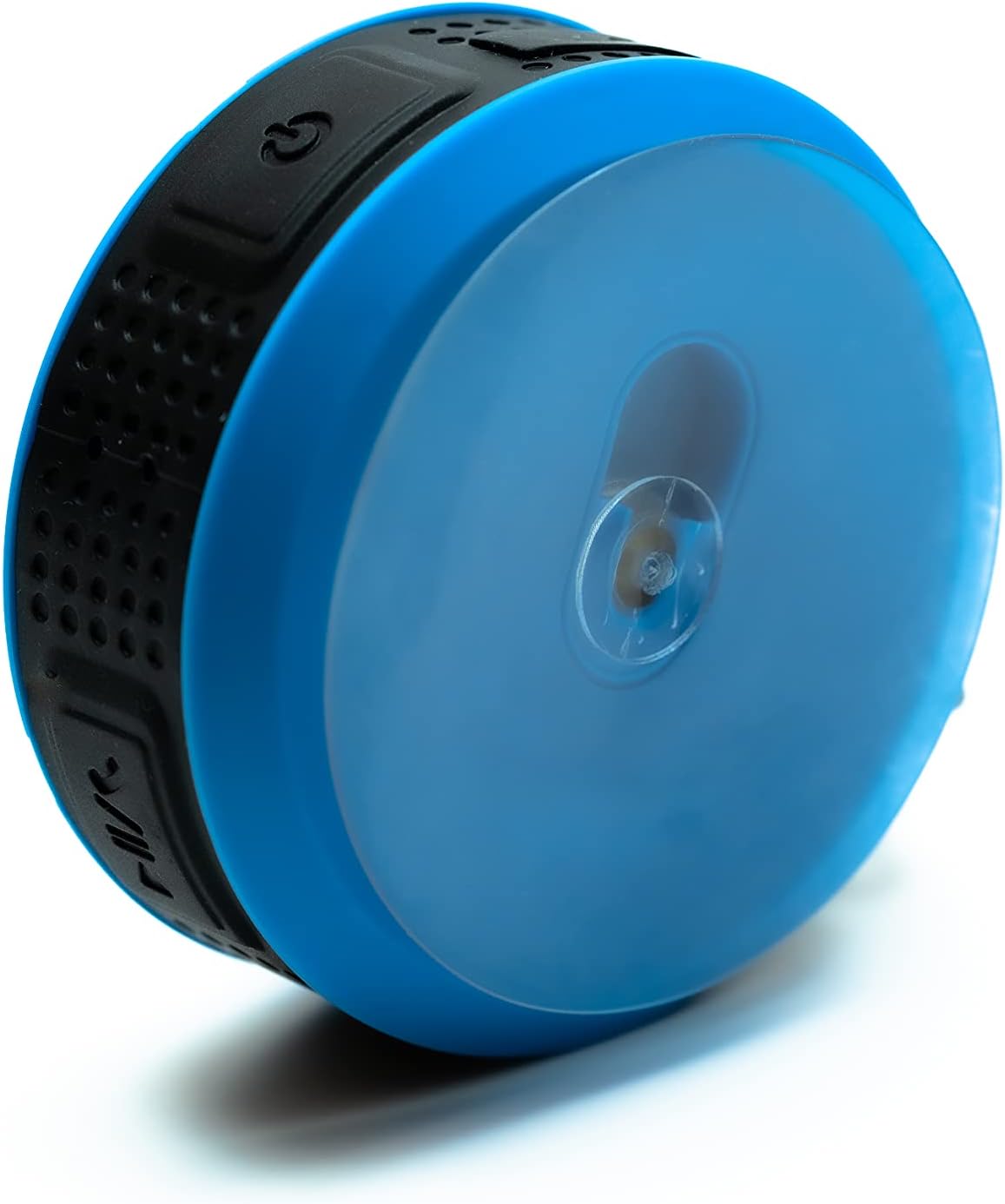
Image 4: The back of the Daewoo DIBT2122 speaker, clearly showing the large, transparent suction cup for mounting on smooth surfaces.
5. Operating Instructions
5.1 Button Functions
The speaker features several control buttons, typically located on its side:
- Power Button (On/Off): Press and hold to power on/off.
- Play/Pause Button: Press once to play or pause music.
- Volume Up / Next Track Button: Press once to increase volume. Press and hold to skip to the next track.
- Volume Down / Previous Track Button: Press once to decrease volume. Press and hold to go to the previous track.
- Call Button (Answer/End/Reject): Press once to answer or end a call. Press and hold to reject a call.

Image 5: A side view of the Daewoo DIBT2122 speaker, highlighting the embossed control buttons for power, play/pause, volume, and track navigation.
5.2 Bluetooth Music Playback
After successfully pairing your device, open your music application and start playback. You can control volume, play/pause, and skip tracks using the speaker's buttons or your connected device.
5.3 Hands-Free Calling
When a call comes in while connected via Bluetooth, the music will pause. Press the Call button once to answer. Press it again to end the call. Press and hold to reject an incoming call.
5.4 SD Card Playback
Insert a microSD card (not included) with MP3 audio files into the designated SD card slot. The speaker should automatically switch to SD card mode and begin playing music. Use the track control buttons to navigate your music.
6. Maintenance
- Cleaning: Wipe the speaker with a soft, dry cloth. Do not use abrasive cleaners or solvents.
- Storage: When not in use for extended periods, store the speaker in a cool, dry place, away from direct sunlight.
- Battery Care: To prolong battery life, avoid fully discharging the battery frequently. Charge the speaker regularly, even if not in use.
7. Troubleshooting
| Problem | Possible Cause | Solution |
|---|---|---|
| Speaker does not power on. | Low battery. | Charge the speaker for at least 30 minutes. |
| Cannot pair via Bluetooth. | Bluetooth is off on your device; speaker is too far; speaker is already paired to another device. | Ensure Bluetooth is enabled on your device. Move speaker closer. Disconnect from other devices or restart speaker. |
| No sound. | Volume is too low; device is not playing; speaker is not connected. | Increase volume on both speaker and connected device. Ensure music is playing. Re-pair Bluetooth. |
| Poor sound quality. | Speaker is too far from the device; interference. | Move speaker closer to the connected device. Avoid obstacles between devices. |
8. Specifications
- Model: DIBT2122
- Bluetooth Version: 5.0
- Output Power: 3W
- Battery: 300 mAh Li-ion
- Charging Time: Approximately 2.5 hours
- Playback Time: Approximately 1.5 hours
- Transmission Distance: Up to 10 meters (33 feet)
- Connectivity: Bluetooth, USB (for charging), SD Card Slot
- Dimensions: 9 x 9 x 3.5 cm
- Weight: 140 grams
- Special Features: Hands-free calling, SD card playback, suction cup mount, metal hanging hook, LED light.
9. Warranty and Support
Daewoo Electronics products are designed and manufactured to the highest quality standards. For warranty information, technical support, or customer service inquiries, please refer to the warranty card included with your purchase or visit the official Daewoo Electronics website. Please have your model number (DIBT2122) and proof of purchase ready when contacting support.