
Important Safeguards
When using electrical appliances, basic safety precautions should always be followed, including the following:
- Read all instructions before using the stand mixer.
- To protect against risk of electrical shock, do not immerse the mixer base, cord, or electrical plug in water or other liquid.
- Close supervision is necessary when any appliance is used by or near children.
- Unplug from outlet when not in use, before putting on or taking off parts, and before cleaning.
- Avoid contact with moving parts. Keep hands, hair, and clothing, as well as spatulas and other utensils, away from beaters during operation to reduce the risk of injury to persons and/or damage to the mixer.
- Do not operate any appliance with a damaged cord or plug, or after the appliance malfunctions or has been dropped or damaged in any manner. Contact KitchenAid for examination, repair, or electrical or mechanical adjustment.
- The use of attachments not recommended or sold by KitchenAid may cause fire, electric shock, or injury.
- Do not use the mixer outdoors.
- Do not let the cord hang over the edge of a table or counter.
Introduction
Welcome to your new KitchenAid Professional 5 Plus Series Stand Mixer. This manual provides essential instructions for the safe operation, maintenance, and troubleshooting of your appliance.
Your mixer features a robust 450-watt motor and 10 variable speeds, designed to handle a wide range of culinary tasks from whipping delicate meringues to kneading heavy bread doughs.
Parts and Features
Familiarize yourself with the components of your KitchenAid Professional 5 Plus Series Stand Mixer.
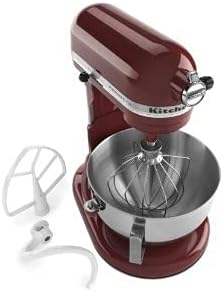
Image Description: This image displays the KitchenAid Professional 5 Plus Series Stand Mixer in Gloss Cinnamon (dark red). The mixer head is tilted back, revealing the attachment hub. The stainless steel mixing bowl is attached to the base, and a wire whip attachment is visible inside the bowl. To the left of the mixer, a flat beater and a dough hook attachment are shown separately.
- Power Hub: For optional attachments.
- Motor Head: Contains the motor and gearing.
- Speed Control Lever: Offers 10 variable speeds.
- Attachment Hub Knob: Secures optional attachments.
- Bowl Lift Handle: Raises and lowers the mixing bowl.
- Stainless Steel Bowl: Typically 5-quart capacity.
- Wire Whip: For incorporating air into mixtures.
- Flat Beater: For general mixing, creaming, and mashing.
- Dough Hook: For mixing and kneading yeast doughs.
- Power Cord: For electrical connection.
Setup
Unpacking
- Carefully remove all packaging materials from the mixer and its accessories.
- Wash the mixing bowl, wire whip, flat beater, and dough hook in warm, soapy water. Rinse thoroughly and dry completely before first use.
- Wipe the mixer base with a soft, damp cloth. Do not immerse the mixer base in water.
Positioning the Mixer
Place the stand mixer on a dry, flat, and stable countertop. Ensure there is adequate space around the mixer for operation and ventilation.
Attaching the Bowl
- Ensure the mixer is unplugged and the speed control lever is set to "OFF".
- Raise the bowl lift handle to the up position.
- Place the bowl supports over the locating pins on the mixer base.
- Press down on the back of the bowl until the pin snaps into the spring latch.
- Lower the bowl lift handle to secure the bowl in place.
Attaching an Accessory
- Ensure the mixer is unplugged and the speed control lever is set to "OFF".
- With the bowl attached and in the lowered position, slide the accessory (flat beater, wire whip, or dough hook) onto the beater shaft.
- Rotate the accessory until it hooks over the pin on the shaft.
Operating
Powering On and Speed Control
- Ensure the mixer is properly set up with the bowl and desired accessory.
- Plug the mixer into a grounded 3-prong electrical outlet.
- Add ingredients to the mixing bowl.
- Move the speed control lever to the desired speed setting (1-10). Always start at a lower speed and gradually increase to avoid splashing ingredients.
- To stop the mixer, move the speed control lever to "OFF".
Recommended Speeds for Attachments
| Attachment | Recommended Use | Speed Setting |
|---|---|---|
| Flat Beater | Mixing batters, mashing potatoes, creaming butter and sugar | 2-6 |
| Wire Whip | Whipping eggs, cream, frosting | 8-10 |
| Dough Hook | Mixing and kneading yeast doughs | 2 |
Note: Always refer to your specific recipe for precise speed recommendations and mixing times.
Maintenance
Cleaning
- Always unplug the stand mixer from the electrical outlet before cleaning.
- Mixing Bowl and Accessories: The stainless steel bowl, flat beater, and dough hook are dishwasher safe. The wire whip should be hand-washed in warm, soapy water and dried thoroughly to prevent corrosion.
- Mixer Body: Wipe the mixer body with a soft, damp cloth. Do not use abrasive cleaners or scourers. Never immerse the mixer body in water or other liquids.
Storage
Store the mixer in a clean, dry place. Ensure the power cord is neatly wrapped and secured to prevent damage.
Troubleshooting
| Problem | Possible Cause | Solution |
|---|---|---|
| Mixer does not start | Not plugged in; power outlet not working | Check power cord connection; test outlet with another appliance |
| Mixer stops during operation | Overload protection activated | Turn off, unplug, remove some ingredients, wait 10-15 minutes for the motor to cool, then restart |
| Attachment hits the bottom of the bowl | Bowl not properly seated | Ensure the mixing bowl is securely locked into the bowl supports. If the issue persists, contact customer support. |
| Mixer makes unusual noise | Normal operation noise; attachment not properly installed | Ensure attachment is securely installed. If noise is excessive, new, or accompanied by other issues, contact customer support. |
For issues not listed here, or if troubleshooting steps do not resolve the problem, please contact KitchenAid Customer Service.
Specifications
- Model: KV25GOXGC
- Brand: KitchenAid
- Motor: 450 Watts
- Speeds: 10 Variable Speeds
- Bowl Capacity: Approximately 5 Quarts (Professional 5 Plus Series)
- Color: Gloss Cinnamon (Dark Red)
- UPC: 656942114840
- Controls Type: Knob
- Special Feature: Adjustable Speed Control
Warranty and Support
This product is a renewed item. Please refer to the Amazon Renewed Guarantee for specific details regarding replacement or refund eligibility for your purchase.
For general product support, information on parts, or service inquiries, please visit the official KitchenAid website or contact their customer service department.
Amazon Renewed Guarantee: Learn more about Amazon Renewed
KitchenAid Official Website: www.kitchenaid.com


