
1. Introduction
Thank you for choosing the Dongcheng DFF03-80 Laser Distance Meter. This device is designed for precise and efficient distance measurement, offering a range of features for various applications. Please read this manual carefully before using the device to ensure safe and optimal operation. Keep this manual for future reference.
2. Safety Instructions
WARNING: Read all safety warnings and instructions. Failure to follow the warnings and instructions may result in serious injury.
2.1 Laser Safety
The DFF03-80 is a Class 2 laser product. Do not stare directly into the laser beam or direct it at other people. Avoid pointing the laser beam at reflective surfaces. Eye protection is recommended in environments where direct exposure to the laser beam is possible.
- Do not attempt to modify the laser device.
- Do not disassemble the device.
- Keep the device out of reach of children.
2.2 General Safety
- Use the device only for its intended purpose as described in this manual.
- Do not operate the device in explosive atmospheres, such as in the presence of flammable liquids, gases, or dust.
- Protect the device from moisture and direct sunlight.
- Avoid dropping or subjecting the device to strong impacts.
3. Package Contents
Please check that all items listed below are included in your package. If any items are missing or damaged, contact your retailer.
- Dongcheng DFF03-80 Laser Distance Meter
- 2 x 1.5V AAA Alkaline Batteries
- User Manual
- Hand Strap (optional, may vary by region)
- Protective Pouch (optional, may vary by region)
4. Product Overview
Familiarize yourself with the components of your DFF03-80 Laser Distance Meter.
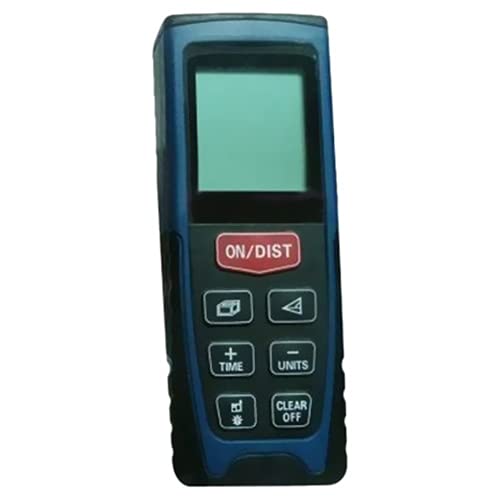
Figure 1: Front view of the Dongcheng DFF03-80 Laser Distance Meter. This image shows the device's compact design, featuring a clear LCD display at the top, a central measurement button, and additional function buttons below. The laser emission point is typically located at the top edge of the device.
4.1 Device Components
- Laser Emission/Reception Lens: Located at the top of the device.
- LCD Display: Shows measurement results, battery status, and mode indicators.
- Measurement Button: Initiates single or continuous measurements.
- Function Buttons: For changing measurement modes (e.g., area, volume, Pythagorean), unit selection, and historical data.
- Clear/Off Button: Clears current measurement or turns off the device.
- Battery Compartment: Located at the rear, for inserting AAA batteries.
5. Setup
5.1 Battery Installation
- Locate the battery compartment cover on the back of the device.
- Slide or unclip the cover to open it.
- Insert two 1.5V AAA alkaline batteries, ensuring correct polarity (+/-) as indicated inside the compartment.
- Close the battery compartment cover securely.
5.2 Powering On/Off
- To Power On: Press the [MEAS] button once. The display will light up.
- To Power Off: Press and hold the [CLEAR/OFF] button for a few seconds until the display turns off. The device also features an automatic shut-off after 180 seconds of inactivity to conserve battery life.
6. Operating Instructions
6.1 Basic Single Measurement
- Power on the device by pressing the [MEAS] button.
- Point the laser beam at the target surface. Ensure the laser dot is clearly visible on the target.
- Press the [MEAS] button again. The measurement will be taken, and the result will appear on the display.
- To take another measurement, repeat steps 2 and 3.
6.2 Continuous Measurement (Tracking)
This mode allows you to track distances in real-time as you move the device.
- Power on the device.
- Press and hold the [MEAS] button (or a dedicated tracking button if available) until the continuous measurement icon appears on the display.
- Move the device slowly towards or away from the target. The display will update with real-time distance readings.
- Press the [MEAS] button again to stop continuous measurement and hold the last reading.
6.3 Measurement Modes (Common)
Your DFF03-80 may include various measurement functions. Refer to the icons on your device's display and buttons for specific mode selection.
- Area Measurement: Typically requires two measurements (length and width) to calculate the area.
- Volume Measurement: Requires three measurements (length, width, height) to calculate the volume.
- Pythagorean Measurement: Used for indirect measurement of heights or distances where direct measurement is not possible. This mode usually involves measuring two or three sides of a right-angled triangle.
- Addition/Subtraction: Allows adding or subtracting measurement results.
- Unit Switching: Press the [UNIT] button (if available) to cycle through measurement units (e.g., meters, feet, inches).
7. Maintenance
7.1 Cleaning
- Wipe the device with a soft, damp cloth. Do not use abrasive cleaners or solvents.
- Clean the laser emission/reception lens carefully with a soft cloth, similar to cleaning camera lenses. Do not touch the lens with your fingers.
7.2 Storage
- Store the device in a dry, cool place, away from direct sunlight and extreme temperatures.
- If the device will not be used for an extended period, remove the batteries to prevent leakage.
8. Troubleshooting
| Problem | Possible Cause | Solution |
|---|---|---|
| Device does not power on. | Batteries are dead or incorrectly inserted. | Replace batteries or check polarity. |
| Inaccurate measurements. | Target surface is too reflective, transparent, or rough. Device is unstable. | Use a non-reflective target. Ensure device is stable during measurement. |
| Laser beam is not visible. | Bright ambient light. | Use in lower light conditions or closer to the target. |
| Error message on display. | Measurement out of range, or internal error. | Ensure target is within 0.1m to 80m. Restart the device. If error persists, contact support. |
9. Specifications
| Feature | Specification |
|---|---|
| Brand | Dongcheng |
| Model Number | DFF03-80 |
| Type | Laser Distance Meter |
| Measurement Accuracy | ±1.5 mm |
| Automatic Shut-off | 180 seconds |
| Battery Type | 2 x 1.5V AAA Alkaline Batteries |
| Battery Life | Approx. 5000 measurements |
| Laser Class | Class 2 |
| Laser Diode | 620 to 650 nm |
| Measuring Range | 0.1 to 80 meters |
| Display Unit | 1 mm |
| Product Dimensions (L x W x H) | 122 × 46 × 25 mm |
| Product Weight | Approx. 105 grams (Note: Original data indicated 105 kg, which is a likely typo and corrected to grams for a handheld device.) |
| Operating Temperature | 10°C to 50°C |
10. Warranty and Support
Dongcheng products are manufactured to high-quality standards. For warranty information, please refer to the warranty card included with your purchase or contact your local Dongcheng distributor. Keep your purchase receipt as proof of purchase.
For technical support, service, or spare parts, please contact the retailer where you purchased the device or visit the official Dongcheng website for contact information.