
MAONO AM100
MAONOCASTER AU-AM100 All-In-One Podcast Production Studio
User Instruction Manual
1. Product Overview
The MAONOCASTER AU-AM100 is a portable, all-in-one podcast production studio designed to simplify audio mixing and recording for podcasts, radio shows, and live streams. It integrates multiple digital audio mixing functions into a single, user-friendly device, making it suitable for both beginners and experienced broadcasters.
This device features four channels for audio mixing, allowing easy connections for microphones, smartphones, and computers. It includes advanced controls for sound levels, live vocal effects, and sound effects, minimizing the need for extensive post-production.

Figure 1.1: Front view of the Maonocaster AU-AM100, showcasing its compact design and primary controls.

Figure 1.2: Top-down view of the Maonocaster AU-AM100, highlighting the various knobs, faders, and pads for audio control and effects.

Figure 1.3: Rear view of the Maonocaster AU-AM100, displaying the input and output ports for various connections.
2. Setup Guide
Follow these steps to set up your MAONOCASTER AU-AM100 for optimal performance.
2.1 Powering the Device
- The MAONOCASTER AU-AM100 features a built-in 5000mAh battery, providing up to 8 hours of continuous operation.
- To charge the device or power it directly, connect the included USB-C cable to the USB-C port on the rear of the unit and to a power source (e.g., computer USB port, USB wall adapter).
- Press and hold the POWER button located on the rear panel to turn the unit on or off.
2.2 Connecting Microphones
- The unit supports two microphone inputs via XLR or 6.35mm (1/4") jacks. Connect your microphones to the MIC INPUT 1 and MIC INPUT 2 ports on the rear.
- For condenser microphones requiring phantom power, press the 48V button located above each microphone's gain knob on the top panel. The indicator light will illuminate when 48V phantom power is active.
2.3 Connecting to a Computer (PC/Mac)
- Connect the MAONOCASTER AU-AM100 to your computer using the USB-C cable. The device will be recognized as an audio input/output device.
- Select "MAONOCASTER" as your input and output device in your computer's sound settings or your preferred recording/streaming software.
2.4 Connecting Smartphones and Other Audio Sources
- Phone Call Input: Use a 3.5mm TRRS cable to connect your smartphone to the PHONE INPUT port for integrating phone calls into your podcast.
- Auxiliary Input: Connect external audio devices (e.g., music players) to the AUX INPUT (3.5mm TRS) port.
- Audio Output: Use the two 3.5mm TRRS OUTPUT ports to send mixed audio to recording devices or other systems.
- Aux Speaker Output: Connect external speakers to the AUX SPEAKER (3.5mm) port for monitoring.
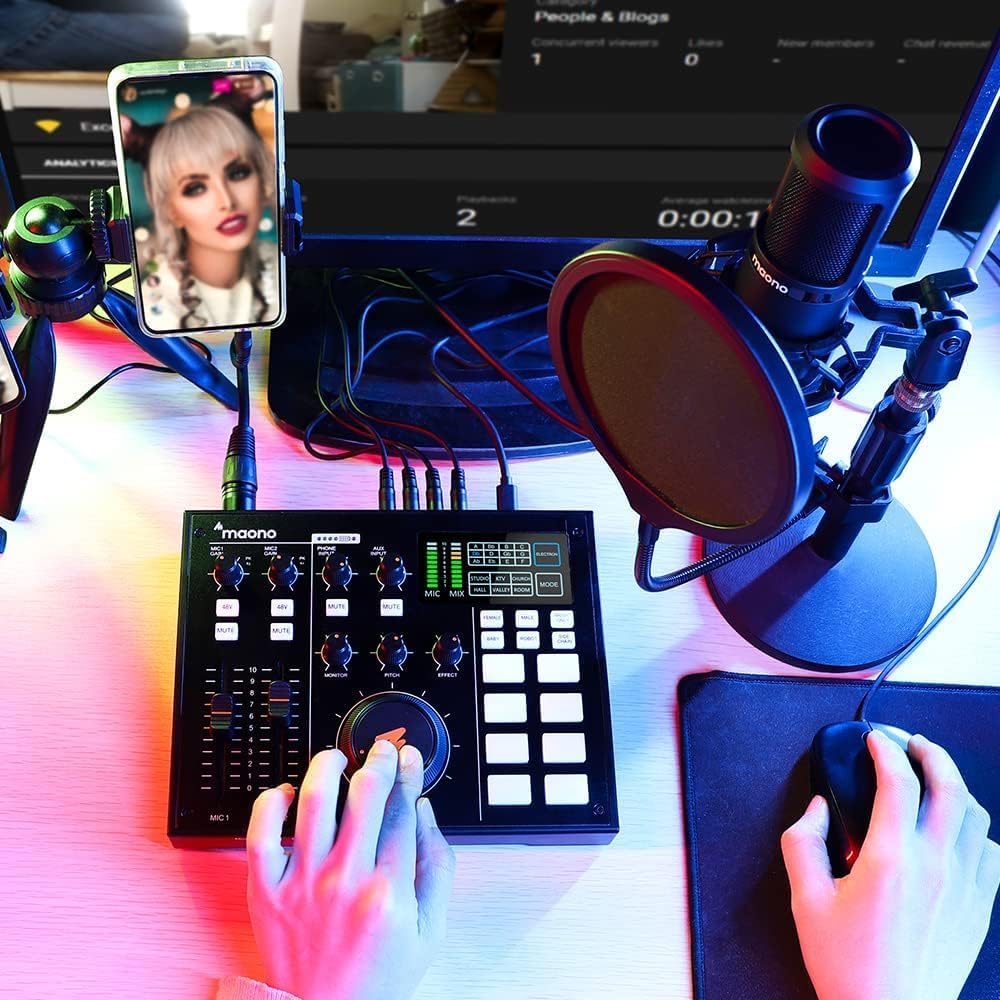
Figure 2.1: The Maonocaster AU-AM100 connected and in use for a podcast setup, demonstrating typical connectivity with a microphone and smartphone.
3. Operating Instructions
This section details the functions of the MAONOCASTER AU-AM100's controls and how to use them effectively.
3.1 Controls and Indicators
- MIC GAIN Knobs: Adjust the input sensitivity for Microphone 1 and Microphone 2. Turn clockwise to increase gain, counter-clockwise to decrease.
- 48V Buttons: Activates 48V phantom power for condenser microphones connected to the respective XLR inputs.
- MUTE Buttons: Mutes the corresponding microphone input.
- MIC Faders (MIC 1, MIC 2): Control the volume level of each microphone in the main mix.
- MONITOR Knob: Adjusts the volume of the headphone output.
- PITCH Knob: Controls the pitch shift effect for vocal modulation.
- EFFECT Knob: Adjusts the intensity or type of the selected vocal effect (e.g., reverb).
- MIX Knob: Controls the overall output volume of the main mix.
- Vocal FX Buttons: Pre-programmed buttons for vocal effects suchs as pitch, gender-bend, robot, sidechain, and music only. Press to activate.
- Sound FX Pads: Four pre-programmed pads for sound effects like stinger, cheering, clapping, and suspense. Press to trigger.
- Programmable Pads: Three customizable pads where you can upload your own sound effects or jingles using the MAONOCASTER PC app.
- Cough/Bleep Button: Instantly mutes the microphone input for bleeping out expletives or coughing.
- Display Screen: Shows levels, selected effects, and other operational information.
3.2 Basic Operation
- Adjusting Microphone Levels: Use the MIC GAIN knobs and MIC Faders to set appropriate input levels for your microphones. Monitor the levels on the display to avoid clipping.
- Applying Vocal Effects: Select a vocal effect using the dedicated buttons (e.g., PITCH, GENDER-BEND). Adjust the intensity with the EFFECT knob.
- Triggering Sound Effects: Press any of the Sound FX Pads to play pre-loaded or custom sound effects.
- Monitoring Audio: Connect headphones to the MONITOR output and adjust the volume using the MONITOR knob to hear your mix.
- Controlling Overall Mix: Use the large MIX knob to control the master output volume.
3.3 Advanced Features
- Sidechain: This feature automatically lowers the volume of background music or other audio sources when a microphone signal is detected, ensuring clear vocal prominence.
- Mix-Minus: Prevents audio feedback during phone calls by removing the caller's own voice from their monitor mix.
- Noise-Canceling: Reduces unwanted background noise from microphone inputs.
- Loopback Switch: Allows the audio output from your computer to be routed back into the MAONOCASTER's mix, useful for playing computer audio during streams.
- Programmable Jingles: Use the MAONOCASTER PC/Mac application to upload and customize audio files for the three programmable pads.
4. Maintenance
Proper maintenance ensures the longevity and optimal performance of your MAONOCASTER AU-AM100.
- Cleaning: Use a soft, dry cloth to clean the exterior of the unit. Avoid using abrasive cleaners, solvents, or waxes. Do not spray liquids directly onto the device.
- Battery Care: To preserve battery life, avoid fully discharging the battery frequently. If storing the device for an extended period, charge it to approximately 50% before storage and recharge every few months.
- Storage: Store the MAONOCASTER in a cool, dry place away from direct sunlight, extreme temperatures, and high humidity. Keep it free from dust.
- Handling: Handle the device with care. Avoid dropping it or subjecting it to strong impacts, which can damage internal components.
5. Troubleshooting
If you encounter issues with your MAONOCASTER AU-AM100, refer to the following common problems and solutions.
| Problem | Possible Cause | Solution |
|---|---|---|
| No sound output |
|
|
| Microphone not detected/no input signal |
|
|
| Distorted audio |
|
|
| Device not powering on |
|
|
6. Specifications
| Model Number | AM100 |
| Battery Type | 1 Lithium Ion battery (required) |
| Battery Capacity | 5000mAh (built-in) |
| Battery Life | Up to 8 hours (non-stop podcasting) |
| Connectivity | USB-C, 3.5mm Aux Speaker, 2 x 3.5mm TRRS Audio Output, 3.5mm TRS Input Aux Audio, 3.5mm TRRS Link Phone Call to Podcast, 2 x XLR and 6.35mm 1/4" Input |
| Package Dimensions | 32.7 x 22.1 x 9 cm |
| Item Weight | 1.16 kg |
| Country of Origin | United Arab Emirates |
7. Warranty and Support
For detailed warranty information, please refer to the warranty card included with your product or visit the official MAONO website. If you require technical support or have questions regarding your MAONOCASTER AU-AM100, please contact MAONO customer service through their official channels.
Keep your purchase receipt and product serial number handy when contacting support.
Ask a question about this manual
Ask about setup, troubleshooting, compatibility, parts, safety, or missing instructions. Manuals+ will review the question and use this page’s manual context to help answer it.