
1. Product Overview
The PowMr Growatt SPF 5000ES is a 5000W 48V solar inverter with an integrated MPPT charge controller. This versatile unit is designed to work with or without a 48V battery system, offering flexible power solutions for various applications. It features a maximum PV input voltage of 450VDC and provides a 220VAC output.
Key features include:
- Integrated MPPT charge controller with 100A maximum charge current.
- Supports 48V battery systems (Li-Ion & Lead Acid: AGM, Flooded, User-defined, Lithium).
- Capable of operating without a 48V battery.
- 220VAC pure sine wave output.
- Maximum PV input voltage up to 450VDC.
- Configurable grid or solar input priority.
- Bypass mode support.
- Parallel operation for capacity expansion up to 30kW (max 6 units).
- Detailed LCD display for monitoring and settings.
- WIFI/GPRS remote monitoring (optional).
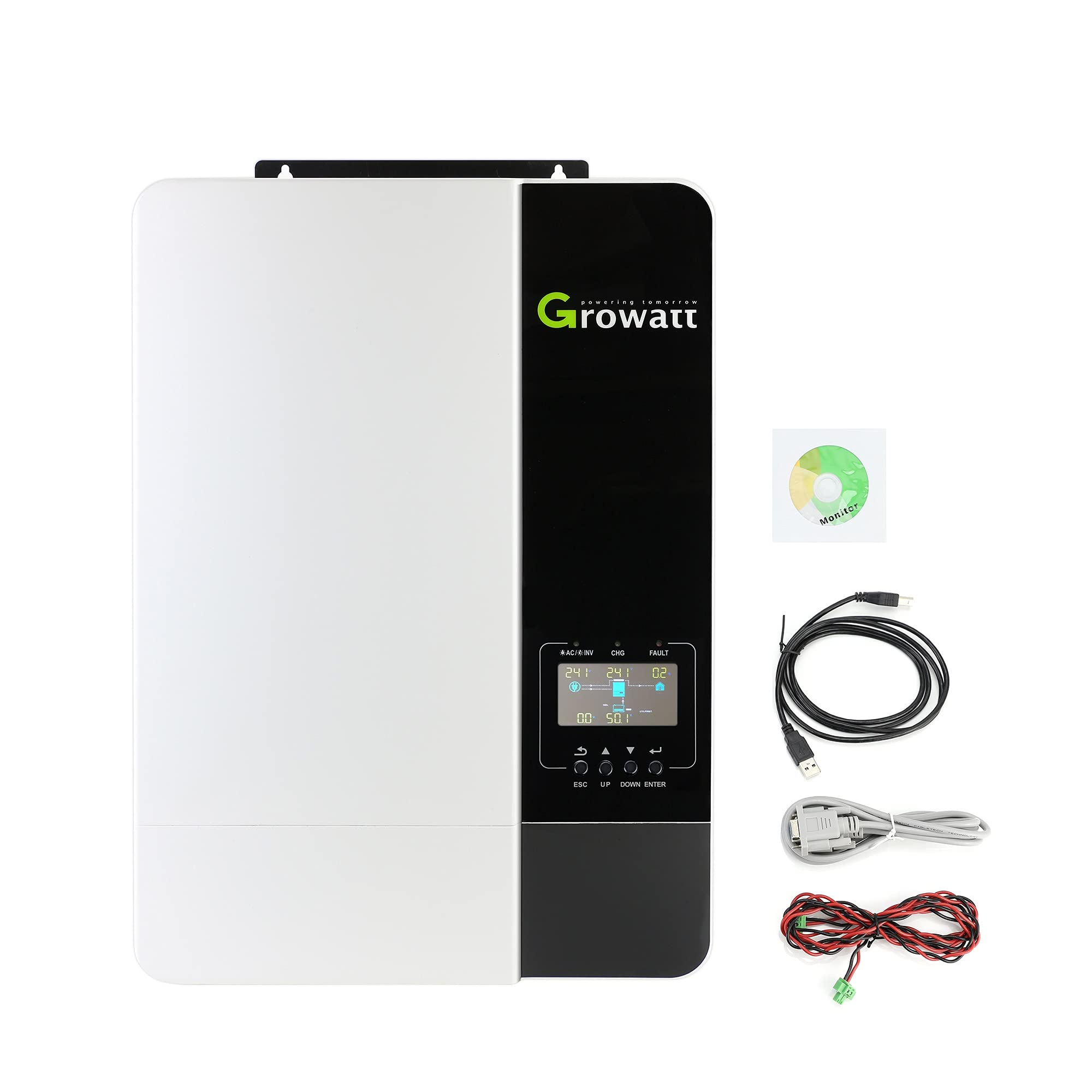
Figure 1: Front view of the Growatt SPF 5000ES Solar Inverter.
2. Package Contents
Upon unpacking, verify that all items listed below are included and undamaged. If any items are missing or damaged, please contact your dealer.
The standard package typically includes:
- Growatt SPF 5000ES Inverter Unit
- User Manual
- Software CD
- Parallel Communication Cable
- Current Sharing Cable
- USB Communication Cable
For a visual guide on unpacking and identifying components, refer to the 'Packing And Unpack Inspect' section of Video 1 in the Operation section.
3. Installation
3.1 Safety Precautions
- Do not mount the inverter on flammable construction materials.
- Mount the inverter on a solid surface capable of supporting its weight.
- Install the inverter at eye level to ensure the LCD display is easily readable.
- Ensure the ambient temperature is between 0°C and 55°C for optimal operation.
- Maintain sufficient clearance (at least 20 cm on sides, 50 cm top/bottom) around the inverter for heat dissipation and wire access.

Figure 2: Recommended installation position and clearances for the inverter to ensure proper ventilation and access.
3.2 Wiring Connections
All wiring should be performed by a qualified electrician. Ensure all power sources are disconnected before making any connections.
Battery Connection:
- Connect the 48V battery bank to the Battery Input Port.
- Use 2AWG size cables for battery connections.
- Ensure correct polarity (+ to + and - to -).
AC Input Connection:
- Connect the utility grid or generator AC input to the AC Input Port.
- Use 8AWG size cables for AC input connections.
- Connect Ground wire to Ground terminal, Hot Line 1 to L terminal, and Hot Line 2 to N terminal.
AC Output Connection:
- Connect your loads to the AC Output Port.
- Use 8AWG size cables for AC output connections.
PV Input Connection:
- Connect the solar panel array to the PV Input Port.
- Use 8AWG size cables for PV input connections.
- Ensure PV panel voltage is at least 150V and stable, and current does not exceed 18A.

Figure 3: Detailed view of the inverter's connection ports and recommended cable sizes.
Communication Ports:
The inverter includes ports for WIFI/GPRS, USB, CAN, and RS485 communication for monitoring and parallel operation. An optional WIFI/GPRS module can be connected for remote monitoring.

Figure 4: Front panel with LCD display and indicators, and rear panel showing AC input/output, PV input, battery input, and various communication ports.
4. Operation
4.1 Powering On/Off
- Ensure all wiring connections are secure and correct.
- Switch the DC input breaker to the ON position.
- Switch the AC output breaker to the ON position.
- Press the Power On/Off switch on the inverter to turn it on.
4.2 LCD Display and Function Buttons
The inverter features an LCD display and function buttons for monitoring system status and configuring settings.
4.3 System Settings
To access and modify settings, press and hold the ENTER button for 3 seconds. Use the UP and DOWN buttons to navigate through programs and values, and ENTER to confirm selections.
Program 01: Output Source Priority
This setting determines the priority of power sources for your loads.
- SOL (Solar First): Solar energy powers loads as first priority. If solar is insufficient, battery energy supplies power. Grid energy is used only if solar is unavailable or battery voltage drops below a warning level.
- UTI (Utility First): Utility grid is the primary power source.
- SBU (Solar-Battery-Utility): Solar power first, then battery, then utility.
- SUB (Solar-Utility-Battery): Solar power first, then utility, then battery.
Program 05: Battery Type
Select the type of battery connected to the inverter. Options include AGM, Flooded, User-defined, and Lithium. For Lithium batteries, consult the lithium battery compatibility list and set the relevant communication protocol.
Program 14: Charger Source Priority
This setting determines the priority of charging sources for your battery.
- CSO (Solar First): Solar energy charges the battery as first priority. Utility charges only when solar energy is not available.
- CUE (Grid First): Grid energy charges the battery as first priority.
- SNU (Solar and Grid): Both solar and utility energy charge the battery.
- OSO (Only Solar): Only solar energy will be the charger source, regardless of utility power availability.
Program 19: Bulk Charging Voltage (CV voltage)
Set the bulk charging voltage from 48V to 58.4V. This setting is active when Program 05 is set to 'User-defined'.
Program 20: Floating Charging Voltage
Set the floating charging voltage from 48V to 58.4V. This setting is active when Program 05 is set to 'User-defined'.
Program 21: Low DC Cut-off Voltage
Set the low DC cut-off voltage from 40V to 48V. This setting is active when Program 05 is set to 'User-defined'.
Program 23: AC Output Mode (Parallel Operation)
When units are used in parallel for a single-phase system, select "PAL". For parallel operation in a three-phase system, select "3P1" for L1 phase, "3P2" for L2 phase, and "3P3" for L3 phase.
Video 1: Growatt SPF 5000ES Inverter Installation and Operation Guide. This video demonstrates system introduction, unpacking, product overview, installation steps, and basic operation settings for the inverter, including troubleshooting.
5. Specifications
| Feature | Specification |
|---|---|
| Brand | PowMr |
| Model | SPF 5000ES |
| Power Source | Battery Powered |
| Wattage | 5000 watts |
| Input Voltage | 48 Volts |
| Output Power | 5000 Watts |
| Output Voltage | 120 Volts, 220 Volts |
| Frequency | 50 Hz |
| Max PV Input Voltage | 450VDC |
| Max Charge Current | 100A |
| Item Weight | 31.9 Pounds |
6. Troubleshooting
Refer to the table below for common issues and their solutions. For more detailed troubleshooting, please consult the full user manual.
| Problem / Fault Code | Explanation | What to do |
|---|---|---|
| Unit shuts down automatically during startup process. | The battery voltage is too low (<1.91V/Cell). | 1. Re-charge battery. 2. Replace battery. |
| No response after power on. | 1. The battery voltage is too low (<1.4V/Cell). 2. Battery polarity is reversed. | 1. Check if batteries and the wiring are connected well. 2. Re-charge battery. 3. Replace battery. |
| Mains exist but unit works in battery mode. (Green LED is flashing) | Input voltage is 0 on the LCD and green LED is flashing. | Check if AC breaker is tripped and AC wiring is connected well. |
| Mains exist but unit works in battery mode. (Green LED is flashing) | Insufficient quality of AC power. (Shore or Generator) | 1. Check if AC wires are too thin and/or too long. 2. Check if generator (if applied) is working well or if input voltage range setting is correct. (UPS - Appliance) |
| Mains exist but unit works in battery mode. (Green LED is flashing) | Set "Battery First" or "Solar First" as the priority of output source. | Change output source priority to Utility First. |
| When it's turned on, internal relay is switching on and off repeatedly. | LCD display and LEDs are flashing. | Battery is disconnected. Check if battery wires are connected well. |
| Fault code 01 | Fan fault | Replace the fan. |
| Fault code 02 | Internal temperature of component is over 100°C. | Check whether the air flow of the unit is blocked or whether the ambient temperature is too high. |
| Fault code 03 | Battery is over-charged. | Return to repair center. |
| Fault code 03 | The battery voltage is too high. | Check if spec and quantity of batteries are meet requirements. |
| Fault code 05 | Output short circuited | Check if wiring is connected well and remove abnormal load. |
| Fault code 06/08 | Output abnormal (Inverter voltage below 190Vac or is higher than 260Vac) | 1. Reduce the connected load. 2. Return to repair center. |
| Fault code 07 | The inverter is overload 110% and time is up. | Reduce the connected load by switching off some equipment. |
| Fault code 08/09/53/57 | Internal components failed. | Return to repair center. |
| Fault code 51 | Over current or surge | Restart the unit, if the error happens again, please return to repair center. |
| Fault code 52 | Bus voltage is too low | Restart the unit, if the error happens again, please return to repair center. |
| Fault code 55 | Output voltage is unbalanced | If the battery is connected well, please return to repair center. |
| Fault code 56 | Battery is not connected well or fuse is burnt. | If the battery is connected well, please return to repair center. |
| Fault code 60 | Negative power fault. | 1. Check whether the AC output connected to the grid input. 2. Check whether Program 8 settings are the same for all parallel inverters. 3. Check whether the current sharing cables are connected well in the same parallel phases. 4. Check whether all neutral wires of all parallel units are connected together. 5. If problem still exists, contact repair center. |
| Fault code 80 | CAN fault. | 1. Check whether the parallel communication cables are connected well. 2. Check whether Program 23 settings are right for the parallel system. |
| Fault code 81 | Host loss. | If problem still exists, contact repair center. |
7. Warranty and Support
The product comes with a manufacturer's warranty. For specific warranty terms and conditions, please refer to the warranty card included in your package or contact PowMr customer support. For technical assistance or service, please reach out to your authorized dealer or the manufacturer directly.
Warranty Description: 1 (as per product specifications, further details should be sought from the manufacturer).


