
Introduction
This manual provides essential instructions for the installation, operation, and maintenance of the Ariete Gear Pinion, specifically designed for the Ariete 0260 series tomato presses. Please read this manual carefully before attempting any installation or use to ensure proper function and longevity of the product.
Product Overview
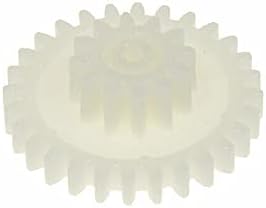
Image 1: The Ariete Gear Pinion. This image displays the white plastic gear with two distinct sets of teeth, one larger and one smaller, designed to mesh with other components within the tomato press mechanism.
The Ariete Gear Pinion is an original replacement part for Ariete 0260 series tomato presses. It is a crucial component responsible for transmitting power within the appliance, enabling the tomato press to function correctly. This gear is made of durable material designed for food contact applications.
Compatibility: This gear is exclusively compatible with the Ariete 0260 series. Please verify your appliance's model number, typically found on the identification plate located under the device, to ensure compatibility. Compatible models include: 00C026010AR0, 00C026010KECH, 00C026010KEF, 00C026010MKUS, 00C026010SUAU, 00C026020AR0, 00C026020KEF, 0C026030AR0, 00C026030KEF, 00C026050AR0, 00C026050KEF.
Setup and Installation
Warning: Always unplug the tomato press from the power outlet before attempting any installation or maintenance. Failure to do so may result in electric shock or injury.
- Preparation: Ensure the tomato press is clean, dry, and completely disconnected from the power supply. Place the appliance on a stable, flat surface.
- Accessing the Gear Mechanism: Carefully disassemble the tomato press according to its specific model's instructions to gain access to the internal gear mechanism. This may involve removing covers or housing components. Refer to your specific tomato press model's user manual for detailed disassembly steps.
- Removing the Old Gear: Identify the worn or broken gear. Gently remove it, noting its orientation and how it connects with other components. Take photos if necessary to aid reassembly.
- Installing the New Gear: Position the new Ariete Gear Pinion in the exact orientation as the old one. Ensure it meshes correctly with all adjacent gears and shafts. Apply gentle pressure to secure it in place. Do not force the gear.
- Reassembly: Reassemble the tomato press, ensuring all components are correctly fitted and secured. Double-check that no parts are left loose.
- Initial Test: Once fully reassembled, plug the tomato press back into the power outlet and perform a brief test run without any food to ensure the gear operates smoothly and quietly. Listen for any unusual noises.
Operating Guidelines
Once the gear is correctly installed, the tomato press should operate as intended. These guidelines pertain to the general operation of the tomato press, assuming the gear is functioning properly.
- Preparation: Wash and prepare tomatoes as per your recipe. Ensure they are cut into appropriate sizes for your specific tomato press model.
- Loading: Load the prepared tomatoes into the hopper of the appliance.
- Operation: Turn on the tomato press. The gear mechanism will drive the auger, processing the tomatoes and separating pulp from skins and seeds.
- Monitoring: Observe the process to ensure smooth operation. If any unusual sounds or blockages occur, immediately turn off the appliance and investigate.
- Completion: Once all tomatoes are processed, turn off the appliance and unplug it from the power outlet.
Maintenance
Regular maintenance ensures the longevity and optimal performance of your tomato press and its components, including the gear pinion.
- Cleaning: After each use, disassemble the parts of the tomato press that come into contact with food, including the gear mechanism if accessible. Wash all components with warm, soapy water. Rinse thoroughly and dry completely before reassembly or storage.
- Inspection: Periodically inspect the gear pinion for signs of wear, cracks, or damage. If the gear appears worn or damaged, replace it promptly to prevent further damage to the appliance.
- Storage: Store the tomato press and its components in a clean, dry place when not in use.
Troubleshooting
If you encounter issues after installing the new gear, consider the following common troubleshooting steps:
- Appliance Not Turning On:
- Ensure the power cord is securely plugged into a working outlet.
- Check if the appliance is fully and correctly reassembled. Some models have safety interlocks that prevent operation if not properly assembled.
- Gear Not Engaging / Unusual Noise:
- Unplug the appliance immediately.
- Re-open the gear mechanism area and verify that the new gear is correctly seated and meshing with all other components.
- Ensure no foreign objects are obstructing the gear's movement.
- Check if the gear is installed in the correct orientation.
- Poor Performance (e.g., tomatoes not processing efficiently):
- This is less likely to be directly related to the gear itself unless the gear is slipping.
- Ensure other parts of the tomato press, such as the auger and screen, are clean and free from blockages.
If problems persist after following these steps, contact Ariete customer support or a qualified service technician.
Specifications
| Feature | Detail |
|---|---|
| Brand | Ariete |
| Product Dimensions (L x W x H) | 3.4 x 1.1 x 3.4 cm |
| Item Weight | 10 grams |
| ASIN | B096ZMFGCB |
| Manufacturer | Ariete |
| Model Number | 0260 Series (e.g., 00C026010AR0, 00C026010KEF) |
Warranty Information
Specific warranty details for this replacement part are not provided in this manual. For information regarding the warranty period and terms for your Ariete Gear Pinion, please refer to the original purchase documentation or contact the seller or Ariete customer service directly. Keep your proof of purchase for any warranty claims.
Support and Contact
If you require further assistance, have questions about installation, or need to report a defective part, please contact:
- Seller: PG Service (as per product listing)
- Manufacturer: Ariete Official Website (search online for "Ariete official support" or "Ariete customer service")
- Product Page: Amazon Product Page
When contacting support, please have your product model number (0260 series) and proof of purchase readily available.