
WKONCLDY 5000
WKONCLDY 12-inch LED Flush Mount Ceiling Light Instruction Manual
Model: 5000
Introduction
Thank you for choosing the WKONCLDY 12-inch LED Flush Mount Ceiling Light. This manual provides essential information for the safe and efficient installation, operation, and maintenance of your new lighting fixture. This LED ceiling light features a super bright 3200 lumen output with 5000K daylight color temperature, an ultra-slim design, and advanced eye protection technology. It is designed for energy efficiency and a long lifespan.
Important Safety Information
Please read all instructions carefully before installation and retain this manual for future reference. Failure to follow these instructions may result in electric shock, fire, or other hazards.
- Always turn off the power at the circuit breaker before beginning installation or maintenance.
- This product must be installed in accordance with the applicable installation code by a person familiar with the construction and operation of the product and the hazards involved.
- Use only with regular ON/OFF wall switches. This fixture is not designed for use with dimmer switches unless explicitly stated otherwise on the product packaging.
- Ensure all electrical connections are secure and properly insulated.
- The fixture is constructed with high-quality fire-resistance plastic housing to prevent electric shock and leakage.
- Do not attempt to modify the fixture. Any modifications may void the warranty and create safety hazards.
Package Contents
Verify that all components are present before beginning installation:
- LED Flush Mount Ceiling Light Fixture (Quantity: 6 for 6-pack model)
- Mounting Base Plate
- Installation Accessories (Screws, Anchorings, Wire Nuts)
- Instruction Manual
Specifications
| Feature | Specification |
|---|---|
| Brand | WKONCLDY |
| Model Name | LED Ceiling Light |
| Item Model Number | 5000 |
| Color | White |
| Material | Plastic |
| Style | Modern |
| Light Fixture Form | Close to Ceiling |
| Product Dimensions | 12"L x 12"W x 0.87"H |
| Power Source | Corded Electric |
| Installation Type | Flush Mount |
| Light Source Type | LED |
| Voltage | 120 Volts (AC) |
| Wattage | 28 watts |
| Brightness | 3200 Lumens |
| Color Temperature | 5000 Kelvin (Daylight) |
| Efficiency | 114.29 lumens/watt (approx. 90% energy saving) |
| Lifespan | 25,000 hours |
| Special Feature | Energy Efficient, Eye Protection Technology (No Flicker, No IR/UV radiation) |
| Indoor/Outdoor Usage | Indoor |
Setup and Installation
Installation is designed to be straightforward, typically completed in a few steps. All necessary installation accessories are included.
- Prepare for Installation: Turn off power at the circuit breaker before starting. Ensure you have basic tools like a screwdriver.
- Remove the Mounting Base: Gently rotate the back piece of the light fixture to detach the mounting base. This base is what will be secured to your ceiling.
- Secure the Base Plate: Position the mounting base over your junction box on the ceiling. Use the provided screws and anchorings to securely fasten the base plate to the ceiling. Ensure it is firmly attached.
- Connect AC Cables: Thread the AC power cables from your ceiling through the center opening of the secured base plate. Connect the fixture's wires to your household wiring using the provided wire nuts. Match black to black (live), white to white (neutral), and green to green (ground).
- Install the Light Fixture: Once wiring is complete and secured, align the main light fixture body with the installed base plate. Rotate the light fixture clockwise until it locks securely into place on the base plate.
- Restore Power: Turn the power back on at the circuit breaker and test your new light fixture.
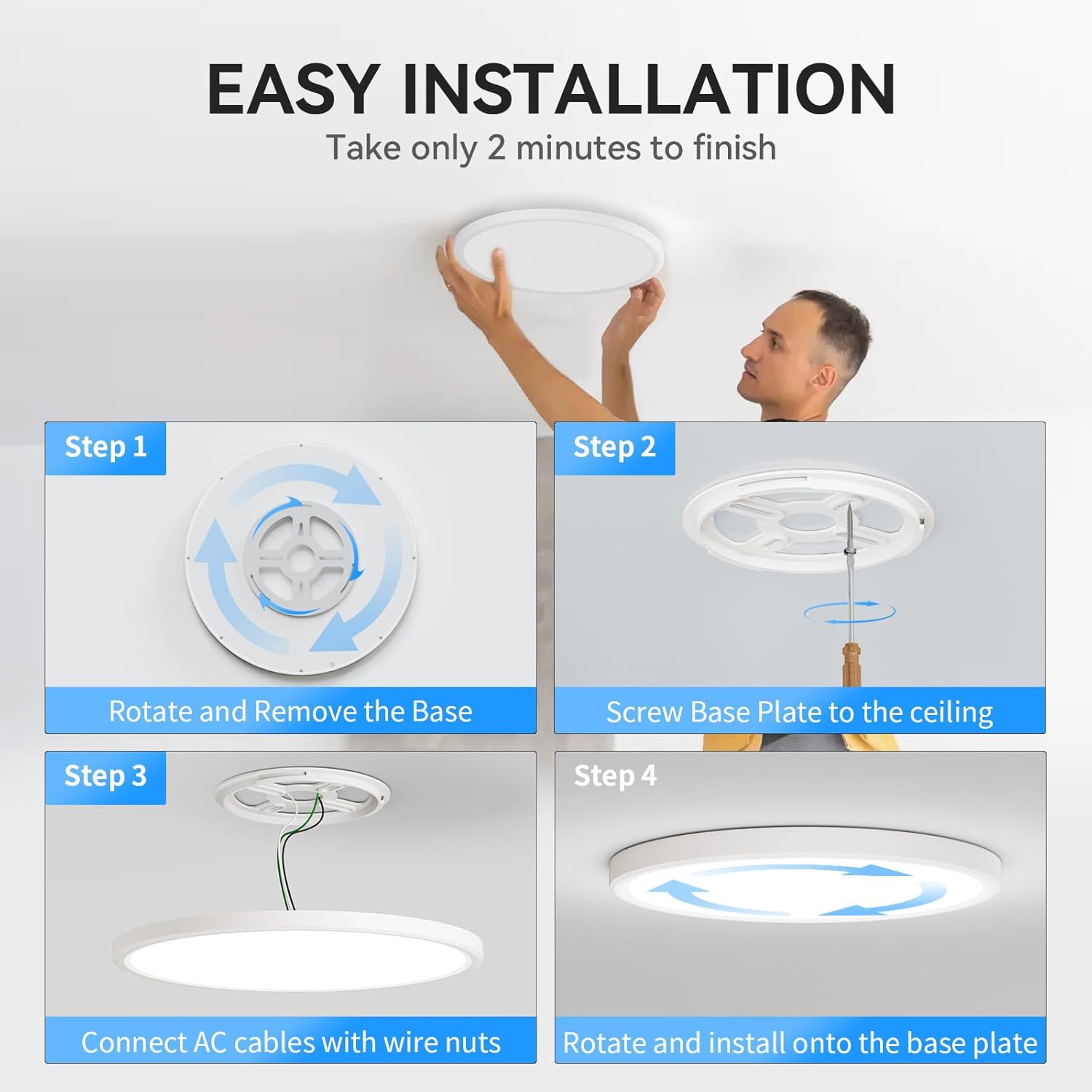
Figure 1: Easy Installation Steps
Operating Instructions
The WKONCLDY LED Flush Mount Ceiling Light is designed for simple operation using a standard ON/OFF wall switch. There are no complex controls or settings required.
- Turning On/Off: Use your existing wall switch to turn the light fixture on or off.
- Light Output: The fixture provides a consistent 5000K daylight illumination at 3200 lumens when turned on.

Figure 2: Super Bright Illumination

Figure 3: Eye-Caring Design with No Flicker
Maintenance
To ensure the longevity and optimal performance of your LED ceiling light, follow these simple maintenance guidelines:
- Cleaning: Before cleaning, ensure the power is turned off at the circuit breaker. Wipe the fixture with a soft, dry, or slightly damp cloth. Do not use harsh chemicals, abrasive cleaners, or scouring pads, as these can damage the finish or electrical components.
- Bulb Replacement: This fixture uses integrated LED chips and does not require bulb replacement. The LEDs are designed for a long lifespan of approximately 25,000 hours.
- Inspection: Periodically inspect the fixture for any signs of damage or loose connections. If any issues are found, turn off the power and contact a qualified electrician or customer support.
Troubleshooting
If you encounter any issues with your WKONCLDY LED Flush Mount Ceiling Light, please refer to the following common problems and solutions:
| Problem | Possible Cause | Solution |
|---|---|---|
| Light does not turn on | No power to the fixture; Loose wiring connection; Faulty wall switch. | Check the circuit breaker and ensure power is on. Verify all wire connections are secure. Test the wall switch with another device. |
| Light flickers | Loose wiring connection; Incompatible dimmer switch (this fixture is designed for ON/OFF switches). | Ensure all wire connections are secure. If a dimmer switch is installed, replace it with a standard ON/OFF switch. |
| Light is dim or inconsistent | Power supply issue; Internal component failure. | Verify stable power supply. If the issue persists, contact customer support for assistance. |
If these troubleshooting steps do not resolve your issue, please contact WKONCLDY customer service.
Warranty and Support
WKONCLDY provides a 24-Month Support Guarantee for this product. We are committed to ensuring your satisfaction.
- Customer Service: Our friendly customer service team is ready to respond to your inquiries within 24 hours.
- Contact Information: Please refer to the product packaging or our official website for the most current contact details.

Figure 4: WKONCLDY Support Commitment
Ask a question about this manual
Ask about setup, troubleshooting, compatibility, parts, safety, or missing instructions. Manuals+ will review the question and use this page’s manual context to help answer it.