
COOAU D20
COOAU D20 Dual Dash Cam User Manual
Model: D20
Introduction
Thank you for choosing the COOAU D20 Dual Dash Cam. This manual provides detailed instructions for setting up, operating, and maintaining your device. The D20 is designed to capture high-quality video footage both in front of and inside your vehicle, offering enhanced safety and evidence in case of incidents. Its advanced features include built-in GPS, Wi-Fi connectivity, superior night vision, and robust parking monitoring.
What's in the Box
Please verify that all items listed below are included in your package:
- COOAU D20 Dash Cam (1)
- 11.81ft USB Data Cable (1)
- Car Charger (1)
- D20 Dash Cam User Manual (1)
- Suction Mount (1)

Image: All components included in the COOAU D20 Dash Cam package.
Product Overview
The COOAU D20 features a compact design with dual cameras for front and interior recording. It includes a display screen for live view and settings adjustment, along with intuitive buttons for navigation.

Image: The COOAU D20 Dual Dash Cam with its suction mount and a smartphone showing the app interface.

Image: Exploded view of the dash cam, highlighting its elaborate design and components.
Setup
1. Installing the Suction Mount
Attach the suction mount to the dash cam. Choose a location on your windshield that does not obstruct your view. Ensure the surface is clean and dry. Press the suction cup firmly against the windshield and flip the lock lever to secure it. The mount allows for 360° rotation and 120° tilt for optimal positioning.

Image: Step-by-step guide for installing the dash cam with the suction mount.
2. Power Connection
Connect the provided car charger to your vehicle's 12V power outlet and the dash cam. Route the cable neatly to avoid interference with driving. The dash cam will power on automatically when the vehicle starts.
3. Inserting the Micro SD Card
Insert a Micro SD card (not included, up to 256GB supported) into the designated slot on the dash cam. Ensure the card is inserted correctly until it clicks into place. It is recommended to format the SD card within the dash cam's settings before first use to ensure optimal performance.
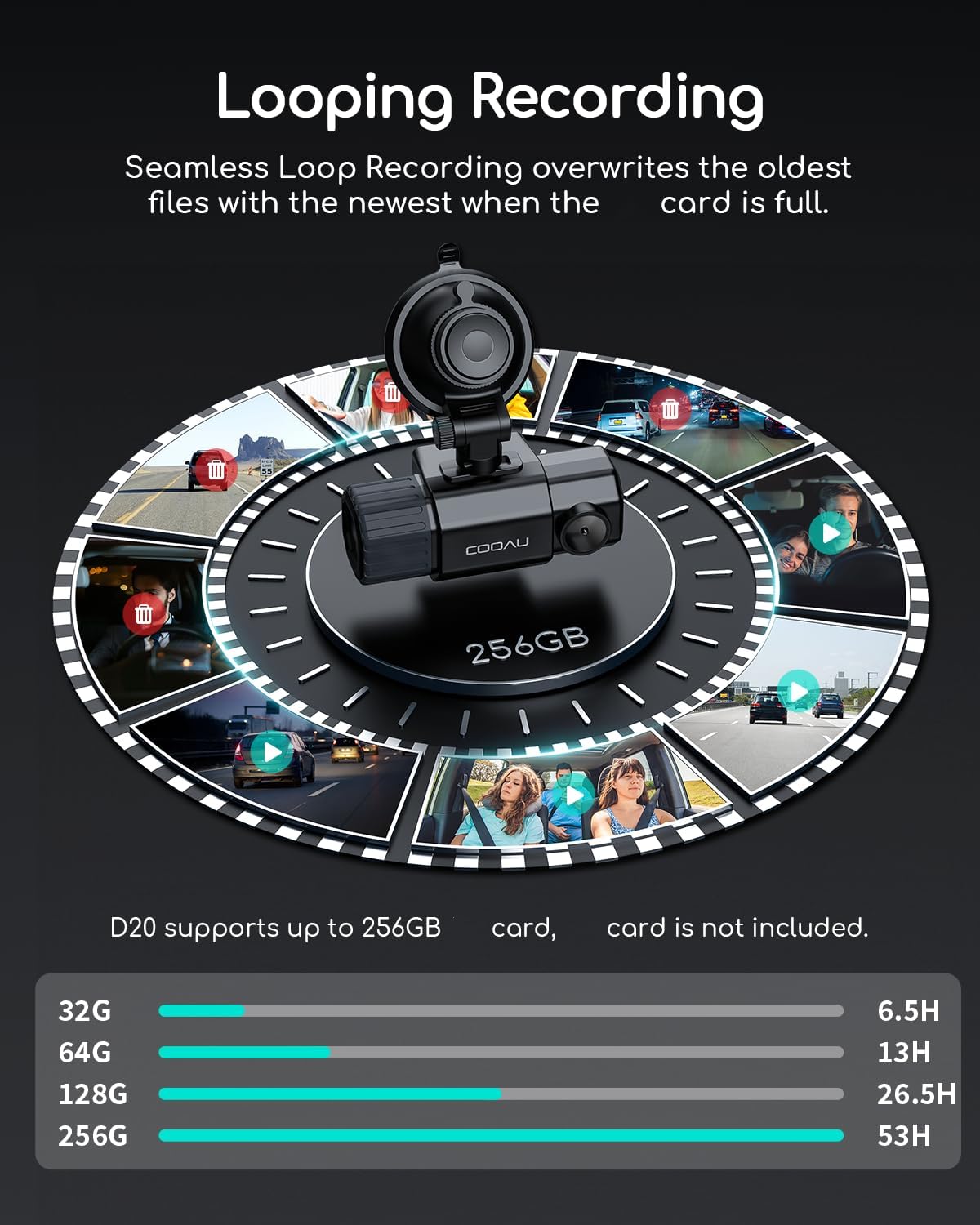
Image: Visual representation of loop recording and supported SD card capacities.
Operating Instructions
1. Loop Recording
The dash cam automatically records video in continuous loops (e.g., 1/3/5 minute segments). When the SD card is full, the oldest unlocked files are overwritten by new recordings. Locked videos (triggered by G-sensor) are stored separately and will not be overwritten.

Image: Loop recording mechanism, ensuring continuous recording without manual deletion.
2. Excellent Night/Day Vision
Equipped with a dual IMX323 sensor, Novatek NT96663 processor, 4 infrared LED lights, and an F1.8 large aperture, the D20 provides clear video capture in various lighting conditions, including low light and total darkness. WDR technology further enhances image quality.

Image: Night vision capabilities of the dash cam, showing clear visibility in dark environments.
3. G-Sensor (Collision Detection)
The built-in G-sensor automatically detects sudden shakes or collisions. When an impact is detected, the current video footage is locked to prevent it from being overwritten, serving as crucial evidence in accidents.
4. 24/7 Parking Mode
For continuous protection, the parking mode monitors your vehicle even when parked. It can detect collisions (G-sensor) and motion, automatically recording and locking footage. Note: This feature requires an ACC hardwire kit with a Micro USB interface (not included) for continuous power.

Image: Parking monitoring features, including collision detection and motion detection.
5. Built-in GPS Tracking
The integrated GPS module automatically records your vehicle's location, driving route, and speed. This data is embedded in the video footage, providing comprehensive information for every journey.

Image: The dash cam's app interface displaying GPS tracking and video management.
6. Wi-Fi Connection & App (Aoni CarDVR)
Connect the dash cam to your smartphone via Wi-Fi using the "Aoni CarDVR" app (available on iOS and Android). This allows you to view live footage, play back recorded videos, download files to your phone, change settings, and perform firmware updates (OTA Upgrade) without removing the SD card.

Image: Seamless connectivity between the dash cam and the smartphone app for easy control and access.
7. Personalized Features
You can set your car's license plate to be watermarked onto the video recordings. The dash cam also includes a fatigue driving alert to remind you to take breaks during long drives, promoting safer driving habits.
Maintenance
1. SD Card Management
Regularly format your Micro SD card (at least once a month) through the dash cam's settings to prevent data corruption and ensure smooth recording. Back up any important footage before formatting.
2. Supercapacitor Technology
The D20 dash cam utilizes a supercapacitor instead of a traditional lithium-ion battery. This provides superior heat resistance, allowing the device to withstand extreme temperatures (from -4°F to 158°F). This technology enhances the device's long-term reliability and stability, reducing the risk of internal damage due to temperature fluctuations.

Image: Advantages of supercapacitor technology for enhanced durability and performance.
Troubleshooting
If you encounter any issues with your COOAU D20 Dash Cam, please refer to the following common problems and solutions:
- Dash Cam Not Powering On: Ensure the car charger is securely connected to both the dash cam and the vehicle's power outlet. Check if the vehicle's 12V outlet is functioning.
- Recording Issues: Format the Micro SD card regularly. Ensure the card is not full (unless locked files are intended). Try a different, high-speed Micro SD card if issues persist.
- Wi-Fi Connection Problems: Ensure the dash cam's Wi-Fi is enabled. Restart both the dash cam and your smartphone. Make sure you are within range of the dash cam's Wi-Fi signal.
- GPS Not Tracking: Ensure the dash cam has a clear view of the sky for satellite reception. It may take a few minutes for the GPS signal to be acquired.
- Buttons Unresponsive: In extreme heat, the buttons may temporarily become unresponsive. Allow the device to cool down. If the issue persists, perform a factory reset (refer to the full user manual for instructions).
For more detailed troubleshooting or persistent issues, please consult the full user manual or contact COOAU customer support.
Specifications
| Feature | Detail |
|---|---|
| Product Dimensions | 1.65 x 3.94 x 1.65 inches |
| Item Weight | 12.7 ounces |
| Model Number | D20 |
| Connectivity Technology | Wi-Fi |
| GPS | GPS Enabled |
| Color | Black&Silver |
| Video Capture Resolution | 1080p |
| Orientation | Front & Inside |
| Field Of View | 170 Degrees |
| Manufacturer | COOAU |
| First Available Date | June 9, 2021 |
Warranty and Support
COOAU is committed to providing high-quality products and excellent customer service. While specific warranty terms may vary by region and purchase date, COOAU generally offers comprehensive support for its products.
Customer Support
For any questions, technical assistance, or warranty claims, please contact COOAU customer support. They offer lifetime support, 24-hour service support, and a 30-day free return policy.

Image: COOAU's commitment to superior customer service.
You can also refer to the official user manual PDF for additional information: Download User Manual (PDF)
Related Documents - D20
 |
COOAU D50 Driving Recorder: User Manual for Enhanced Vehicle Safety This user manual provides comprehensive instructions for the COOAU D50 Driving Recorder, detailing its features, setup, operation, and troubleshooting. Learn how to maximize your vehicle's safety and recording capabilities with this guide. |
 |
COOAU M53 Dash Cam User Manual: Installation, Features, and Operation Comprehensive user manual for the COOAU M53 Dash Cam. Learn about installation, features like WDR and G-Sensor, menu settings, recording modes, and troubleshooting. Get the most out of your COOAU dash camera. |
 |
COOAU D20 Dual Dash Cam: User Manual & Setup Guide This user manual provides comprehensive instructions for the COOAU D20 Dual Dash Cam, covering setup, basic operations, app connectivity, and specifications. Learn how to install and use your dash cam effectively. |
 |
COOAU D30 Dual Dash Cam: Official User Manual & Setup Guide Download the official user manual for the COOAU D30 Dual Dash Cam. Get detailed instructions on setup, operation, features, specifications, and troubleshooting for your car camera. |
 |
COOAU D30 Dual Dash Cam User Manual User manual for the COOAU D30 Dual Dash Cam, detailing installation, operation, features, specifications, and support for optimal use. |
 |
Información sobre Datos y Uso de la Cámara COOAU 4G LTE Detalles sobre los tipos de datos, volumen, formato, almacenamiento, retención, acceso y eliminación para la cámara de vigilancia exterior 4G LTE de COOAU. Incluye información sobre la aplicación COOAU Cam. |
Ask a question about this manual
Ask about setup, troubleshooting, compatibility, parts, safety, or missing instructions. Manuals+ will review the question and use this page’s manual context to help answer it.