
1. Product Overview
The DEWALT D25263K Rotary Hammer Drill is a powerful and versatile tool designed for heavy-duty drilling and chipping applications in concrete, masonry, and other tough materials. This kit includes the D25263K rotary hammer drill and the DPG82-11C safety goggle, ensuring both performance and user protection.
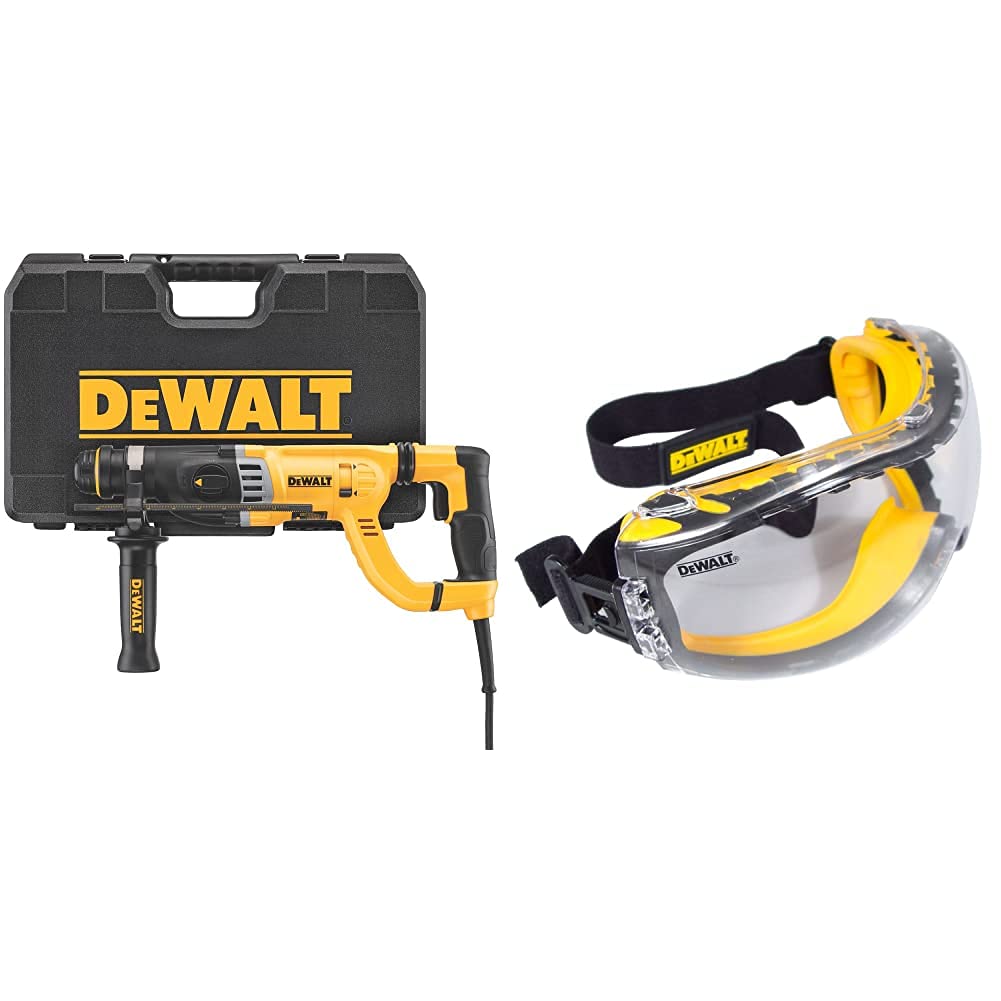
Figure 1.1: DEWALT D25263K Rotary Hammer Drill and DPG82-11C Safety Goggle kit.
Key Features:
- Powerful Performance: Equipped with an 8.5 amp high-performance motor and 3.0 joules of impact energy for fast drilling and chipping.
- SHOCKS - Active Vibration Control: Reduces vibration felt by the user at the handles, enhancing comfort and control.
- SDS Chuck System: Allows for quick and easy bit changes.
- D-Handle Design: Provides comfortable and secure grip for various applications.
- Included Safety Goggle (DPG82-11C): Features a tough coat hard-coated lens for scratch protection, Xtra clear anti-fog coating, and soft, dual-injected rubber for debris protection and comfort.
2. Important Safety Instructions
Always observe basic safety precautions when using electrical tools to reduce the risk of fire, electric shock, and personal injury. Read all instructions before operating this product.
General Power Tool Safety Warnings:
- Work Area Safety: Keep your work area clean and well-lit. Cluttered or dark areas invite accidents. Do not operate power tools in explosive atmospheres, such as in the presence of flammable liquids, gases, or dust.
- Electrical Safety: Power tool plugs must match the outlet. Never modify the plug in any way. Do not abuse the cord. Keep cord away from heat, oil, sharp edges, or moving parts.
- Personal Safety: Always wear eye protection. The included DEWALT DPG82-11C Safety Goggle provides essential protection. Also, use hearing protection, dust mask, and non-skid safety shoes when appropriate. Stay alert, watch what you are doing, and use common sense when operating a power tool.
- Tool Use and Care: Do not force the power tool. Use the correct power tool for your application. Disconnect the plug from the power source before making any adjustments, changing accessories, or storing power tools.
Specific Rotary Hammer Safety:
- Always ensure the side handle is securely attached before operation.
- Be aware of hidden wiring or plumbing when drilling into walls, floors, or ceilings. Use a metal detector to locate hidden utilities.
- The tool may get hot during prolonged use. Wear gloves to protect your hands.
- Do not touch the drill bit immediately after use as it will be extremely hot.

Figure 2.1: The included DEWALT DPG82-11C Safety Goggle features impact resistance, UV protection, and anti-fog properties.

Figure 2.2: The soft, dual-injected rubber seal of the safety goggle provides comfortable debris protection.
3. Setup and Assembly
3.1 Attaching the Side Handle
- Loosen the side handle by twisting it counter-clockwise.
- Slide the handle onto the front of the tool, positioning it to your desired angle for optimal control and comfort.
- Tighten the side handle by twisting it clockwise until it is firmly secured.

Figure 3.1: The DEWALT Rotary Hammer Drill with its adjustable side handle.
3.2 Installing SDS Bits
- Ensure the tool is unplugged from the power source.
- Clean the shank of the SDS bit to remove any dust or debris.
- Pull back the chuck collar on the front of the drill.
- Insert the SDS bit into the chuck until it clicks into place. Release the collar.
- Pull on the bit to ensure it is securely locked. There will be a slight play, which is normal for SDS systems.
3.3 Adjusting the Depth Rod
- Loosen the depth rod clamp on the side handle.
- Adjust the depth rod to the desired drilling depth. The tip of the rod should indicate the maximum depth.
- Tighten the depth rod clamp to secure the rod in position.
4. Operating Instructions
4.1 Selecting Operating Mode
The DEWALT D25263K offers three operating modes, selected via the mode selector switch located on the side of the tool:
- Rotary Hammer Mode (Drill with Hammer): For drilling in concrete, masonry, and stone. This mode provides both rotation and hammering action.
- Rotary Only Mode (Drill Only): For drilling in wood, metal, and plastics. This mode provides rotation without hammering.
- Chipping Mode (Hammer Only): For light chipping, chiseling, and demolition work in concrete and masonry. This mode provides hammering action without rotation.

Figure 4.1: The mode selector switch allows selection between rotary hammer, rotary only, and chipping modes.
4.2 Starting and Stopping the Tool
- To start the tool, depress the trigger switch.
- To stop the tool, release the trigger switch.
- For continuous operation, depress the trigger switch and then press the lock-on button. To release, depress the trigger switch again.
4.3 Drilling Techniques
- Always hold the tool firmly with both hands, utilizing the D-handle and side handle for maximum control.
- Apply steady, even pressure. Do not force the drill, allow the tool to do the work.
- For deep holes, periodically withdraw the bit to clear debris and allow the bit to cool.

Figure 4.2: Proper two-hand grip for operating the rotary hammer drill.
5. Maintenance
Regular maintenance ensures the longevity and optimal performance of your DEWALT Rotary Hammer Drill.
5.1 Cleaning
- After each use, clean the tool with a soft, damp cloth. Do not use harsh chemicals or abrasive cleaners.
- Periodically blow compressed air through the ventilation openings to clear dust and debris from the motor housing.
- Clean the SDS chuck regularly to ensure smooth bit insertion and removal. Apply a small amount of grease to the bit shank before insertion.
5.2 Lubrication
The internal components of the rotary hammer are factory-lubricated and sealed. No additional lubrication is required by the user. If you notice any oil leakage, discontinue use and contact DEWALT service.
5.3 Storage
- Store the tool in a dry, secure location, out of reach of children.
- If storing for extended periods, ensure the tool is clean and free of debris.
- Use the provided carrying case for protection during storage and transport.
6. Troubleshooting
This section addresses common issues you might encounter with your rotary hammer drill.
| Problem | Possible Cause | Solution |
|---|---|---|
| Tool does not start. | No power supply; Faulty power cord/plug; Trigger switch issue. | Check power outlet and circuit breaker. Inspect power cord for damage. If issues persist, contact DEWALT service. |
| Reduced hammering action. | Incorrect mode selected; Worn carbon brushes; Internal mechanism issue. | Ensure tool is in Rotary Hammer or Chipping mode. If problem continues, contact DEWALT service. |
| Bit not locking into chuck. | Dirty bit shank; Damaged chuck; Incorrect bit type. | Clean bit shank. Ensure you are using an SDS-Plus bit. If chuck is damaged, contact DEWALT service. |
| Tool overheats. | Prolonged heavy use; Blocked ventilation openings. | Allow tool to cool down. Clear any obstructions from ventilation openings. Avoid excessive continuous load. |
7. Product Specifications
| Specification | Value |
|---|---|
| Model Number | D25263K |
| Brand | DEWALT |
| Power Source | Corded Electric |
| Amperage | 8.5 Amps |
| Maximum Chuck Size | 1.13 Inches (1-1/8") |
| Impact Energy | 3.0 Joules |
| Vibration Control | SHOCKS - Active Vibration Control |
| Included Safety Goggle Model | DPG82-11C |
| Goggle Lens Coating | Tough Coat (scratch resistant), Xtra Clear (anti-fog) |
| Date First Available | June 8, 2021 |
8. Warranty Information
DEWALT stands behind its products with comprehensive warranty coverage:
- 3-Year Limited Warranty: Covers defects in material or workmanship for three years from the date of purchase.
- 1-Year Free Service: DEWALT will maintain the tool and replace worn parts caused by normal use, for free, any time during the first year after purchase.
- 90-Day Money Back Guarantee: If you are not completely satisfied with the performance of your DEWALT Power Tool, Laser, or Nailer for any reason, you can return it within 90 days from the date of purchase for a full refund.
For full terms and conditions, please refer to the official DEWALT warranty documentation or contact DEWALT customer service.

Figure 8.1: Summary of DEWALT's tool warranty policy.
9. Customer Support
For further assistance, technical support, or to locate a service center, please use the following resources:
- Official DEWALT Website: Visit www.dewalt.com for product information, FAQs, and service center locators.
- DEWALT Store on Amazon: Explore other DEWALT products and accessories at the official DEWALT Amazon Store.
- User Manual (PDF): A downloadable PDF version of the user manual is available here.


