1. Introduction
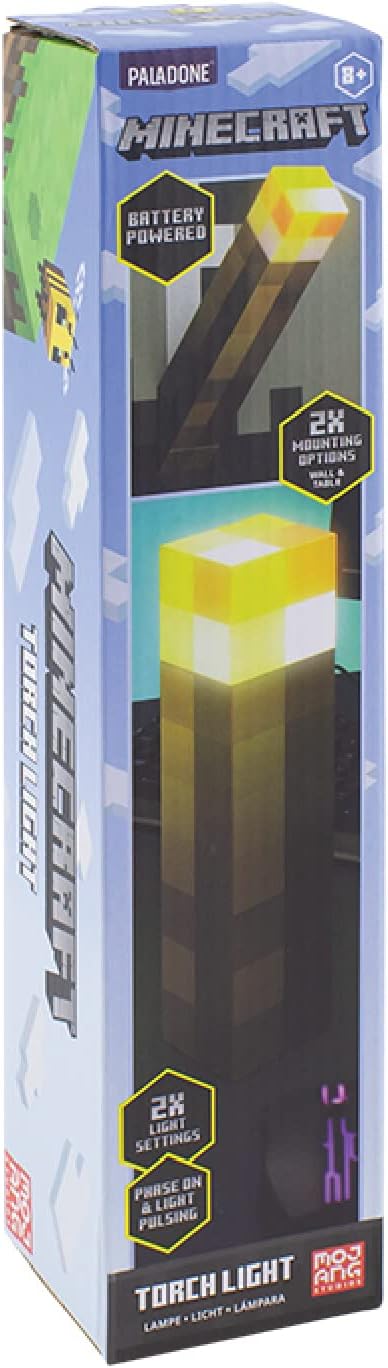
Thank you for purchasing the Paladone Minecraft Torch Light. This officially licensed product brings the iconic Minecraft torch to life, offering two distinct light modes and versatile placement options. This manual provides essential information for the safe and effective use of your new torch light.
2. Features
- Two Light Modes: Choose between a steady light or a pulsating effect, mimicking a real torch.
- Versatile Placement: Designed for both tabletop display and wall mounting.
- Battery Powered: Operates on 3x AAA batteries (not included) for portability.
- Auto Shut-Off: Features a 20-minute auto shut-off function, ideal for use as a bedside light.
- Officially Licensed: Authentic Minecraft merchandise.
3. Package Contents
Ensure all items are present before proceeding with setup:
- 1 x Paladone Minecraft Torch Light
- Instruction Manual
4. Setup
4.1. Battery Installation
- Locate the battery compartment cover on the bottom of the torch light.
- Using a small Phillips head screwdriver, unscrew the retaining screw on the battery compartment cover.
- Remove the cover.
- Insert 3x AAA batteries (not included), ensuring correct polarity (+/-) as indicated inside the compartment.
- Replace the battery compartment cover and secure it with the screw.

4.2. Mounting Options
The Minecraft Torch Light offers two ways to display it:
- Tabletop Use: Simply place the torch light on any flat, stable surface.
- Wall Mounting: The torch light features keyhole slots on its base for wall mounting. Flip the bottom section to reveal the wall mount option. Use appropriate screws (not included) for your wall type to securely hang the torch light.


5. Operation
5.1. Turning On/Off and Changing Light Modes
The torch light has a button on its side to control power and light modes.
- To Turn On: Press the button once. The light will illuminate in its steady mode.
- To Change Mode: Press the button a second time to switch to the pulsating light mode.
- To Turn Off: Press the button a third time to turn the light off.

5.2. Auto Shut-Off Function
The torch light is equipped with a 20-minute auto shut-off feature. This conserves battery life and makes it suitable for use as a night light. After 20 minutes of continuous operation, the light will automatically turn off.
5.3. Product Videos
Video 1: A 360-degree view of the Minecraft Torch Light, showcasing its design and appearance from all angles.
Video 2: Demonstrates the two light modes (steady and pulsating) and the wall mounting feature of the Minecraft Torch Light.
6. Maintenance
- Cleaning: Wipe the torch light with a soft, dry cloth. Do not use abrasive cleaners or solvents.
- Battery Replacement: Replace batteries when the light dims or stops functioning. Always replace all three batteries at the same time with new ones.
- Storage: If storing for an extended period, remove the batteries to prevent leakage.
7. Troubleshooting
| Problem | Possible Cause | Solution |
|---|---|---|
| Light does not turn on. | Batteries are dead or incorrectly installed. | Check battery polarity and replace with fresh AAA batteries. |
| Light is dim or flickers. | Low battery power. | Replace all three AAA batteries with new ones. |
| Auto shut-off activates too soon or not at all. | Internal sensor issue or defect. | Ensure the light is not obstructed. If the issue persists, contact customer support. |
8. Specifications
| Attribute | Detail |
|---|---|
| Model Name | RS561006 |
| Part Number | PP9202MCF |
| Brand | Paladone |
| Product Dimensions | 1.01"D x 2.17"W x 11.02"H (2.57cm D x 5.51cm W x 28cm H) |
| Item Weight | 9.5 ounces (270 Grams) |
| Power Source | Battery Powered (3x AAA batteries required, not included) |
| Battery Life | Approximately 8 Hours |
| Light Source Type | LED |
| Brightness | 125 Lumens |
| Control Method | Touch Button |
| Material | Plastic |
| Indoor/Outdoor Usage | Indoor |
| Water Resistance Level | Not Water Resistant |
9. Safety Information
- This product is not a toy. Keep out of reach of small children.
- Do not mix old and new batteries, or different types of batteries.
- Dispose of used batteries responsibly according to local regulations.
- Do not expose the product to water or extreme temperatures.
- Do not attempt to disassemble or modify the product.
10. Warranty & Support
For warranty information or technical support, please refer to the contact details provided on the product packaging or visit the official Paladone website. Keep your proof of purchase for any warranty claims.


