
Brass Monkey GH1640
Contents
User Manual for Brass Monkey 36L Dual Zone Fridge/Freezer GH1640
Model: GH1640
1. Introduction
Thank you for purchasing the Brass Monkey 36L Dual Zone Fridge/Freezer GH1640. This portable appliance is designed to provide reliable cooling and freezing for your food and beverages, ideal for camping, caravanning, and other outdoor activities. Please read this manual thoroughly before use to ensure proper operation, maintenance, and safety.
2. Safety Information
To reduce the risk of fire, electric shock, or injury, always follow these basic safety precautions:
- Ensure the power supply voltage matches the voltage specified on the appliance's rating label.
- Do not operate the appliance if the power cord or plug is damaged.
- Keep ventilation openings clear of obstructions.
- Do not use mechanical devices or other means to accelerate the defrosting process, other than those recommended by the manufacturer.
- Do not damage the refrigerant circuit.
- Do not store explosive substances such as aerosol cans with a flammable propellant in this appliance.
- This appliance is not intended for use by persons (including children) with reduced physical, sensory or mental capabilities, or lack of experience and knowledge, unless they have been given supervision or instruction concerning use of the appliance by a person responsible for their safety.
- Children should be supervised to ensure that they do not play with the appliance.
- Disconnect the power supply before cleaning or performing maintenance.
3. Package Contents
Please check that all items are present in the package:
- 1 x Brass Monkey 36L Dual Zone Fridge/Freezer GH1640 Unit
- 1 x DC Power Cable (12/24V)
- 1 x AC Power Adapter
- 1 x User Manual

Figure 3.1: The product packaging box, showing the model number GH-1640 and key features like dual fridge/freezer zones, AC or DC power connections, and a 3-year warranty.
4. Product Features and Components
The Brass Monkey GH1640 is designed for portability and efficient cooling. Key components include:
- Dual Zone Compartments: Allows for simultaneous refrigeration and freezing.
- Digital Control Panel: For precise temperature adjustments and monitoring.
- Integrated Wheels and Handle: For easy transport.
- USB Charging Port: Convenient for charging small electronic devices.
- 3-Stage Battery Protection: Prevents vehicle battery drain.

Figure 4.1: Overview of the Brass Monkey 36L Dual Zone Fridge/Freezer GH1640 in its closed state, showing the grey body, black lid, and integrated wheel for portability.
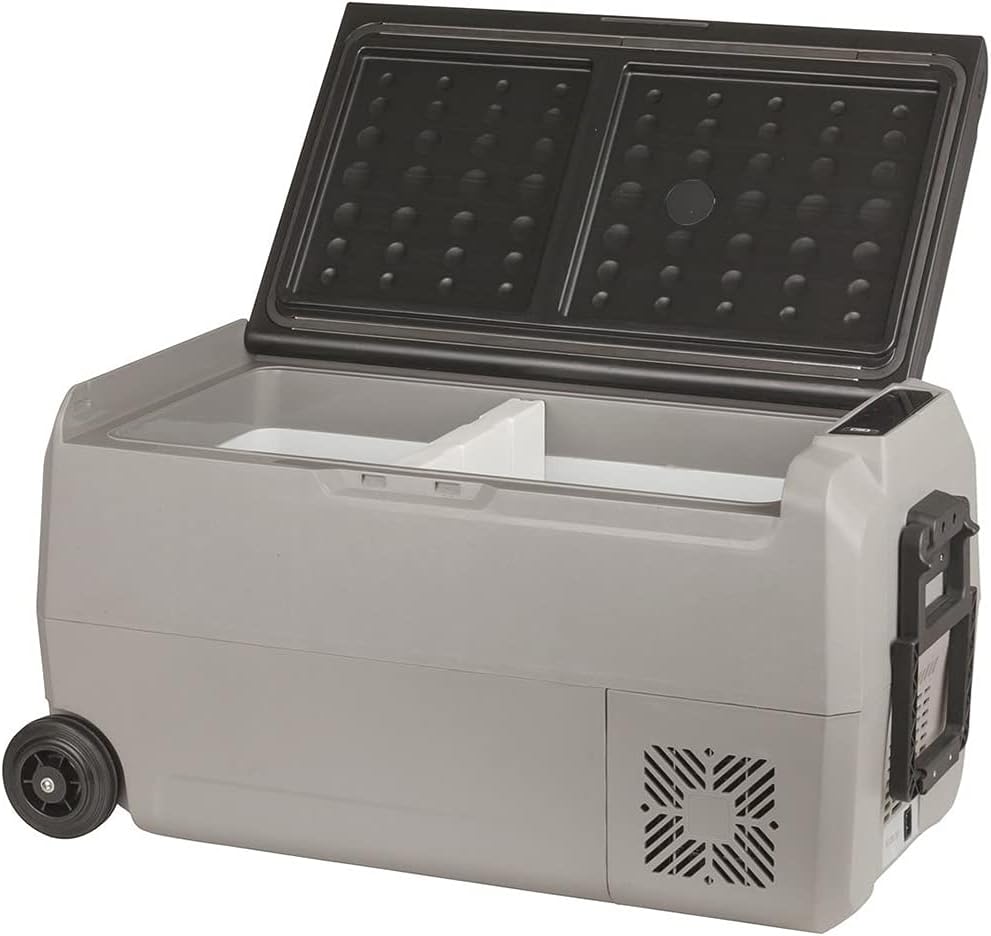
Figure 4.2: The fridge/freezer with its lid open, revealing the two distinct compartments for dual-zone temperature control.

Figure 4.3: Side profile of the unit, highlighting the durable wheel for easy transport and the ventilation grille.

Figure 4.4: Detailed view of the digital control panel, displaying temperature settings, battery voltage, and control buttons for power, settings, and temperature adjustment.

Figure 4.5: An interior view of one of the cooling compartments, showing its clean, white lining and spacious design.
5. Setup
5.1 Unpacking
- Carefully remove the fridge/freezer from its packaging.
- Remove all packing materials, including any protective films or tapes.
- Inspect the appliance for any signs of damage. If damaged, do not use and contact your retailer.
5.2 Placement
- Place the fridge/freezer on a flat, stable surface.
- Ensure there is adequate ventilation around the unit, especially near the air inlets and outlets. Maintain at least 10cm clearance on all sides.
- Avoid placing the unit in direct sunlight or near heat sources.
5.3 Power Connection
The GH1640 can be powered by either DC (12/24V) or AC (100-240V) power.
- DC Power: Connect the DC power cable to the unit's DC input port and then to your vehicle's 12V or 24V power outlet (cigarette lighter socket).
- AC Power: Connect the AC power adapter to the unit's AC input port, then plug the adapter into a standard wall outlet.
6. Operating Instructions
6.1 Turning On/Off
- To turn on, press the Power button on the control panel. The display will illuminate.
- To turn off, press and hold the Power button for a few seconds until the display turns off.
6.2 Temperature Setting
The GH1640 features dual zones, allowing independent temperature control for each compartment.
- Press the Set button (gear icon) to select the zone you wish to adjust. The selected zone's temperature display will flash.
- Use the + and - buttons to increase or decrease the desired temperature.
- The setting will be saved automatically after a few seconds of inactivity.
6.3 Battery Protection Mode
The unit has a 3-stage battery protection system to prevent your vehicle's battery from draining completely. You can adjust this setting:
- With the unit on, press and hold the Set button (gear icon) for 3 seconds. The current battery protection mode (H, M, L) will flash.
- Press the Set button again to cycle through the modes: H (High), M (Medium), L (Low).
- Release the button to select the desired mode. The setting will be saved automatically.
Note: High mode offers the most battery protection, while Low mode allows the fridge to run longer before cutting off, suitable for auxiliary battery systems.
6.4 USB Charging Port
A USB port is located on the control panel side. This port provides 5V DC output for charging small electronic devices like smartphones or tablets when the fridge/freezer is powered on.
7. Maintenance
7.1 Cleaning
- Always disconnect the power before cleaning.
- Clean the interior and exterior surfaces with a damp cloth and mild detergent. Do not use abrasive cleaners or solvents.
- Ensure the unit is completely dry before reconnecting power.
- Regularly clean the ventilation grilles to ensure proper airflow and efficiency.
7.2 Storage
- If storing for an extended period, ensure the unit is clean and dry.
- Leave the lid slightly ajar to prevent odors and mold growth.
- Store in a dry, well-ventilated area, away from direct sunlight and extreme temperatures.
8. Troubleshooting
| Problem | Possible Cause | Solution |
|---|---|---|
| Unit does not turn on | No power supply; Damaged power cable; Blown fuse; Battery protection mode activated. | Check power connection; Replace cable; Check vehicle fuse; Adjust battery protection mode (L, M, H). |
| Poor cooling performance | Insufficient ventilation; Overloaded with warm items; Lid not sealed properly; Ambient temperature too high. | Ensure proper ventilation; Allow items to cool before placing in unit; Check lid seal; Move unit to cooler environment. |
| Display error codes | Internal fault. | Refer to specific error code in a more detailed service manual or contact customer support. |
| Excessive noise | Unit not level; Fan obstruction. | Place on a level surface; Check for and remove any obstructions from the fan. |
9. Specifications
| Feature | Detail |
|---|---|
| Model | GH1640 |
| Capacity | 36 Litres |
| Type | Dual Zone Fridge/Freezer |
| Power Input | DC 12V/24V, AC 100-240V |
| Special Features | Portable, USB Charging Port, 3-Stage Battery Protection |
| Item Weight | Approx. 14 kg |
| Installation Type | Freestanding |
| Number of Doors | 1 |
10. Warranty and Support
The Brass Monkey 36L Dual Zone Fridge/Freezer GH1640 comes with a 3-year warranty from the date of purchase, covering manufacturing defects. Please retain your proof of purchase for warranty claims.
For technical support, troubleshooting assistance, or warranty inquiries, please contact your retailer or the Brass Monkey customer service department. Contact details can typically be found on the Brass Monkey official website or on your purchase receipt.
For more information, you may visit the Brass Monkey website (example link, actual link may vary).
Ask a question about this manual
Ask about setup, troubleshooting, compatibility, parts, safety, or missing instructions. Manuals+ will review the question and use this page’s manual context to help answer it.