
1. Introduction
The ASUS TUF Gaming F15 (model TUF506HE-DS74) is a high-performance gaming laptop designed for demanding applications and gaming. It features an Intel Core i7-11800H processor, NVIDIA GeForce RTX 3050 Ti graphics, a 15.6-inch 144Hz Full HD IPS-Type display, 16GB DDR4 RAM, and a 512GB PCIe SSD. This manual provides essential information for its proper use and care.

Front view of the ASUS TUF Gaming F15 laptop, showcasing its display and keyboard.
2. Setup
2.1 Unboxing and Initial Inspection
Carefully remove all components from the packaging. Ensure the following items are present:
- ASUS TUF Gaming F15 Laptop (TUF506HE-DS74)
- Power Adapter & Cord
- User Guide
- Warranty Card
Inspect the laptop for any physical damage before proceeding.
2.2 Connecting the Power Adapter
Connect the power cord to the AC adapter, then plug the AC adapter into a power outlet. Insert the DC output connector of the AC adapter into the power input port on the left side of your laptop.

The left side of the laptop features various ports, including the power input, Ethernet, HDMI, USB, and audio jack.
2.3 Initial Power On and Windows Setup
Press the power button located on the top right of the keyboard to turn on the laptop. Follow the on-screen instructions to complete the initial Windows 10 Home setup. This includes selecting your region, connecting to a Wi-Fi network, and creating a user account.

A top-down view of the laptop's keyboard, featuring a numeric keypad and backlit keys.
3. Operating Your Laptop
3.1 Keyboard and Touchpad
The laptop features a full-sized keyboard with a numeric keypad and customizable RGB backlighting. The touchpad supports multi-touch gestures for navigation.
3.2 Display Features
The 15.6-inch Full HD (1920x1080) IPS-Type display offers a 144Hz refresh rate for smooth visuals. Adaptive-Sync technology synchronizes the display's refresh rate with the GPU's frame rate to reduce lag and visual tearing.

The laptop's display showcasing its 144Hz refresh rate, IPS-level panel, 100% sRGB color, and Adaptive-Sync technology.
3.3 Audio System
The laptop is equipped with DTS X Ultra for 7.1-channel virtual surround sound and AI Noise-Cancellation technology to enhance communication clarity.

Diagram illustrating the 7.1-channel surround sound and AI Noise-Cancellation features of the laptop.
3.4 Connectivity
The laptop supports Wi-Fi 6 (802.11ax) for high-speed wireless networking and Bluetooth for connecting peripherals. It includes multiple USB 3.0 ports and an HDMI output for external displays.

Diagram showing the various input/output ports available on the laptop, including USB, HDMI, and audio jack.
3.5 Performance Modes
The laptop offers different performance modes to balance power and acoustics. These modes typically include Silent, Performance, and Turbo, which can be adjusted via ASUS software.

A graph illustrating the relationship between GPU performance, CPU performance, and noise levels across Silent, Performance, and Turbo operating modes.
4. Maintenance
4.1 Cooling System
The ASUS TUF Gaming F15 features a patented Anti-Dust Cooling (ADC) system designed to prevent dust buildup and maintain optimal performance and longevity. Ensure the vents are not obstructed during use.

Diagram illustrating the Anti-Dust Cooling system, showing how dust is expelled from the chassis.
4.2 Cleaning Your Laptop
Use a soft, lint-free cloth to clean the screen and exterior surfaces. For stubborn smudges, a slightly dampened cloth with water or a mild, non-abrasive cleaner can be used. Avoid spraying liquids directly onto the laptop.
4.3 Storage and RAM Upgrades
The laptop is designed with an accessible upgrade slot for additional storage (NVMe PCIe SSD) and RAM. Refer to the detailed instructions in the full user manual or consult a qualified technician for upgrades to avoid voiding your warranty.
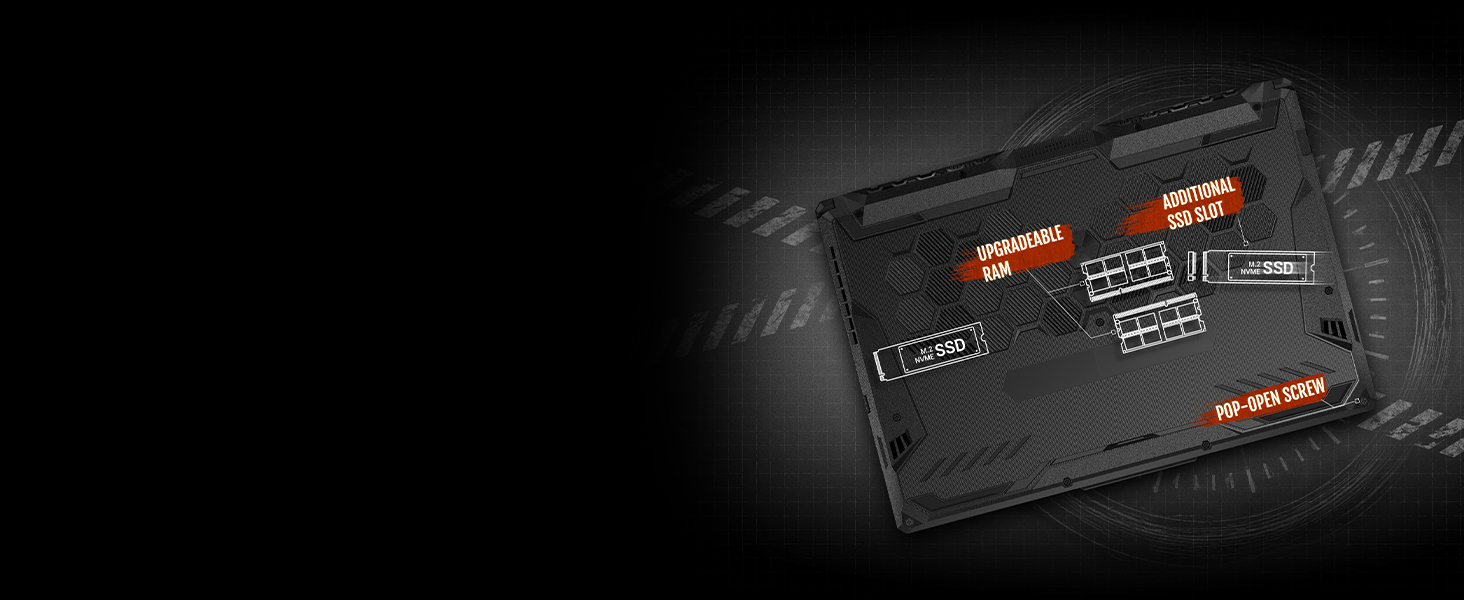
An internal view diagram highlighting the upgradeable RAM slots and additional SSD slot, accessible via a pop-open screw.
5. Troubleshooting
If you encounter issues with your ASUS TUF Gaming F15, consider the following basic troubleshooting steps:
- No Power: Ensure the AC adapter is securely connected to both the laptop and a working power outlet. Try a different outlet.
- Display Issues: If the screen is blank, try connecting an external monitor to verify if the issue is with the laptop's display or graphics output.
- Connectivity Problems: For Wi-Fi issues, restart your router and the laptop. Ensure Wi-Fi is enabled in Windows settings.
- Performance Lag: Close unnecessary applications. Check for background processes consuming high CPU or RAM. Ensure cooling vents are clear.
For more complex issues or persistent problems, refer to the comprehensive troubleshooting section in the full user manual or visit the official ASUS support website for assistance.
6. Specifications
Key technical specifications for the ASUS TUF Gaming F15 (TUF506HE-DS74):
| Feature | Specification |
|---|---|
| Model Name | TUF506HE-DS74 |
| Processor | 11th Gen Intel Core i7-11800H (up to 4.6 GHz, 8 Cores) |
| Graphics | NVIDIA GeForce RTX 3050 Ti 4GB GDDR6 |
| Display | 15.6-inch FHD (1920x1080) IPS-Type, 144Hz |
| RAM | 16GB DDR4 3200MHz |
| Storage | 512GB PCIe NVMe M.2 SSD |
| Operating System | Windows 10 Home |
| Wireless Connectivity | Wi-Fi 6 (802.11ax), Bluetooth |
| Ports | USB 3.0, HDMI, 3.5mm Audio Jack, Ethernet |
| Dimensions (LxWxH) | 14.13 x 10.08 x 0.96 inches |
| Weight | 5.07 pounds |
| Durability | MIL-STD-810H military standard |

Visual representation of the MIL-STD-810H military standard durability tests, including resistance to drops, vibrations, extreme heat, cold, and humidity.
7. Warranty and Support
Your ASUS TUF Gaming F15 laptop comes with a manufacturer's warranty. Please refer to the included Warranty Card for detailed terms and conditions, including coverage period and service procedures.
For technical support, driver downloads, and additional resources, please visit the official ASUS support website. Keep your product's serial number (found on the bottom of the laptop or on the packaging) handy when contacting support.
ASUS Support Website: www.asus.com/support/