
Hotomely 763565134589
Hotomely Outdoor Motion Sensor Light
Model: 763565134589 - User Instruction Manual
1. Introduction
Thank you for choosing the Hotomely Outdoor Motion Sensor Light. This battery-operated security light is designed to provide bright, motion-activated illumination for outdoor areas such as garages, yards, porches, and patios. Featuring an IP65 waterproof rating and adjustable heads, it offers reliable performance in various weather conditions. Please read this manual thoroughly before installation and use to ensure proper operation and longevity of your product.

Image 1.1: Two Hotomely Outdoor Motion Sensor Lights. These lights are black, cylindrical, and feature four bright LED bulbs and a central motion sensor. They are mounted on adjustable bases.
2. Safety Information
- Ensure all batteries are inserted with correct polarity. Incorrect installation can damage the device.
- Do not mix old and new batteries, or different types of batteries.
- Remove batteries if the light will not be used for an extended period to prevent leakage.
- Keep the device away from open flames or extreme heat sources.
- Do not attempt to disassemble or modify the light. This will void the warranty and may cause damage or injury.
- Dispose of used batteries according to local regulations.
3. Package Contents
Please check the package contents upon receipt to ensure all items are present:
- Hotomely Outdoor Motion Sensor Light unit(s)
- Mounting screws and wall anchors
- Instruction Manual
Note: 4 D-cell batteries are required per unit and are not included.
4. Specifications
| Feature | Specification |
|---|---|
| Brand | Hotomely |
| Model Number | 763565134589 |
| Light Source Type | LED (4 LEDs) |
| Brightness | 600 Lumens |
| Color Temperature | 6000 Kelvin (White Light) |
| Power Source | 4 x D-cell Batteries (Not Included) |
| Motion Sensor Detection Range | 5-7 meters (approx. 16-23 feet) |
| Motion Sensor Detection Angle | 90-120 degrees |
| Auto-off Time | 20-30 seconds (after no motion detected) |
| Water Resistance Level | IP65 Waterproof |
| Material | Acrylonitrile Butadiene Styrene (ABS) |
| Mount Rotation | 180 degrees |
| Light Head Rotation | 360 degrees |
| Installation Type | Wall Mount |
| Item Weight | 1.5 Pounds (per unit) |
5. Setup and Installation
5.1. Battery Installation
- Gently pull out the battery box from the main light unit.
- Press the buckle to separate the battery compartment.
- Insert 4 D-cell batteries (not included) into the compartment, ensuring correct polarity (+/-).
- Close the battery compartment by pressing the buckle until it clicks.
- Reinsert the battery box into the main light unit and tighten the cap clockwise to secure it.

Image 5.1: Detailed battery installation guide. This image illustrates the process of opening the battery compartment, inserting four D-cell batteries, and reassembling the unit.
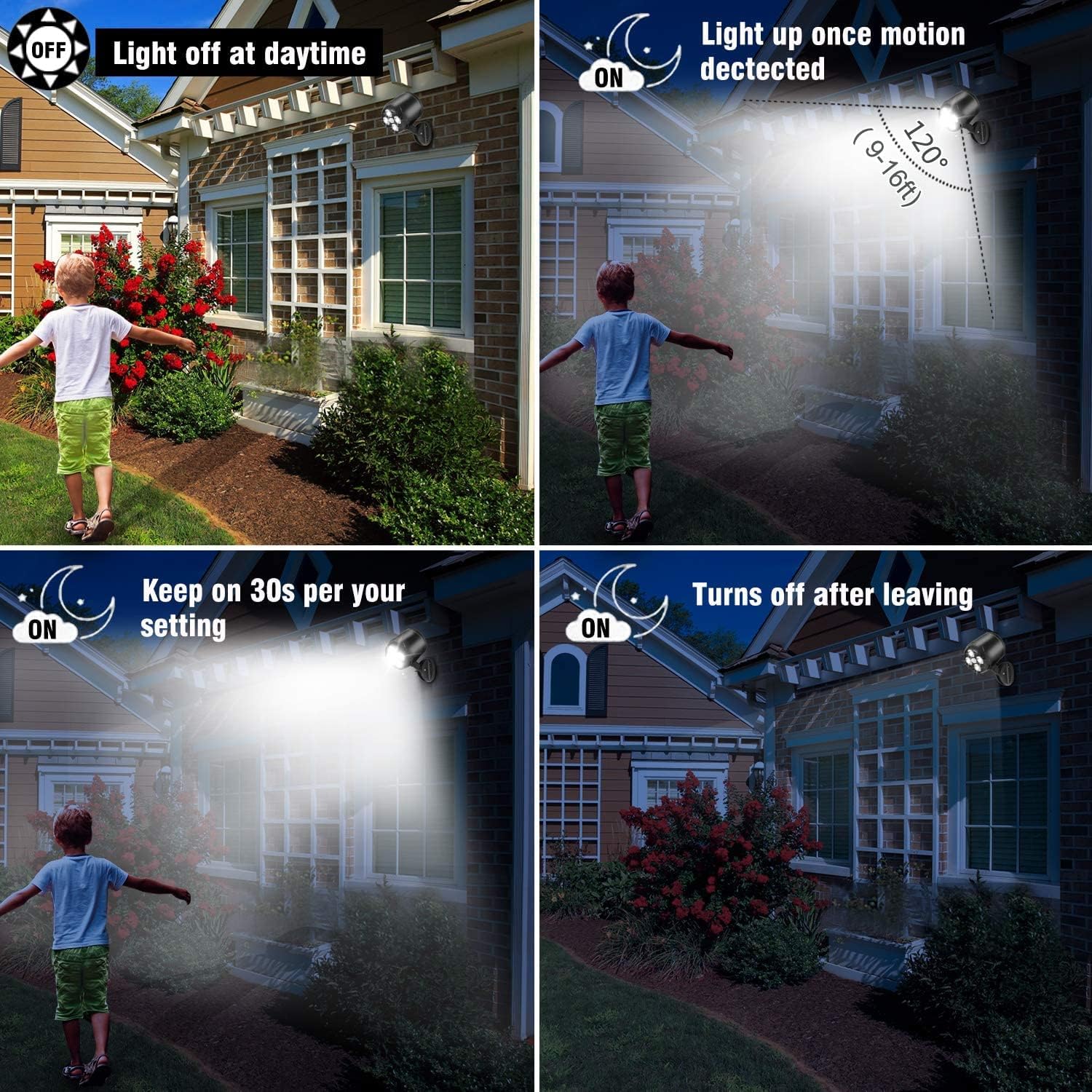
Image 5.2: Exploded view of the light, highlighting the motion sensor, LED light, mounting base, battery compartment, and included screws.
5.2. Mounting the Light
- Choose a suitable location for installation. The light should be mounted where its motion sensor can cover the desired area without obstruction.
- Use the provided mounting screws and wall anchors to securely attach the mounting base to a wall or other stable surface.
- Ensure the light is firmly attached to prevent it from falling.
5.3. Adjusting the Light Head and Mount
The Hotomely motion sensor light offers flexible adjustment options:
- The entire mount can be rotated up to 180 degrees to position the light unit.
- The light head itself can be manually rotated 360 degrees to direct the illumination precisely where needed.
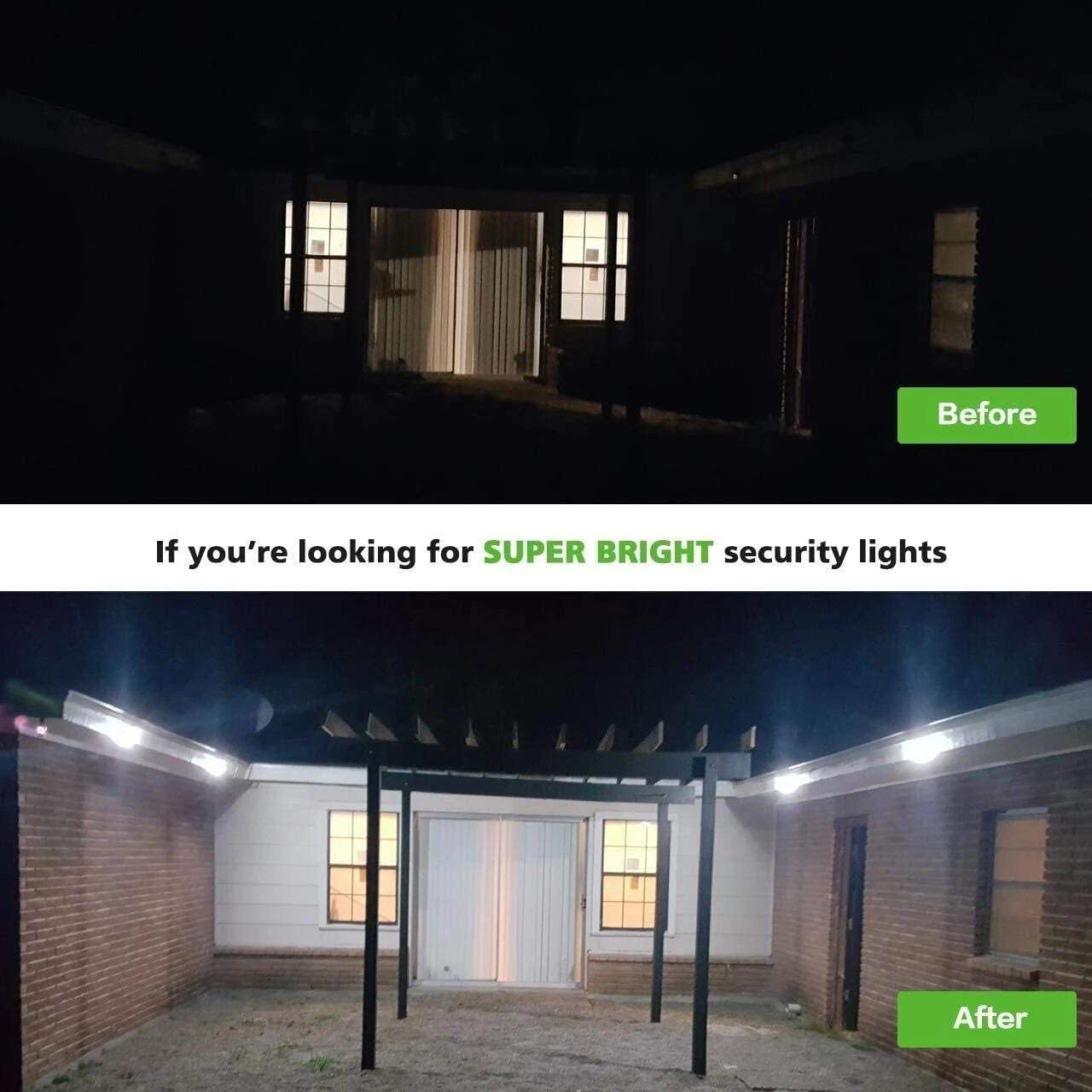
Image 5.3: Illustration of the adjustable features, showing the mount rotating 180 degrees and the light head rotating 360 degrees for optimal positioning.
6. Operating Instructions
The Hotomely Outdoor Motion Sensor Light features an intelligent lighting control system with a Smart PIR Motion Sensor.
- Daytime Operation: During daylight hours, the light will remain OFF to conserve battery power, regardless of motion detection.
- Nighttime Operation: In darkness or low-light conditions, the light will automatically turn ON when motion is detected within its sensing range.
- Motion Detection: The sensor detects motion within a range of 5-7 meters (approximately 16-23 feet) and an angle of 90-120 degrees.
- Auto-Off Function: If no further motion is detected for 20-30 seconds, the light will automatically turn OFF.

Image 6.1: Visual representation of the motion sensor's detection angle (90-120 degrees) and sensing distance (5-7 meters).
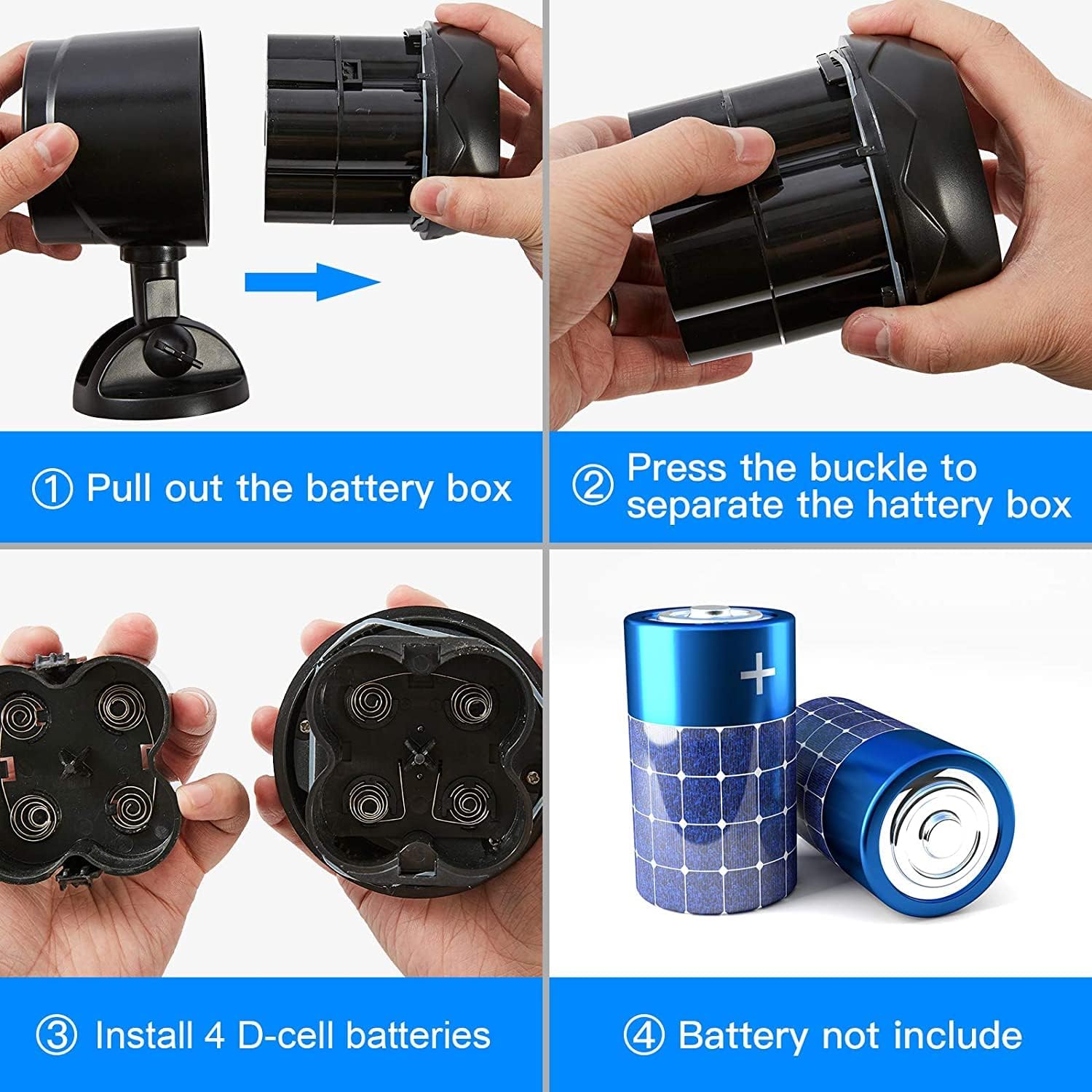
Image 6.2: This image demonstrates the light's operational cycle: remaining off during the day, activating upon motion detection at night, staying illuminated for approximately 30 seconds, and then turning off when no motion is present.
7. Maintenance
7.1. Battery Replacement
When the light output becomes dim or the motion sensor responsiveness decreases, it is time to replace the batteries. Follow the steps in Section 5.1 for battery installation, ensuring all 4 D-cell batteries are replaced with new ones.
7.2. Cleaning
To maintain optimal performance, periodically clean the light's surface and the motion sensor lens with a soft, damp cloth. Do not use abrasive cleaners or solvents.
7.3. Waterproof Rating
The light is rated IP65 waterproof, meaning it is protected against dust ingress and low-pressure water jets from any direction. The design includes a sealing ring at connecting parts to enhance its weather resistance, making it suitable for outdoor use in rain, snow, and frost.
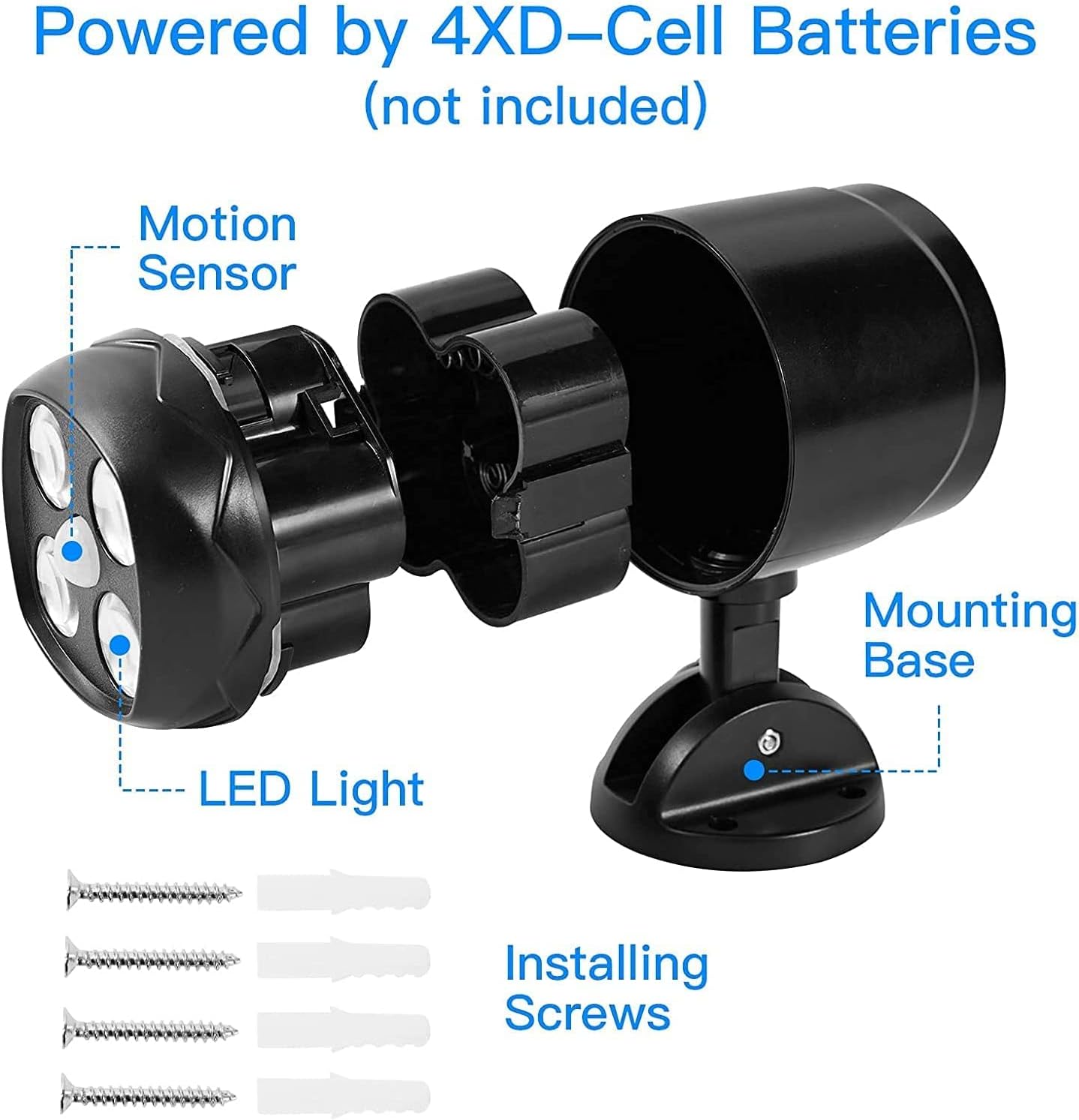
Image 7.1: The light demonstrating its IP65 waterproof capability, with a close-up of the sealing ring design.
8. Troubleshooting
If you encounter issues with your Hotomely Outdoor Motion Sensor Light, please refer to the following common problems and solutions:
- Light does not turn on at night:
- Check if the batteries are installed correctly with the right polarity.
- Ensure the batteries are fresh and fully charged. Replace if necessary.
- Verify that the ambient light is dark enough for the sensor to activate. The light will not turn on in daylight.
- Check if the motion sensor is obstructed or dirty. Clean the sensor lens if needed.
- Light is dim or flickers:
- This usually indicates low battery power. Replace all 4 D-cell batteries.
- Motion sensor is not detecting motion:
- Ensure the light is mounted within the recommended detection range (5-7 meters).
- Adjust the light head and mount to ensure the sensor is facing the desired detection area.
- Clear any obstructions (e.g., branches, large objects) that might block the sensor's view.
- Clean the sensor lens to remove any dirt or debris.
- Light stays on constantly:
- This is uncommon for this model. Ensure there is no continuous motion within the sensor's range.
- Remove and reinsert the batteries to reset the device.
9. Warranty and Support
9.1. Warranty Information
Specific warranty details are not provided in this manual. Please refer to the product packaging or your purchase documentation for information regarding warranty coverage and terms. Keep your proof of purchase for any warranty claims.
9.2. Customer Support
For further assistance, technical support, or inquiries regarding your Hotomely Outdoor Motion Sensor Light, please contact Hotomely customer service through the retailer where the product was purchased or visit the official Hotomely website.
Ask a question about this manual
Ask about setup, troubleshooting, compatibility, parts, safety, or missing instructions. Manuals+ will review the question and use this page’s manual context to help answer it.