1. Introduction
This manual provides essential information for the safe and efficient use of your TESSAN Surge Protector Power Strip. Please read these instructions carefully before use and retain them for future reference.

Image 1.1: TESSAN Surge Protector Power Strip, showing the main unit with 8 AC outlets and 4 USB ports, connected via a flat extension cord to a wall outlet. A magnified inset shows the 'Protected 1' and 'Protected 2' indicator lights.
2. Safety Instructions
- Do not exceed the maximum power rating of 1250W (10A, 125V).
- This device is for indoor use only. Avoid exposure to moisture or wet environments.
- Do not disassemble or modify the power strip.
- Keep away from children and pets.
- Ensure the plug is fully inserted into the wall outlet.
- Do not use with aquariums or other water-related products.
- If the surge protection indicator lights are off, the surge protection may have failed. Replace the unit.
3. Product Overview
The TESSAN Surge Protector Power Strip is designed to provide multiple power outlets and USB charging ports with surge protection for your electronic devices.
3.1 Components
- 8 AC Outlets: Standard 3-prong outlets for various devices.
- 2 USB-C Ports: For fast charging compatible devices (PD 20W Max).
- 2 USB-A Ports: For standard USB charging (12W Max per port).
- 5 Ft Flat Extension Cord: Ultra-thin design for discreet placement.
- Flat Wall Plug: 45° right-angle design to fit in tight spaces.
- Dual Surge Protection Indicators: Lights to show active surge protection.
- Overload Protection Switch: Automatically shuts off power during overloads.
- Mounting Holes: Two keyhole slots on the back for wall or desk mounting.
- Rubber Feet: Four non-slip feet for stable desktop placement.
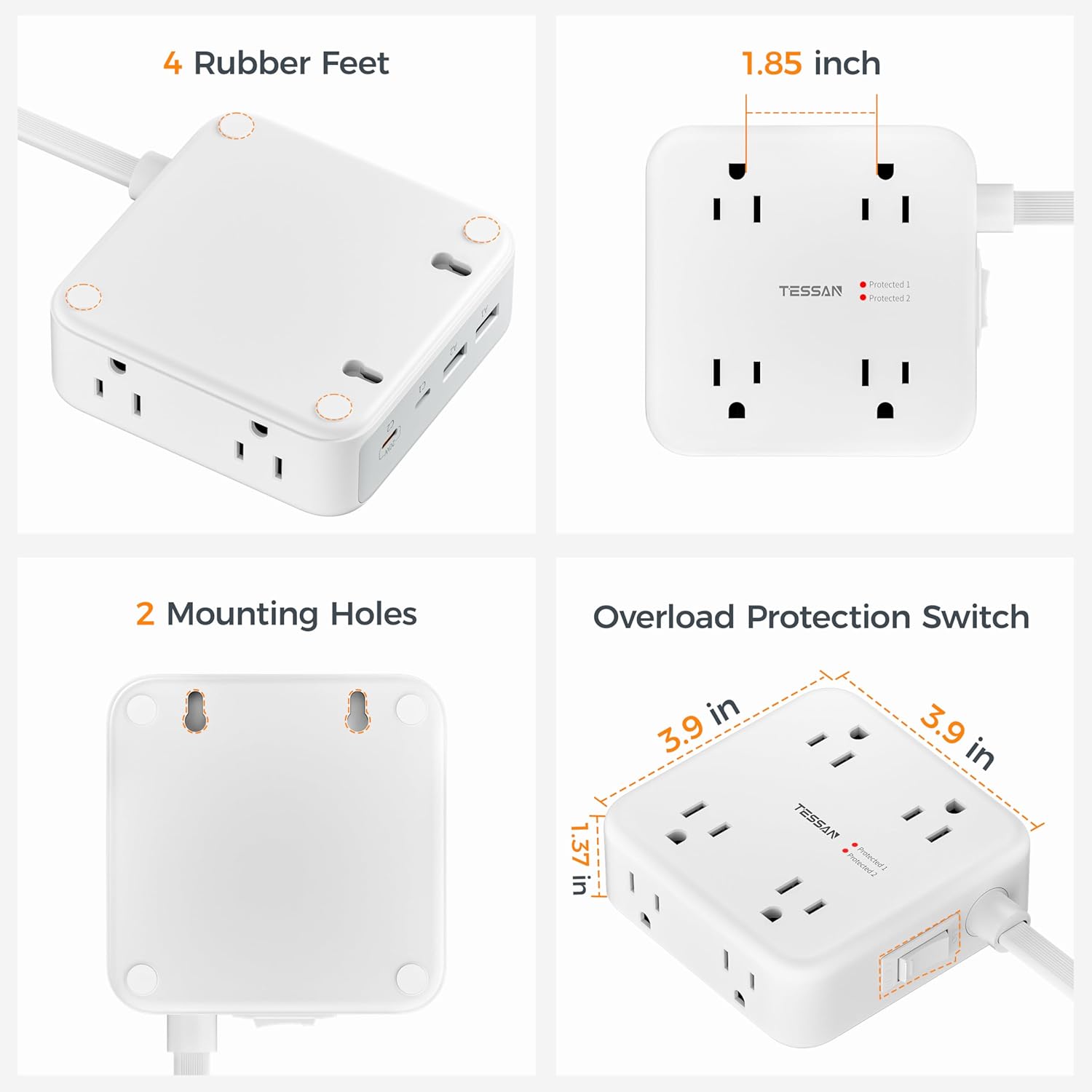
Image 3.1: Detailed view of the TESSAN Power Strip highlighting its features including 4 rubber feet, 2 mounting holes, an overload protection switch, and dimensions (3.9 in x 3.9 in, 1.85 inch outlet spacing).
4. Setup
4.1 Connecting to Power
- Uncoil the 5 ft flat extension cord.
- Plug the ultra-thin, 45° right-angle flat wall plug into a standard 125V AC wall outlet. The flat design allows it to sit flush against the wall, ideal for behind furniture.
- Verify that the surge protection indicator lights (Protected 1 and Protected 2) on the power strip are illuminated, indicating active surge protection.

Image 4.1: A visual comparison showing the TESSAN ultra-thin flat plug (0.35 inches) fitting flush against a wall outlet, next to a standard plug that protrudes further. This demonstrates space-saving behind furniture.
4.2 Mounting (Optional)
The power strip can be mounted to a wall or under a desk using the two keyhole slots on the back.
- Use the provided template (if included) to mark the drilling locations.
- Drill two holes and insert the provided wall anchors (if necessary).
- Insert screws, leaving a small portion exposed.
- Align the keyhole slots on the back of the power strip with the screws and slide the unit down to secure it.

Image 4.2: The TESSAN Power Strip is shown mounted on a wall above a desk, with a laptop and printer nearby, illustrating its space-saving and organizational benefits.
5. Operating Instructions
5.1 Using AC Outlets
Plug your electronic devices directly into any of the 8 AC outlets. The wide spacing (1.85 inches) between outlets accommodates larger power adapters without blocking adjacent ports.

Image 5.1: The TESSAN Power Strip is shown with multiple AC adapters and USB cables connected, demonstrating its 12-in-1 functionality (8 AC outlets, 2 USB-A, 2 USB-C) and ability to charge 12 devices simultaneously.
5.2 Using USB Charging Ports
- USB-C Ports (C1, C2): Connect USB-C compatible devices for fast charging. The C2 port delivers up to PD 20W Max for rapid charging of smartphones and tablets.
- USB-A Ports (A1, A2): Connect standard USB devices. Each USB-A port provides up to 12W Max.

Image 5.2: The TESSAN Power Strip is shown with a smartphone connected to a USB-C port, displaying a 75% charge. Text highlights the 2 USB-C (PD 20W Max) and 2 USB-A (12W Max) ports for fast charging.
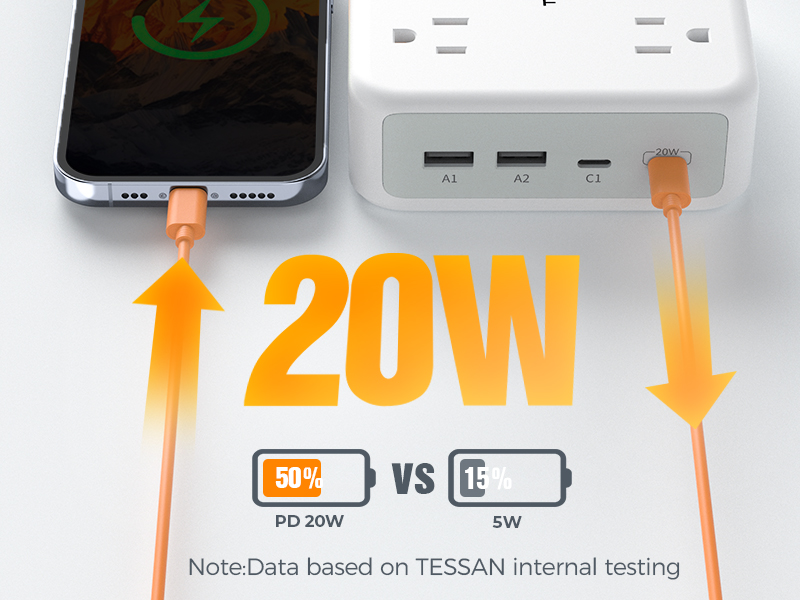
Image 5.3: A graphic illustrating the speed difference between PD 20W USB-C charging (50% charged) versus 5W charging (15% charged), based on TESSAN internal testing.
5.3 Power Switch
The integrated power switch allows you to easily turn the entire unit on or off, conserving energy when devices are not in use. This switch also functions as an overload protector, automatically tripping to prevent damage during power surges or overloads.
6. Maintenance
- Keep the power strip clean and free from dust. Use a dry, soft cloth for cleaning.
- Do not use liquid cleaners or aerosols.
- Regularly inspect the cord and plug for any signs of damage. If damaged, discontinue use and replace the unit.
7. Troubleshooting
7.1 No Power to Devices
- Ensure the power strip is securely plugged into a functioning wall outlet.
- Check the power switch on the unit to ensure it is in the "ON" position.
- If the overload protection switch has tripped (popped out), unplug some devices and press the switch back in to reset.
- Verify that the total power consumption of connected devices does not exceed 1250W.
7.2 Surge Protection Indicator Lights
The TESSAN Surge Protector features dual surge protection, indicated by two red lights (Protected 1 and Protected 2).
- Both lights ON: Dual surge protection is active and functioning.
- Only one light ON (Protected 2): The first surge protection group has failed, but the second group is still active.
- Both lights OFF: Both surge protection groups have failed. The unit no longer provides surge protection and should be replaced.

Image 7.1: An X-ray view of the TESSAN Power Strip showing the internal components for 2100J dual surge protection. Diagrams illustrate the states of the indicator lights: both on (two groups in effect), one on (only second group in effect), and both off (surge protection failed).

Image 7.2: A close-up diagram explaining the three states of the TESSAN surge protection indicator lights: both on (dual surge protection active), one on (first group failed, second active), and both off (all surge protection failed).
8. Specifications
| Feature | Detail |
|---|---|
| Model Number | TS-PS07US00 |
| AC Outlets | 8 |
| USB-C Ports | 2 (PD 20W Max) |
| USB-A Ports | 2 (12W Max per port) |
| Max Power Rating | 1250W (10A, 125V) |
| Surge Protection | 2100 Joules |
| Extension Cord Length | 5 Feet |
| Plug Type | Flat, 45° Right-Angle |
| Dimensions | 3.9 x 3.9 x 1.85 inches (main unit) |
| Weight | 14.4 ounces |
9. Official Product Video
Watch this video for a quick overview of the TESSAN Surge Protector Power Strip and its features.
Video 9.1: An official product video from Tessan Direct showcasing the TESSAN Surge Protector Power Strip, highlighting its compact design, multiple outlets, and USB charging capabilities.
10. Warranty and Support
TESSAN products are designed for reliability and performance. For warranty information, technical support, or customer service inquiries, please refer to the contact information provided on the product packaging or visit the official TESSAN website.
Please retain your purchase receipt for warranty claims.


