1. Product Overview
The XTRONS Android 13 Car Stereo Radio Player is an advanced in-car entertainment and navigation system designed for select Volkswagen, Skoda, and SEAT models. It features a 9-inch IPS touch screen, Octa Core CPU, 4GB RAM, 64GB ROM, built-in DSP, and supports 4G LTE, Wireless Car Play, and Android Auto. This manual provides essential information for setup, operation, and maintenance.

Image: Front view of the XTRONS Android 13 Car Stereo, showcasing its 9-inch IPS display with navigation and media widgets.

Image: An infographic detailing the core specifications and features of the XTRONS car stereo, including its processor, memory, storage, and connectivity options.
2. Setup and Installation
2.1 Applicable Models & Years
This unit is designed for specific vehicle models and years. Please verify your vehicle's compatibility before installation.
- For Volkswagen: Amarok (2010-2015), Beetle (2011-2015), Bora (2005-2015), Caddy (2004-2015), EOS (2006-2015), Golf MK5 / V5 / A5 / 1K (Variant / GTI / Estate) (2003-2009), Golf MK6 / VI6 / A6 / 5K (GTI / Wagon / R / Variant / Estate / Cabriolet) (2008-2013), Golf Plus (2004-2013), Jetta V / A5 / 1K (2005-2009), Jetta Vl / A6 / 1B (2010-2015), Passat B6 / 3C (Estate / Sedan / Wagon) (2005-2010), Passat B7 / 3C (Estate / Sedan / Wagon / Alltrack) (2010-2014), Passat CC (2008-2011), Polo MK5 / 6R (GTI / Sedan) (2009-2014), Scirocco Mk3 (2008-2011), Magotan (2007-2013), Sharan (2010-2014), Touran (2003-2014), Tiguan (2007-2013), T5 Multivan (2010-2013), T5 Transporter (2010-2013), T5 Caravelle (2010-2015), Vento (2009-2015)
- For SKODA: Fabia (2007-2014), Fabia Combi (2008-2014), Roomster (2006-2015), Octavia (2007-2012), Yeti (2009-2015), Superb (2008-2015)
- For SEAT: Alhambra (2010-2015), Altea (2004-2015), Altea XL (2007-2015), Leon Mk2 (2005-2012), Toledo (2004-2015)

Image: Visual comparison of a car dashboard before and after the XTRONS unit installation, demonstrating its fit.
2.2 Important Compatibility Notes
Please review the following notes to ensure proper fitment and functionality:
- If your VW T5 vehicle's center console is square-shaped as shown in the image, this unit will NOT fit.
- If your SKODA vehicle's center console matches the image, this unit will NOT fit. Refer to XTRONS PE72CTS for compatible models.
- This unit does NOT support your car's Dynaudio or Fender sound system.

Image: Visual guide for incompatible dashboard configurations for VW T5 and Skoda vehicles.
2.3 Included Accessories and Wiring
The following accessories are included with your XTRONS car stereo:
- 2 × ISO Wiring Harness
- 1 × RCA Cable
- 1 × 4G Antenna
- 1 × Camera Cable
- 1 × CANbus Box
- 2 × USB Cable
- 1 × GPS Antenna
- 1 × Radio Antenna Cable
- 1 × Original USB Cable
- 1 × Filter
- 1 × CANbus Cable
- 1 × User Manual

Image: A comprehensive layout of all cables and accessories provided with the XTRONS car stereo.
2.4 Wiring Diagram
Refer to the wiring diagram for proper connection of the unit to your vehicle's electrical system. Professional installation is recommended.
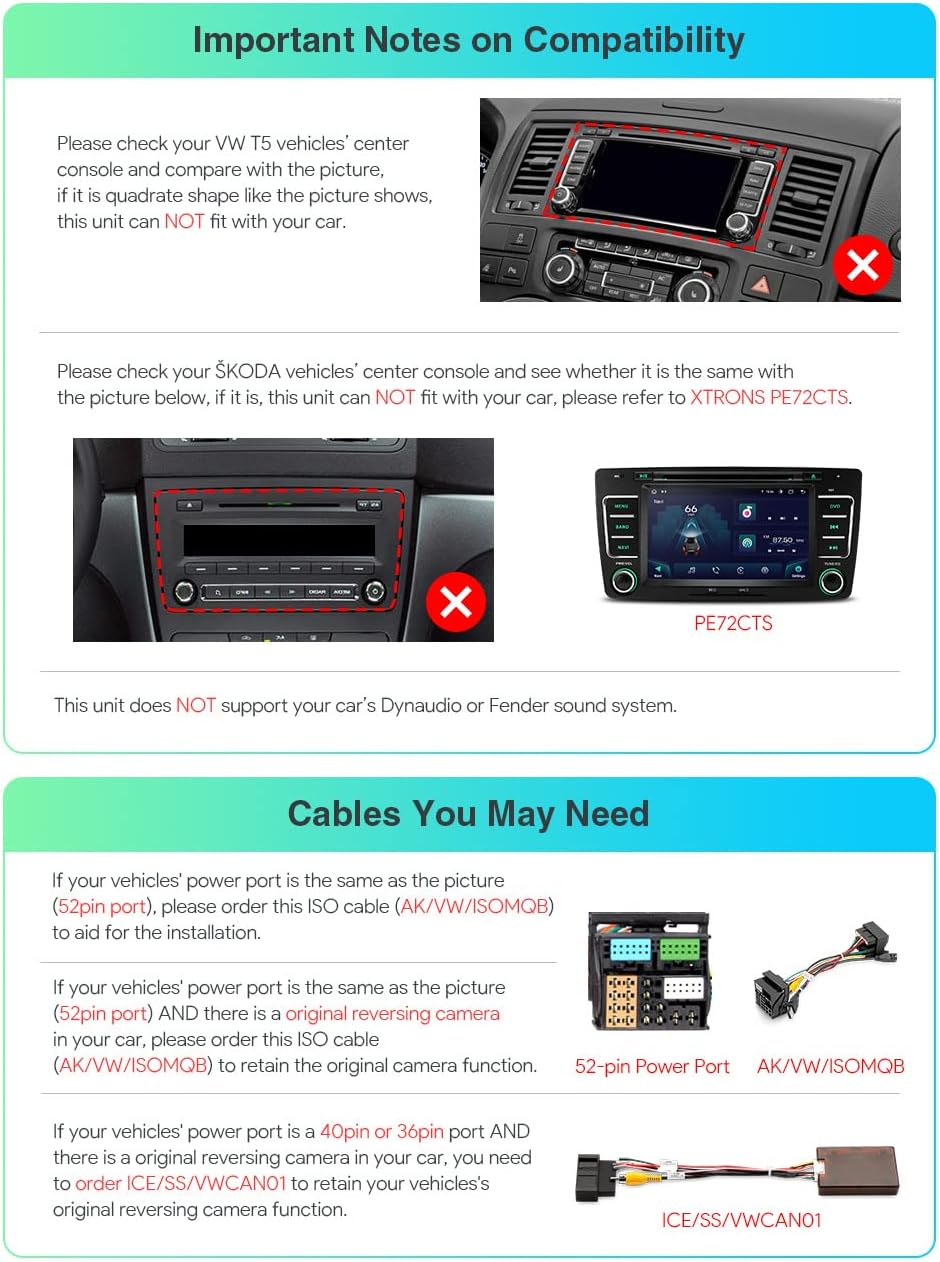
Image: Detailed wiring diagram illustrating all connection points for the car stereo, including ISO wiring harness pinouts.
3. Operating Instructions
3.1 Core System Features
- Fast & Responsive Android System: Equipped with the latest Android 13 OS, Octa Core CPU, 4GB RAM, and 64GB ROM for a smooth and quick user experience. Boot time is less than 1 second, with first boot time under 50 seconds.
- 9-inch IPS Touch Screen: High-resolution display supporting 2K video playback, offering clear visibility and responsive touch control.
- Integrated 4G Solution: Insert a Micro-SIM network card to access 4G mobile broadband connection. Supports 99% of worldwide carriers (Bands: 1, 2, 3, 4, 5, 7, 8, 12, 17, 20, 28, 38, 40, 41, 42. Not supported: 13, 25, 26).
- Dual Band WiFi: Supports both 2.4GHz and 5GHz bands for faster and more flexible internet connectivity.
- USB Tethering: Get online by connecting a smartphone via the USB port and enabling "USB Tethering" (Android) or "Allow Others to Join" (iPhone).
3.2 Connectivity and Entertainment
- Wireless Car Play & Wired/Wireless Android Auto: Access your favorite mobile apps safely. Activate Siri or Google Assistant with voice commands.
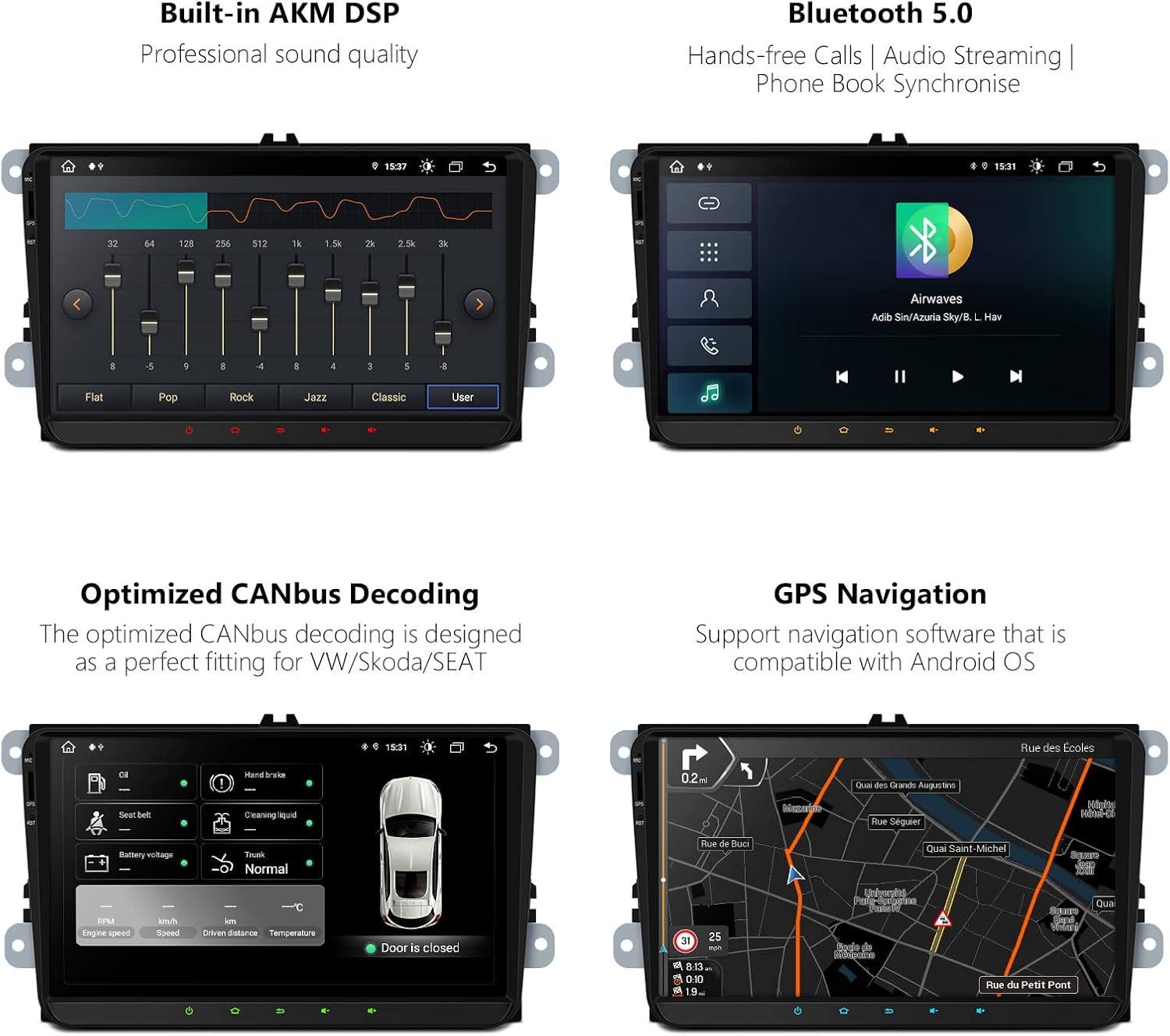
Image: Car Play and Android Auto interfaces displayed on the unit, demonstrating app integration and voice control.
- Bluetooth 5.0: Connect your mobile phone for hands-free calls, phone book access, call logs, and audio streaming.
- Built-in DSP (Digital Signal Processor): Enhances audio quality with advanced sound processing capabilities.
- Radio with RDS: Features a built-in ST TDA7708 radio chip for AM/FM bands, offering state-of-the-art performance with multipath noise mitigation and RDS decoding.
- GPS Navigation: Supports various Android navigation software including Sygic, IGO, Waze, Google Maps, and more.
3.3 Advanced Features
- Dual UI Theme: Express your style with optimized and intuitive icons. Switch between different user interfaces with a simple touch for a distraction-free driving experience.
- Multi-window View: Run two applications side-by-side on the screen. For example, you can open a navigation map on one side and a music player on the other.
- PIP (Picture-in-Picture) Mode: A floating video player that stays in the foreground, allowing you to watch videos while multitasking.
- Optimized CANbus Decoding: Designed for perfect fitting and integration with VW/Skoda/SEAT vehicles.
- DAB+ Tuner Ready (Optional): Enjoy DAB radio in your car by connecting an XTRONS USB DAB radio receiver stick (sold separately) via the USB port.
- OBD2 Support (Optional): With an optional OBD2 function, retrieve real-time data and trouble codes from your vehicle's computer.
3.4 Official Product Video
Watch the official product video for a visual demonstration of the XTRONS Android 13 Car Stereo's features and functionality.
Video: An official XTRONS video showcasing the Android 13 Car Stereo's features, including its interface, connectivity options, and various applications.
4. Maintenance
To ensure the longevity and optimal performance of your XTRONS car stereo, follow these general maintenance guidelines:
- Screen Cleaning: Use a soft, lint-free cloth to gently wipe the touch screen. For stubborn smudges, slightly dampen the cloth with water or a screen-safe cleaner. Avoid harsh chemicals or abrasive materials.
- Software Updates: Periodically check for and install available software updates to ensure the system runs efficiently and has the latest features and security patches. Updates can improve performance and resolve potential issues.
- Environmental Conditions: Avoid exposing the unit to extreme temperatures, direct sunlight for prolonged periods, or excessive moisture. Ensure proper ventilation around the unit.
- Cable Connections: Periodically check all connected cables to ensure they are securely plugged in. Loose connections can lead to intermittent functionality.
5. Troubleshooting
If you encounter issues with your XTRONS car stereo, consider the following troubleshooting steps:
- No Power/Unit Not Turning On:
- Check all power connections and fuses. Ensure the wiring harness is correctly installed.
- Verify your vehicle's battery is charged and functioning correctly.
- No Sound/Distorted Audio:
- Check speaker connections and ensure they are properly wired.
- Verify audio settings, including volume, balance, fader, and DSP equalizer settings.
- Ensure the correct audio source is selected.
- Touch Screen Unresponsive:
- Perform a soft reset of the unit (refer to the device's specific reset procedure, often a small reset button).
- Ensure the screen is clean and free of debris.
- GPS Navigation Issues:
- Ensure the GPS antenna is properly installed and has a clear view of the sky.
- Verify that the navigation software is up-to-date and maps are downloaded.
- Check GPS signal strength in the system settings.
- Bluetooth Connectivity Problems:
- Ensure Bluetooth is enabled on both the car stereo and your mobile device.
- Delete previous pairings on both devices and attempt to re-pair.
- Move your mobile device closer to the car stereo.
- 4G/WiFi Connectivity Issues:
- For 4G, ensure the Micro-SIM card is correctly inserted and activated with your carrier. Check signal strength.
- For WiFi, ensure the correct network is selected and the password is entered accurately. Try restarting your WiFi hotspot/router.
- Software/App Malfunctions (e.g., Google Assistant/Voice issues mentioned in reviews):
- Ensure all system and app updates are installed.
- Clear the cache and data for the problematic application in the Android settings.
- If issues persist, a factory reset may be necessary (note: this will erase all user data and settings).
If these steps do not resolve the issue, please contact XTRONS customer support for further assistance.
6. Specifications
| Feature | Detail |
|---|---|
| Model Number | IA92MTVL |
| Operating System | Android 13 (upgraded from Android 12) |
| CPU | Octa Core |
| RAM | 4GB |
| ROM | 64GB |
| Display Size | 9 Inches |
| Display Type | IPS Touch Screen |
| Video Playback | Supports 2K Video Playback |
| Connectivity | Bluetooth 5.0, Cellular (4G LTE), Wi-Fi (Dual Band) |
| Audio Output Mode | Stereo |
| Special Features | Built-in DSP, Wireless Car Play, Wired/Wireless Android Auto, GPS Navigation, Optimized CANbus Decoding, USB Tethering, PIP Mode, Multi-window View |
| Mounting Type | Panel Mount |
7. Warranty and Support
XTRONS provides a 1-year warranty for this unit. We are committed to offering professional technical support to ensure your satisfaction.
For any inquiries, technical assistance, or warranty claims, please do not hesitate to contact XTRONS via Amazon email. We aim to reply as soon as possible to address your concerns and protect your rights and interests at all times.
For more information and additional support resources, please visit the official XTRONS store: XTRONS Amazon Store.


