
1. Introduction
This manual provides comprehensive instructions for the installation, operation, and maintenance of the XTRONS IA7253B Single DIN Car Stereo. This unit is specifically designed for BMW X5 E53 models manufactured between 1999 and 2006. Please read this manual thoroughly before installation and use to ensure proper function and to maximize your experience with the product.
The XTRONS IA7253B features a 7-inch IPS touch screen, runs on Android 14 with an Octa-Core processor, and includes advanced functionalities such as wireless CarPlay, Android Auto, 4G LTE connectivity, and a built-in Digital Sound Processor (DSP).

Image 1.1: Front view of the XTRONS IA7253B Single DIN Car Stereo, showcasing its 7-inch display and control buttons.
2. Product Features
- 7-inch Premium HD IPS Screen: High-resolution (1024x600) G+G touch screen for clear visuals and wide viewing angles.
- Android 14 Operating System: Latest Android version with an Octa-Core processor, 4GB RAM, and 64GB ROM for responsive performance and ample storage for applications.
- Wireless CarPlay & Android Auto: Seamless integration with smartphones for navigation, calls, music, and voice control (Siri/Google Assistant) via Bluetooth or USB.
- Global 4G LTE Connectivity: Supports Micro-SIM card for mobile broadband access, enabling internet connectivity and data sharing.
- Built-in DSP (Digital Sound Processor): Enhances audio quality with customizable sound settings.
- Optimized CANbus Decoding: Retains original vehicle functions such as steering wheel controls, ACC control, reversing control, and door status display.
- Off-Road Inclinometer Function: Utilizes high-precision gyroscope sensors to display vehicle ride height, roll, and pitch angles, useful for off-road driving.
- GPS Navigation: Compatible with popular Android navigation software like Google Maps, Sygic, and Waze.
- Changeable UI Themes: Offers various user interface themes for personalization.

Image 2.1: Illustration of the 7-inch Premium HD IPS Screen and Bluetooth 5.0 capabilities for stable audio transmission and hands-free calls.
3. Installation and Compatibility Notes
3.1 Applicable Models
This unit is designed for the following vehicle model:
- BMW X5 E53 (1999-2006)
3.2 Pre-Installation Checks
Before proceeding with installation, carefully review the following compatibility notes:
- Center Console Frame: If your car's center console has an existing frame, it must be removed before installing the XTRONS unit.
- Radio Antenna Port: If your car's radio antenna port is similar to the older BMW style (round, single pin), you may need two extension cables (ISO to FZMF and FZMF to ISO) for proper installation.
- Original Display (4.3" or 7" with 12-pin plug) or Navigation: If your vehicle has an original 4.3-inch or 7-inch screen with a 12-pin plug, or if the navigation drive is located in the rear of the car, an extra 6-meter extension cable (e.g., XTRONS EXL005 or EXL007) is required.
- Blue 12-pin Plug: Connect the blue plug in the XTRONS ISO wiring harness only if a blue 12-pin plug is present in your car's dashboard.
- DSP (Digital Sound Processing) Button: If your factory radio includes a DSP button or your car has a digital sound system (e.g., Harman Kardon), an extension cable (e.g., XTRONS EXL007) is necessary.
- Logic7 System or Fiber Optic: For cars equipped with the Logic7 system or a factory car radio with fiber optic input (resulting in "NO SOUND" issues after installation), an additional decoder (e.g., XTRONS FOBB05) is needed to retain the factory amplifier and resolve sound output problems.

Image 3.1: Comparison of the BMW X5 E53 dashboard before and after installing the XTRONS unit.

Image 3.2: Visual guide for checking and removing the center console frame if present.

Image 3.3: Overview of specific cables and adapters required for different vehicle configurations.
4. Operating Instructions
4.1 Smartphone Connectivity (CarPlay & Android Auto)
The unit supports both wireless CarPlay and Android Auto for seamless smartphone integration. This allows access to navigation, communication, and entertainment apps directly from the stereo display.
- Wireless CarPlay: Connect your iPhone via Bluetooth for wireless CarPlay functionality.
- Android Auto: Connect your Android phone wirelessly via Bluetooth or using a USB cable for Android Auto functionality.
- Screen Mirroring: Wirelessly mirror your smartphone screen to the unit via Wi-Fi.

Image 4.1: Overview of smartphone connectivity features, including wireless CarPlay, Android Auto, and screen mirroring.
4.2 4G LTE Connectivity and USB Tethering
Insert a Micro-SIM card into the designated slot to enable 4G LTE mobile broadband. This provides independent internet access for the unit. You can also share your mobile phone's internet connection with the unit via USB tethering.
- 4G LTE: Insert a Micro-SIM card for direct internet access.
- USB Tethering: Connect your phone via USB and enable mobile internet sharing in your phone's settings. (Note: Carrier restrictions or charges may apply).
- Dual Band Wi-Fi: The unit supports 2.4 GHz and 5 GHz Wi-Fi for flexible network connections.
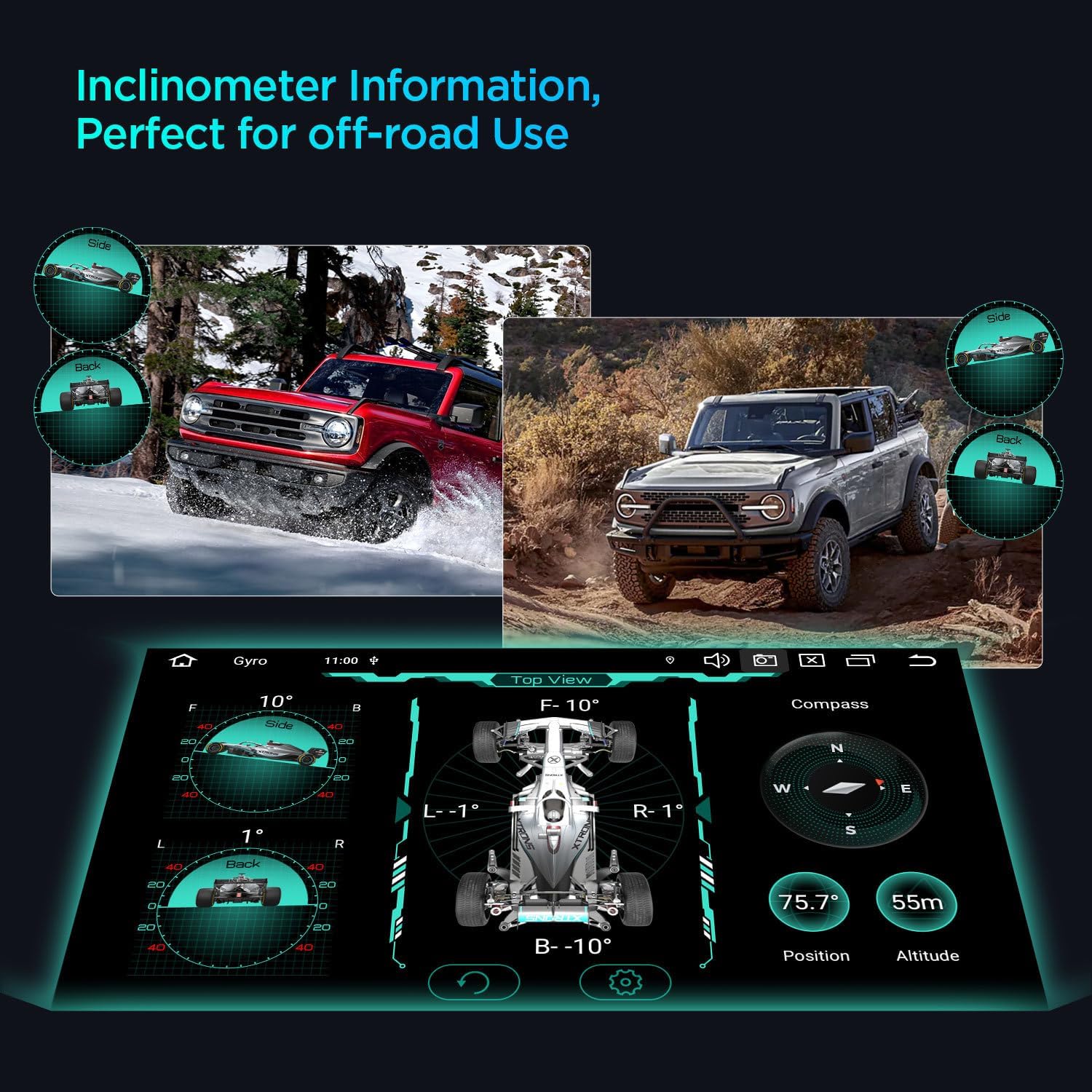
Image 4.2: Visual representation of global 4G LTE modem, dual-band Wi-Fi, and USB tethering capabilities.
4.3 Off-Road Inclinometer
The built-in high-precision gyroscope sensors provide real-time inclinometer information, displaying the vehicle's current ride height, roll, and pitch angles. This feature is particularly useful for off-road driving to monitor vehicle stability.

Image 4.3: Screen display of the inclinometer function, showing pitch, roll, and compass readings.
4.4 Digital Sound Processor (DSP)
The integrated AKM DSP allows for advanced audio customization. Users can adjust equalizer settings and other sound parameters to optimize the listening experience within the vehicle.
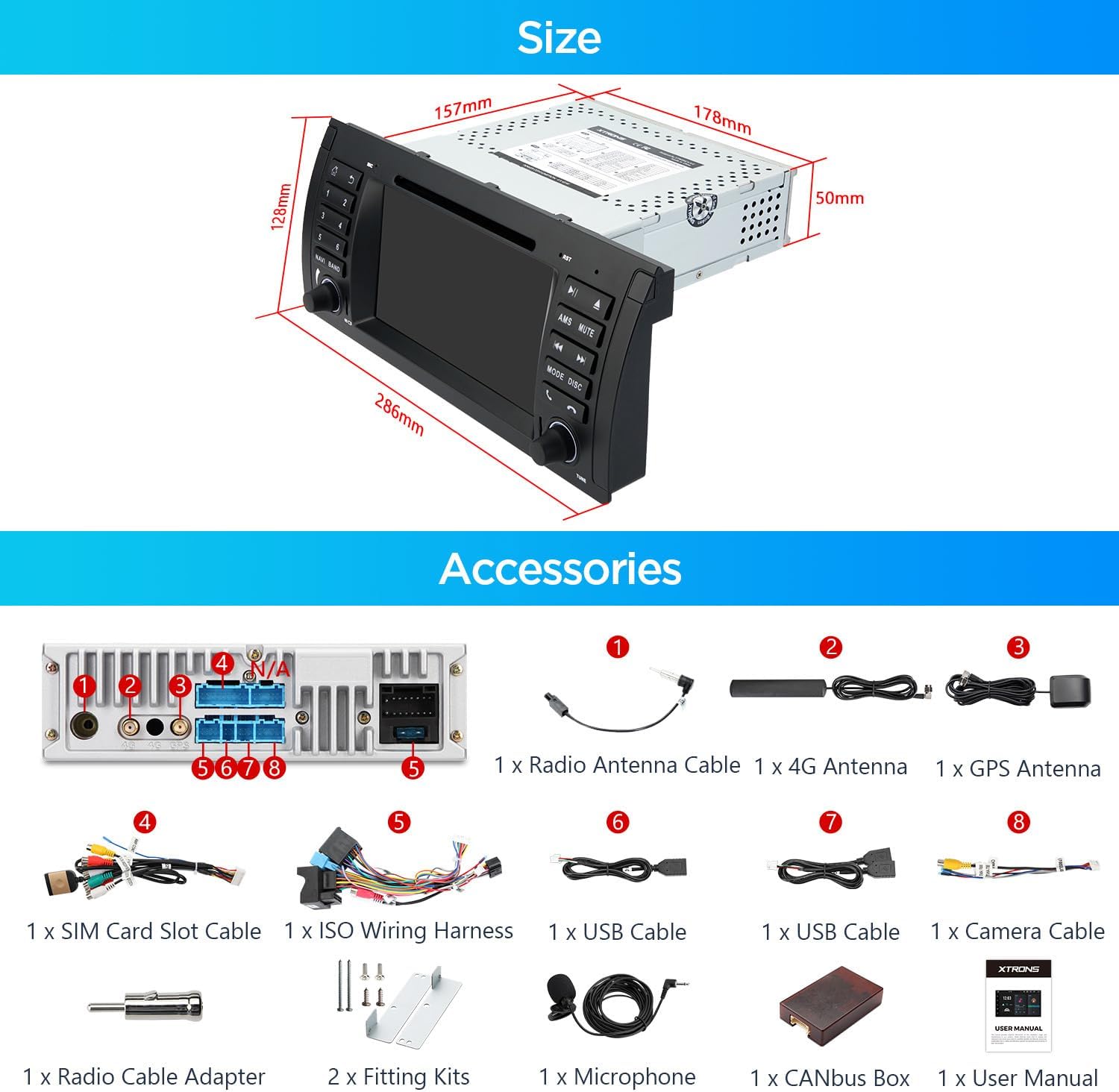
Image 4.4: The DSP interface on the XTRONS unit, showing equalizer controls for audio tuning.
5. Included Accessories
The following accessories are included with your XTRONS IA7253B car stereo:
- 1 × ISO Wiring Harness
- 1 × RCA Cable
- 1 × 4G Antenna
- 1 × Camera Cable
- 1 × CANbus Box
- 2 × USB Cables
- 1 × GPS Antenna
- 1 × Radio Antenna Cable
- 1 × CANbus Cable
- 2 × Fitting Kits
- 1 × User Manual (this document)

Image 5.1: Diagram illustrating the unit's dimensions and the complete set of included accessories.
6. Specifications
| Feature | Specification |
|---|---|
| Model Number | IA7253B |
| Display Size | 7 Inches |
| Display Resolution | 1024x600 |
| Operating System | Android 14 |
| Processor | Octa-Core |
| RAM | 4GB |
| ROM | 64GB |
| Media Type | DVD |
| Color | Black |
| Manufacturer | XTRONS/ShenZhen KaJunDa Technology Co.Ltd |
7. Troubleshooting
This section addresses common issues you might encounter. For more complex problems, please contact customer support.
7.1 No Sound After Installation
- Check Fiber Optic System: If your vehicle has a Logic7 system or a factory radio with fiber optic input, an additional decoder (e.g., XTRONS FOBB05) is required to ensure sound output. Refer to Section 3.2 for details.
- Verify DSP Connection: If your original radio had a DSP button, ensure the correct extension cable (e.g., XTRONS EXL007) is used.
- Wiring Harness: Double-check all connections in the ISO wiring harness.
7.2 GPS Signal Issues
- Antenna Placement: Ensure the GPS antenna is installed in a location with a clear view of the sky, free from obstructions.
- Antenna Connection: Verify that the GPS antenna is securely connected to the unit.
- Software Check: Confirm that your navigation software is up-to-date and properly configured.
7.3 Poor Radio Reception
- Antenna Connection: Ensure the radio antenna cable is securely connected.
- Antenna Adapters: If your vehicle has an older antenna port, confirm that the necessary extension cables (ISO to FZMF and FZMF to ISO) are correctly installed.
8. Maintenance
To ensure the longevity and optimal performance of your XTRONS IA7253B car stereo, follow these maintenance guidelines:
- Screen Cleaning: Use a soft, lint-free cloth slightly dampened with water or a screen cleaner specifically designed for electronic displays. Avoid harsh chemicals or abrasive materials.
- Software Updates: Periodically check for and install available software updates to ensure the system runs efficiently and has the latest features and security patches.
- Environmental Conditions: Avoid exposing the unit to extreme temperatures, direct sunlight for prolonged periods, or excessive moisture.
- Cable Connections: Periodically check all visible cable connections to ensure they are secure and free from damage.
9. Warranty and Support
The XTRONS IA7253B car stereo comes with a 1-Year Manufacturer Warranty. Please retain your proof of purchase for warranty claims.
For technical support, troubleshooting assistance beyond this manual, or warranty inquiries, please contact XTRONS customer service through their official website or the retailer where the product was purchased.
