
PlanetCare microfibre filters Microfiber Filter Starter Kit
Planet Care Microfiber Filter Starter Kit User Manual
Model: Microfiber Filter Starter Kit
1. Introduction
The Planet Care Microfiber Filter Starter Kit is designed to significantly reduce the release of microplastic fibers from your laundry into the environment. This universal filter system captures microfibers before they enter the drainage system, helping to protect aquatic ecosystems. This manual provides essential information for the proper installation, operation, and maintenance of your Planet Care filter.
2. Product Overview and Contents
The Planet Care Microfiber Filter Starter Kit includes all necessary components to begin filtering microfibers from your washing machine's discharge water.

Image: The Planet Care Microfiber Filter Starter Kit, showing the main filter unit, three replacement cartridges, and the product packaging.
Kit Contents:
- 1 x Planet Care Filter Unit (housing top with a cup)
- 3 x Replacement Filter Cartridges
- 1 x Holder for the filter unit
- 4 x Screws for mounting
- 1 x Drainage Pipe (1.5m) for connection
- 1 x Magnetic Wash Counter
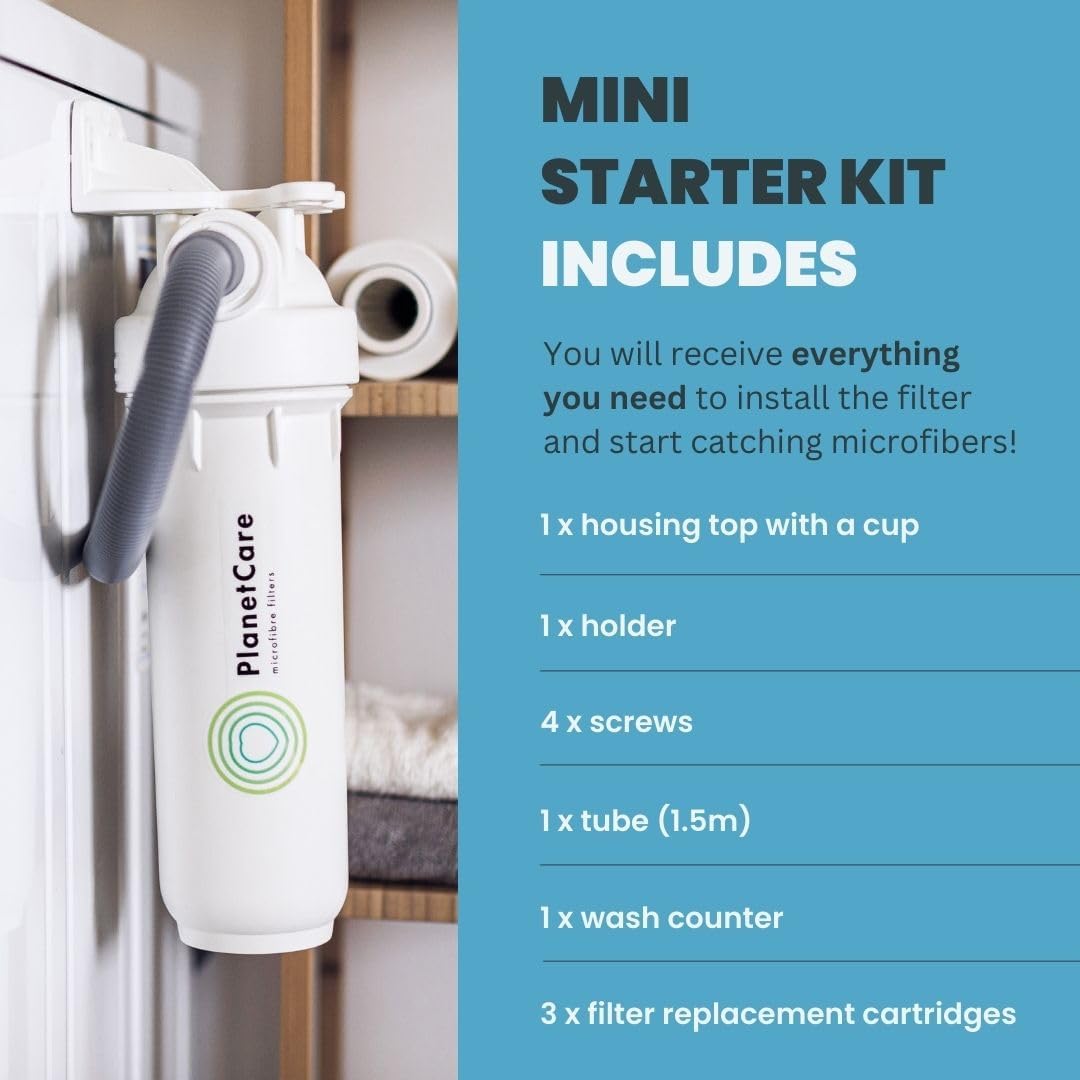
Image: The Planet Care filter unit mounted on a wall next to a washing machine, illustrating the components included in the starter kit.
3. Safety Information
Please read and understand all safety instructions before installing and operating the Planet Care Microfiber Filter. Failure to follow these instructions may result in property damage or injury.
- Ensure the washing machine is unplugged from the power outlet before installation.
- Turn off the water supply to the washing machine before disconnecting any hoses.
- Verify all connections are secure and watertight to prevent leaks.
- Do not attempt to modify the filter unit or its components.
- Keep out of reach of children and pets.
- If any damage is observed, do not install or use the product. Contact customer support.
4. Installation (Setup)
The Planet Care filter is designed for universal compatibility with all washing machines and features a straightforward installation process, typically taking about 10 minutes.
Installation Steps:
- Prepare the Area: Unplug your washing machine and turn off its water supply. Position the filter unit near the washing machine, ensuring easy access for maintenance.
- Mount the Holder: Use the provided screws to securely mount the filter holder to a stable surface (e.g., a wall or sturdy cabinet) next to your washing machine. Ensure it is level and at an appropriate height for the drainage pipe connection.
- Connect the Drainage Pipe: Disconnect the existing drainage pipe from your washing machine's outlet. Connect the washing machine's drainage pipe to the inlet of the Planet Care filter unit. Then, connect the provided 1.5m drainage pipe from the outlet of the Planet Care filter unit to your household's drainage system (e.g., a standpipe or sink). Ensure all connections are tight and secure to prevent leaks.
- Insert Cartridge: Open the filter housing and insert one of the new replacement cartridges. Close the housing securely.
- Restore Connections: Turn on the water supply to your washing machine and plug it back into the power outlet.
- Initial Check: Run a short wash cycle without laundry to check for any leaks around the filter connections. If leaks occur, tighten the connections.

Image: A visual guide to the filter's lifecycle, from installation to cartridge replacement and return.

Image: The filter unit correctly installed beside a washing machine, demonstrating the ease of access for cartridge maintenance.
5. Operating Instructions
Once installed, the Planet Care filter operates automatically with your washing machine. It efficiently captures approximately 90% of microfibers from the wash water before it drains.
Using the Magnetic Wash Counter:
The included magnetic counter helps you track the number of wash cycles completed. Attach it to your washing machine near the power button or in a visible location. After each wash cycle, advance the counter by one mark. This will help you determine when a cartridge replacement is due, typically after 20 washes or approximately one month of regular use.

Image: Key operational benefits of the Planet Care filter, including its high filtration efficiency.
6. Maintenance
Regular maintenance, primarily cartridge replacement, is crucial for the optimal performance of your Planet Care filter.
Cartridge Replacement:
Replace the filter cartridge approximately every 20 washes or once a month, depending on your laundry habits and the amount of lint collected. The magnetic counter will assist you in tracking this.
- Prepare for Replacement: Turn off the water supply to your washing machine and unplug it.
- Open Filter Housing: Carefully unscrew the bottom part of the filter housing. Some residual water may drain out, so have a small container or towel ready.
- Remove Used Cartridge: Gently pull out the used filter cartridge. You will observe the collected microfibers.
- Insert New Cartridge: Insert a new, clean filter cartridge into the housing, ensuring it is seated correctly.
- Secure Housing: Screw the bottom part of the filter housing back on tightly until it is hand-tight. Do not overtighten.
- Restore Connections: Turn on the water supply and plug in your washing machine. Run a quick check for leaks.

Image: A visual comparison demonstrating the effectiveness of the filter by showing a new cartridge versus a used one filled with microfibers.
Cartridge Return and Recycling:
Planet Care offers a free return service for used cartridges. Instructions for requesting a free return are provided inside the product box. Returning used cartridges ensures they are properly refurbished and recycled, completing the closed-loop system and maximizing environmental benefit.
7. Troubleshooting
If you encounter any issues with your Planet Care Microfiber Filter, refer to the following common problems and solutions:
| Problem | Possible Cause | Solution |
|---|---|---|
| Water Leakage | Loose connections; damaged seals. | Ensure all hose connections are tightened securely. Check rubber seals for damage and replace if necessary. |
| Washing Machine Error (e.g., drainage issue) | Clogged filter cartridge; incorrect installation causing restricted flow. | Replace the filter cartridge. Verify the drainage pipe is not kinked or obstructed. Ensure the filter is installed correctly and not impeding water flow. |
| Filter Unit Detaches from Wall | Inadequate mounting; excessive vibration. | Ensure the holder is securely mounted using all four screws into a stable surface. If using adhesive, ensure the surface is clean and dry, and consider additional mechanical fasteners for vibrating surfaces. |
| Magnetic Counter Falls Off | Weak magnetic adhesion; vibrating surface. | Ensure the counter is placed on a flat, clean metallic surface. If it continues to fall, consider securing it with a small piece of adhesive tape. |
If the problem persists after attempting these solutions, please contact Planet Care customer support for further assistance.
8. Specifications
| Attribute | Detail |
|---|---|
| Brand | PlanetCare microfibre filters |
| Model | Microfiber Filter Starter Kit |
| Colour | Off White |
| Material | Microfiber (filter media) |
| Item Weight | 1.6 kg |
| Package Dimensions | 28.5 x 25.3 x 16.2 cm |
| Compatibility | Universal with all washing machines |
| Filtration Efficiency | Captures approximately 90% of microfibers |
9. Warranty and Support
Planet Care is committed to providing high-quality products and excellent customer service. For specific warranty details, please refer to the documentation included with your product or visit the official Planet Care website.
Customer Support:
If you have any questions, require technical assistance, or need to arrange for cartridge returns, please contact Planet Care customer support through the contact information provided in your product packaging or on the official Planet Care website. Please have your product model and purchase details ready when contacting support.
Related Documents - Microfiber Filter Starter Kit
 |
Samsung Microfiber Filter FT-MF User Manual User manual for the Samsung Microfiber Filter (FT-MF). Provides essential information on installation, safe operation, maintenance, and troubleshooting for effective microplastic fiber capture from laundry. |
 |
PlanetCare 2.0 Microfiber Filter User Manual and Installation Guide Comprehensive user manual for the PlanetCare 2.0 microfiber filter, detailing installation, operation, fine-tuning, and maintenance to prevent microplastic pollution from laundry. Learn how to attach the filter, connect hoses, replace cartridges, and adjust settings for optimal performance. |
 |
PlanetCare 2.0 User Manual: Installation, Operation, and Fine-Tuning Guide Comprehensive user manual for the PlanetCare 2.0 microfiber filter. This guide provides detailed instructions for installation, connecting hoses, attaching the filter cartridge, and adjusting settings for optimal performance in reducing microplastic pollution from laundry. |
 |
PlanetCare Microfiber Filter Installation Guide and User Manual Comprehensive guide to installing and using the PlanetCare microfiber filter for washing machines. Learn how to reduce microplastic pollution from your laundry, including setup, maintenance, and cartridge replacement. |
 |
Siemens WZMPF10 External Microplastic Filter User Manual and Installation Instructions User and installation guide for the Siemens WZMPF10 external microplastic filter, detailing safety precautions, installation steps, operation, cleaning, troubleshooting, and technical specifications. |
 |
Bosch WMZMPF10 External Microplastic Filter User Manual Comprehensive user manual and installation guide for the Bosch WMZMPF10 External Microplastic Filter. Learn about safety, installation, basic operation, cleaning, troubleshooting, and technical specifications. |