1. Introduction
This manual provides detailed instructions for the KSIX Eclipse Smartwatch. Please read this manual thoroughly before using the device to ensure proper operation and to maximize its features. Keep this manual for future reference.
2. Package Contents
Verify that all items are present in the package:
- KSIX Eclipse Smartwatch
- Charging Cable
- User Manual (this document)
3. Product Overview
Familiarize yourself with the components of your KSIX Eclipse Smartwatch.

Figure 3.1: Front view of the KSIX Eclipse Smartwatch, displaying the round screen with a digital watch face showing time, date, heart rate, and battery percentage.

Figure 3.2: Overview of key features: 1.28-inch extra-large screen, 8 sport modes, and up to 7 days of battery autonomy.

Figure 3.3: Rear view of the smartwatch, highlighting the biometric sensors, multifunction button on the side, and the wireless charging port.
- Display: 1.28-inch round touchscreen.
- Multifunction Button: Located on the side for navigation and control.
- Biometric Sensors: On the rear for health monitoring.
- Wireless Charging Port: On the rear for power input.
- Strap: Adjustable silicone strap.
4. Setup
4.1 Initial Charging
- Connect the charging cable to a USB power adapter (not included).
- Place the smartwatch on the wireless charging port. Ensure the charging contacts align correctly.
- Allow the device to charge completely before first use. A full charge typically takes approximately 2 hours.
4.2 Powering On/Off
- To Power On: Press and hold the multifunction button until the screen illuminates.
- To Power Off: Navigate to the power off option in the watch settings or press and hold the multifunction button, then confirm power off.
4.3 App Installation and Pairing
To unlock the full potential of your KSIX Eclipse Smartwatch, download and install the companion application.

Figure 4.1: The KSIX Eclipse Smartwatch displayed alongside a smartphone running the "Da Fit" application, with icons for Google Play, App Store, and Bluetooth connectivity.
- Download the App: Search for "Da Fit" in the Google Play Store (for Android devices) or the Apple App Store (for iOS devices). Install the application.
- Enable Bluetooth: Ensure Bluetooth is enabled on your smartphone.
- Open the App: Launch the "Da Fit" app and follow the on-screen instructions to create an account or log in.
- Pair the Smartwatch: In the app, navigate to "Add Device" or a similar option. Select "Eclipse" or the corresponding device ID from the list of available Bluetooth devices.
- Confirm Pairing: A pairing request may appear on both your phone and smartwatch. Confirm the pairing on both devices.
- Complete Setup: Follow any remaining prompts in the app to complete the initial setup, including personal profile information and notification preferences.
5. Operating Instructions
5.1 Basic Navigation
- Swipe Up/Down: Scroll through menus and notifications.
- Swipe Left/Right: Access quick functions or different watch faces.
- Tap: Select an item or confirm an action.
- Multifunction Button: Press to return to the home screen or wake the device.
5.2 Health Monitoring Functions
The KSIX Eclipse Smartwatch can monitor various health metrics.

Figure 5.1: The smartwatch on a user's wrist, showing icons and readings for heart rate, blood pressure, blood oxygen, and sleep monitoring.
- Heart Rate Monitoring: Access the heart rate function on the watch or through the app to measure your current heart rate.
- Blood Pressure Monitoring: Use the dedicated function to take blood pressure readings.
- Blood Oxygen (SpO2) Monitoring: Measure your blood oxygen saturation levels.
- Sleep Monitoring: The watch automatically tracks your sleep patterns when worn during sleep. View detailed analysis in the "Da Fit" app.
- Note: These measurements are for reference only and should not be used for medical diagnosis. Consult a healthcare professional for medical advice.
5.3 Sport Modes
The smartwatch supports 8 different sport modes to track your physical activities.

Figure 5.2: A person engaged in exercise, with icons representing 8 sport modes, a hydration reminder, and a stopwatch function available on the smartwatch.
- Access the "Sport" menu on the watch.
- Select your desired activity (e.g., running, cycling, walking).
- The watch will track duration, distance, calories burned, and heart rate during your workout.
- Additional features include a hydration reminder and a stopwatch.
5.4 Notifications and Connectivity
When paired with your smartphone, the KSIX Eclipse Smartwatch provides various notifications and controls.

Figure 5.3: The smartwatch screens illustrating functions such as weather display, incoming call notifications, music playback control (Spotify, SoundCloud), message notifications, built-in games, and a remote selfie button.
- Call Notifications: Receive alerts for incoming calls and see caller ID.
- Message Notifications: View messages from various apps directly on your wrist.
- Music Control: Control music playback on your smartphone (play, pause, skip tracks).
- Weather Forecast: Get real-time weather updates.
- Remote Camera Control (Selfie Button): Use the watch as a remote shutter for your phone's camera.
- Games: Access simple games directly on the smartwatch.
5.5 Customizable Watch Faces
Personalize your smartwatch with a variety of watch faces.
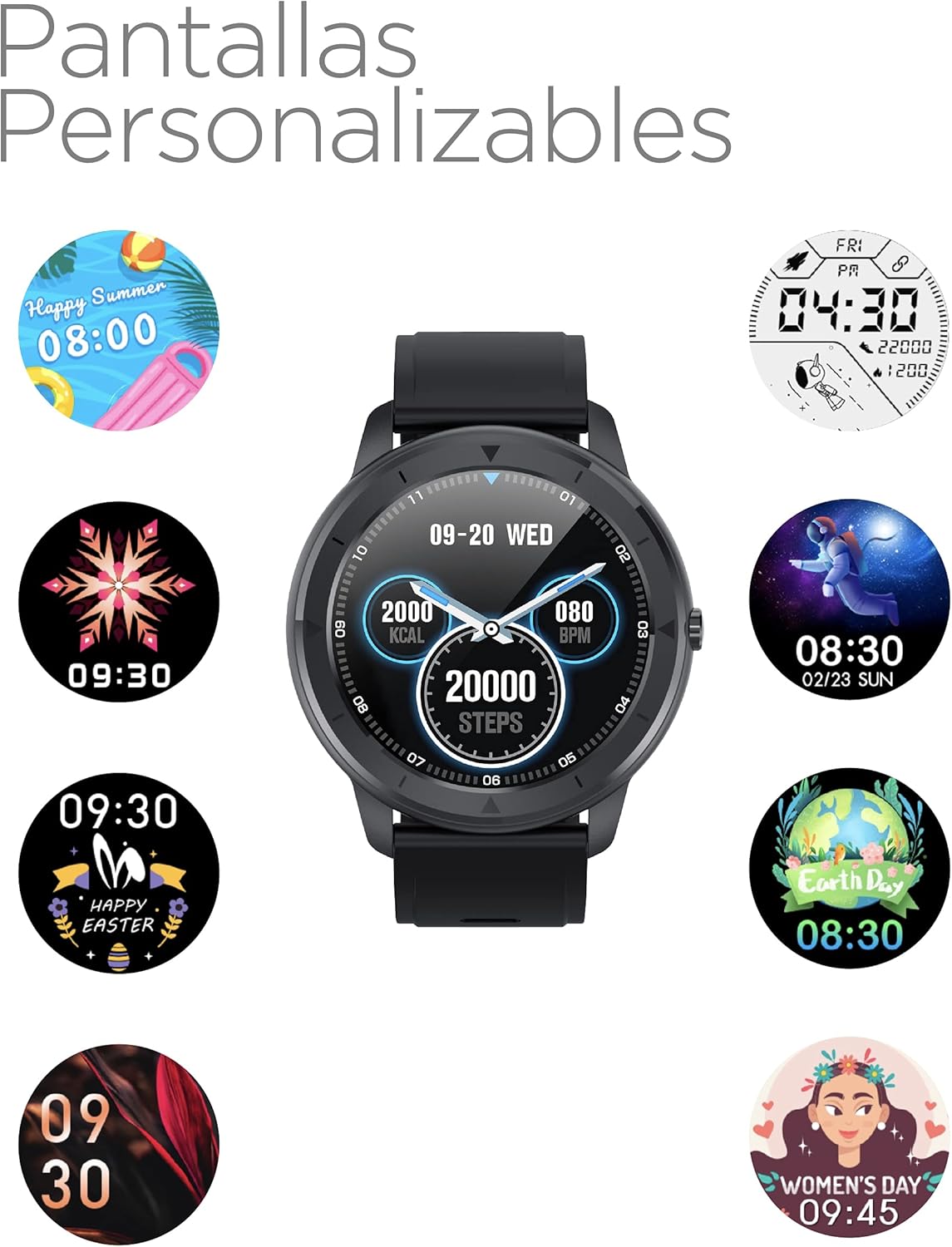
Figure 5.4: The KSIX Eclipse Smartwatch displaying a central watch face, surrounded by several examples of customizable watch face designs, including seasonal, abstract, and themed options.
- Access the watch face selection menu on the device or through the "Da Fit" app.
- Choose from pre-installed faces or download new ones via the app.
6. Maintenance
6.1 Cleaning
- Wipe the screen and body of the smartwatch with a soft, lint-free cloth.
- For stubborn marks, slightly dampen the cloth with water. Avoid using harsh chemicals or abrasive materials.
- Clean the charging contacts regularly to ensure efficient charging.
6.2 Storage
- Store the smartwatch in a cool, dry place away from direct sunlight and extreme temperatures.
- If storing for an extended period, ensure the battery is partially charged (around 50%) to prolong battery life.
6.3 Water Resistance
The KSIX Eclipse Smartwatch has a certain level of water resistance. Refer to the specifications section for details. Avoid exposing the device to hot water, steam, or high-pressure water jets, as this may compromise its water resistance.
7. Troubleshooting
If you encounter issues with your KSIX Eclipse Smartwatch, refer to the following common solutions:
| Problem | Possible Solution |
|---|---|
| Smartwatch does not turn on. | Ensure the device is fully charged. Connect it to the charger for at least 30 minutes. |
| Cannot pair with smartphone. |
|
| Notifications are not received. |
|
| Inaccurate health data. |
|
| Battery drains quickly. |
|
8. Specifications
Technical specifications for the KSIX Eclipse Smartwatch:
| Feature | Detail |
|---|---|
| Brand | KSIX smart your tech |
| Model Name | Eclipse |
| Model Number | TP-8427542117089_BXSMABLK_Vendor |
| Manufacturer | Atlantis internacional |
| Dimensions (L x W x H) | 50 x 50 x 28 cm |
| Item Weight | 130 grams |
| Color | Black |
| Closure Type | Buckle |
| Shape | Round |
| Material Type | Aluminum |
| Screen Size | 1.28 Inches |
| Operating System | AsteroidOS |
| Special Feature | Heart Rate Monitor |
| Connectivity Technology | Bluetooth |
| Wireless Communication Standard | Bluetooth |
| GPS | Integrated GPS |
| First Available Date | June 3, 2021 |
9. Warranty and Support
For warranty information and customer support, please refer to the documentation provided with your purchase or visit the official KSIX website. Specific warranty terms may vary by region and retailer.
If you require technical assistance or have questions not covered in this manual, please contact KSIX customer service through their official channels.
10. Video Resources
No official product videos from the seller were found in the provided data that meet the embedding criteria (m3u8 format).


