
1. Introduction
The DIGITEN WTC200 is a wireless temperature controller designed to automatically manage heating or cooling devices based on a preset target temperature. This device consists of a remote control unit and a plug-in receiver socket, offering convenience and precise temperature regulation for various applications.
It is suitable for use in environments such as greenhouses, mushroom houses, reptile breeding setups, pet feeding areas, wine cellars, cigar storage, home brewing, seed germination, fermentation, baby rooms, attics, and garages. It can control appliances like attic fans, swamp coolers, evaporative coolers, space heaters, wall panel heaters, electric fireplace heaters, and heat pads.

Image 1.1: The DIGITEN WTC200 Wireless Temperature Controller, featuring the remote control and the plug-in receiver unit.
2. Product Components
The DIGITEN WTC200 package includes the following main components:
- Wireless Remote Controller: This unit features an LCD display and control buttons for setting and monitoring temperatures.
- Receiver Socket: A plug-in unit that connects to your heating or cooling appliance and communicates wirelessly with the remote controller.
- Temperature Probe: A highly accurate sensor that detects ambient temperature, connected to the receiver socket.
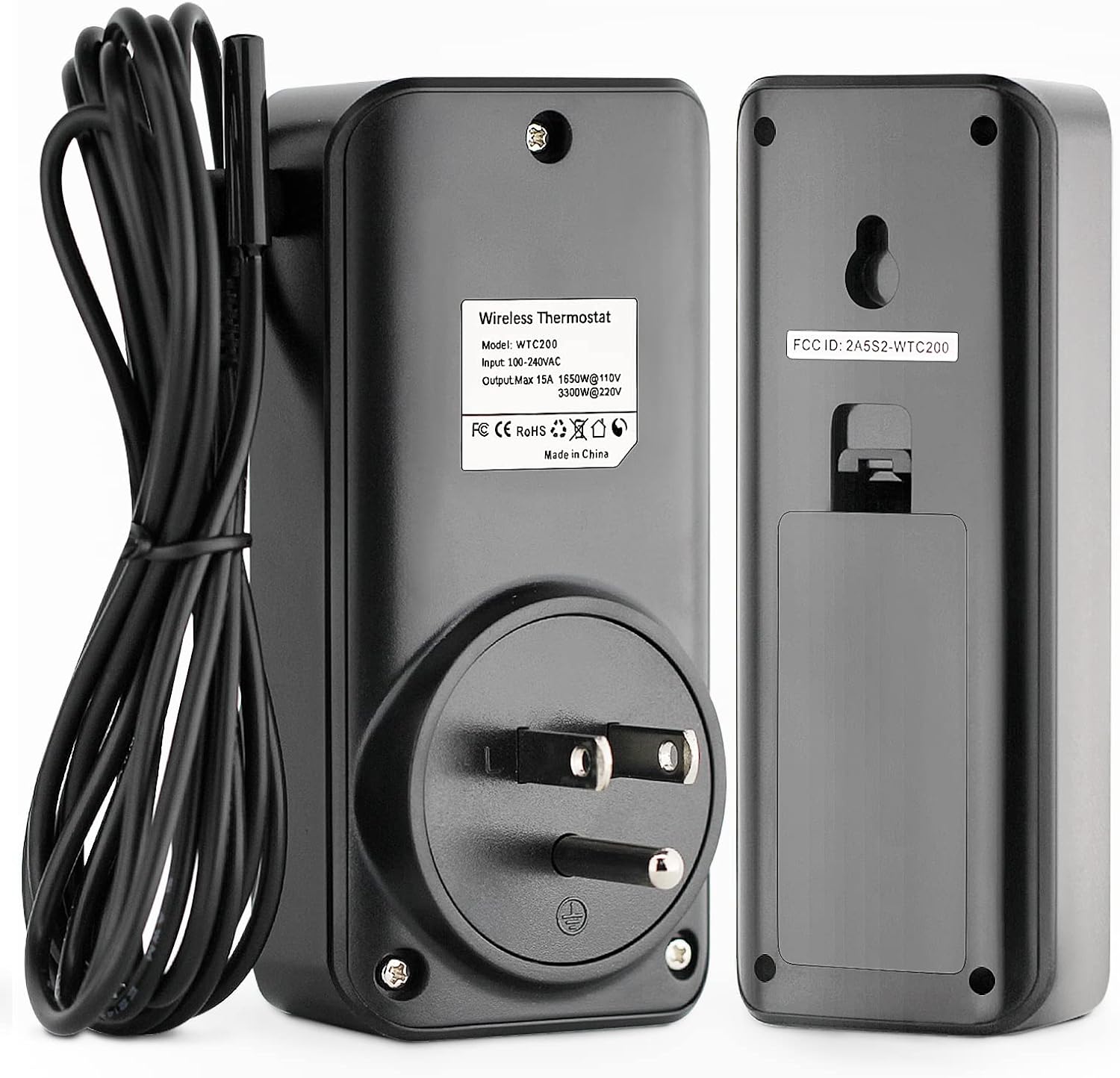
Image 2.1: Rear view of the receiver and remote, illustrating the temperature probe connection point on the receiver.
3. Setup Instructions
- Install Batteries in Remote: The remote control requires batteries (not included). Open the battery compartment on the back of the remote and insert the required batteries, observing correct polarity.
- Connect Temperature Probe: Plug the temperature probe into the designated port on the receiver socket. Ensure a secure connection.
- Plug in Receiver: Insert the receiver socket into a standard electrical outlet.
- Connect Appliance: Plug your heating or cooling appliance into the outlet on the receiver socket.
- Power On: Press the power button on the remote control to turn on the device. The remote and receiver should automatically pair.

Image 3.1: The included temperature probe, which connects to the receiver unit for accurate temperature readings.
4. Operating Instructions
The remote control allows for easy adjustment of settings. The LCD display provides clear temperature readings and operational status.

Image 4.1: The remote control unit, displaying current temperature and control buttons.
4.1 Setting Temperature
- Press the SET button on the remote. The target temperature display will flash.
- Use the Up and Down arrow buttons to adjust the desired target temperature.
- Press SET again to confirm the setting, or wait a few seconds for it to automatically save.
4.2 Switching Cooling/Heating Mode
The WTC200 supports both cooling and heating modes. The mode determines whether the connected appliance turns on when the temperature is above or below the set point.
- To switch modes, press the M button. The display will indicate the current mode (e.g., a snowflake icon for cooling, a flame icon for heating).

Image 4.2: The remote control displaying icons for cooling and heating modes, indicating the active operational setting.
4.3 Switching Temperature Units (°C/°F)
The display can be switched between Celsius (°C) and Fahrenheit (°F).
- Refer to the full user manual for specific button combinations to toggle between temperature units. This is typically done by holding a specific button (e.g., 'M' or 'SET') for a few seconds.
4.4 Setting High/Low Temperature Alarms
The device features high and low temperature alarms to alert you if the temperature exceeds or falls below a specified range.
- Consult the detailed user manual for instructions on how to set and activate these alarm thresholds.

Image 4.3: Remote display indicating a low temperature alarm setting.

Image 4.4: Remote display indicating a high temperature alarm setting.
5. Key Features
- Wireless Remote Control: Offers convenient control from a distance, with a communication range of 50-100 meters in open areas.
- LCD Display with Backlight: Provides clear temperature readings and settings, easily visible even in low-light conditions.
- Cooling & Heating Modes: Supports both heating and cooling applications, automatically switching connected devices on or off to maintain the desired temperature.
- High Accuracy Sensor: Equipped with a precise temperature sensor for reliable ambient temperature detection.
- Temperature Alarms: Features configurable high and low temperature alarms to notify users of extreme temperature conditions.
- Memory Function: All settings are saved automatically, even in the event of a power failure.
- Energy Saving: By precisely controlling appliances based on target temperatures, the thermostat helps reduce energy consumption.

Image 5.1: Visual representation of the DIGITEN WTC200's core functionalities.

Image 5.2: Illustration of the wireless control capability, allowing monitoring and control from various locations within a 50-100m range.
6. Applications
The DIGITEN WTC200 Wireless Temperature Controller is versatile and can be used in a wide range of settings requiring precise temperature management:
- Environmental Control: Greenhouses, mushroom houses, baby rooms, attics, garages.
- Animal Care: Reptile breeding, pet feeding.
- Specialized Storage: Wine cellars, cigar storage.
- Hobby & Production: Home brewing, seed germination, fermentation.
- Appliance Control: Space heaters, wall panel heaters, electric fireplace heaters, heat pads, attic fans, swamp coolers, evaporative coolers.

Image 6.1: Examples of diverse applications for the wireless temperature controller.
7. Maintenance
To ensure optimal performance and longevity of your DIGITEN WTC200 Wireless Temperature Controller, follow these general maintenance guidelines:
- Cleaning: Periodically wipe the remote control and receiver socket with a soft, dry cloth. Avoid using abrasive cleaners or solvents.
- Battery Replacement: Replace the batteries in the remote control when the low battery indicator appears on the display. Use high-quality alkaline batteries for best performance.
- Probe Care: Ensure the temperature probe is kept clean and free from obstructions. Avoid bending or damaging the probe cable.
- Storage: If storing the device for an extended period, remove the batteries from the remote control to prevent leakage. Store in a cool, dry place.
8. Troubleshooting
If you encounter issues with your DIGITEN WTC200, consider the following troubleshooting steps:
- No Display on Remote: Check if the batteries are correctly installed and have sufficient charge. Replace batteries if necessary.
- Receiver Not Responding: Ensure the receiver is securely plugged into a working electrical outlet. Verify that the remote control is within the effective communication range (50-100m in open areas) and there are no significant obstructions.
- Appliance Not Turning On/Off: Confirm that the appliance is correctly plugged into the receiver socket and is functioning independently. Check the set temperature and mode (cooling/heating) on the remote to ensure they align with the desired operation.
- Inaccurate Temperature Readings: Ensure the temperature probe is properly connected to the receiver and is placed in a location that accurately reflects the ambient temperature you wish to control. Avoid placing the probe near heat sources or drafts.
- Settings Not Saving: The device has a memory function. If settings are not retained, ensure the remote's batteries are not critically low, although the receiver typically holds settings.
For persistent issues, refer to the comprehensive user manual or contact customer support.
9. Specifications
| Feature | Specification |
|---|---|
| Brand | DIGITEN |
| Model Number | WTC200 |
| Controller Type | Remote |
| Connectivity Technology | Wireless |
| Power Source | Electric |
| Voltage | 120 Volts (AC) |
| Wattage | 1300 watts |
| Amperage Capacity | 12 Amps |
| Display Type | Digital LCD |
| Backlight | Yes |
| Included Components | Temperature Probe |
| Batteries Required | Yes (for remote, not included) |
| Item Weight | 8.1 ounces |
| Package Dimensions | 4.76 x 4.13 x 2.36 inches |
10. Warranty and Support
DIGITEN provides a one-year warranty term for any product issues. For support or warranty claims, please refer to the contact information provided with your product packaging or visit the official DIGITEN website.


