
1. Introduction
This manual provides essential instructions for the setup, operation, and maintenance of your Miles Electronic Keyboard Model F. Please read this manual thoroughly before using the product to ensure proper function and longevity. This electronic keyboard is designed to provide an engaging musical experience for users aged 5 years and above, fostering creativity and developing motor skills.
2. Product Overview
The Miles Electronic Keyboard Model F is a versatile musical instrument featuring 37 standard accordion keys. It incorporates large-scale integration and a matrix controlling logical circuit for reliable performance. The keyboard offers a variety of musical options, including eight different voices and eight kinds of rhythms, along with single-finger and fingered chord functions. Demonstration songs are pre-programmed for easy learning and enjoyment. The unit also supports external speaker and microphone connections, and can be powered by DC or AC sources.
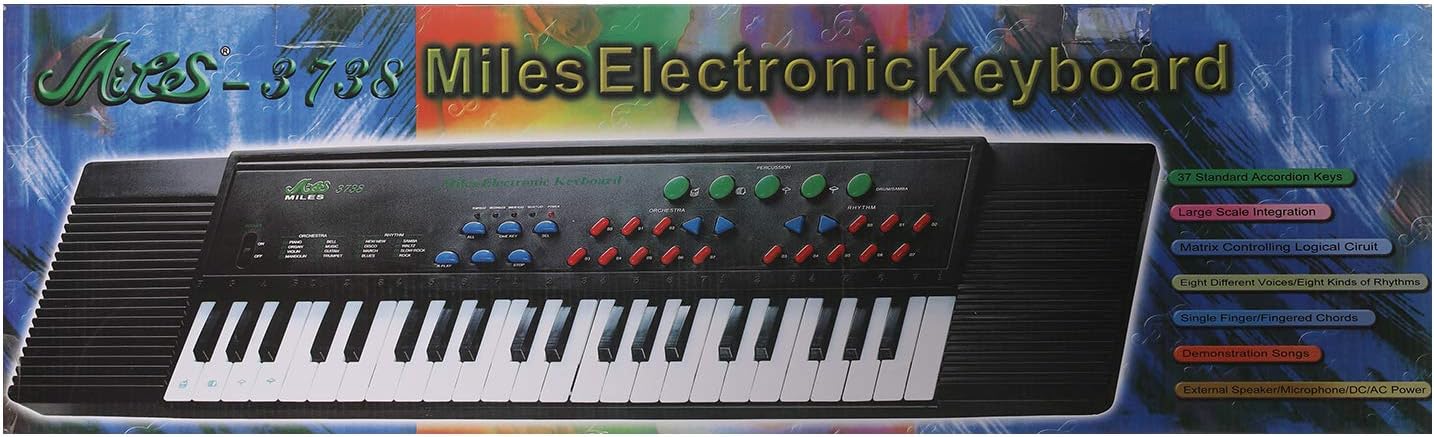
Figure 1: Miles Electronic Keyboard Model F, shown in its retail packaging. The image highlights key features such as 37 standard accordion keys, large scale integration, matrix controlling logical circuit, eight different voices/rhythms, single/fingered chords, demonstration songs, and external speaker/microphone/DC/AC power capabilities.
3. Setup
- Unpacking: Carefully remove the keyboard from its packaging. Retain all packaging materials for future storage or transport.
- Power Connection:
- AC Power: Connect a compatible AC power adapter (not included, check specifications for voltage/current requirements) to the DC IN jack on the keyboard and then to a standard wall outlet.
- DC Power (Batteries): If using batteries (not included), open the battery compartment cover on the underside of the keyboard. Insert the required number of batteries, ensuring correct polarity (+/-). Close the battery compartment cover securely.
- Placement: Place the keyboard on a stable, flat surface. Ensure there is adequate space around the unit for ventilation and comfortable play. Avoid placing it near heat sources, direct sunlight, or areas with high humidity.
- External Connections (Optional):
- Microphone: Connect a microphone (not included) to the MIC IN jack for vocal input.
- External Speaker: Connect an external speaker system (not included) to the AUDIO OUT jack for amplified sound.
4. Operating Instructions
4.1 Basic Operation
- Power On/Off: Locate the POWER button or switch and press it to turn the keyboard on. Press it again to turn the keyboard off.
- Volume Control: Use the VOLUME control knob or buttons to adjust the overall sound level.
- Playing the Keys: Press the 37 standard keys to produce musical notes.
4.2 Voices and Rhythms
- Selecting Voices: Use the VOICE selection buttons to choose from the eight available instrument sounds (e.g., Piano, Organ, Guitar).
- Selecting Rhythms: Use the RHYTHM selection buttons to choose from the eight available rhythm patterns (e.g., Rock, Disco, Waltz).
- Rhythm Tempo: If available, use the TEMPO buttons to adjust the speed of the selected rhythm.
4.3 Chord Functions
- Single Finger Chords: Activate the "Single Finger Chord" mode. Press a single key in the lower section of the keyboard to play a full chord.
- Fingered Chords: Activate the "Fingered Chord" mode. Play multiple keys in the lower section of the keyboard to form specific chords. Refer to basic chord charts for common fingerings.
4.4 Demonstration Songs
Press the "DEMO" or "DEMONSTRATION SONG" button to play pre-recorded melodies. This feature allows users to listen to various musical pieces and can aid in learning.
5. Maintenance
- Cleaning: Use a soft, dry cloth to wipe the surface of the keyboard. Do not use abrasive cleaners, solvents, or waxes, as these can damage the finish.
- Storage: When not in use, store the keyboard in a cool, dry place, away from direct sunlight and extreme temperatures. If storing for an extended period, remove batteries to prevent leakage.
- Handling: Avoid dropping the keyboard or subjecting it to strong impacts. Do not place heavy objects on top of the unit.
6. Troubleshooting
| Problem | Possible Cause | Solution |
|---|---|---|
| No sound from the keyboard. |
|
|
| Some keys do not produce sound. |
|
|
| Rhythm or voice selection not working. |
|
|
7. Specifications
- Brand: Miles
- Model: F
- Instrument Type: Electronic Keyboard
- Number of Keys: 37 Standard Accordion Keys
- Voices: 8 Different Voices
- Rhythms: 8 Kinds of Rhythms
- Chord Functions: Single Finger Chords, Fingered Chords
- Special Features: Large Scale Integration, Matrix Controlling Logical Circuit, Demonstration Songs
- Connectivity: External Speaker/Microphone ports
- Power Source: DC/AC Power (Adapter not included), Battery operated (Batteries not included)
- Material: Mixed Materials
- Product Dimensions: 9 x 8 x 7 cm
- Item Weight: 750 Grams
- Recommended Age: 5 Years & Above
8. Warranty and Support
For warranty information and customer support, please refer to the documentation provided at the time of purchase or contact your retailer. Keep your proof of purchase for any warranty claims. For technical assistance or inquiries, please reach out to the manufacturer's customer service department.