Introduction
Thank you for choosing the Toyotomi TAD-T33 Portable Air Conditioner. This manual provides important information regarding the safe operation, installation, maintenance, and troubleshooting of your new air conditioner. Please read this manual thoroughly before using the appliance and keep it for future reference.
Safety Information
To prevent injury to the user or other people and property damage, the following instructions must be followed. Incorrect operation due to ignoring instructions may cause harm or damage.
- Always use a grounded power outlet.
- Do not operate the unit with wet hands.
- Do not block air inlets or outlets.
- Keep the unit away from heat sources and direct sunlight.
- Ensure the unit is placed on a stable, level surface.
- Unplug the unit before cleaning or servicing.
Package Contents
Verify that all items listed below are present in your package:
- Toyotomi TAD-T33 Portable Air Conditioner Unit
- Exhaust Hose
- Window Sealing Plate Kit (Adjustable)
- Hose Adapters (for unit and window kit)
- Remote Control
- Drain Hose (if applicable)
- User Manual (this document)

Product Overview
Familiarize yourself with the main components of your portable air conditioner.

Control Panel

- Digital Display: Shows temperature, timer settings, and error codes.
- ON/OFF Button: Powers the unit on or off.
- TEMP/TIME Buttons (+/-): Adjusts temperature settings or timer duration.
- SPEED Button: Selects fan speed (Low, Medium, High).
- TIMER Button: Activates or deactivates the timer function.
- MODE Button: Cycles through operating modes (Cool, Fan, Dry).
Remote Control
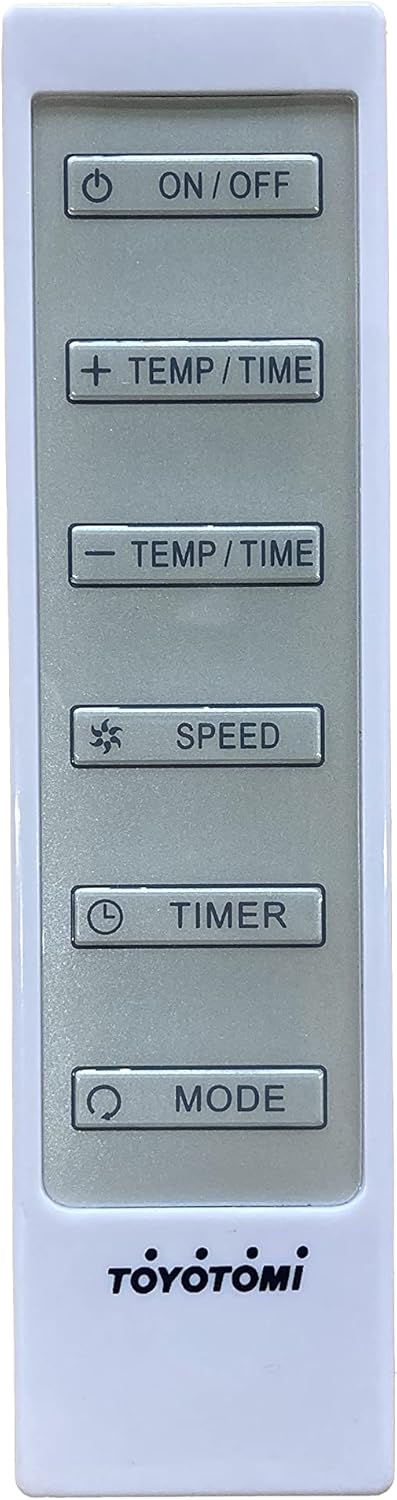
The remote control duplicates most functions of the control panel for convenient operation.
Setup
1. Placement
Place the unit on a firm, level surface in a location that allows for proper ventilation. Maintain at least 20 cm (8 inches) of space from walls or other objects to ensure proper airflow.
2. Window Kit Installation
- Assemble the window sealing plate kit according to your window type (sliding or casement).
- Insert the exhaust hose adapter into the opening of the window sealing plate.
- Secure the window sealing plate in your window opening, extending it to fit snugly.
3. Exhaust Hose Connection
- Attach one end of the exhaust hose to the hose adapter on the back of the air conditioner unit.
- Attach the other end of the exhaust hose to the adapter in the window sealing plate.
- Ensure both connections are secure to prevent air leakage.
4. Drainage Setup (Continuous Drainage)
For continuous drainage in dehumidifying mode or high humidity environments, connect the drain hose (if included) to the continuous drain port on the back of the unit and direct it to a suitable drain or container.
5. Power Connection
Plug the power cord into a grounded 120V/60Hz electrical outlet. Do not use extension cords or power strips.
Operating Instructions
Turning On/Off
Press the ON/OFF button on the control panel or remote control to power the unit on or off.
Selecting Operating Mode
Press the MODE button repeatedly to cycle through the available modes:
- Cool Mode: For cooling the room.
- Fan Mode: Circulates air without cooling.
- Dry Mode (Dehumidify): Reduces humidity in the air.
Setting Temperature
In Cool mode, use the TEMP/TIME + or TEMP/TIME - buttons to adjust the desired temperature. The temperature range is typically 17°C to 30°C (62°F to 86°F).
Adjusting Fan Speed
Press the SPEED button to select the desired fan speed: Low, Medium, or High.
Using the Timer Function
The timer function allows you to set a time for the unit to automatically turn on or off.
- Press the TIMER button.
- Use the TEMP/TIME + or TEMP/TIME - buttons to set the desired delay time (in hours).
- The timer will activate after a few seconds.
Maintenance
Air Filter Cleaning
Clean the air filter every two weeks or more frequently if the unit is used often or in dusty environments. A dirty filter reduces airflow and cooling efficiency.
- Unplug the unit from the power outlet.
- Locate and remove the air filter from the back or side of the unit.
- Wash the filter with warm, soapy water. Rinse thoroughly.
- Allow the filter to air dry completely before reinstalling. Do not expose to direct sunlight.
Draining Accumulated Water
The unit has an internal water collection tank. When the tank is full, the unit will stop operating and display an error code (e.g., "FL").
- Turn off and unplug the unit.
- Place a shallow pan or tray under the drain port at the bottom rear of the unit.
- Remove the drain plug to allow water to flow out.
- Once drained, replace the drain plug securely.
Storage
Before storing the unit for an extended period:
- Drain all accumulated water.
- Clean the air filter.
- Store the unit in a cool, dry place, away from direct sunlight and extreme temperatures.
Troubleshooting
Before contacting customer support, please refer to the following table for common issues and their solutions.
| Problem | Possible Cause | Solution |
|---|---|---|
| Unit does not turn on. | No power, power cord unplugged, circuit breaker tripped. | Check power connection, reset circuit breaker. |
| Unit does not cool. | Air filter dirty, exhaust hose not properly installed, room too large, windows/doors open. | Clean air filter, ensure hose is sealed, close windows/doors. |
| Water leakage. | Drain plug loose, unit not level, continuous drain hose blocked. | Secure drain plug, place unit on level surface, clear drain hose. |
| Unit is noisy. | Unit not level, foreign object in fan, filter dirty. | Ensure unit is level, check for obstructions, clean filter. |
| Error code displayed (e.g., "FL"). | Water tank full. | Drain the water tank. |
Specifications
| Feature | Detail |
|---|---|
| Model Number | TAD-T33 |
| Cooling Capacity | 11,500 BTU/h |
| Product Dimensions (L x W x H) | 50.8 x 50.8 x 91.44 cm (20 x 20 x 36 inches) |
| Weight | 36.29 kg (79.99 lbs) |
| Voltage | 120 Volts |
| Form Factor | Portable |
| Special Feature | Portable |
Warranty and Support
This Toyotomi product comes with a limited warranty. For detailed warranty information, please refer to the warranty card included with your purchase or visit the official Toyotomi website. For technical support, parts, or service inquiries, please contact Toyotomi customer service through their official channels.
Note: Specific warranty terms and support contact information may vary by region.


