
1. Product Overview
The Pyle PDA4BU.5 is a versatile multi-channel home stereo amplifier designed to enhance your audio experience. It features a compact design, built-in Bluetooth for wireless music streaming, and a wide array of input options including optical, phono, coaxial, USB, SD, AUX, and RCA. This amplifier also includes FM radio functionality and microphone inputs for karaoke or public address applications, making it a comprehensive solution for your home audio needs.

Figure 1: Pyle PDA4BU.5 Wireless Bluetooth Home Stereo Amplifier with included remote.
2. Package Contents
Please check the box for the following items:
- Desktop Stereo Amplifier (PDA4BU.5)
- Remote Control
- FM Antenna

Figure 2: Items included in the Pyle PDA4BU.5 amplifier package.
3. Setup Guide
Follow these steps to set up your Pyle PDA4BU.5 amplifier:
3.1 Connecting Speakers
- Ensure the amplifier is powered off and unplugged.
- Connect your passive speakers to the Banana Plug Speaker Output Connectors on the rear panel. Ensure correct polarity (+ to + and - to -) for each speaker. The amplifier supports 4-16 Ohm speakers.
3.2 Connecting Audio Sources
The amplifier offers various input options:
- RCA Inputs (L/R): Connect CD/DVD players, mixers, or other audio devices using RCA cables to the "CD/PHONO/DVD" or "AUX" RCA input pairs.
- Optical/Coaxial Digital Inputs: For digital audio sources like TVs or game consoles, use the Optical or Coaxial digital inputs.
- Phono Input: Connect a turntable directly to the dedicated Phono input.
- AUX (3.5mm) Input: Use the 3.5mm AUX input on the front panel for portable devices like smartphones or MP3 players.
- USB/SD Card Readers: Insert a USB flash drive or SD memory card into the respective slots on the front panel for direct playback of MP3/WAV audio files.
- Microphone Inputs: Connect up to two 1/4'' microphones to the front panel jacks for karaoke or public address.
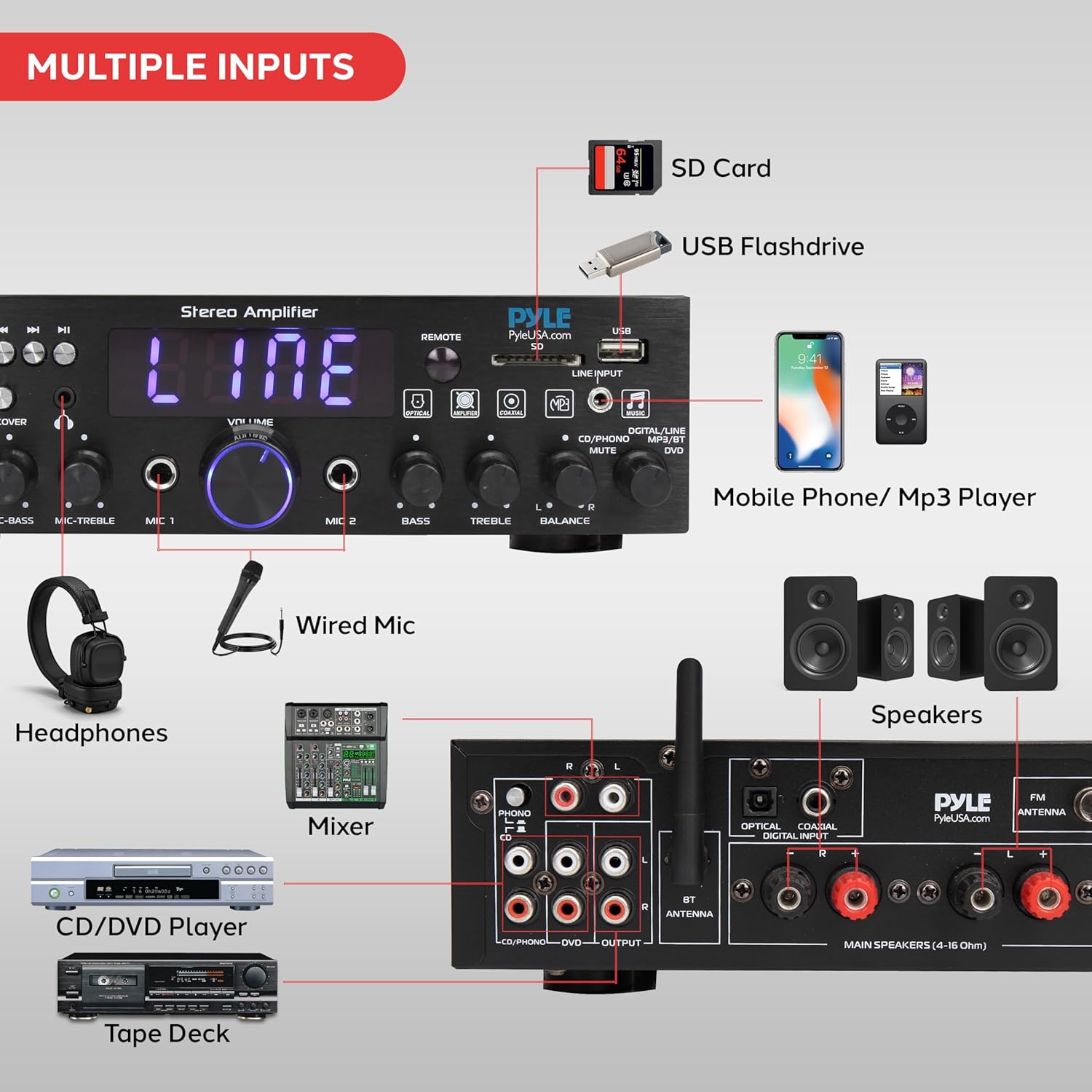
Figure 3: Overview of various input and output connections on the amplifier.
3.3 Connecting FM Antenna
Connect the included FM antenna to the "FM ANTENNA" terminal on the rear panel for optimal FM radio reception.
3.4 Power Connection
After all connections are made, plug the amplifier's power cord into a standard 115V/230V AC power outlet. Ensure the voltage switch on the rear is set correctly for your region.
4. Operating Instructions
4.1 Front Panel Controls
The front panel provides easy access to all primary functions:

Figure 4: Precision control at your fingertips with the front panel.
- POWER Button: Turns the unit on or off.
- MODE Button: Cycles through input sources (USB, SD, FM, AUX, Optical, Coaxial, Phono, Bluetooth).
- EQ Button: Activates or deactivates the equalizer.
- TALKOVER Switch: Enables or disables the microphone talk-over function.
- VOLUME Knob: Adjusts the master volume level.
- MIC/VOL, ECHO, MIC-BASS, MIC-TREBLE Knobs: Controls for microphone volume, echo effect, bass, and treble.
- BASS, TREBLE, BALANCE Knobs: Adjusts the overall bass, treble, and left/right channel balance for the main audio output.
- USB/SD Slots: For media playback.
- LED Digital Display: Shows current mode, FM frequency, or track information.
4.2 Remote Control Operation
The included remote control allows for convenient operation from a distance. Functions include power on/off, input selection, volume control, track navigation (for USB/SD), FM tuning, and mute.
4.3 Bluetooth Connectivity
Stream audio wirelessly from your Bluetooth-enabled devices:
- Press the MODE button on the front panel or remote until "BLUE" appears on the LED display.
- On your smartphone, tablet, or computer, search for Bluetooth devices and select "PDA4BU" from the list.
- Once paired, you can stream audio wirelessly. The wireless range is approximately 40+ feet.

Figure 5: Enjoy wireless audio streaming via Bluetooth.
4.4 FM Radio Operation
To use the FM radio:
- Switch the input mode to FM.
- Use the "Radio Station Auto-Search Scan" function (refer to remote control buttons or front panel instructions for specific button) to automatically scan and save available stations.
- Manually tune or select saved stations using the remote control.
4.5 Microphone Talk-Over Function
The microphone talk-over function allows your voice to be heard clearly over background music, ideal for karaoke or announcements.
- Connect a microphone to one of the 1/4'' MIC input jacks.
- Adjust the MIC/VOL knob to set the microphone volume.
- Toggle the TALKOVER switch to "ON" to activate the function. When active, the background music volume will automatically lower when you speak into the microphone.

Figure 6: Utilize the microphone talk-over function for clear announcements or karaoke.
5. Maintenance
To ensure the longevity and optimal performance of your amplifier, follow these maintenance guidelines:
- Cleaning: Disconnect the power cord before cleaning. Use a soft, dry cloth to wipe the exterior. Do not use liquid cleaners or aerosol sprays.
- Ventilation: Ensure the amplifier has adequate ventilation. Do not block ventilation openings. Avoid placing the unit in enclosed spaces or on soft surfaces that may impede airflow.
- Placement: Place the amplifier on a stable, flat surface away from direct sunlight, heat sources, and moisture.
- Power Cord: Regularly inspect the power cord for any damage. If damaged, do not use the unit and contact customer support.
6. Troubleshooting
If you encounter issues with your amplifier, refer to the following common problems and solutions:
| Problem | Possible Cause | Solution |
|---|---|---|
| No Power | Power cord not connected; Power outlet not active; Power switch off. | Ensure power cord is securely plugged in. Check power outlet with another device. Turn the POWER switch to ON. |
| No Sound Output | Incorrect input selected; Volume too low; Speakers not connected properly; Mute function active. | Press MODE to select correct input. Increase VOLUME. Check speaker connections and polarity. Deactivate MUTE. |
| Bluetooth Not Connecting | Amplifier not in Bluetooth mode; Device too far; Device already connected to another amplifier. | Switch amplifier to Bluetooth mode. Move device closer to amplifier. Disconnect device from other Bluetooth connections. |
| Poor FM Reception | FM antenna not connected or poorly positioned. | Ensure FM antenna is securely connected. Adjust antenna position for better signal. |
| Distorted Sound | Volume too high; Incorrect impedance speakers; Damaged audio source/cable. | Lower the volume. Ensure speakers match amplifier impedance (4-16 Ohm). Test with a different audio source or cable. |
7. Technical Specifications
Detailed specifications for the Pyle PDA4BU.5 amplifier:
- MAX Power Output: 25 Watt (@ 4 Ohm)
- RMS Power Output: 20 Watt x 2 (@ 8 Ohm)
- Tone Control (Bass): f=100Hz +/-12dB
- Tone Control (Treble): f=10 KHz +/-12dB
- Tone Control for Mic (Bass): f=100Hz +/-8dB
- Tone Control for Mic (Treble): f=10 KHz +/-8dB
- Frequency Response: 20Hz-20 kHz
- Frequency Adjustment: +/-2dB
- Signal to Noise Ratio: >71dB
- T.H.D.: 48dB
- Bluetooth Version: 4.2
- Bluetooth Network Name: 'PDA4BU'
- Wireless Range: 40'+ Ft.
- Power Supply: 115V/230V, Switchable
- LED Screen Size: 3.3'' x 1''
- Remote Control Battery: 3V Lithium Cell (CR2025) Included
- Dimensions (L x W x H): 10.2'' x 9.8'' x 2.8'' -inches
- Item Weight: 6.3 pounds

Figure 7: The compact design of the amplifier, with dimensions indicated.
8. Warranty and Support
For warranty information and technical support, please refer to the official Pyle website or contact their customer service directly. A detailed User Manual in PDF format is also available for download from the product's Amazon page or Pyle's support section for further assistance.
You can find the official User Manual (PDF) here.


