
1. Introduction
The FLAMMA FV02 Vocal Processor Doubling Effects Pedal is designed for vocalists and guitarists seeking to enhance their sound with rich chorus and reverb effects. This compact stompbox offers multiple vocal modes, phantom power support, and flexible output options, making it a versatile tool for live performances, studio recording, and practice.

Figure 1: Front view of the FLAMMA FV02 Vocal Doubling Pedal.
2. Key Features
- Vocal doubling effects for enhanced vocal presence.
- Built-in vocal reverb effects with Room, Hall, and Plate options.
- Guitar input with optional guitar reverb effect.
- Support for 48V phantom power for condenser microphones.
- Line-in function for external microphone amplifiers or other FV series pedals.
- Two different output modes: mixed signal or individual signals for guitar and microphone.
- Three tone modes (Warm, Bright, Normal) for EQ manipulation.

Figure 2: Visual representation of the pedal's key features.
3. Setup
3.1 Power Connection
Connect a 9V DC 500mA power adapter (center negative) to the DC IN port on the pedal's rear panel. Ensure the power supply meets the specified requirements to prevent damage.
3.2 Microphone and Guitar Connections
Connect your microphone to the MIC XLR input. If using a condenser microphone, ensure the 48V phantom power switch is engaged. Connect your guitar to the GUITAR IN 1/4-inch input.

Figure 3: FLAMMA FV02 connected to a microphone and guitar.

Figure 4: Rear panel showing power, microphone, and output connections.
3.3 Output Modes
The FV02 supports two output modes: Individual Mode and Mix Mode. You can switch between these modes by pressing and holding the footswitch while powering on the pedal.
- Individual Mode: Microphone signal outputs via XLR OUT, and guitar signal outputs via GUITAR OUT.
- Mix Mode: Both microphone and guitar signals are mixed and output via XLR OUT. The GUITAR OUT will output the guitar signal only.
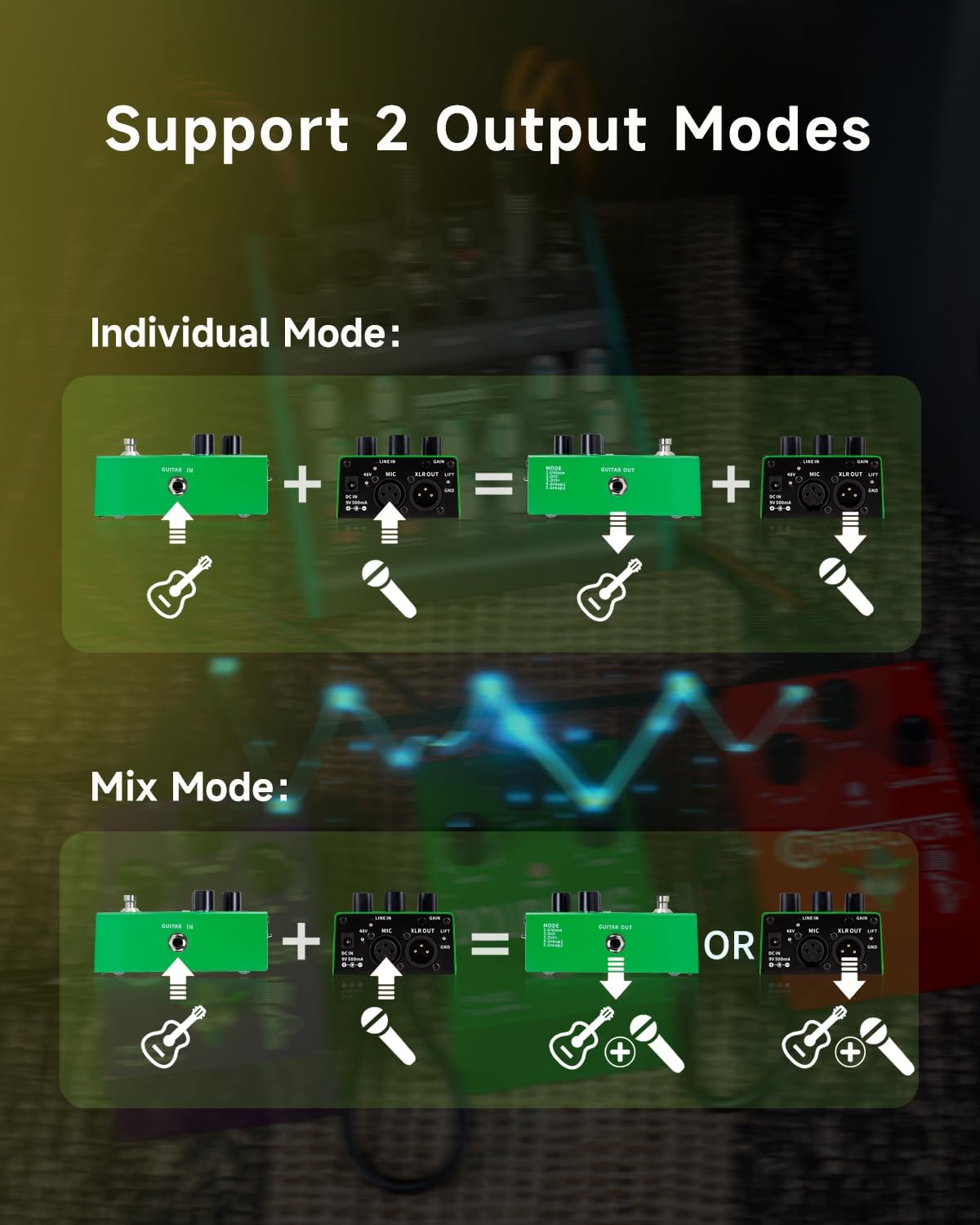
Figure 5: Diagram illustrating Individual and Mix output modes.
4. Operating the Pedal
4.1 Controls Overview
- MODE Knob: Selects one of the 5 vocal doubling modes.
- REVERB Knob: Selects one of the 3 reverb types (RM, HL, PL) or turns reverb off.
- LEVEL Knob: Adjusts the overall output level of the effect.
- TONE Button: Cycles through Warm, Bright, and Normal tone modes.
- Footswitch: Toggles the effect on/off.

Figure 6: Close-up of the REVERB knob.

Figure 7: Close-up of the MODE knob.
4.2 Vocal Doubling Modes
Rotate the MODE knob to select from the following doubling effects:
| Effect | Name | Description |
|---|---|---|
| Doubling Mode | UNISON | Unison single-voice chorus |
| Doubling Mode | Oct - | Lower octave single-voice chorus |
| Doubling Mode | Oct + | Upper octave single-voice chorus |
| Doubling Mode | Group1 | Lower/upper multi-voice chorus |
| Doubling Mode | Group2 | Unison multi-voice chorus |
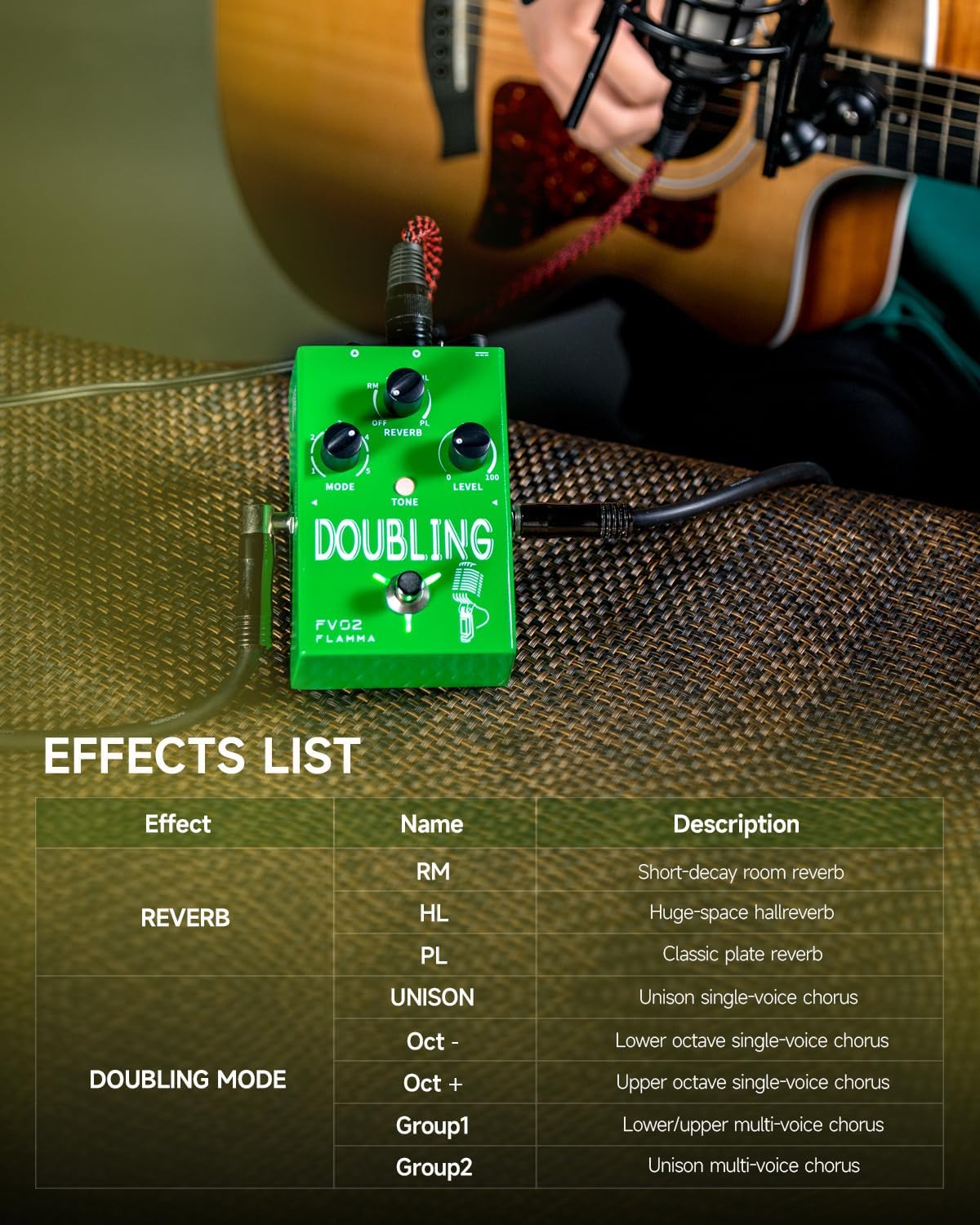
Figure 8: Detailed list of vocal doubling effects.
4.3 Tone Modes
Press the TONE button to cycle through three different EQ settings:
- Warm (Red LED): Adds warmth to the vocal tone.
- Bright (Blue LED): Adds brightness to the vocal tone.
- Normal (LED Off): Provides a neutral tone without EQ manipulation.
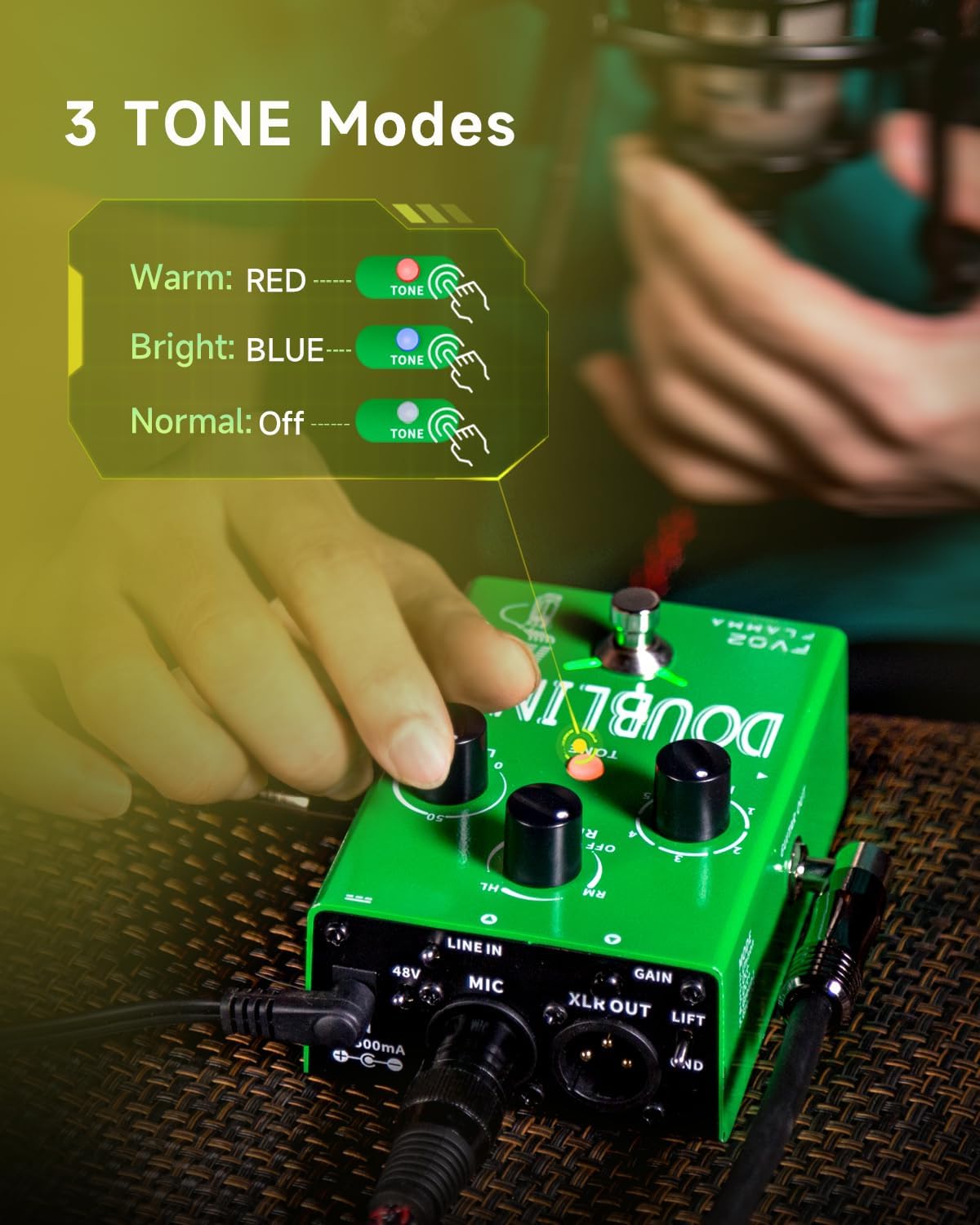
Figure 9: Visual representation of the three tone modes.
4.4 Official Product Videos
FLAMMA FV02 Vocal Effects Processor with Reverb Chorus Effects
Video demonstrating the various vocal effects and features of the FLAMMA FV02 pedal.
Rundown of modes of FV02
A detailed rundown of the different vocal modes available on the FV02 pedal.
5. Specifications
| Attribute | Value |
|---|---|
| Item Weight | 12.8 ounces |
| Product Dimensions | 3.4 x 4.9 x 2.3 inches |
| Country of Origin | China |
| Item model number | FV02 |
| Signal Format | Digital |
| Power Source | Corded Electric |
| Voltage | 9 Volts |
| Style | Vocal Doubling Effects |
6. Maintenance
To ensure the longevity and optimal performance of your FLAMMA FV02 pedal, follow these maintenance guidelines:
- Cleaning: Use a soft, dry cloth to clean the pedal's exterior. Avoid using abrasive cleaners or solvents.
- Storage: Store the pedal in a cool, dry place away from direct sunlight and extreme temperatures.
- Power Supply: Always use the recommended 9V DC 500mA (center negative) power supply. Using an incorrect power supply can damage the unit and void the warranty.
- Handling: Handle the pedal with care. Avoid dropping it or subjecting it to strong impacts.
7. Troubleshooting
If you encounter issues with your FV02 pedal, try the following troubleshooting steps:
- No Sound:
- Check all cable connections (microphone, guitar, outputs, power).
- Ensure the pedal is powered on and the footswitch LED is illuminated.
- Verify the LEVEL knob is not set to zero.
- If using a condenser mic, ensure 48V phantom power is enabled.
- Unwanted Noise/Hum:
- Ensure all cables are properly shielded and in good condition.
- Try a different power outlet or power supply.
- Check for ground loop issues; use the GND LIFT switch if necessary.
- Adjust the GAIN knob on the pedal's rear panel. Some users report reducing noise by maximizing pedal gain and lowering audio interface gain.
- Pedal Not Responding/Defective:
- Power cycle the unit (unplug and re-plug the power supply).
- If the pedal consistently malfunctions or does not power on, it may be defective. Refer to the support section for warranty information.
8. Support & Warranty
For further assistance or warranty information, please refer to the official user manual PDF or contact FLAMMA customer support.
FLAMMA products typically come with a limited manufacturer's warranty. Please check the official user manual or the FLAMMA website for specific warranty terms and conditions.
