Introduction
This manual provides instructions for the VINABTY RMT-D198P replacement remote control. This remote is designed to function as a direct replacement for various Sony DVD Player models, offering essential controls without the need for programming.
Compatibility
The RMT-D198P remote control is compatible with the following Sony DVD Player models:
- DVP-SR170
- DVP-SR760HP
- DVP-SR201P
- DVP-SR210P
- DVP-SR310P
- DVP-SR320
- DVP-SR405P
- DVP-SR510H
- DVP-SR750HP
It is also compatible with other remote control models: RMT-D197P, RMT-D197A, RMT-D198A.
Setup
Battery Installation
The remote control requires two AA batteries (not included). Follow these steps to install the batteries:
- Locate the battery compartment cover on the back of the remote control.
- Slide the cover downwards or press the latch and lift to open the compartment.
- Insert two AA batteries, ensuring the positive (+) and negative (-) terminals align correctly with the markings inside the compartment.
- Replace the battery compartment cover by sliding it back into place until it clicks securely.

Image: Rear view of the RMT-D198P remote control, highlighting the battery compartment. This is where two AA batteries are inserted.
No programming is required for this remote control. Once batteries are installed, it is ready for use with compatible Sony DVD Players.
Operating Instructions
To operate your Sony DVD Player with this remote, point the remote control directly at the DVD player and press the desired function button.
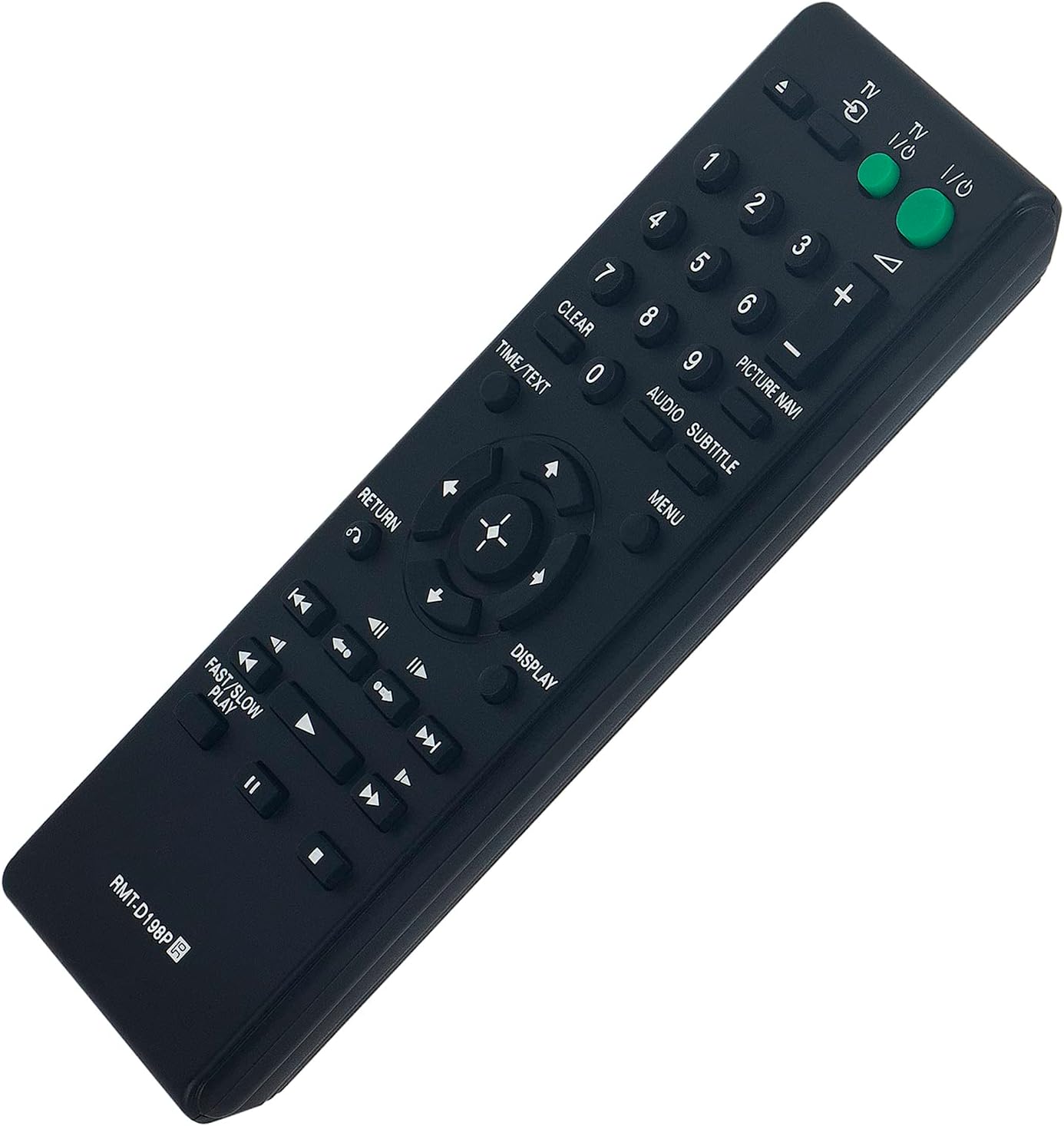
Image: Front view of the RMT-D198P remote control, displaying the layout of all control buttons.
Key Functions:
- TV I/O (Power): Turns the DVD player on or off.
- Number Buttons (0-9): For direct track selection or inputting numbers.
- CLEAR: Clears current selection or input.
- TIME/TEXT: Displays time information or text data.
- AUDIO: Selects audio tracks or languages.
- SUBTITLE: Toggles or selects subtitle options.
- PICTURE NAVI: Accesses picture navigation features.
- MENU: Opens the DVD menu.
- RETURN: Returns to the previous screen or menu.
- DISPLAY: Shows on-screen display information.
- Directional Pad (Up, Down, Left, Right, Enter): Navigates menus and confirms selections.
- Playback Controls (Play, Pause, Stop, Fast Forward, Rewind, Skip Forward, Skip Back): Standard media playback functions.
- FAST/SLOW PLAY: Adjusts playback speed.
Maintenance
- Cleaning: Wipe the remote control with a soft, dry cloth. Do not use liquid cleaners or abrasive materials.
- Battery Replacement: Replace batteries when the remote's response becomes sluggish or stops working. Always replace both batteries at the same time with new AA batteries.
- Storage: If the remote will not be used for an extended period, remove the batteries to prevent leakage and damage.
Troubleshooting
| Problem | Solution |
|---|---|
| Remote is not working. |
|
| Buttons are unresponsive. |
|
Specifications
- Model Number: RMT-D198P
- Brand: VINABTY
- Connectivity Technology: Infrared
- Compatible Devices: DVD/Blu-ray Player (specifically Sony DVD Players listed in compatibility section)
- Power Source: 2 x AA Batteries (not included)
- Product Dimensions: 6.8 x 2 x 0.75 inches
- Item Weight: 2 ounces
Support
If you encounter any issues or have questions regarding your VINABTY RMT-D198P remote control, please contact the seller for assistance. They aim to provide a reply within 24 hours.


