
1. Introduction
The Claymore Multi Pile Driver is a versatile and portable outdoor lighting stand designed to provide stable support for various lighting devices and accessories. Its lightweight aluminum construction, adjustable height, and multiple mounting options make it suitable for a wide range of outdoor and indoor applications.

Image: The Claymore Multi Pile Driver providing versatile lighting in an outdoor tent setting, demonstrating its adaptability for various environments.
2. Safety Information
- Always ensure the stand is placed on a stable, level surface to prevent tipping.
- Do not overload the stand beyond its intended weight capacity.
- Avoid using the stand in strong winds or extreme weather conditions without proper anchoring.
- Keep all components clean and free from debris to ensure proper function.
- Store the stand in its carrying pouch when not in use to protect components.
3. Package Contents
Verify that all the following components are included in your package:
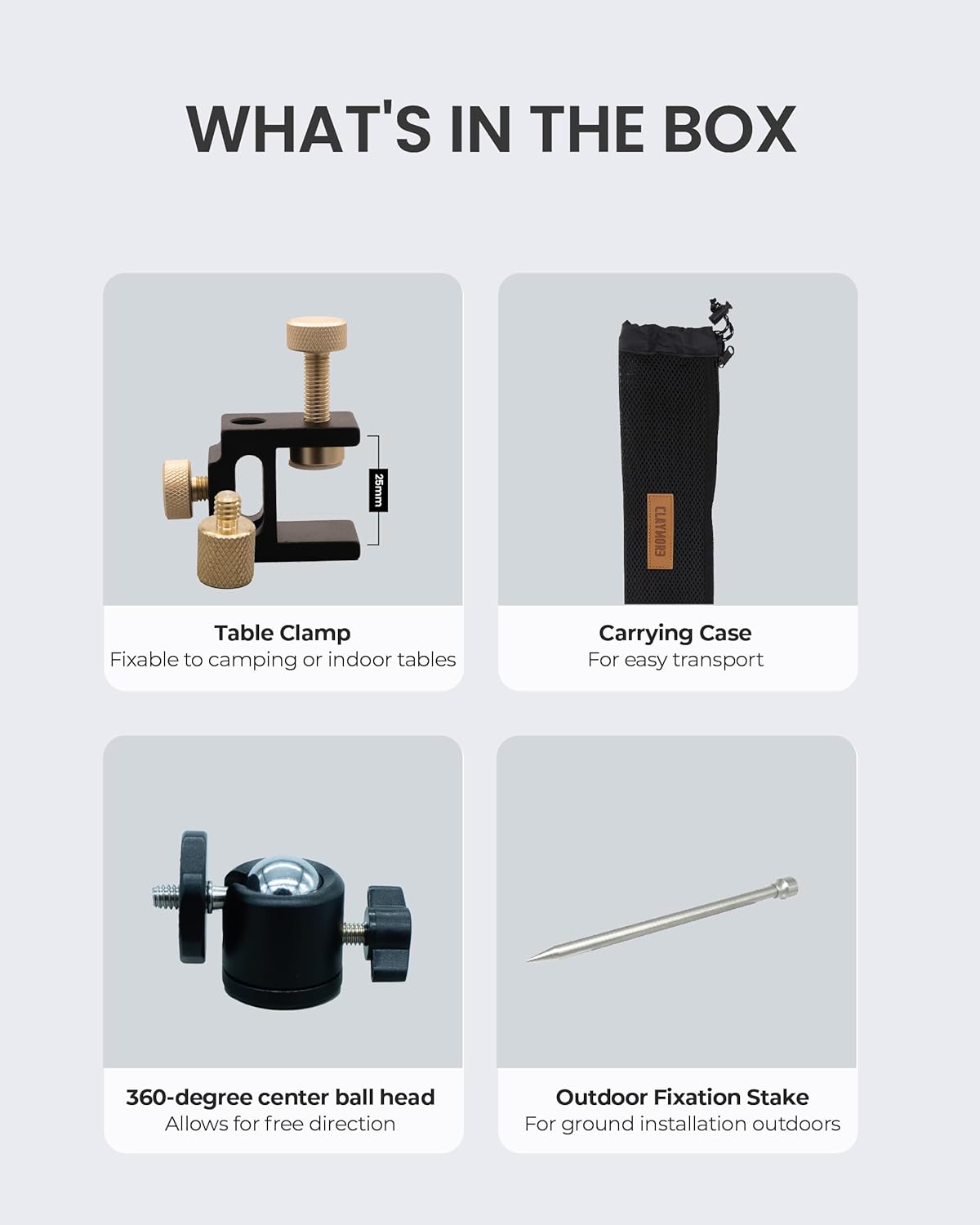
Image: All components of the Claymore Multi Pile Driver, neatly laid out, including the main poles, fixation stake, 360-degree ball head, table clamp, and carrying case.
- Multi Pile Driver Poles (4 sections)
- Outdoor Fixation Stake
- 360-degree Center Ball Head with 1/4-inch screw
- Table Clamp
- Carrying Pouch
- Lantern Hook (optional accessory, may be included)
4. Setup Instructions
4.1 Assembling the Stand Poles
- Unpack all pole sections from the carrying pouch.
- Screw the pole sections together clockwise until securely fastened. The stand features a 4-step height adjustment.

Image: Detailed view of the pole connection mechanism and the integrated lantern hook, highlighting the durable aluminum construction.
4.2 Attaching Mounting Options
The Multi Pile Driver offers two primary mounting methods:
4.2.1 Using the Outdoor Fixation Stake
- Attach the Outdoor Fixation Stake to the bottom of the assembled pole.
- Firmly push or gently hammer the stake into soft ground until stable. Ensure it is vertical.
4.2.2 Using the Table Clamp
- Attach the Table Clamp to the bottom of the assembled pole.
- Secure the clamp to a table edge or flat surface (maximum 25mm/0.97in thickness) by tightening the screw until firm.
4.3 Attaching the 360-degree Ball Head
- Screw the 360-degree Center Ball Head onto the 1/4-inch screw at the top of the main pole.
- Ensure it is tightened securely.
5. Operating Instructions
5.1 Adjusting Height
The stand offers a 4-step height adjustment. To adjust the height, simply add or remove pole sections. The height can range from 300mm (11.8in) to 1,250mm (49.2in).

Image: A visual representation of the adjustable height feature, illustrating the minimum (300mm/11.8in) and maximum (1250mm/49.2in) height settings of the stand.
5.2 Mounting Devices
The 1/4-inch screw on the 360-degree ball head is universally compatible with most cameras, lights, and other accessories. Screw your device onto the 1/4-inch bolt until it is snug.
5.3 Adjusting Device Angle
The 360-degree ball head allows for versatile directional adjustments. Loosen the knob on the ball head, position your device to the desired angle, and then tighten the knob to secure it.
5.4 Using the Lantern Hook
If included, the lantern hook can be attached to one of the pole sections to hang lanterns or other lightweight items, providing additional utility.
6. Maintenance
- Cleaning: Wipe down the aluminum poles and other components with a damp cloth. Avoid abrasive cleaners or solvents that could damage the finish.
- Storage: Disassemble the stand and store all components in the provided carrying pouch when not in use. This protects the parts from dirt, dust, and potential damage during transport or storage.
- Inspection: Periodically check all screw threads and connections for wear or damage. Ensure the ball head moves smoothly and locks securely.
7. Troubleshooting
| Problem | Possible Cause | Solution |
|---|---|---|
| Stand is unstable or wobbles. | Uneven ground; loose pole connections; clamp not tightened sufficiently. | Ensure stand is on a level surface. Tighten all pole sections. If using table clamp, ensure it is fully tightened to a stable surface. If using stake, ensure it is firmly inserted into the ground. |
| Ball head does not hold position. | Locking knob is loose; device is too heavy. | Tighten the ball head locking knob firmly. Ensure the mounted device does not exceed the stand's weight capacity. |
| Pole sections are difficult to screw together. | Dirt or debris in threads; cross-threading. | Clean threads thoroughly. Ensure sections are aligned correctly before screwing to avoid cross-threading. |
8. Specifications
- Model: CLA-D01
- Material: Lightweight Aluminum
- Weight: Approximately 450g (1 lbs)
- Adjustable Height: 300mm (11.8in) to 1,250mm (49.2in) (4-step adjustment)
- Compatibility: Universal 1/4-inch screw
- Ball Head: 360-degree detachable
- Mounting Options: Outdoor Fixation Stake, Table Clamp (max 25mm/0.97in thickness)
- Color: Black

Image: An infographic illustrating key features of the Claymore Multi Pile Driver, including its fixation stake, table clamp, 360-degree full rotation, ultra-lightweight design, and 1/4-inch head screw compatibility.
9. Warranty and Support
For warranty information or technical support, please refer to the official Claymore website or contact their customer service directly. Keep your purchase receipt as proof of purchase for any warranty claims.
Claymore Official Website: Visit the Claymore Store on Amazon