
Introduction
Thank you for purchasing the Paladone Friends Logo Light. This product is designed to provide ambient lighting and decorative appeal. This manual contains important information regarding the safe and proper use of your device. Please read it thoroughly before use and retain it for future reference.

Image: Front view of the Paladone Friends Logo Light, showcasing the illuminated 'FRIENDS' logo.
Safety Information
- Keep the device away from water and moisture.
- Do not expose to direct sunlight or extreme temperatures.
- Use only the specified power sources (USB or 3x AAA batteries).
- Do not attempt to open or modify the device. There are no user-serviceable parts inside.
- Keep out of reach of small children.
- Dispose of batteries responsibly according to local regulations.
Package Contents
- 1 x Paladone Friends Logo Light
- 1 x Micro USB Cable (approximately 151 cm / 59.5 inches)
- Instruction Manual (this document)
Note: 3x AAA batteries are required for battery operation and are not included.

Image: The Paladone Friends Logo Light shown within its retail packaging.
Setup
Power Source Options
The Friends Logo Light can be powered by either a USB connection or 3x AAA batteries.
- USB Power: Connect the provided Micro USB cable to the USB port on the back of the light and plug the other end into a compatible USB power adapter (not included) or a powered USB port.
- Battery Power: Open the battery compartment on the back of the light. Insert 3x AAA batteries, ensuring correct polarity (+/-). Close the battery compartment securely.

Image: Rear view of the light, illustrating the Micro USB input and the battery compartment for 3x AAA batteries.
Placement
The light is designed for versatile placement:
- Freestanding: Place the light on any flat, stable surface such as a desk, shelf, or bedside table.
- Wall Mount: The light features keyhole slots on the back for wall mounting. Use appropriate hardware (screws, anchors - not included) suitable for your wall type to securely hang the light.

Image: The Friends Logo Light displayed mounted on a wall, highlighting its wall-mountable feature.

Image: The Friends Logo Light placed on a wooden surface, demonstrating its use as a decorative item in a room.
Operating Instructions
Power On/Off
Locate the power button, typically on the side or back of the unit. Press the button once to turn the light on.
Light Modes
The Friends Logo Light features two distinct light modes:
- Normal Mode: Provides a steady, continuous illumination of the logo.
- Pulsing Mode: The light will gently pulse, creating a dynamic effect.
To switch between modes, press the power button repeatedly. Each press will cycle through the available modes (Off → Normal → Pulsing → Off).
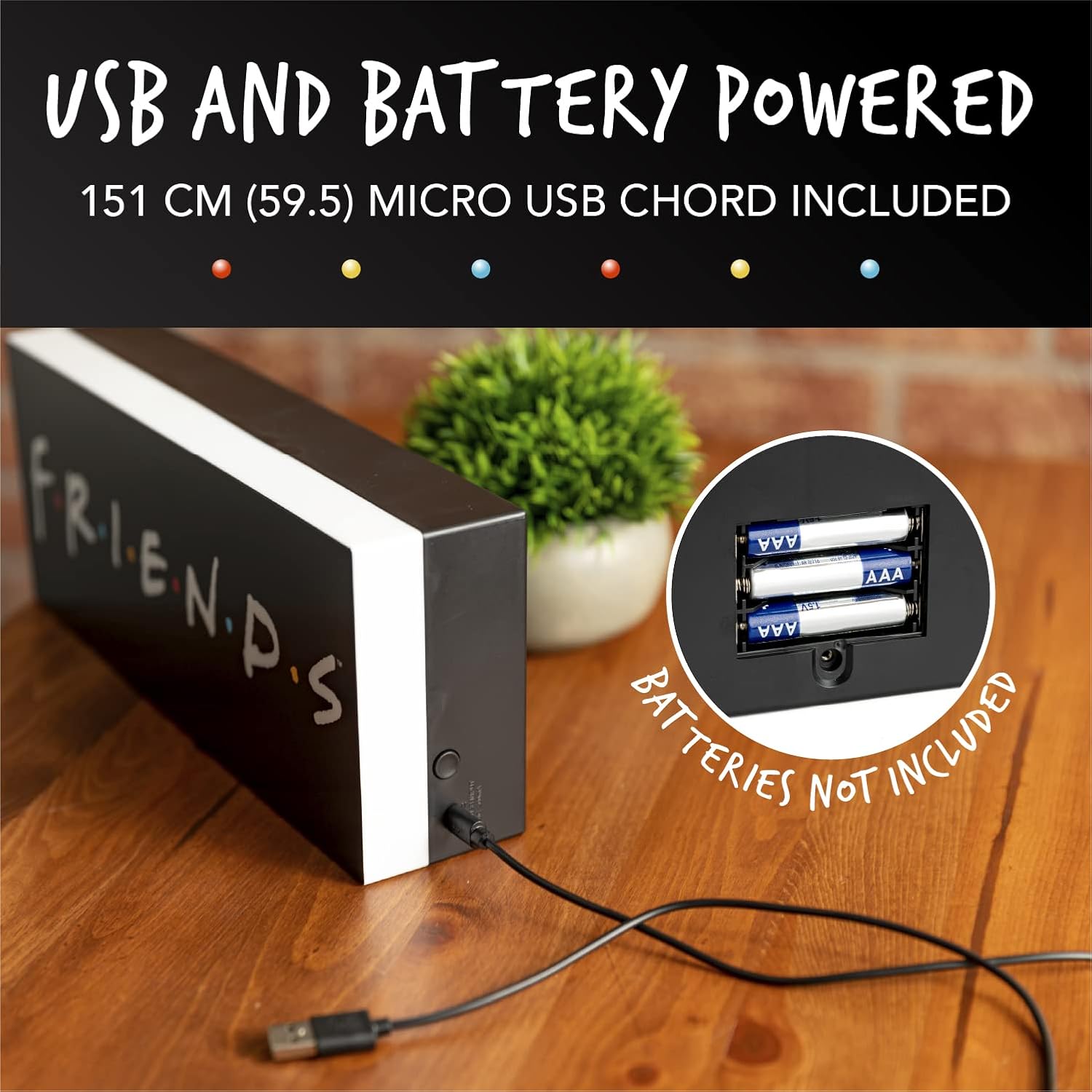
Image: The Friends Logo Light illustrating its two light modes: a steady 'Normal' illumination and a dynamic 'Pulsing' effect.
Maintenance
- To clean the light, gently wipe the surface with a soft, dry cloth.
- Do not use abrasive cleaners, solvents, or harsh chemicals, as these may damage the finish.
- If using batteries, remove them if the device will not be used for an extended period to prevent leakage.
Troubleshooting
| Problem | Possible Cause | Solution |
|---|---|---|
| Light does not turn on. | No power, dead batteries, or loose USB connection. | Check USB connection or replace batteries. Ensure batteries are inserted with correct polarity. |
| Light flickers or dims. | Low battery power or unstable USB connection. | Replace batteries or ensure USB cable is securely connected to a stable power source. |
| Cannot change light modes. | Button malfunction or power issue. | Ensure the device has sufficient power. Press the button firmly. If the issue persists, contact support. |
Specifications
| Model Number | PP8740FR |
| Dimensions (D x W x H) | 1.12" x 11.75" x 2.17" (2.84 cm x 29.85 cm x 5.51 cm) |
| Item Weight | 0.39 Kilograms (13.7 ounces) |
| Power Source | USB (5V DC) or 3x AAA Batteries (4.5V DC) |
| Light Source Type | LED |
| Material | Plastic |
| Color | Black and White |
| Control Method | Push Button |
| Indoor/Outdoor Usage | Indoor Only |
| Water Resistance Level | Not Water Resistant |

Image: The Friends Logo Light with its dimensions clearly marked in both centimeters and inches.
Warranty and Support
This product is manufactured by Paladone Products LTD. For warranty information or technical support, please refer to the contact details provided on the product packaging or visit the official Paladone website. Please retain your proof of purchase for any warranty claims.