1. Introduction
This manual provides detailed instructions for the safe installation, operation, and maintenance of your HALO SMD6 Square Surface Mount LED Downlight. The SMD6 is a low-profile, high-performance LED luminaire designed for modern indoor lighting applications. It features a 3000K warm white light output and 1135 lumens of brightness, offering efficient and quality illumination.
The SMD6 is primarily designed for surface mounting on 3.5-inch and 4-inch square, octagon, or round junction boxes. Additionally, it can be used to retrofit into existing 5-inch and 6-inch IC and Non-IC recessed housings.
2. Safety Information
- WARNING: Risk of Electric Shock. Disconnect power at the circuit breaker or fuse box before installation or servicing.
- All electrical connections must be in accordance with local and National Electrical Code (NEC) standards. If you are unfamiliar with proper electrical wiring connections, consult a qualified electrician.
- This fixture is intended for indoor use only. Do not install in wet or damp locations.
- Do not attempt to modify the fixture. Any modifications may void the warranty and create a safety hazard.
- Ensure the mounting surface can support the weight of the fixture.
- Do not look directly into the LED light source for extended periods.
3. Package Contents
Verify that all components are present before beginning installation:
- HALO SMD6 Square Surface Mount LED Downlight (1 unit)
- Supply wire adapter with GU24 base and LED quick wiring connector (1 unit)
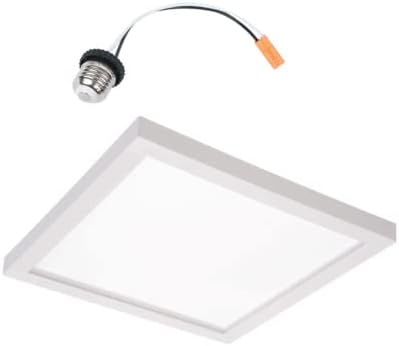
This image displays the HALO SMD6 square LED downlight and the included GU24 screw-in adapter with a quick-connect plug, used for connecting the fixture to standard junction box wiring.
4. Setup and Installation
Tools Required (Not Included): Screwdriver, wire strippers, electrical tape.
Pre-Installation Steps:
- Turn off power: Locate the circuit breaker or fuse box controlling the light fixture you are replacing or installing. Turn off the power completely. Verify power is off using a voltage tester.
- Prepare the junction box: Ensure the junction box is securely mounted and accessible. The SMD6 is compatible with 3.5-inch and 4-inch square, octagon, or round junction boxes.
- Remove existing fixture (if applicable): Carefully disconnect and remove any existing light fixture.
Installation Steps (Surface Mount):
- Connect the GU24 adapter: Screw the GU24 adapter into the existing GU24 socket in your junction box, or if hardwiring, connect the adapter's wires to the junction box wiring: black wire to the hot (black) wire, white wire to the neutral (white) wire, and ground wire to the ground wire. Secure connections with wire nuts (not included) and electrical tape.
- Connect the downlight: Plug the quick wiring connector from the GU24 adapter into the corresponding receptacle on the back of the HALO SMD6 downlight. Ensure a secure connection.
- Mount the downlight: Align the mounting holes on the back of the SMD6 downlight with the screw holes on your junction box. Secure the downlight to the junction box using the provided screws or appropriate mounting hardware (not included). Ensure the fixture is flush with the ceiling surface.
- Restore power: Once the fixture is securely installed and all connections are checked, restore power at the circuit breaker.
Installation Steps (Retrofit into Recessed Housing):
The SMD6 can also retrofit into 5-inch and 6-inch recessed housings. Follow the same connection steps as above, ensuring the GU24 adapter is properly connected within the recessed housing. The spring clips on the SMD6 will secure it into the recessed can aperture.
5. Operating Instructions
The HALO SMD6 LED Downlight is designed for simple operation. Once properly installed and powered, the light can be controlled using a standard wall switch connected to the circuit. There are no integrated controls on the fixture itself.
6. Maintenance
- Cleaning: To clean the fixture, ensure power is off. Use a soft, dry, or slightly damp cloth. Do not use abrasive cleaners, solvents, or cleaning agents containing alcohol, as these can damage the finish or optical components.
- No User-Serviceable Parts: The LED light source is integrated and not replaceable. Do not attempt to open or repair the fixture.
- Regularly inspect the fixture for any signs of damage or loose connections.
7. Troubleshooting
If you experience issues with your HALO SMD6 downlight, refer to the following common troubleshooting steps:
- Light does not turn on:
- Ensure the wall switch is in the 'ON' position.
- Check the circuit breaker or fuse box to confirm power is supplied to the circuit.
- Verify all electrical connections are secure and properly wired.
- Light flickers or dims unexpectedly:
- Check all electrical connections for looseness.
- Ensure the voltage supply is stable and within the specified range (120-277V).
- If using a dimmer, ensure it is compatible with LED fixtures. (Note: Dimmability is not explicitly stated for this model, but if flickering occurs with a dimmer, it may be incompatible).
- Light output is low or inconsistent:
- Verify the fixture is clean and free from obstructions.
- Ensure the ambient temperature is within the operating range for LED fixtures.
If these steps do not resolve the issue, contact HALO customer support.
8. Specifications
| Feature | Specification |
|---|---|
| Model Number | SMD6 |
| Brand | HALO |
| Light Output | 1135 Lumens (Max) |
| Color Temperature | 3000K (Warm White) |
| Color Rendering Index (CRI) | 90 |
| Power Source | Corded Electric |
| Voltage | 120-277 Volts (Universal) |
| Energy Consumption | LED, equivalent to 90W incandescent |
| Installation Type | Surface Mount (also retrofits 5"/6" recessed) |
| Indoor/Outdoor Usage | Indoor |
| Water Resistance Level | Not Water Resistant |
| Fixture Form | Square |
| Finish Type | Painted |
| Shade Material | Plastic, Metal |
| Item Weight | 1 Pound |
| UPC | 080083817726 |
9. Warranty Information
For detailed warranty information regarding your HALO SMD6 LED Downlight, please refer to the official HALO website or the warranty documentation included with your product packaging. Warranty terms and conditions may vary.
10. Support
Should you require technical assistance, have questions about installation, or need customer support, please visit the official HALO website or contact their customer service department. Contact information can typically be found on the manufacturer's website or product packaging.


