
Introduction
This manual provides detailed instructions for the setup, operation, and maintenance of your IXIU L8 Smartwatch. Please read this manual thoroughly to ensure proper use and to maximize the device's functionality. Keep this manual for future reference.
Package Contents
Verify that all items are present in the package:
- IXIU L8 Smartwatch (with pre-installed battery)
- Black Silicone Band
- Charging Cable
- User Manual (this document)
Getting Started
1. Charging the Device
Before initial use, fully charge your smartwatch. Connect the charging cable to the charging port on the back of the watch and plug the USB end into a standard USB power adapter (not included) or a computer's USB port. The watch display will indicate charging status. A full charge typically takes approximately 2-3 hours.
2. App Installation and Device Pairing
To unlock the full potential of your IXIU L8 Smartwatch, you need to install the companion application on your smartphone. The app is compatible with both Android and iOS operating systems.
- Scan the QR code provided in the quick start guide (if available) or search for the official app name (e.g., 'WearFit', 'Da Fit', 'FitPro' - refer to packaging for exact name) in your phone's app store (Google Play Store for Android, Apple App Store for iOS).
- Download and install the application.
- Ensure Bluetooth is enabled on your smartphone.
- Open the installed app and follow the on-screen instructions to create an account or log in.
- Within the app, navigate to the 'Device' or 'Add Device' section. The app will search for nearby smartwatches.
- Select 'L8' from the list of discovered devices to initiate pairing. Confirm the pairing request on both your phone and the smartwatch if prompted.
- Once paired, the watch will synchronize time and data with your phone.
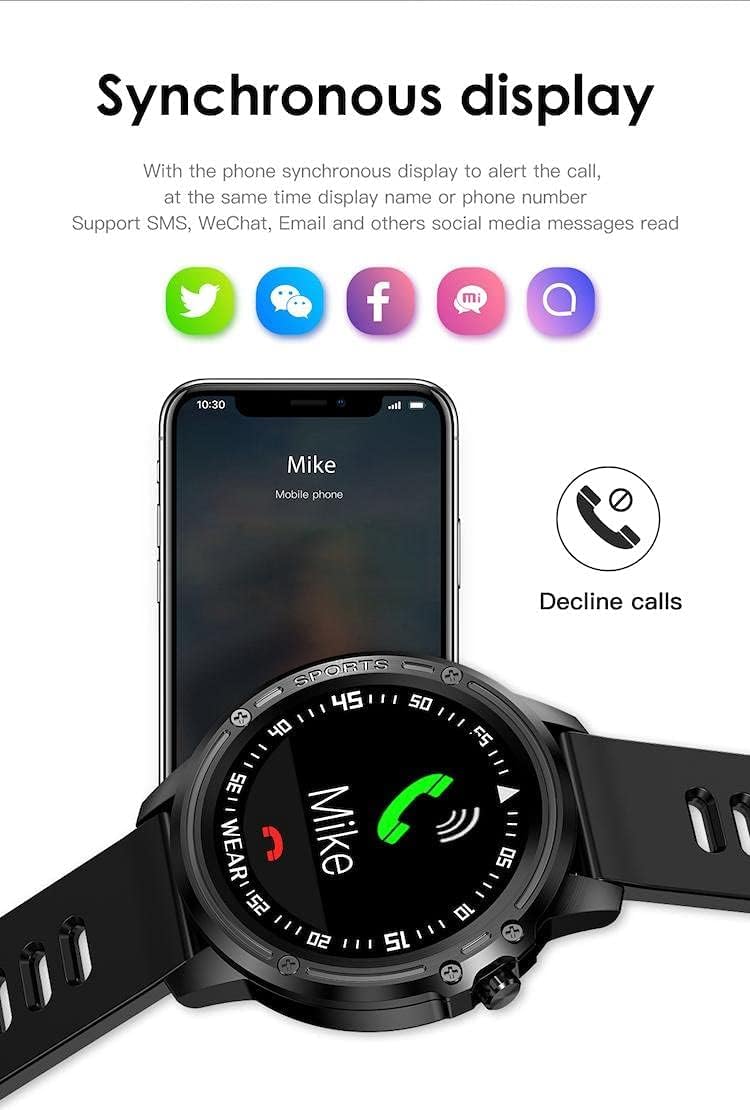
Image: The smartwatch screen showing an incoming call notification and icons for various social media and messaging applications, indicating its synchronous display capabilities with a paired smartphone.
Operating Instructions
Basic Navigation
The IXIU L8 Smartwatch features a full touchscreen display for navigation. Swipe left, right, up, or down to access different menus and functions. Tap to select an option or confirm an action. The physical buttons on the side may also provide shortcuts or act as a 'back' function.
Key Features
The L8 Smartwatch offers a range of functions to support your daily activities and health monitoring:
- Health Monitoring: ECG, PPG, Heart Rate, Blood Pressure, Blood Oxygen, Sleep Monitor.
- Activity Tracking: Steps, Distance, Calories, Average Pace.
- Notifications: Call Alerts (with option to decline), SMS, WeChat, Email, and other social media messages.
- Convenience Features: Bluetooth Music Control, Weather Display, Settings, Bluetooth Camera Remote, Find Phone, Find Watch, Sedentary Reminder, Alarm, Water Reminder, Stopwatch, Timer, Raise Wrist to Wake Screen.

Image: A comprehensive display of icons illustrating the diverse functionalities of the smartwatch, such as health tracking (ECG, Heart Rate), communication (Call Alert, Notifications), and utility tools (Weather, Stopwatch).
Sports Activity Tracking
The L8 Smartwatch is designed to monitor various sports activities with precision. Select the appropriate sport mode before starting your workout for accurate data collection. The watch supports the following activities:
- Walking
- Running
- Swimming
- Climbing
- Cycling
- Football
- Basketball
- Table Tennis
- Badminton
Synchronization reports and history data analysis are available through the companion app.

Image: The smartwatch face showing different sports modes with corresponding icons and tracked metrics like distance, illustrating its multi-sport monitoring capability.

Image: A close-up of the IXIU L8 Sports Smartwatch, emphasizing its robust design and key features such as extended battery life, water resistance, and comprehensive health tracking.
Maintenance
Cleaning Your Smartwatch
Regularly clean your smartwatch and band to prevent skin irritation and maintain device performance. Use a soft, damp, lint-free cloth to wipe the screen and body. For the silicone band, you can use mild soap and water, then rinse thoroughly and dry completely before reattaching to your wrist. Avoid harsh chemicals or abrasive materials.
Water Resistance (IP68)
The IXIU L8 Smartwatch is rated IP68, meaning it is protected against dust ingress and can withstand immersion in water up to 1.5 meters for up to 30 minutes. It is suitable for daily use, including hand washing, rain, and shallow swimming. However, it is not recommended for hot showers, saunas, or diving, as steam and high water pressure can compromise the seals. Avoid prolonged exposure to saltwater.
Troubleshooting
- Device not turning on: Ensure the watch is fully charged. Connect it to the charger for at least 30 minutes.
- Cannot pair with smartphone: Make sure Bluetooth is enabled on your phone and the watch. Ensure the watch is within range. Restart both the watch and your phone, then try pairing again through the app.
- Inaccurate health data: Ensure the watch is worn snugly on your wrist, about one finger's width above the wrist bone. Keep the sensor clean. Environmental factors and individual physiology can affect readings.
- Notifications not received: Check app settings to ensure notification permissions are granted for the companion app and for the specific apps you wish to receive notifications from. Ensure the watch is connected via Bluetooth.
- Short battery life: Reduce screen brightness, disable unnecessary features, and ensure the watch is fully charged.
Specifications
| Feature | Specification |
|---|---|
| Model Name | L8 |
| Brand | IXIU |
| Operating System | Multi |
| Display | Digital, Touchscreen (240 x 240 resolution) |
| Screen Size | 30 Millimeters |
| Connectivity | Bluetooth |
| GPS | No GPS |
| Water Resistance | IP68 |
| Band Material | Silicone |
| Item Weight | 11 g |
| Compatible OS | Android & iOS |
Warranty and Support
The IXIU L8 Smartwatch comes with a standard manufacturer's warranty. Please refer to the warranty card included in your package or contact your retailer for specific warranty terms and conditions. For technical support or further assistance, please contact the customer service provided by your point of purchase.