Introduction
Thank you for choosing the WEKOME V25 TWS Wireless Bluetooth Earphones. This manual provides comprehensive instructions on how to set up, operate, and maintain your earphones to ensure optimal performance and longevity. Please read this manual carefully before using the product and retain it for future reference.
Package Contents
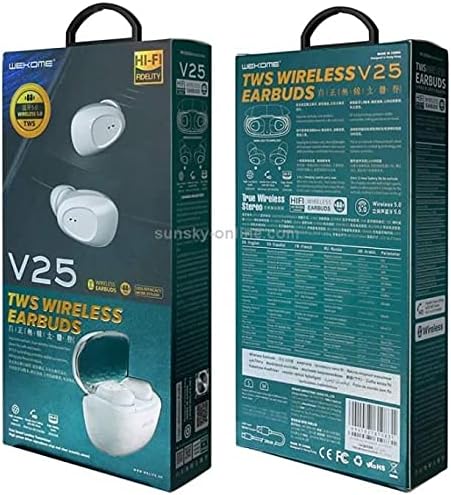
This image displays the front and back of the WEKOME V25 TWS Wireless Bluetooth Earphones retail packaging. The front shows the white earbuds and charging case, along with 'V25 TWS WIRELESS EARBUDS' branding. The back provides detailed specifications and features in multiple languages, including 'True Wireless Stereo' and 'Wireless 5.0' indicators.
Upon opening the package, please verify that all items are present and in good condition:
- WEKOME V25 TWS Wireless Bluetooth Earphones (Left and Right)
- Charging Case
- USB Charging Cable
- User Manual
- Ear Cushions (various sizes, as per product specifications)
Setup Guide
1. Charging the Earphones and Case
Before first use, it is recommended to fully charge both the earphones and the charging case.
- Place the earphones into the charging case, ensuring they are correctly seated.
- Connect the USB charging cable to the charging port on the case and the other end to a 5V/1A USB power adapter (not included) or a computer's USB port.
- The indicator lights on the case and earphones will show charging status. Refer to the indicator light section for specific patterns.
- Once fully charged, disconnect the charging cable. A full charge typically takes 1-2 hours for the earphones and 2-3 hours for the case.
2. Pairing with a Bluetooth Device
The earphones will automatically enter pairing mode when taken out of the charging case.
- Ensure the earphones are charged and remove them from the charging case. They will automatically power on and enter pairing mode (indicated by flashing lights).
- On your Bluetooth-enabled device (smartphone, tablet, laptop), go to the Bluetooth settings.
- Turn on Bluetooth and search for available devices.
- Select "WEKOME V25" from the list of found devices.
- Once connected, the earphone indicator lights will stop flashing, and you may hear a "Connected" prompt.
- The earphones will automatically reconnect to the last paired device when taken out of the case, if Bluetooth is enabled on the device.
Operating Instructions
Basic Controls
The WEKOME V25 earphones feature touch controls for easy management of music and calls.
| Function | Action (Left/Right Earbud) |
|---|---|
| Power On | Take out of charging case |
| Power Off | Place back into charging case |
| Play/Pause Music | Single tap |
| Next Track | Double tap Right earbud |
| Previous Track | Double tap Left earbud |
| Answer/End Call | Single tap |
| Reject Call | Press and hold for 2 seconds |
| Activate Voice Assistant | Triple tap |
Wearing the Earbuds
For optimal sound quality and comfort, ensure the earbuds are worn correctly.
- Identify the Left (L) and Right (R) earbuds.
- Gently insert each earbud into the corresponding ear canal.
- Rotate the earbud slightly until it fits snugly and comfortably.
- Experiment with different ear cushion sizes (if provided) to find the best fit for passive noise isolation and comfort.
Maintenance and Care
Proper care will extend the life of your WEKOME V25 earphones.
- Cleaning: Regularly clean the earbuds and charging case with a soft, dry, lint-free cloth. Do not use harsh chemicals or abrasive materials.
- Ear Tips: Remove ear tips and clean them with a damp cloth and mild soap if necessary. Ensure they are completely dry before reattaching.
- Charging Ports: Keep the charging contacts on the earbuds and inside the case clean and free of debris. Use a dry cotton swab if needed.
- Storage: When not in use, always store the earphones in their charging case to protect them from dust, dirt, and damage.
- Temperature: Avoid exposing the earphones to extreme temperatures (hot or cold) or high humidity.
- Water Exposure: These earphones are not waterproof. Avoid contact with water or other liquids.
Troubleshooting
If you encounter issues with your earphones, refer to the following common problems and solutions.
| Problem | Possible Solution |
|---|---|
| Earphones not powering on | Ensure earphones are charged. Place them in the charging case for a few minutes, then remove. |
| Cannot pair with device |
|
| Only one earbud working |
|
| Low volume or poor sound quality |
|
| Charging case not charging |
|
If the problem persists after trying these solutions, please contact customer support.
Specifications
Key technical specifications for the WEKOME V25 TWS Wireless Bluetooth Earphones:
| Feature | Detail |
|---|---|
| Brand | WEKOME |
| Model Number | V25 |
| Connectivity Technology | Wireless (Bluetooth) |
| Headphones Form Factor | In Ear |
| Noise Control | Active Noise Cancellation |
| Microphone | Included |
| Color | White |
| Included Components | Ear Cushions |
| Cable Feature | Without Cable |
| Manufacturer | WEKOME |
| Date First Available | 31 May 2021 |
Warranty and Support
WEKOME products are designed and manufactured to the highest quality standards. For information regarding warranty coverage, technical support, or service inquiries, please refer to the warranty card included with your product or visit the official WEKOME website. Please retain your proof of purchase for warranty claims.
For further assistance, you may contact WEKOME customer service through their official channels.


