
Introduction
This manual provides detailed instructions for the proper use and maintenance of your CATIGA CD-2449 Electronic Calculator. The CD-2449 is a 12-digit desktop calculator designed for general arithmetic operations, featuring dual power sources and durable construction. Please read this manual thoroughly to ensure optimal performance and longevity of your device.

Image: Angled view of the CATIGA CD-2449 Electronic Calculator, showing the display and key layout.
Setup
1. Battery Installation
The CATIGA CD-2449 calculator operates on dual power: solar power and one AG13 (or equivalent) button cell battery. The battery provides power when ambient light is insufficient for solar operation.
- Turn the calculator over to access the battery compartment on the back.
- Using a small screwdriver, carefully remove the screw securing the battery compartment cover.
- Remove the cover.
- Insert one AG13 battery, ensuring the positive (+) side faces upwards.
- Replace the battery compartment cover and secure it with the screw.

Image: Rear view of the CATIGA CD-2449 calculator, highlighting the battery compartment location.
2. Power On/Off
- To turn the calculator on, press the ON/C key.
- The calculator will automatically turn off after approximately 8-12 minutes of inactivity to conserve battery power.
- Alternatively, you can press the GT-ON/OFF key to turn the calculator off manually.
Operating Instructions
Familiarize yourself with the key functions to perform various calculations efficiently.

Image: Front view of the CATIGA CD-2449 Electronic Calculator, showing the full key layout and display.
Basic Arithmetic Operations
- Addition (+): Enter the first number, press +, enter the second number, press =.
- Subtraction (-): Enter the first number, press -, enter the second number, press =.
- Multiplication (×): Enter the first number, press ×, enter the second number, press =.
- Division (÷): Enter the first number, press ÷, enter the second number, press =.
Clear Functions
- ON/C (Clear All / Power On): Clears all entries and calculations, and powers on the calculator.
- AC (All Clear): Clears all entries, calculations, and memory.
- CE (Clear Entry): Clears the last entered number or the current display value without affecting previous calculations or memory.
Memory Functions
- M+ (Memory Plus): Adds the displayed number to the memory.
- M- (Memory Minus): Subtracts the displayed number from the memory.
- MRC (Memory Recall/Clear):
- Press once to recall the value stored in memory.
- Press twice consecutively to clear the memory.
Special Functions
- % (Percentage): Used for percentage calculations. For example, to calculate 15% of 200: enter 200 × 15 %.
- √ (Square Root): Calculates the square root of the displayed number.
- MU (Mark Up): Used for profit margin calculations.
- GT (Grand Total): Accumulates the results of all calculations performed since the last AC or GT clear. Press GT to display the grand total. Press GT twice to clear the grand total memory.
Decimal and Rounding Settings
The calculator features slide switches for adjusting decimal places and rounding rules.
- Decimal Selector (F 4 2 0 Add2):
- F (Float): Floating decimal point.
- 4, 2, 0: Fixed decimal places (4, 2, or 0 digits after the decimal point).
- Add2: Adds two decimal places automatically for currency calculations.
- Rounding Selector (UP 5/4 CUT):
- UP: Rounds up.
- 5/4: Rounds to the nearest digit (standard rounding).
- CUT: Truncates (cuts off) decimal places without rounding.
Maintenance
Cleaning
To maintain the appearance and functionality of your calculator:
- Wipe the calculator's surface with a soft, dry cloth.
- For stubborn dirt, slightly dampen the cloth with water or a mild, non-abrasive cleaner.
- Avoid using strong chemicals, solvents, or abrasive cleaning pads, as these can damage the casing or display.
Battery Replacement
When the display becomes dim or erratic even in good lighting conditions, it may be time to replace the AG13 battery. Refer to the "Battery Installation" section under Setup for detailed instructions.
Troubleshooting
| Problem | Possible Cause | Solution |
|---|---|---|
| Display is blank or dim. | Insufficient light for solar power, or low battery. | Move the calculator to a brighter area. If the problem persists, replace the AG13 battery. |
| Incorrect calculation results. | Incorrect key input, or incorrect decimal/rounding settings. | Press AC to clear all and restart the calculation. Check the decimal and rounding slide switches. |
| Calculator does not respond. | System error or temporary malfunction. | Press AC. If unresponsive, remove the battery for a few minutes, then reinsert it. |
Specifications
| Model Number | CD-2449 |
| Display | 12 Digits LCD |
| Power Source | Dual Power (Solar & 1 x AG13 Battery) |
| Dimensions (L x W x H) | 196 x 144 x 45 mm (7.7 x 5.7 x 1.8 inches) |
| Weight | Approximately 278 g (0.61 lbs) |
| Key Type | Plastic Key |
| Cover Material | Durable Metal |
| Color | Silver/Black |
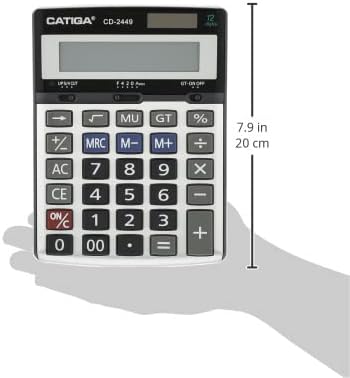
Image: The CATIGA CD-2449 calculator held in a hand, illustrating its approximate size and dimensions.
Warranty and Support
For warranty information, technical support, or service inquiries regarding your CATIGA CD-2449 Electronic Calculator, please contact your retailer or the manufacturer directly. Keep your purchase receipt as proof of purchase.