1. Introduction
The Aigostar Smart LED Strip Light is designed to enhance your living space with dynamic and customizable lighting. This versatile LED strip offers multiple control options, including smart app control, voice commands via Alexa and Google Assistant, and a traditional remote control. It features music synchronization, color changing capabilities, and timer settings, making it ideal for various home decor, entertainment, and ambient lighting needs.

Figure 1: Aigostar Smart LED Strip Light product and accessories.
2. Product Features
- Multiple Control Methods: Control your lights via the Aigosmart App, voice commands (Alexa/Google Assistant), physical remote control, or the integrated control box.
- Music Synchronization: The lights can sync with the rhythm of your music, creating a dynamic and immersive atmosphere.
- Color Changing & Brightness Adjustment: Choose from a wide spectrum of RGB colors and adjust brightness to suit any mood or occasion.
- Timer Settings: Schedule your lights to turn on/off at specific times, enhancing convenience and energy efficiency.
- Smart Color Recognition: Use the app to pick colors from images, allowing for personalized lighting themes.
- Easy Installation: Features strong adhesive backing and is cuttable and linkable for flexible placement.
- Low Voltage Operation: Designed for safety with low voltage operation.

Figure 2: Overview of the four control methods.

Figure 3: Lights syncing with music.
3. What's in the Box
Your Aigostar Smart LED Strip Light package includes the following components:
- LED Strip Light (33 FT)
- Remote Control
- Power Adapter
- Control Box
- User Manual (this document)
4. Setup and Installation
Follow these steps for proper installation of your Aigostar Smart LED Strip Light:
4.1 Pre-Installation Test
Before permanent installation, it is recommended to test the strip light to ensure all components are working correctly.
- Connect the LED strip light to the 3-button controller. Ensure the arrows on both connectors align.
- Connect the 3-button controller to the power adapter.
- Plug the power adapter into a power socket.
- Press the on/off button on the controller or use the remote to test the lights.
Video 1: How to Install Aigostar Smart LED Strip Light. This video demonstrates the pre-installation test and the full installation process.
4.2 Surface Preparation
For optimal adhesion, ensure the installation surface is clean, dry, and free of dust or grease.

Figure 4: Connection schematic and features like cuttable design and adhesive backing.
4.3 Attaching the LED Strip
- Tear off the protective film from the adhesive backing on the strip light.
- Carefully stick the strip light onto the desired surface. Press firmly along the entire length to ensure strong adhesion.
- When bending the strip light around corners, ensure a gentle curvature to avoid damaging the LED components. Do not fold the LED components directly.
- If necessary, use the included fixed clips for additional support, especially on rough or vertical surfaces.
- The strip light can be cut at designated marks (usually indicated by a scissor icon) to fit specific lengths. Ensure the power is disconnected before cutting.
5. Operating Instructions
5.1 Remote Control Operation
The included remote control provides convenient access to various lighting functions.
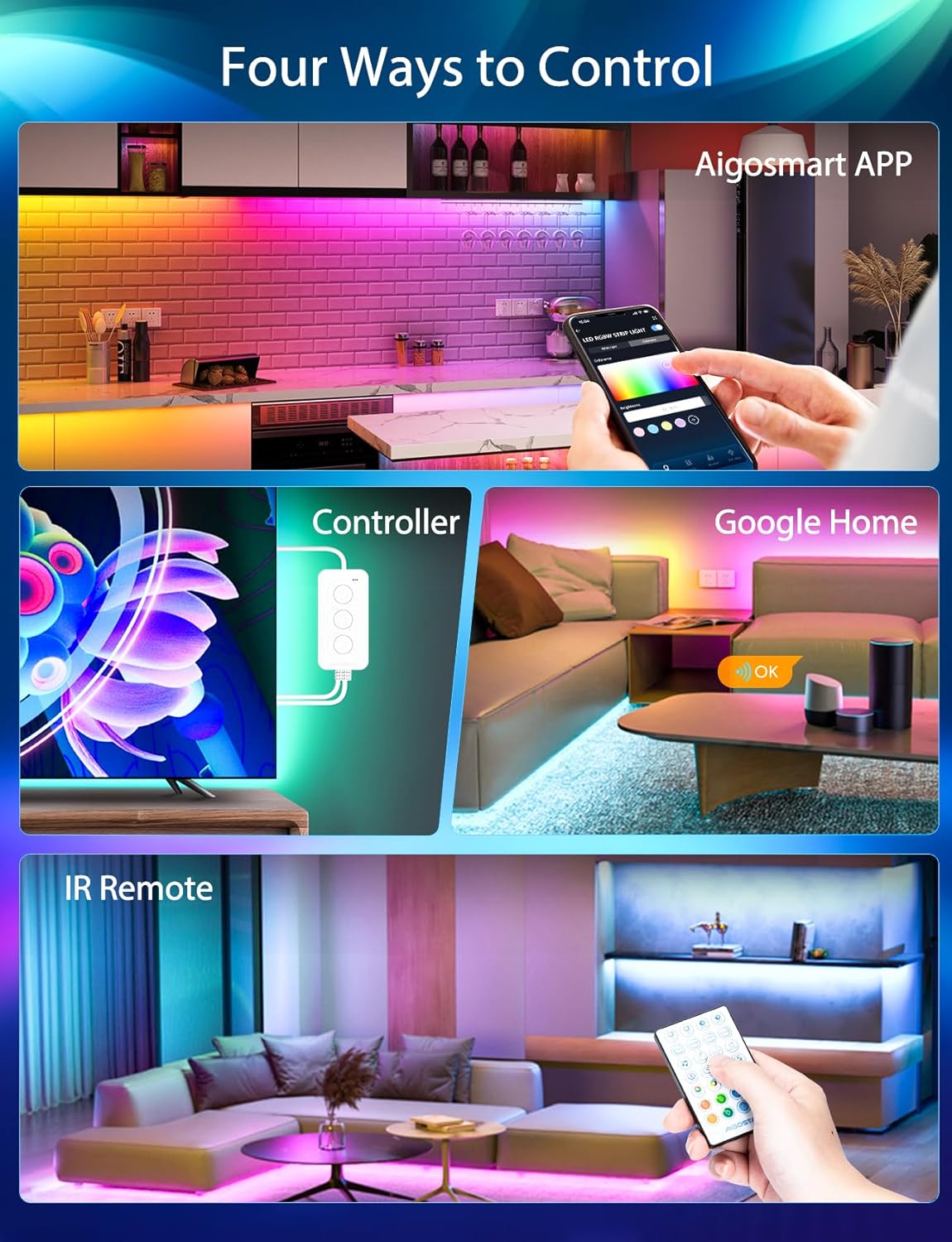
Figure 5: Multiple control options for the LED strip.
Video 2: LED Strip Light, RGB 5050 LED Lights with Remote Control. This video demonstrates the functions of the remote control.
Refer to the remote control diagram for specific button functions:
- Power Button: Turns the lights on or off.
- Brightness Adjustment: Increase or decrease light intensity.
- Color Selection: Directly select static colors.
- DIY Color Mode: Create and save custom colors.
- Mode Selection: Cycle through various dynamic lighting modes (e.g., flash, fade, jump).
- Speed Adjustment: Control the speed of dynamic modes.
- Timer Buttons: Set automatic shut-off timers (e.g., 2H, 4H, 6H, 8H).
5.2 Aigosmart App Control
Download the Aigosmart App from your device's app store. Follow the in-app instructions to connect your LED strip light to your 2.4GHz Wi-Fi network. No additional hub is required.
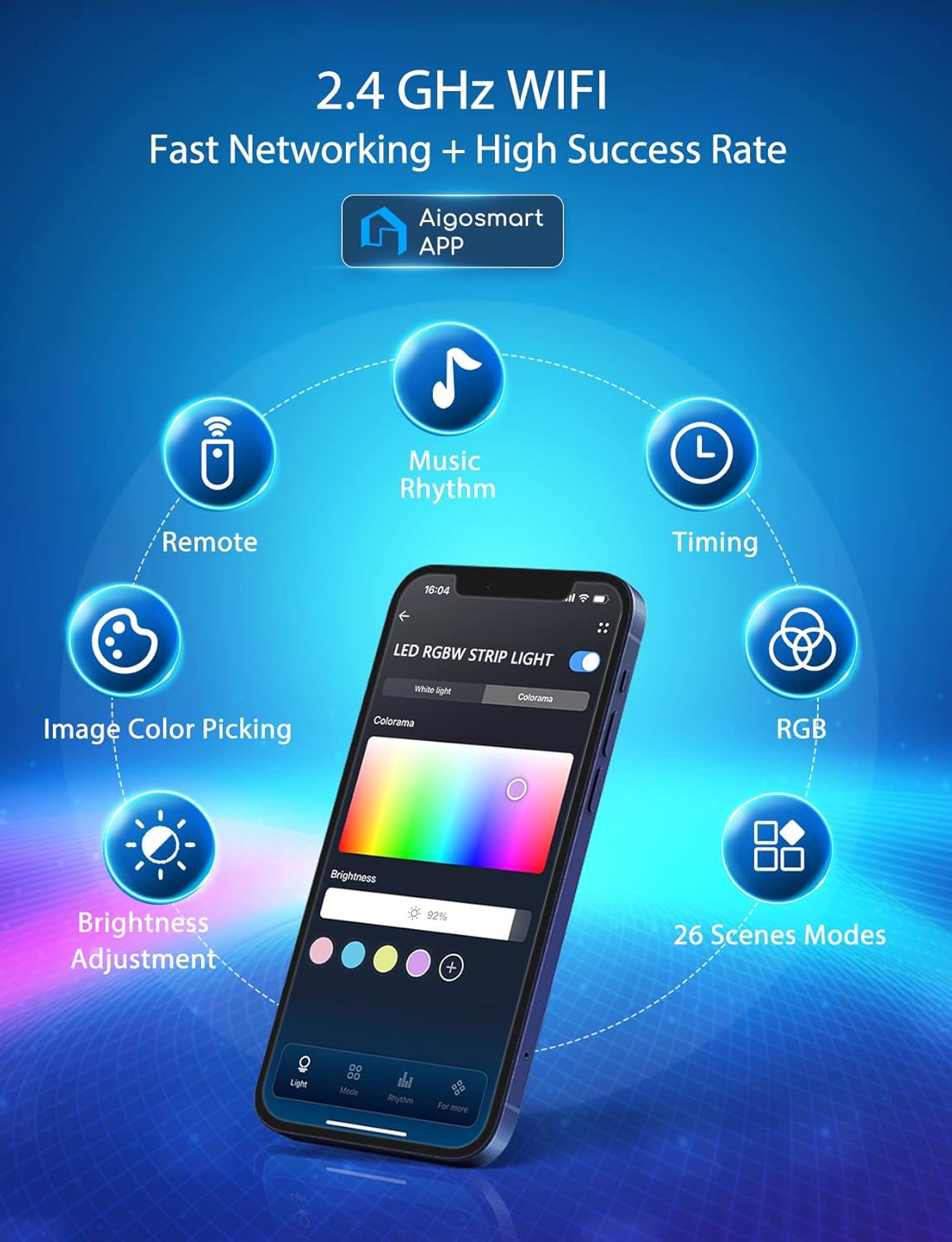
Figure 6: Aigosmart App interface with various control options.
- Color Wheel: Precisely select any color.
- Brightness & Saturation: Fine-tune light intensity and color vibrancy.
- Scene Modes: Choose from pre-set scenes for different moods or occasions (e.g., Christmas, Birthday, Reading, Goodnight).
- Music Sync: Activate the music rhythm mode to make lights dance to sound.
- Timer & Schedule: Set detailed schedules for lighting automation.
- Image Color Picking: Select a color from any image on your phone to apply to the lights.
- Group Control: Control multiple Aigostar light strips simultaneously.
- Family Sharing: Share control of your lights with family members through the app.
5.3 Voice Control (Alexa & Google Assistant)
Once connected to the Aigosmart App, you can link your LED strip light to Amazon Alexa or Google Assistant for convenient voice control. Follow the linking instructions within the Aigosmart App or your smart assistant's app.
Video 3: Dancing with Aigostar Smart Light. This video showcases the music sync and voice control features.
Example voice commands:
- "Alexa, turn on the [Light Name]."
- "Hey Google, set [Light Name] to blue."
- "Alexa, dim [Light Name] to 50%."
- "Hey Google, turn on music rhythm mode for [Light Name]."
6. Specifications
| Feature | Detail |
|---|---|
| Brand | Aigostar |
| Model Number | AG-DD |
| Color | Multicolor (RGB) |
| Light Source Type | LED |
| Power Source | Corded Electric |
| Voltage | 120 Volts |
| Connectivity Protocol | Bluetooth, Wi-Fi (2.4GHz) |
| Control Method | Remote, App, Voice |
| Material | Vinyl |
| Item Weight | 14.4 ounces |
| Package Dimensions | 6.14 x 4.45 x 3.11 inches |
| Indoor/Outdoor Usage | Outdoor, Indoor |
7. Maintenance
To ensure the longevity and optimal performance of your Aigostar Smart LED Strip Light, follow these maintenance guidelines:
- Cleaning: Gently wipe the LED strip with a dry, soft cloth to remove dust. Do not use liquid cleaners or abrasive materials.
- Adhesion: If the adhesive begins to weaken over time, you may reinforce it with additional adhesive clips or double-sided tape, ensuring they do not cover the LED components.
- Storage: If storing the strip light for an extended period, ensure it is clean, dry, and coiled loosely to prevent damage to the LEDs or wiring.
- Environment: While rated for indoor/outdoor use, avoid prolonged exposure to extreme weather conditions or direct water immersion as the product is not fully water resistant.
8. Troubleshooting
If you encounter issues with your Aigostar Smart LED Strip Light, please refer to the following common problems and solutions:
| Problem | Possible Cause | Solution |
|---|---|---|
| Lights do not turn on. | No power, loose connection, faulty adapter. | Check power outlet. Ensure all connections (strip to controller, controller to adapter, adapter to wall) are secure and arrow-to-arrow aligned. Test with another power source if possible. |
| Remote control not working. | Battery depleted, remote out of range, IR sensor blocked. | Replace remote battery. Ensure remote is pointed directly at the IR receiver on the control box and within 26ft range. Remove any obstructions between the remote and receiver. |
| App cannot connect to lights. | Incorrect Wi-Fi, 5GHz Wi-Fi, poor signal, lights not in pairing mode. | Ensure your phone and lights are on a 2.4GHz Wi-Fi network. Check Wi-Fi signal strength. Reset the lights to pairing mode (refer to app instructions for specific steps). Restart your router. |
| Lights are not syncing with music. | Microphone sensitivity too low, incorrect mode selected. | Adjust microphone sensitivity in the Aigosmart App. Ensure the music rhythm mode is activated. Place the control box closer to the sound source. |
| Colors are incorrect or inconsistent. | Loose connection, damaged LEDs. | Check all connections for proper alignment and tightness. If only a section is affected, it might indicate damage to that segment. |
9. Warranty and Support
Aigostar products are manufactured to high-quality standards. For warranty information, technical support, or customer service inquiries, please refer to the contact details provided on the product packaging or visit the official Aigostar website. Please retain your proof of purchase for warranty claims.
For further assistance, you may also visit the Aigostar Store on Amazon: Aigostar Store


