Introduction
The SOULYI Safe Box is designed to provide secure storage for your valuables, documents, and personal items. Featuring a robust alloy steel construction, digital keypad access, and backup key functionality, it offers reliable protection for your home or office.

Package Contents
- 1 x SOULYI Safe Box
- 2 x Backup Keys
- 4 x AA Batteries (for initial setup)
- 1 x Steel Security Cable
- Screws and Bolts for mounting
- User Manual

Specifications
| Feature | Detail |
|---|---|
| Brand | SOULYI |
| Product Dimensions | 9.16"D x 12.2"W x 9.64"H |
| Lock Type | Electronic |
| Color | Matte Black |
| Capacity | 0.5 Cubic Feet |
| Material | Alloy Steel |
| Special Feature | Alarm System |
| Mounting Type | Wall Mount; Floor Mount |
| Control Type | Push Button Control |
| Item Weight | 13.67 Pounds |
| Batteries | 4 AA batteries required |

Setup
1. Battery Installation
The safe requires 4 AA batteries for the digital keypad to function. Locate the battery compartment, typically on the inside of the door. Insert the batteries, ensuring correct polarity.
2. Setting Your Personal Code
With the door open, press the red reset button located on the inside of the door. Enter your desired 3-8 digit personal code on the keypad, then press the '#' key to confirm. Test the new code with the door open before closing.

Operation
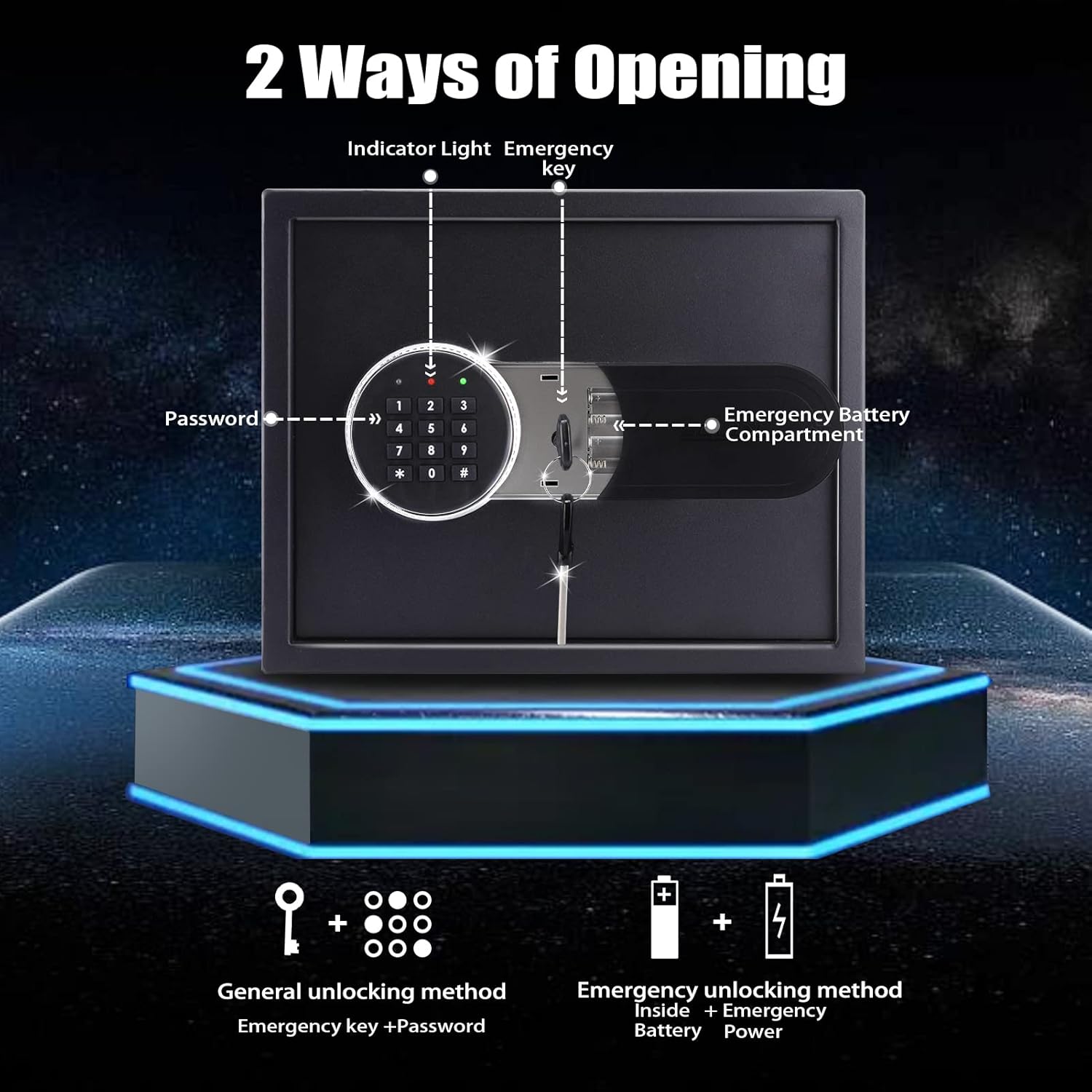
1. Opening the Safe with Digital Keypad
Enter your 3-8 digit personal code on the keypad. The indicator light will turn green. Within 5 seconds, rotate the knob clockwise to open the door.

2. Opening the Safe with Backup Key
In case of forgotten code or depleted batteries, the backup key can be used. Locate the hidden keyhole behind the keypad cover. Insert the backup key and turn it counter-clockwise while simultaneously rotating the knob clockwise to open the door.
3. Closing and Locking the Safe
Close the safe door firmly. Rotate the knob counter-clockwise to engage the locking bolts. The safe is now securely locked.
Mounting the Safe
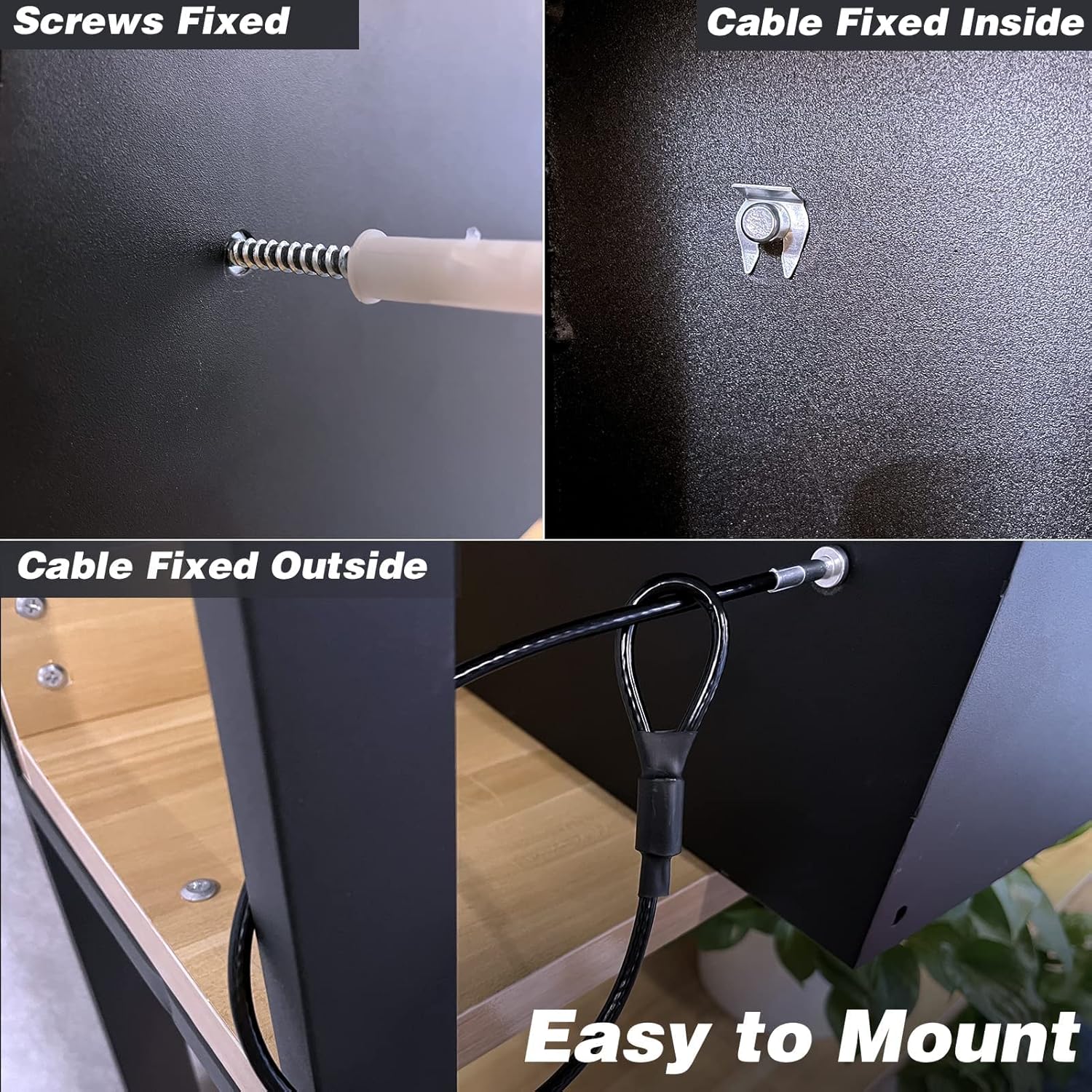
The SOULYI Safe Box can be mounted to a wall or floor for added security. Use the provided screws and bolts to secure the safe through the pre-drilled holes on the back or bottom. An optional security cable is also included for temporary securing without permanent installation.

Maintenance
1. Battery Replacement
When the batteries are low, the indicator light may flash or the keypad may not respond. Replace all 4 AA batteries by opening the battery compartment on the keypad. Always use new, high-quality batteries.
2. Cleaning
Wipe the exterior of the safe with a soft, damp cloth. Avoid abrasive cleaners or solvents that could damage the finish.
Troubleshooting
1. Forgotten Code
If you forget your digital code, use one of the backup keys to open the safe. Once open, you can reset the code by pressing the red reset button inside the door and following the code setting instructions.
2. Keypad Not Responding / Low Battery
If the keypad does not respond, the batteries may be depleted. Use the backup key to open the safe and replace the 4 AA batteries. There is also an external battery compartment for emergency power if the internal batteries are completely dead.
3. Alarm System Activation
The safe features an alarm system that activates if an incorrect code is entered three consecutive times. The indicator light will flash red, and an audible alarm will sound. To silence the alarm, enter the correct code or use the backup key.

Safety Guidelines
- Keep backup keys in a secure location away from the safe and out of reach of children.
- Do not store the backup keys inside the safe.
- Ensure the safe is securely mounted if you intend to store heavy or valuable items.
- Regularly check battery levels to ensure continuous operation of the digital keypad.
- Keep the safe away from excessive moisture or extreme temperatures.

Warranty and Support
For warranty information, technical support, or customer service inquiries, please refer to the contact details provided on the product packaging or the official SOULYI website. Keep your purchase receipt for warranty claims.
Customer Service: If you have any problem, please feel free to contact us as soon as possible; We definitely will do our best to deal with it.