
1. Introduction
Thank you for choosing the GOFORT Portable Power Station P56. This device is designed to provide reliable power for various applications, including home emergencies, outdoor camping, RV travel, and other off-grid scenarios. With a 330W output and 299Wh capacity, it offers multiple charging and output options to keep your essential devices powered.
This manual provides important information regarding the safe operation, maintenance, and troubleshooting of your power station. Please read it thoroughly before use and retain it for future reference.
2. Product Components
The GOFORT Portable Power Station P56 package includes the following items:
- GOFORT P56 Portable Power Station
- AC Wall Charger
- Cigarette Lighter Adapter
- Cigarette Charging Cable

Image: GOFORT P56 Portable Power Station and Included Accessories
2.1. Device Overview
Familiarize yourself with the various ports and controls on your power station:
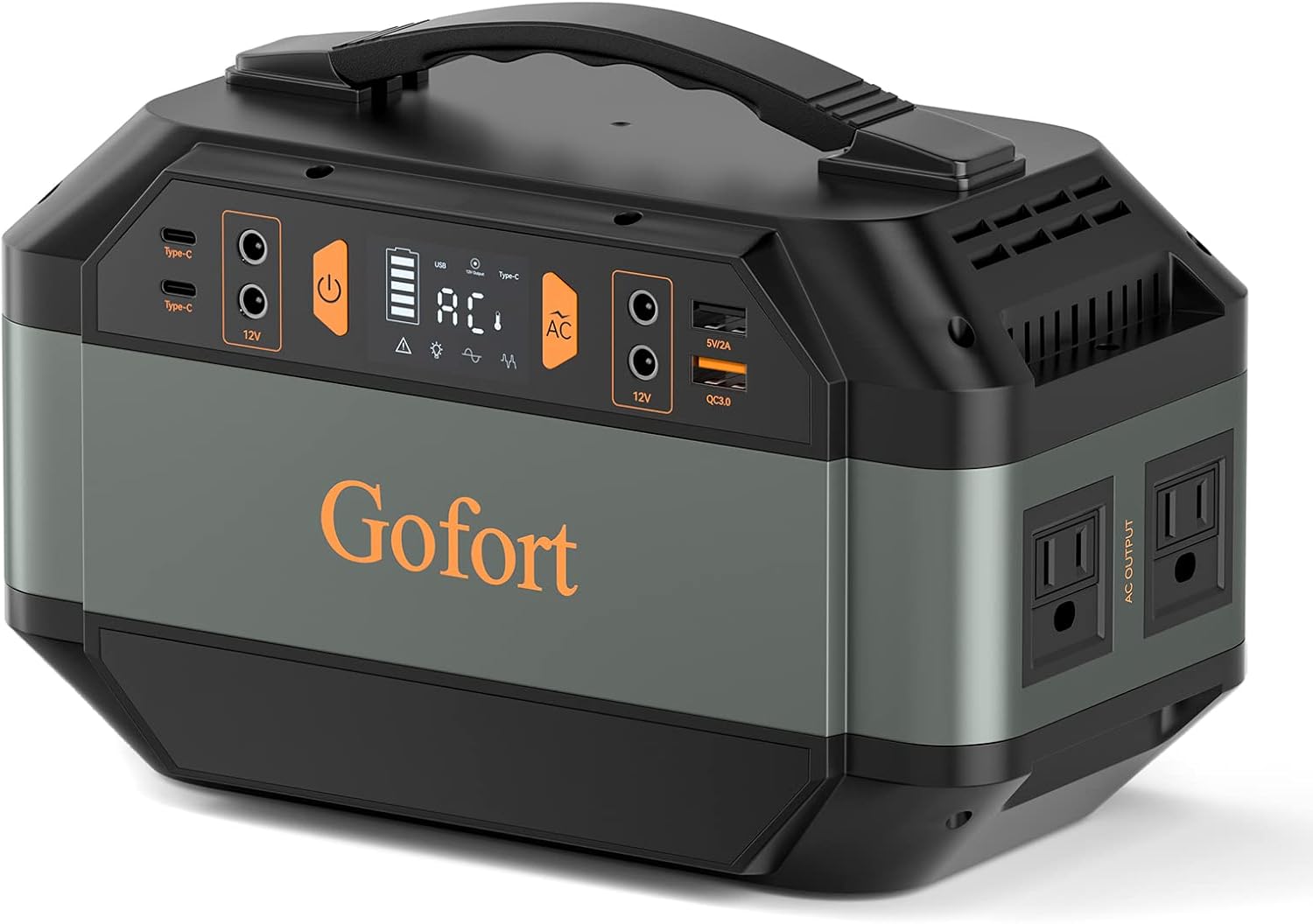
Image: Front view of the GOFORT P56 Portable Power Station
- Display Screen: Shows battery level, input/output wattage, and status indicators.
- AC Output Ports: Two 110V Pure Sine Wave AC outlets for household appliances.
- USB Ports: Includes USB QC 3.0 and Type-C ports for charging mobile devices.
- DC Output Port: For 12V DC devices.
- Input Port: For charging the power station via AC adapter, car charger, or solar panel.
- Power Button: To turn the unit on/off and activate specific outputs.
- Cooling Fan: Built-in fan to prevent overheating during operation.
3. Safety Information
Please observe the following safety precautions to ensure safe operation and prolong the lifespan of your GOFORT P56:
- Do not disassemble, repair, or modify the unit.
- Keep the unit away from fire, water, and extreme temperatures.
- Avoid dropping or subjecting the unit to strong impacts.
- Do not use the unit if it is damaged or appears to be malfunctioning.
- Ensure proper ventilation during use to prevent overheating.
- Keep out of reach of children.
- Dispose of the unit and its battery according to local regulations.
4. Charging the Power Station
The GOFORT P56 offers multiple methods for recharging:

Image: Multiple Charging Methods for the GOFORT P56
4.1. AC Wall Charging
- Connect the AC wall charger to the input port of the power station.
- Plug the AC charger into a standard wall outlet.
- The display will indicate charging status. A full charge from 0-80% can take approximately 4 hours.

Image: Fast Charging the GOFORT P56 via AC Wall Outlet
4.2. Car Charging
- Connect the cigarette charging cable to the input port of the power station.
- Plug the cigarette lighter adapter into your vehicle's 12V car socket.
- The display will show charging progress.
4.3. Solar Panel Charging (Solar Panel Not Included)
The GOFORT P56 features a built-in MPPT controller for efficient solar charging.
- Connect a compatible solar panel (18-22V recommended) to the input port of the power station.
- Position the solar panel in direct sunlight for optimal charging.
- The display will show the charging status. Charging time varies based on sunlight intensity and solar panel wattage.

Image: GOFORT P56 Charging with Solar Panels
5. Operating Instructions
5.1. Powering On/Off
Press and hold the main power button for a few seconds to turn the unit on or off. The display screen will illuminate upon activation.
5.2. Using Output Ports
The GOFORT P56 can power multiple devices simultaneously through its various output ports:

Image: Multiple Power Output Options
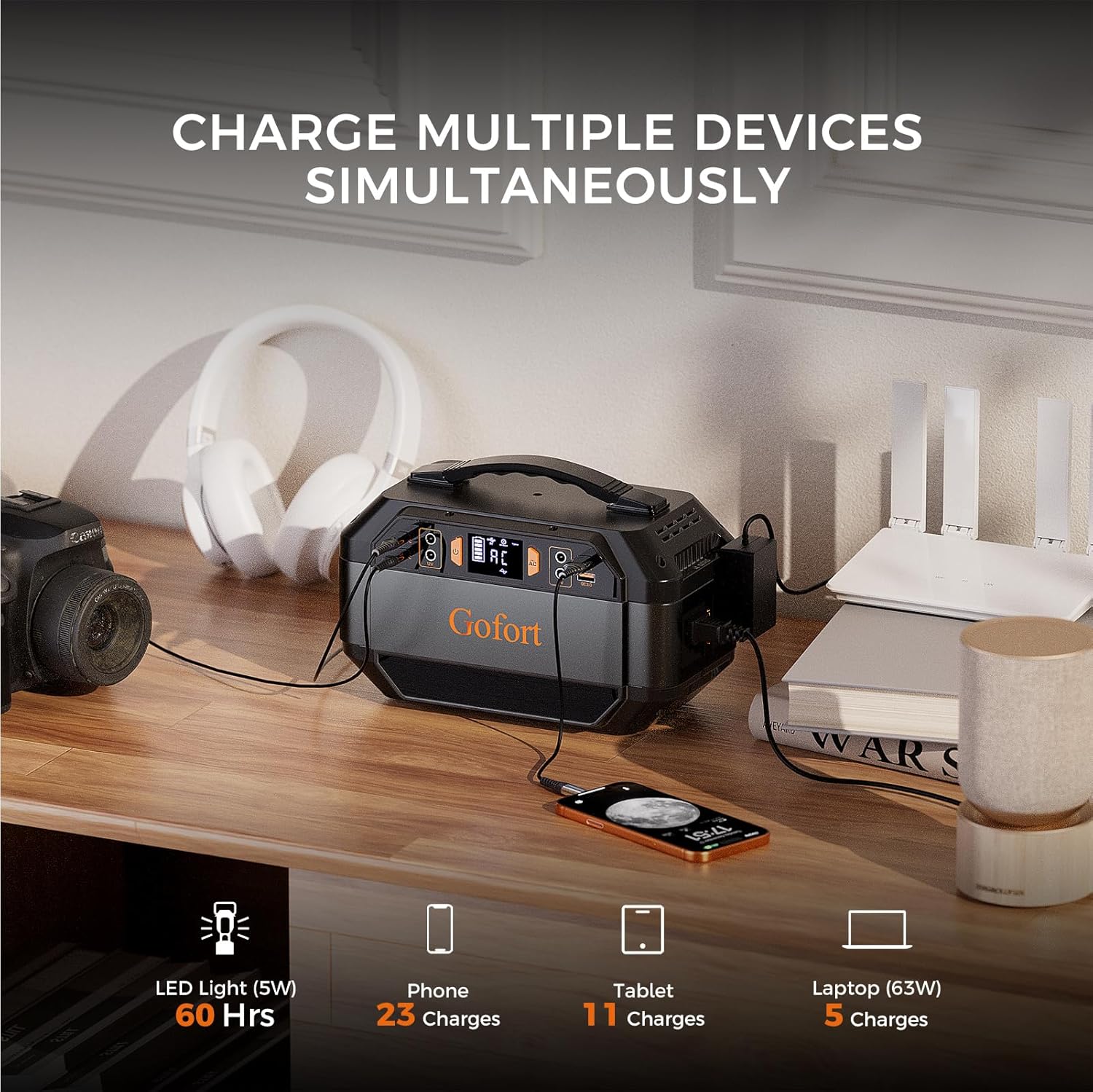
Image: Charging Multiple Devices Simultaneously
- AC Outlets: Press the 'AC' button to activate the AC output. Plug in your 110V devices. Ensure the total wattage does not exceed 330W.
- USB Ports (QC 3.0 & Type-C): Press the 'USB' button to activate. Connect your USB-powered devices.
- DC Port: Press the 'DC' button to activate. Connect your 12V DC devices.
Each output group (AC, USB, DC) has a dedicated power button, allowing you to control them independently and conserve power when not in use.
5.3. Display Indicators
The LCD display provides real-time information:
- Battery Level: Shows the remaining battery capacity.
- Input Power: Indicates the wattage being drawn during charging.
- Output Power: Shows the wattage being consumed by connected devices.
- Status Icons: Indicators for AC, DC, USB active, and warning symbols.
6. Maintenance and Storage
6.1. General Maintenance
- Clean the unit with a dry, soft cloth. Do not use abrasive cleaners or solvents.
- Ensure the ventilation openings are clear of dust and debris.
- Regularly check cables and connectors for any signs of damage.
6.2. Battery Care
The GOFORT P56 uses a Lithium-Ion battery. To maximize battery life:
- Avoid fully discharging the battery frequently.
- Recharge the unit at least once every 3-6 months, even if not in use, to maintain battery health.
- Store the unit with approximately 50% charge.
6.3. Storage
When storing the power station for extended periods:
- Store in a cool, dry place, away from direct sunlight and extreme temperatures.
- Ensure the unit is turned off.
- Keep it away from flammable materials.
7. Troubleshooting
If you encounter issues with your GOFORT P56, refer to the following common problems and solutions:
| Problem | Possible Cause | Solution |
|---|---|---|
| Unit does not turn on | Battery is fully discharged; Power button not pressed correctly. | Charge the unit using an AC adapter. Press and hold the power button firmly for a few seconds. |
| No output from ports | Output port not activated; Device draws too much power; Overload protection triggered. | Ensure the specific output button (AC, USB, DC) is pressed. Check device wattage. Disconnect device, restart unit, and try again with a lower-power device. |
| Unit overheats | Poor ventilation; Excessive load. | Ensure cooling fan vents are clear. Reduce the number or power of connected devices. Move to a cooler environment. |
| Battery drains quickly when stored | Unit accidentally turned on; Stored in extreme temperatures. | Ensure the power button is not accidentally pressed during transport or storage. Store in a cool, dry place. |
If the problem persists after attempting these solutions, please contact customer support.
8. Technical Specifications
| Feature | Specification |
|---|---|
| Model | P56 |
| Capacity | 299Wh |
| AC Output | 330W (Rated), 600W (Peak), 110V Pure Sine Wave |
| USB Output | QC 3.0, Type-C |
| DC Output | 12V |
| Input Charging | AC Adapter, Car Charger, Solar Panel (18-22V) |
| Battery Type | Lithium-Ion |
| Dimensions (L x W x H) | 10.08" x 5.12" x 6.57" (256mm x 130mm x 167mm) |
| Weight | 9.33 lbs (4.23 kg) |
| Special Features | Overload Protection, Portable, Short Circuit Protection, BMS |

Image: GOFORT P56 Dimensions and Portability
9. Warranty and Customer Support
9.1. Warranty Information
The GOFORT Portable Power Station P56 comes with a 12-month warranty from the date of purchase. This warranty covers manufacturing defects and workmanship under normal use. It does not cover damage caused by misuse, accidents, unauthorized modifications, or natural disasters.
Please retain your proof of purchase for warranty claims.
9.2. Customer Support
For technical assistance, warranty claims, or any questions regarding your GOFORT P56, please contact our customer service team. We provide 24-hour friendly customer service and technical support.
Contact information can typically be found on the GOFORT official website or through your purchase platform.


