
1. Product Overview
The Godox M1 is a compact, full-color RGB LED video light designed for various photographic and videographic applications. It offers extensive color control, high color accuracy, and a range of special effects, all within a durable aluminum alloy body.
Key Features:
- Full Color RGB Output: Adjust hue (0-360°), color saturation (0-100%), and brightness (0-100%) to achieve any desired color.
- High Color Accuracy: Features a Color Rendering Index (CRI) of 97 and a Television Lighting Consistency Index (TLCI) of 97 for natural and pristine color reproduction.
- Adjustable Color Temperature: CCT mode allows color temperature adjustment from 2500K (warm) to 8500K (cool).
- Special Effects (FX Mode): Includes 15 special light effects with 40 presets to simulate various lighting environments.
- Music Mode: The light can synchronize its color changes with ambient sound or music.
- Integrated Battery: Built-in 2410mAh lithium battery provides approximately 2.5 hours of operation at full power, rechargeable via USB Type-C (5V/2A).
- Durable Construction: High-strength aviation aluminum alloy shell ensures excellent heat dissipation and durability.
- Articulating Bracket: Integrated bracket with 1/4-inch thread allows for flexible mounting in various angles on camera rigs or shoe mounts.
- Compact and Lightweight: Weighs only 240g with dimensions of 145x70x15mm, making it highly portable.

Figure 1.1: The Godox M1 RGB LED Full Color Video Light with its adjustable articulating bracket.
2. Package Contents
Verify that all items are present in the package upon unboxing:
- Godox M1 Light (x1)
- Type-C USB Cable (x1)
- Wrench (x1)
- Carrying Pouch (x1)
- 1/4-20 Shoe Mount (x1)
- Instruction Manual (x1)

Figure 2.1: Included items in the Godox M1 product package.
3. Component Identification
Familiarize yourself with the various controls and ports on the Godox M1 light:

Figure 3.1: Overview of the Godox M1 controls and ports.
- Type-C USB Charging Port: Used for charging the internal battery.
- ON/OFF Switch: Powers the device on or off.
- Dimming Dial: Adjusts brightness and other parameters.
- Key Button: Used to switch between different operating modes.
- FN Dial: Function dial for fine-tuning settings within modes.
- MIC: Integrated microphone for Music Mode functionality.
4. Setup
4.1. Charging the Battery
Before initial use, fully charge the Godox M1. Connect the supplied USB Type-C cable to the charging port on the light and to a 5V/2A USB power adapter (not included). The charging indicator will show the charging status. A full charge typically takes approximately 2.5 hours.

Figure 4.1: The Godox M1 being charged via its USB Type-C port.
4.2. Mounting the Light
The Godox M1 features an integrated articulating bracket with a 1/4-inch thread for versatile mounting options:
- Camera Shoe Mount: Attach the included 1/4-20 shoe mount to the bracket, then slide it onto your camera's hot shoe or cold shoe.
- Tripods/Light Stands: Mount the light directly onto any tripod or light stand with a 1/4-inch screw.
- Adjusting Angle: The articulating bracket allows for 360-degree rotation on the main axis and 270-degree adjustment on the auxiliary axis, providing flexible positioning.

Figure 4.2: The articulating bracket provides flexible mounting and angle adjustment.
5. Operating Instructions
5.1. Power On/Off
To power on the Godox M1, slide the ON/OFF switch to the 'ON' position. To power off, slide the switch to the 'OFF' position.
5.2. Mode Selection
Press the Key Button to cycle through the available operating modes:
- CCT Mode: For adjusting color temperature and brightness.
- RGB Mode (HSI): For full-color control (Hue, Saturation, Intensity).
- FX Mode: For selecting special lighting effects.
- Music Mode: For sound-activated color changes.
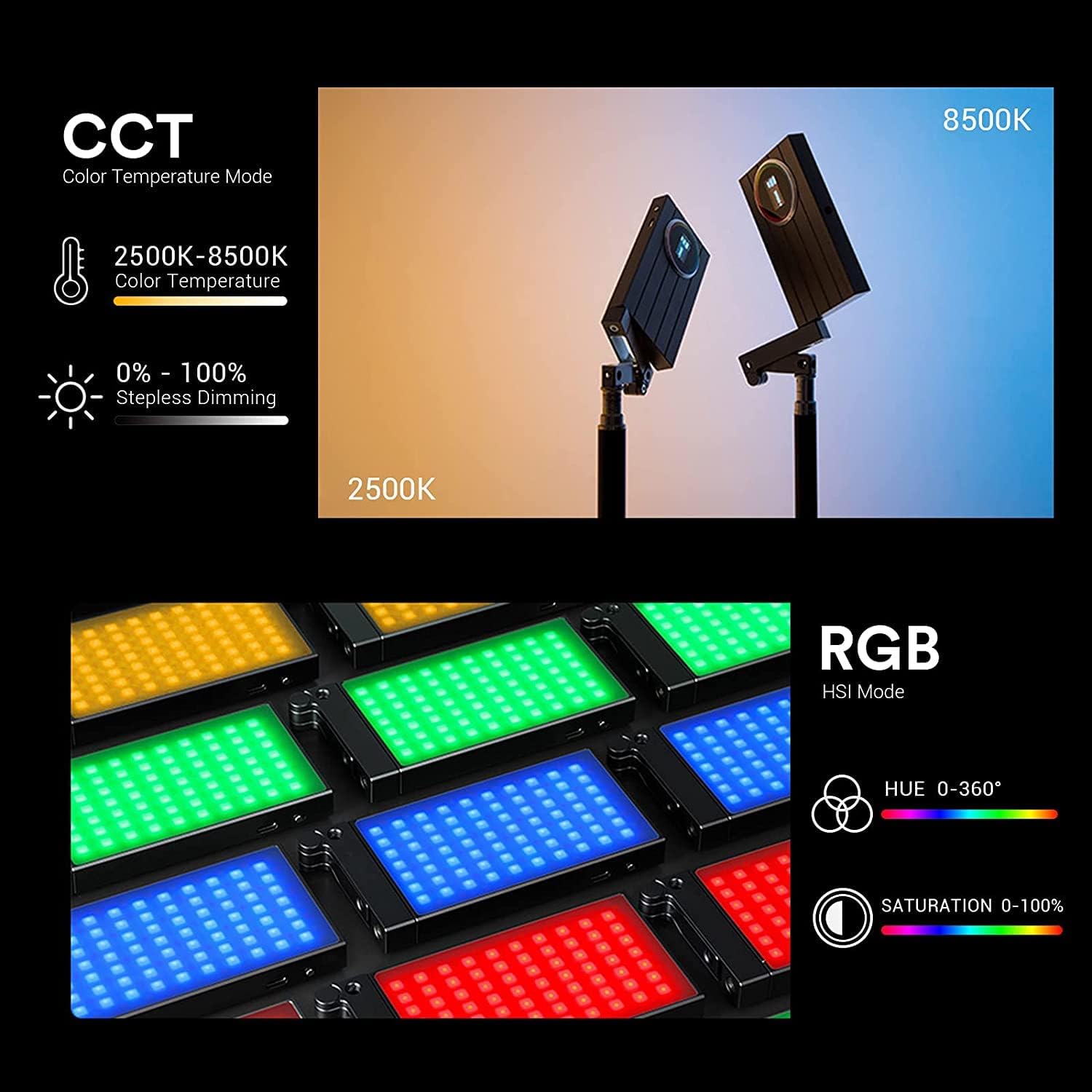
Figure 5.1: CCT and RGB (HSI) mode displays.
5.3. Adjusting Parameters
Once a mode is selected, use the Dimming Dial and FN Dial to adjust parameters:
- In CCT Mode: Rotate the dials to adjust color temperature (2500K-8500K) and brightness (0-100%).
- In RGB Mode: Rotate the dials to adjust Hue (0-360°), Saturation (0-100), and Brightness (0-100%). Long press the FN dial to switch between Hue, Saturation, and Brightness adjustments.
- In FX Mode: Rotate the dials to select from 15 special effects and 40 presets.

Figure 5.2: Examples of the 15 built-in FX special light effects.
5.4. Music Mode
In Music Mode, the Godox M1 utilizes its built-in microphone to detect sound. The light's colors will change dynamically in response to the tempo and volume of ambient music or sounds.
6. Maintenance
6.1. Cleaning
To clean the light, use a soft, dry cloth. Do not use harsh chemicals or abrasive materials, as these can damage the finish or the LED panel.
6.2. Storage
When not in use, store the Godox M1 in its carrying pouch in a cool, dry place, away from direct sunlight and extreme temperatures.
6.3. Battery Care
To prolong battery life, avoid fully discharging the battery frequently. If storing for extended periods, charge the battery to approximately 50% every three months.
7. Troubleshooting
If you encounter issues with your Godox M1, refer to the following common problems and solutions:
- Light does not turn on:
- Ensure the ON/OFF switch is in the 'ON' position.
- Check if the battery is charged. Connect the light to a power source using the USB Type-C cable.
- Light output is dim or inconsistent:
- Verify the brightness setting in the current mode.
- Ensure the battery is sufficiently charged. Performance may decrease with low battery levels.
- Controls are unresponsive:
- Power off the device, then power it back on to reset.
- Ensure no debris is obstructing the dials or buttons.
- Music Mode not responding to sound:
- Ensure Music Mode is selected.
- Check that the microphone (MIC) is not obstructed.
- Increase the volume of the ambient sound source.
If problems persist, contact Godox customer support for further assistance.
8. Specifications
| Feature | Specification |
|---|---|
| Product Dimensions | 5.71 x 0.59 x 2.76 inches (145 x 15 x 70 mm) |
| Item Weight | 1.06 pounds (approx. 480g) |
| Battery Life | 150 minutes (2.5 hours) at full power |
| Connectivity Technology | Auxiliary |
| Hardware Interface | USB Type C |
| Color Temperature Range | 2500K-8500K |
| CRI | 97 |
| TLCI | 97 |
| Manufacturer | GODOX |
9. Warranty and Support
The Godox M1 RGB LED Full Color Video Light is covered by a standard manufacturer's warranty. For specific warranty terms, duration, and to register your product, please refer to the warranty card included in your package or visit the official Godox website.
For technical support, service, or inquiries, please contact Godox customer service through their official channels. You can find more information and contact details on the GODOX Store on Amazon or their official website.