
Café C7CDAAS4PW3
Café Specialty Drip Coffee Maker C7CDAAS4PW3 User Manual
Model: C7CDAAS4PW3 | Brand: Café
Introduction
This manual provides detailed instructions for the safe and efficient operation, setup, and maintenance of your Café Specialty Drip Coffee Maker, Model C7CDAAS4PW3. This 10-cup coffee maker features an insulated thermal carafe, WiFi connectivity for smart control, and is certified by the Specialty Coffee Association (SCA) for optimal brewing performance. Please read this manual thoroughly before using your appliance.
Important Safety Information
When using electrical appliances, basic safety precautions should always be followed to reduce the risk of fire, electric shock, and/or injury to persons, including the following:
- Read all instructions before using the coffee maker.
- Do not touch hot surfaces. Use handles or knobs.
- To protect against fire, electric shock, and injury to persons, do not immerse cord, plugs, or the appliance in water or other liquid.
- Close supervision is necessary when any appliance is used by or near children.
- Unplug from outlet when not in use and before cleaning. Allow to cool before putting on or taking off parts, and before cleaning the appliance.
- Do not operate any appliance with a damaged cord or plug or after the appliance malfunctions, or has been damaged in any manner. Return appliance to the nearest authorized service facility for examination, repair, or adjustment.
- The use of accessory attachments not recommended by the appliance manufacturer may result in fire, electric shock, or injury to persons.
- Do not use outdoors.
- Do not let cord hang over edge of table or counter, or touch hot surfaces.
- Do not place on or near a hot gas or electric burner, or in a heated oven.
- Always attach plug to appliance first, then plug cord into the wall outlet. To disconnect, turn any control to "off", then remove plug from wall outlet.
- Do not use appliance for other than intended use.
- Scalding may occur if the lid is removed during the brewing cycle.
- This appliance is for household use only.
Product Components
Your Café Specialty Drip Coffee Maker includes the following main components:
- Coffee Maker Base Unit
- 10-Cup Insulated Thermal Carafe
- Coffee Scoop
- Reusable Filter Basket
- Water Reservoir with Fill Lines

Image: The Café Specialty Drip Coffee Maker in Matte White with its thermal carafe, water reservoir, and control panel.
Initial Setup
- Unpacking: Carefully remove all packaging materials and inspect the coffee maker for any damage. Retain packaging for future transport if needed.
- Placement: Place the coffee maker on a flat, stable, heat-resistant surface, away from the edge of the counter. Ensure adequate ventilation around the unit.
- Cleaning: Before first use, wash the thermal carafe, filter basket, and coffee scoop in warm, soapy water. Rinse thoroughly and dry. Wipe the exterior of the coffee maker with a damp cloth.
- First Brew Cycle (Cleaning Cycle):
- Fill the water reservoir to the 10-cup (45 oz) mark with fresh, cold water.
- Place the empty filter basket into the brew head. Do not add coffee grounds.
- Place the thermal carafe with its lid securely on the warming plate.
- Press the Brew/Select button to start a cycle. Allow the cycle to complete.
- Discard the water from the carafe. Repeat this process once more to ensure thorough cleaning.
- Power Connection: Plug the power cord into a grounded 120V AC electrical outlet.

Image: Close-up of the clear water reservoir with visible cup and ounce markings for accurate filling.
Operating Your Coffee Maker
Brewing Coffee Manually
- Fill Water Reservoir: Open the water reservoir lid and fill with fresh, cold water to your desired cup level (up to 10 cups / 45 oz).
- Add Coffee Grounds: Place a #4 cone paper filter or the reusable filter basket into the brew head. Add your desired amount of coffee grounds. The included scoop can be used for measurement. For optimal results, follow SCA guidelines for coffee-to-water ratio.
- Position Carafe: Ensure the thermal carafe is placed correctly on the base with its lid securely closed.
- Select Brew Settings: Use the control panel buttons to adjust Strength (Light, Medium, Bold, Gold) and Temperature (185°F to 205°F) if desired. The "Gold" setting is SCA certified for optimal extraction.
- Start Brewing: Press the Brew/Select button to begin the brewing cycle. The display will show the brewing progress.
- Serve: Once brewing is complete, the coffee maker will beep. Carefully remove the carafe and serve. The thermal carafe will keep coffee hot for an extended period.

Image: A hand using the provided scoop to add coffee grounds into the filter basket of the coffee maker.

Image: A detailed view of the control panel, highlighting the Brew/Select button and settings for strength and temperature.
WiFi Connectivity and SmartHQ App
Your Café coffee maker is WiFi enabled, allowing you to control it remotely via the SmartHQ app. This feature enables voice-to-brew technology and advanced scheduling.
- Download SmartHQ App: Download the free SmartHQ app from your smartphone's app store (available for Apple and Android devices).
- Create Account: Open the app and follow the prompts to create an account or sign in.
- Connect Appliance: Select "Café" as the brand, then choose "Coffee Maker" from the appliance categories. Follow the in-app instructions to connect your coffee maker to your home WiFi network.
- Remote Control: Once connected, you can use the app to:
- Adjust brew strength, cup size, and temperature.
- Schedule future brew cycles (Auto Brew).
- Start brewing remotely.
- Receive notifications.
- Voice Control: Integrate with Amazon Alexa or Google Home for voice-activated brewing commands.
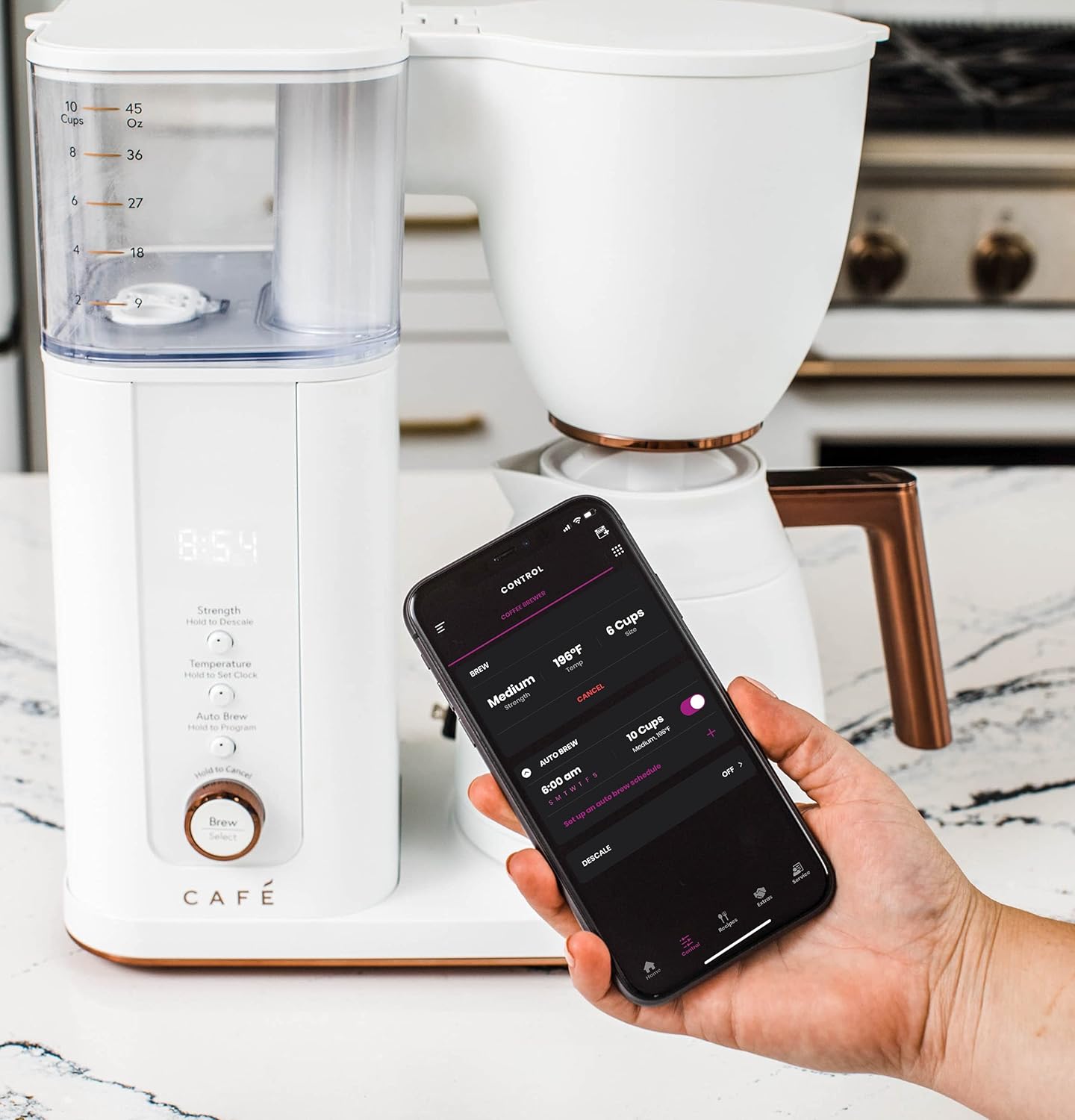
Image: A hand holding a smartphone showing the SmartHQ app interface, demonstrating remote control capabilities for the coffee maker.
Auto Brew Feature
The Auto Brew feature allows you to program the coffee maker to start brewing at a specific time.
- Prepare the coffee maker with water and coffee grounds as described in "Brewing Coffee Manually".
- On the control panel, press and hold the Auto Brew button to enter programming mode.
- Use the Strength and Temperature buttons to set your desired brew time.
- Press Auto Brew again to confirm the setting. The display will show the programmed time.
- Alternatively, use the SmartHQ app to set and manage your Auto Brew schedules.
Care and Maintenance
Daily Cleaning
- Always unplug the coffee maker before cleaning.
- Wash the thermal carafe, carafe lid, and reusable filter basket after each use with warm, soapy water. Rinse thoroughly.
- Wipe the exterior of the coffee maker and the control panel with a soft, damp cloth. Do not use abrasive cleaners or scouring pads.
- Ensure the water reservoir is emptied and allowed to air dry to prevent mold growth. Leaving the lid propped open can aid drying.
Filter Replacement
The coffee maker uses a carbon water filter (GE Appliances Replacement Carbon Coffee Filter Cartridges, 6-pack, UNIV1CFLTR6PK, sold separately) which helps remove chlorine and impurities from water. Replace the filter regularly as recommended by the manufacturer, typically every 2-3 months, or sooner if you notice a change in water quality or taste.
- Locate the filter holder inside the water reservoir.
- Remove the old filter and discard it.
- Soak the new carbon filter in cold water for 15 minutes before use.
- Insert the new filter into the holder and place it back into the reservoir.
Descaling
Mineral deposits (scale) can build up in your coffee maker over time, affecting performance and coffee taste. Descale your coffee maker every 2-3 months, or more frequently if you have hard water.
- Fill the water reservoir with a mixture of white vinegar and water (e.g., 1 part vinegar to 2 parts water). Do not exceed the 10-cup mark.
- Place the empty thermal carafe on the base.
- Start a full brew cycle without coffee grounds.
- After the cycle, discard the vinegar solution.
- Run 2-3 cycles with fresh, clean water to rinse out any remaining vinegar taste.
- The SmartHQ app may also provide a descaling reminder or function.
Troubleshooting Guide
Before contacting customer service, please refer to the following common issues and solutions:
| Problem | Possible Cause | Solution |
|---|---|---|
| Coffee not brewing / "ERR" displayed | Carafe not properly seated on the base. | Ensure the thermal carafe is fully and correctly placed on the coffee maker base. |
| Coffee tastes weak or too strong | Incorrect coffee-to-water ratio, grind size, or brew strength setting. | Adjust the amount of coffee grounds. Ensure coffee grind size is appropriate for drip brewing. Select a different brew strength setting (Light, Medium, Bold, Gold). |
| Brew cycle is slow or incomplete | Mineral buildup (scale) in the coffee maker. | Perform a descaling cycle as described in the Maintenance section. |
| Water reservoir has mold/odor | Insufficient drying after use. | Ensure the water reservoir is completely emptied and allowed to air dry after each use. Prop the lid open to facilitate drying. Clean thoroughly with warm, soapy water. |
| WiFi connection issues | Network interference, incorrect password, or app issues. | Ensure your home WiFi is active and the coffee maker is within range. Re-enter WiFi credentials in the SmartHQ app. Restart the coffee maker and your router if necessary. Refer to the SmartHQ app's help section. |
| "ERR 3" displayed (based on review) | Indicates a potential issue with the boiler or internal components. | Unplug the unit for a few minutes and plug it back in. If the error persists, contact customer support. |
Product Specifications
| Brand | Café |
| Model Name | Café Specialty Drip Coffee Maker with Insulated Thermal Carafe |
| Model Number | C7CDAAS4PW3 |
| Color | Matte White |
| Product Dimensions | 7.3"D x 12.5"W x 14"H |
| Item Weight | 10 pounds |
| Coffee Maker Type | Drip Coffee Machine |
| Carafe Type | Insulated Thermal Carafe |
| Capacity | 10 Cups / 45 Ounces |
| Special Features | App-Controlled, Programmable, Thermal Carafe, Timer, SCA Certified |
| Voltage | 120 Volts |
| Coffee Filter Size | #6 Cone Filter |
| UPC | 084691857846 |
Warranty and Support
For warranty information, technical support, or to purchase replacement parts and accessories (such as carbon water filters), please refer to the official Café website or contact their customer service department.
You can also find the official user manual in PDF format for this product here.
Protection Plans
Extended protection plans are available for purchase separately:
- 3-Year Protection Plan
- 4-Year Protection Plan
- Complete Protect (monthly plan covering multiple eligible purchases)
Please refer to the specific terms and conditions of these protection plans for full details.
Related documentsC7CDAAS4PW3


Ask a question about this manual
Ask about setup, troubleshooting, compatibility, parts, safety, or missing instructions. Manuals+ will review the question and use this page’s manual context to help answer it.