Introduction
This manual provides essential information for the safe and efficient use of your Brennenstuhl Digital Countdown Timer Socket, Model 1506130. This device is designed for indoor use to automatically switch connected appliances on or off, helping to save energy and enhance convenience. Please read these instructions carefully before operating the device.
Safety Instructions
- Read all instructions before use and retain them for future reference.
- This device is intended for indoor use only. Do not expose it to moisture, rain, or extreme temperatures.
- Do not exceed the maximum load specified for the device. Overloading can cause damage or fire.
- Ensure the device is properly plugged into an earthed wall socket.
- Do not attempt to open, modify, or repair the device. Refer all servicing to qualified personnel.
- Keep out of reach of children.
- Unplug the device from the wall socket before cleaning.
Product Overview
Familiarize yourself with the components of your Brennenstuhl Digital Countdown Timer Socket.

Figure 1: Overall view of the Brennenstuhl Digital Countdown Timer Socket.

Figure 2: Detail of the timer socket showing the red LED display for countdown time and the earthed wall socket with enhanced touch protection.

Figure 3: Side view illustrating the 'CD/ON' button for setting the countdown time and the 'Repeat' button for daily repetition.
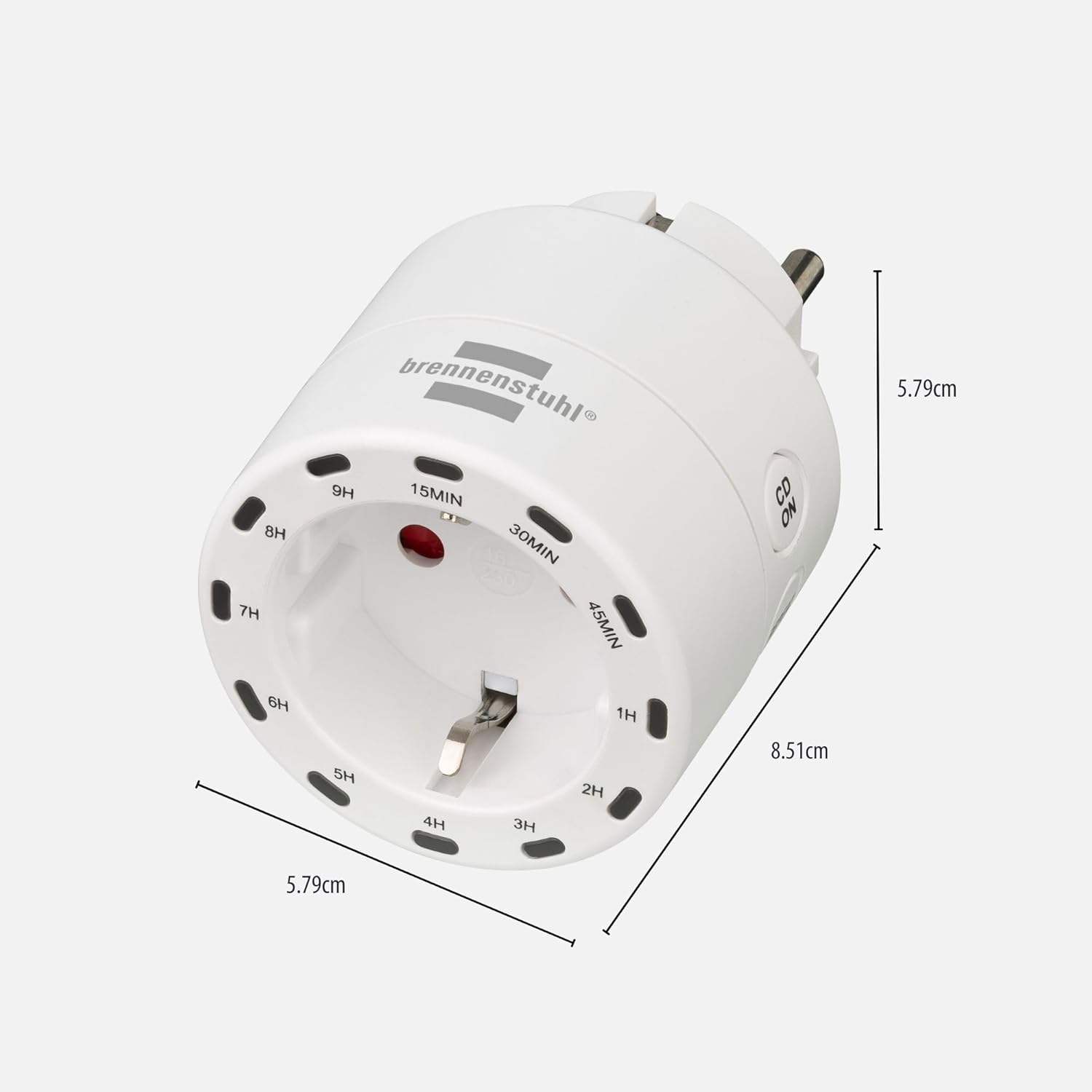
Figure 4: Product dimensions: approximately 5.79 cm (depth) x 8.51 cm (width) x 5.79 cm (height).
Setup
- Unpack the Brennenstuhl Digital Countdown Timer Socket from its packaging.
- Plug the timer socket into a standard earthed wall outlet.
- Plug the appliance you wish to control into the timer socket. Ensure the appliance is switched on if it has its own power switch.
Operating Instructions
Setting a Countdown Timer
The timer allows you to set a countdown after which the connected appliance will automatically switch off.
- With the timer plugged in and an appliance connected, press the "CD/ON" button.
- Each press of the "CD/ON" button cycles through the available countdown durations: 15 minutes, 30 minutes, 45 minutes, 1 hour, 2 hours, 3 hours, 4 hours, 5 hours, 6 hours, 7 hours, 8 hours, and 9 hours.
- The selected countdown time will be indicated on the integrated LED display.
- Once the desired time is selected, the countdown will begin automatically. The connected appliance will remain powered until the countdown reaches zero, at which point it will switch off.
Using the Repeat Function
The repeat function allows the timer to execute the same countdown cycle daily.
- First, set your desired countdown time using the "CD/ON" button as described above.
- After the countdown has started, press the "Repeat" button.
- The timer will now repeat this countdown cycle every 24 hours from the time the repeat function was activated. This is useful for appliances like lighting or coffee makers that you want to operate at the same time each day.
Maintenance
- Always unplug the timer socket from the wall outlet before cleaning.
- Wipe the exterior of the device with a soft, dry cloth.
- Do not use abrasive cleaners, solvents, or harsh chemicals, as these may damage the surface or internal components.
- Ensure no liquids enter the device.
Troubleshooting
| Problem | Possible Cause | Solution |
|---|---|---|
| Appliance does not turn on. | Timer not receiving power. Appliance not switched on or faulty. Countdown has expired. | Check if the timer is securely plugged into a live wall socket. Ensure the connected appliance is switched on and functional. Reset the countdown timer. |
| Countdown timer is not working. | Incorrect setting. Power interruption. | Ensure the desired countdown time is selected by pressing the "CD/ON" button. If there was a power outage, the timer may need to be reset. |
| Repeat function is not active. | Repeat button not pressed after setting countdown. | After setting the initial countdown with "CD/ON", press the "Repeat" button to activate daily repetition. |
Specifications
| Feature | Detail |
|---|---|
| Manufacturer | Brennenstuhl |
| Model Number | 1506130 |
| Product Dimensions (D x W x H) | 5.79 x 8.51 x 5.79 cm |
| Weight | 110 g |
| Color | White |
| Style | Digital Timer |
| Material | Plastic |
| Voltage | 230 Volt |
| Number of Items in Package | 1 |
| Display Size | 2.9 Centimeters |
Warranty and Support
This Brennenstuhl product is covered by the manufacturer's warranty. For specific warranty details, please refer to the documentation included with your purchase or visit the official Brennenstuhl website. For technical support, troubleshooting assistance, or to inquire about spare parts, please contact Brennenstuhl customer service directly.
Contact information can typically be found on the manufacturer's website or on the product packaging.


