
1. Introduction
Welcome to the user manual for your new XTRONS 7-inch Android 12 Octa Core Car Stereo. This manual provides detailed instructions for installation, operation, and maintenance of your device. Please read this manual thoroughly before using the product to ensure proper functionality and to maximize your user experience.
This car stereo is designed to integrate advanced multimedia and navigation features into your vehicle, offering a seamless and intuitive interface.
2. Product Overview and Key Features
The XTRONS PBX7039B is a high-performance car stereo featuring the latest Android 12 operating system, an Octa Core processor, 4GB DDR4 RAM, and 64GB SSD storage. It offers a 7-inch 1024x600 HD IPS capacitive touchscreen for clear visuals and responsive interaction.
- Operating System: Android 12
- Processor: Octa Core (Cortex A75 x2 + Cortex A55 x6)
- Memory: 4GB DDR4 RAM, 64GB Solid State ROM
- Display: 7-inch 1024x600 HD IPS Capacitive Touchscreen
- Connectivity: Built-in 4G LTE, Dual Band Wi-Fi, Bluetooth 5.0, USB, GPS
- Audio: Built-in DSP (Digital Sound Processor), TDA7851 Amplifier (4x48W), TDA7708 Radio
- Compatibility: Wireless CarAutoPlay, Android Auto, AHD Camera Support
- Multimedia: 2K Video Playback, DVD Drive
- Additional Features: USB Tethering, Dual UI, Picture-in-Picture, Split Screen, Changeable UI Themes

Figure 2.1: Front view of the XTRONS 7-inch Android 12 Car Stereo, showing the display and control buttons.

Figure 2.2: Diagram illustrating key features including Android OS, 4GB RAM, 64GB ROM, 4G LTE, Octa Core processor, DSP, AHD camera support, amplifier, radio, DVD drive, IPS screen, USB tethering, and new UIs.
3. Compatibility
This unit is specifically designed for the following BMW models and years:
- BMW E39 M5 (1999-2003)
- BMW E39 (1995-2003)
Important Notes on Compatibility:
- Ensure your car's central console is circular angle before purchasing. If it has a right angle, it may not fit.
- If there is a frame in the center console of your car, as shown in some examples, please remove the frame first to finish the installation.
- Some vehicles may require an extra cable if the adapter plug is located in the trunk.

Figure 3.1: Visual representation of the car stereo installed in BMW E39 and M5 dashboards, showing before and after installation.

Figure 3.2: Visual guide on checking console angle and removing existing frames for proper fitment.
4. Package Contents
Please verify that all items listed below are included in your package:
- 1 x ISO Wiring Harness
- 1 x RCA Cable
- 1 x 4G Antenna
- 1 x CANBus Box
- 1 x Camera Cable
- 2 x USB Cables
- 1 x GPS Antenna
- 1 x CANbus Cable
- 2 x Installation Holders
- 1 x User Manual (English)
- 1 x Radio Antenna Cable

Figure 4.1: Image displaying all included accessories and cables.
5. Installation Guide
Professional installation is highly recommended for this product. Incorrect installation can lead to damage to the unit or your vehicle. Always disconnect the vehicle's battery before beginning any electrical work.
5.1 Wiring Diagram
Refer to the wiring diagram below for proper connection of all cables and components.

Figure 5.1: Detailed wiring diagram showing connections for GPS Antenna, 4G Antenna, Radio Antenna Port, CarAutoPlay Port, USB Ports, SIM card slot, Audio Inputs/Outputs, Camera Inputs, Amplifier Control, Subwoofer Output, External Microphone Port, Brake-in, ACC, Steering Wheel Control, CANBus Box, and ISO Wiring Harnesses.
5.2 Additional Cables You May Need
Depending on your specific BMW E39 model and existing setup, you might require additional cables or adapters:
- If your car is a BMW E38 and has an HVAC Box behind the factory radio, you may need to refer to XTRONS IA1239BLHS.
- If your car's radio antenna port is the same as the picture and it is in the trunk, you may need an adapter cable (XTRONS ISOFZ) to finish the installation.
- If your car's radio antenna port is the same as the picture and it is in the trunk, you may need two 5-meter extension cables (XTRONS ISOFZ and FZMF).
- If your car's original radio is a 4.3" or 7" screen with a 12-pin plug, or you have the navigation drive (located) in the rear of your car, you may need to order an extra 6m extension cable (XTRONS EXL005, EXL007).
- If there is a blue 12-pin plug in your car, you may need to order a cable to aid installation (XTRONS ICE/ACS/BMWDSP01).

Figure 5.2: Visual guide for identifying and connecting optional cables based on vehicle configuration.
6. Initial Setup
After successful installation, follow these steps for initial setup:
- Power On: Turn on your vehicle's ignition. The unit should power on automatically.
- Language and Time: Navigate to 'Settings' to set your preferred language, time zone, and date.
- Network Connection:
- 4G LTE: Insert a Micro-SIM card into the designated slot. The built-in 4G module will connect to the network.
- Wi-Fi: Go to 'Settings' > 'Network & Internet' > 'Wi-Fi' to connect to an available Wi-Fi network. The unit supports dual-band (2.4GHz and 5GHz) Wi-Fi.
- USB Tethering: Connect your smartphone via USB and enable USB tethering in your phone's settings to share its mobile network.
- GPS: Ensure the GPS antenna is properly connected and placed for optimal signal reception.
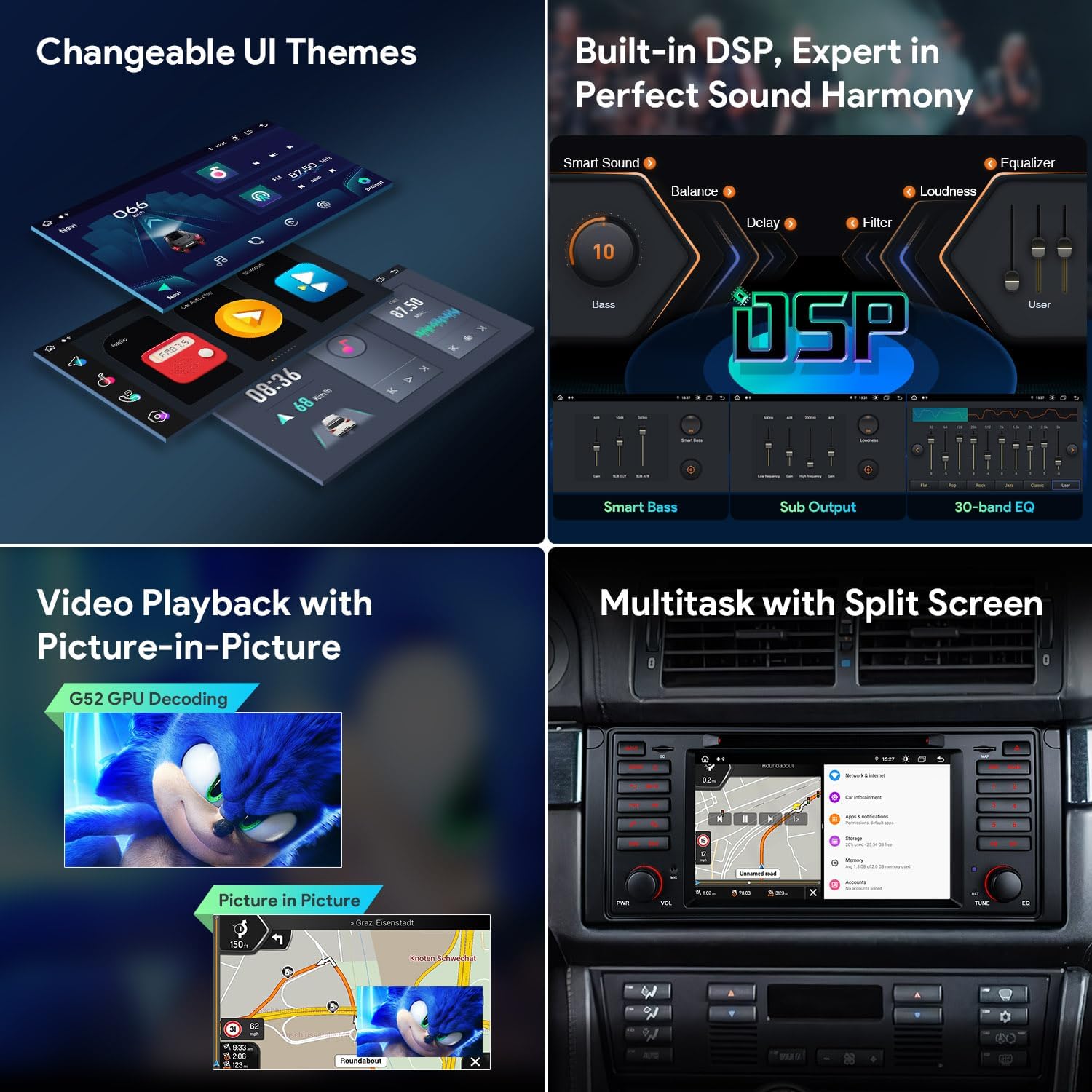
Figure 6.1: Illustration of 4G LTE connectivity, dual-band Wi-Fi, and sharing mobile network via USB tethering.
7. Operating Instructions
7.1 User Interface and Navigation
The unit features a customizable user interface with various themes. Navigate through applications and settings using the touchscreen or physical buttons.
7.2 Audio Features
The built-in Digital Sound Processor (DSP) allows for precise audio tuning. Access the equalizer settings to adjust bass, treble, balance, and other sound parameters to achieve your desired sound harmony.
7.3 Video Playback and Multitasking
Enjoy high-resolution 2K video playback. The Picture-in-Picture (PIP) function allows you to watch videos while using other applications. The split-screen feature enables simultaneous use of two applications, such as navigation and music.
7.4 Smartphone Connection
Connect your smartphone for enhanced functionality:
- Wireless CarAutoPlay: Connect wirelessly via Bluetooth for Apple CarAutoPlay features.
- Android Auto: Connect wirelessly via Bluetooth or via USB for Android Auto functionality.
- Screen Mirroring: Mirror your smartphone screen to the car stereo display via Wi-Fi.

Figure 7.1: Demonstrates changeable UI themes, built-in DSP for sound customization, video playback with Picture-in-Picture, and multitasking with split screen.
Figure 7.2: Shows options for smartphone connection including Wireless CarAutoPlay, Android Auto, and Screen Mirroring.
7.5 Navigation (GPS)
The built-in GPS module provides accurate navigation. Use pre-installed maps or download your preferred navigation applications from the Google Play Store.
7.6 Radio and Bluetooth
Tune into FM/AM radio stations with RDS support. If you have an optional DAB+ tuner, you can enjoy digital audio broadcasting. Bluetooth 5.0 enables hands-free calling and audio streaming from your smartphone.
7.7 Optional Functions
- OBD: Connect an optional OBD2 scanner to retrieve real-time data and error codes from your vehicle's computer.
- TPMS: Install an optional TPMS (Tire Pressure Monitoring System) to monitor tire pressure in real-time.
- DVR + ADAS: Connect an external DVR (Digital Video Recorder) to record your journey. Certain DVR models support ADAS (Advanced Driver-Assistance Systems) functions.
8. Maintenance
To ensure the longevity and optimal performance of your XTRONS car stereo, follow these maintenance guidelines:
- Cleaning: Use a soft, dry cloth to clean the screen and exterior. Avoid abrasive cleaners or solvents.
- Software Updates: Periodically check for software updates provided by XTRONS to ensure you have the latest features and bug fixes.
- Environmental Conditions: Avoid exposing the unit to extreme temperatures, direct sunlight for prolonged periods, or excessive moisture.
9. Troubleshooting
If you encounter issues with your car stereo, refer to the following general troubleshooting tips:
- No Power: Check all power connections and fuses. Ensure the vehicle's ignition is on.
- No Sound: Verify speaker connections, volume settings, and audio source selection. Check if the mute function is active.
- Touchscreen Unresponsive: Try restarting the unit. If the issue persists, a factory reset might be necessary (note: this will erase all user data).
- GPS Signal Loss: Ensure the GPS antenna has a clear view of the sky and is properly connected.
- Bluetooth Connection Issues: Ensure Bluetooth is enabled on both the car stereo and your device. Try unpairing and re-pairing the devices.
- System Slowdown: Close unnecessary applications. Clear cache or perform a factory reset if performance issues persist.
For more complex issues, please contact XTRONS technical support.
10. Specifications
| Feature | Specification |
|---|---|
| Brand | XTRONS |
| Model Number | PBX7039B |
| Operating System | Android 12 |
| Processor | Octa Core |
| RAM | 4GB DDR4 |
| ROM | 64GB SSD |
| Screen Size | 7 Inches |
| Resolution | 1024 x 600 HD IPS |
| Connectivity | 4G LTE, Dual Band Wi-Fi, Bluetooth 5.0, USB, Auxiliary |
| Special Features | DAB (optional), RDS, DSP, CarAutoPlay, Android Auto, AHD Camera Support |
| Installation Type | ISO 1 DIN |
| Front Plate Dimensions | 285 x 120 mm |
| Installation Dimensions | 153 x 178 x 50 mm |
Figure 10.1: Diagram showing the dimensions of the XTRONS car stereo unit.
11. Warranty and Support
XTRONS provides a one-year warranty for this device. Additionally, a 30-day refund option and a replacement or repair option for over 30 days are available. Professional technical support is offered to assist with any product-related inquiries or issues.
For warranty claims, technical assistance, or any questions, please contact XTRONS customer service through the platform where you purchased the product.
