Introduction
The Serene Evolution 36 Sound Portable White Noise Machine is designed to create a soothing environment for improved sleep, concentration, and comfort. Its compact and lightweight design makes it ideal for use at home, during travel, or in a nursery. This device offers a wide range of 36 unique sounds, including various white noises, lullabies, and nature sounds, to effectively mask background disturbances.
Key Features:
- Portable and Rechargeable Design: This white noise machine features a compact, lightweight build and operates via USB or rechargeable battery; suitable for home, travel, or nursery use.
- Adjustable Strap for Versatile Use: Designed with an adjustable rubber strap, this sound machine for sleep easily attaches to cribs, strollers, and car seats; ensures a soothing sleep environment.
- Customizable Sleep Timer: Choose between 30, 60, or 120-minute timer options or let the portable sound machine baby run continuously; remembers your last selected sound and volume setting.
- 36 Soothing Sleep Sounds: Includes white noise, lullabies, sleep music, heartbeat, ocean waves, and rain; helps babies, kids, and adults relax and fall asleep faster by masking background noise.
- Sleek and Travel-Friendly: This Serene Evolution white noise machine is lightweight and easy to carry; enhances any space with premium sleep sounds, making it ideal for nurseries, bedrooms, and travel.

This image shows the compact, circular design of the Serene Evolution white noise machine, featuring a grey fabric speaker grille and white plastic casing with control buttons on the side. A white handle is visible at the top.
Setup Guide
Charging the Device:
The Serene Evolution White Noise Machine is powered by a rechargeable Lithium Ion battery (included) and can also operate via USB. Ensure the device is fully charged before first use for optimal performance.
- Connect the included USB cord to the charging port on the device.
- Plug the other end of the USB cord into a compatible USB power adapter (not included) or a computer USB port.
- Allow the device to charge until the charging indicator light shows a full charge (refer to the device's indicator light behavior for specific details).
Initial Power On:
- Locate the power button on the device.
- Press and hold the power button to turn on the sound machine.
This image illustrates the portability of the device, showing a hand holding the white noise machine next to a grey diaper bag, emphasizing its USB rechargeable capability.
Operating Instructions
Sound Selection:
The Serene Evolution White Noise Machine offers 36 unique soothing sounds across various categories. To select a sound:
- Locate the designated sound selection buttons on the device.
- Press the sound selection button to cycle through the available sounds until you find your preferred one. The device remembers your last selected sound.
Volume Control:
Adjust the volume to your desired level using the volume control buttons.
- Press the '+' button to increase the volume.
- Press the '-' button to decrease the volume.
Setting the Sleep Timer:
The device features a customizable sleep timer, allowing you to set it to turn off automatically after a set period.
- Locate the timer button.
- Press the timer button to cycle through the available options: 30 minutes, 60 minutes, or 120 minutes.
- If no timer is selected, the device will run continuously.

This image shows the white noise machine placed near a sleeping baby, highlighting the optional timer feature that allows users to set it for 30, 60, or 120 minutes, or to run continuously.

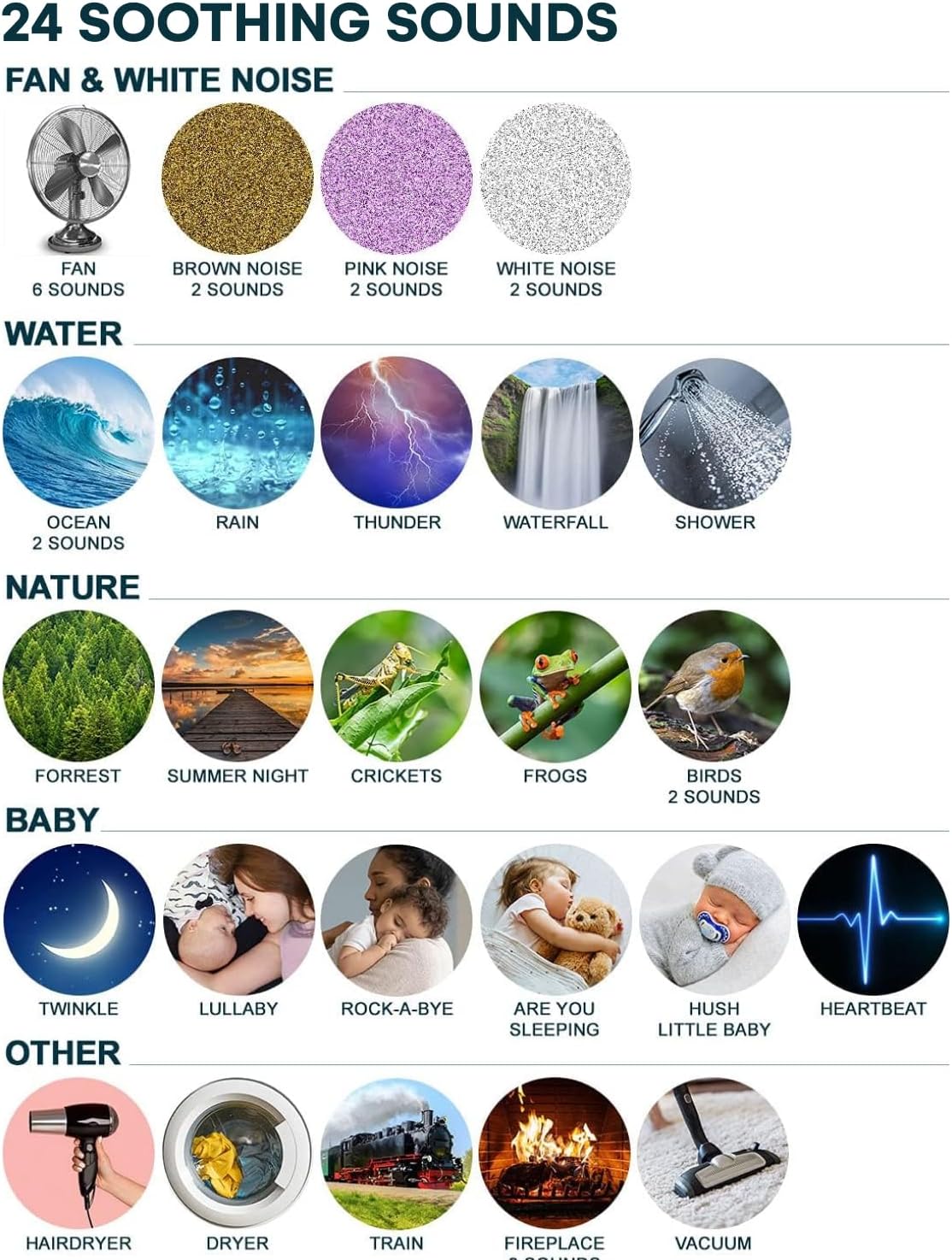
This image visually categorizes the 36 available sounds, including various types of white noise (brown, pink, white), water sounds (ocean, rain, thunder, waterfall, shower), nature sounds (forest, summer night, crickets, frogs, birds), baby sounds (twinkle, lullaby, rock-a-bye, are you sleeping, hush little baby, heartbeat), and other sounds (hairdryer, dryer, train, fireplace, vacuum).
Maintenance
General Care:
- To clean the device, gently wipe the exterior with a soft, dry cloth.
- Do not use abrasive cleaners or immerse the device in water.
- Keep the device away from excessive heat, direct sunlight, and moisture.
Battery Care:
Ensure to use only the included rechargeable batteries and USB cord. Proper battery care extends the life of your device.
- Avoid overcharging the battery.
- If storing the device for an extended period, charge it periodically to maintain battery health.
Troubleshooting
| Problem | Possible Cause | Solution |
|---|---|---|
| Device does not turn on. | Battery is depleted or device is locked. | Charge the device using the included USB cord. Check if the child lock switch is engaged and disengage it. |
| Sound quality is poor or distorted. | Low battery, interference, or speaker obstruction. | Ensure the device is fully charged. Move the device away from other electronic devices. Check if the speaker grille is clean and unobstructed. |
| Timer function is not working. | Incorrect timer setting. | Press the timer button repeatedly to cycle through 30, 60, or 120 minutes. If no timer is desired, ensure no timer option is selected. |
| Device turns off unexpectedly. | Low battery or timer activated. | Recharge the device. Verify if a sleep timer was set. |
Product Specifications
| Feature | Detail |
|---|---|
| Product Dimensions | 4.07 x 3.69 x 1.72 inches; 8.96 ounces |
| Item Model Number | ParentSKU |
| Batteries | 1 Lithium Ion batteries required (included) |
| Manufacturer | London Johnson |
| ASIN | B095XFH1J2 |
| Country of Origin | China |
| Color | White, Grey |
| Material | Plastic |
| Power Source | Battery Powered |
Warranty and Support
For warranty information or product support, please contact Serene Evolution customer service directly. Refer to the product packaging or the official Serene Evolution website for the most up-to-date contact details.
Manufacturer: London Johnson