
1. Introduction
This instruction manual provides essential information for the proper setup, operation, and maintenance of your Marantec Digital 572 Handheld Transmitter. This 2-channel wireless remote control operates at 868 MHz and is designed for use with Marantec garage door operators and compatible systems. Please read this manual thoroughly before using the device to ensure safe and efficient operation.
2. Safety Instructions
- Keep the handheld transmitter out of reach of children to prevent accidental operation of garage doors or gates.
- Do not operate the garage door or gate if there are people, animals, or objects in the path of movement.
- Ensure the garage door or gate is visible during operation to prevent accidents.
- Do not expose the device to extreme temperatures, moisture, or direct sunlight.
- Only use the specified battery type (Lithium Manganese Dioxide) for replacement.
- Dispose of used batteries according to local regulations.
3. Package Contents
Verify that all items are present in the package:
- Marantec Digital 572 Handheld Transmitter
- Wall bracket
- Dowels and screw for wall bracket installation
- Instruction manual (this document)
- Pre-installed Lithium Manganese Dioxide battery
4. Product Overview
The Marantec Digital 572 is a compact, 2-channel handheld transmitter featuring Marantec's bi·linked radio system for enhanced security. It includes two distinct buttons for controlling different functions or operators.

Figure 4.1: Front view of the Marantec Digital 572 Handheld Transmitter, showing the two control buttons and the Marantec logo.

Figure 4.2: Angled view of the Marantec Digital 572, highlighting its compact design and the red LED indicator.

Figure 4.3: Side view of the Marantec Digital 572, illustrating its slim profile.
The transmitter features a small red LED indicator, which illuminates during transmission to confirm button presses and indicate battery status.
5. Setup and Programming
The Marantec Digital 572 Handheld Transmitter must be programmed to your Marantec garage door operator or compatible bi·linked receiver before use. The exact programming procedure may vary slightly depending on your specific operator model. Refer to your garage door operator's instruction manual for detailed programming steps. Generally, the process involves activating a programming mode on your receiver and then transmitting a signal from the handheld transmitter.
General Programming Steps (Consult your operator's manual for specifics):
- Access Receiver Programming Mode: Locate the programming button or menu on your Marantec garage door operator or external bi·linked receiver. Press and hold this button until the programming indicator (usually an LED) illuminates or flashes.
- Transmit Signal from Handheld Transmitter: While the receiver is in programming mode, press and hold the desired button on your Digital 572 handheld transmitter. The LED on the transmitter will illuminate.
- Confirm Pairing: Release the button on the handheld transmitter once the receiver's indicator confirms successful pairing (e.g., LED stops flashing, changes color, or the operator briefly moves).
- Test Operation: After programming, test the handheld transmitter by pressing the programmed button to ensure it controls the garage door or gate correctly.
Note: The bi·linked radio system uses a rolling code and 128-bit encryption for security. Each button press generates a new code, making unauthorized copying extremely difficult.
6. Operating Instructions
Once programmed, operating the Marantec Digital 572 is straightforward:
- Single Function Control: Press and release the programmed button to activate the associated function (e.g., open/close garage door). The red LED on the transmitter will briefly illuminate.
- Multiple Function Control: If you have programmed different buttons to control separate operators or functions, press the respective button for the desired action.
- Range: The effective range of the transmitter can be affected by environmental factors, such as obstacles, weather conditions, and interference from other radio devices.
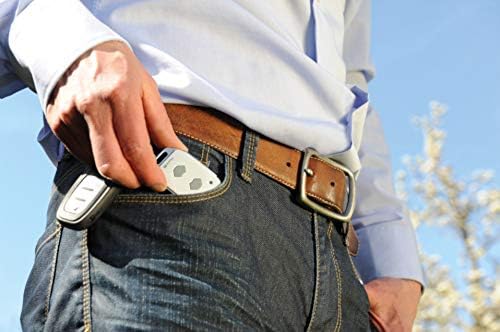
Figure 6.1: The compact Marantec Digital 572 fits conveniently in a pocket or on a keychain.
7. Maintenance
Battery Replacement
The Marantec Digital 572 uses a Lithium Manganese Dioxide battery. When the red LED on the transmitter becomes dim or fails to illuminate during button presses, it indicates a low battery and requires replacement.
- Carefully open the transmitter casing. Refer to the diagram in your operator's manual or look for a small notch to pry open the case.
- Remove the old battery, noting its orientation.
- Insert a new Lithium Manganese Dioxide battery, ensuring correct polarity.
- Close the casing securely.
- Test the transmitter to confirm functionality.
Cleaning: Clean the exterior of the transmitter with a soft, dry cloth. Do not use abrasive cleaners or solvents.
8. Troubleshooting
| Problem | Possible Cause | Solution |
|---|---|---|
| Transmitter does not respond. | Low or dead battery. | Replace the battery (see Section 7). |
| Transmitter LED does not light up. | Battery is completely drained or incorrectly inserted. | Check battery orientation or replace battery. |
| Garage door/gate does not respond after programming. | Incorrect programming procedure. | Repeat programming steps carefully, referring to your operator's manual. Ensure the receiver is in programming mode. |
| Reduced operating range. | Low battery. Environmental interference. Obstructions. | Replace battery. Move closer to the receiver. Clear line of sight. |
9. Specifications
- Model: Digital 572
- Part Number: 101115
- Brand: Marantec
- Frequency: 868 MHz (bi·linked radio system)
- Channels: 2
- Security: 128-bit encryption, rolling code
- Dimensions: 60 x 39 x 12 mm
- Weight: 30 g
- Material: Plastic
- Color: White
- Battery Type: Lithium Manganese Dioxide (included)
- Included Components: Hand-held transmitter, wall bracket, dowels and screw, instruction manual
- Origin: Made in Germany
Note: Specifications are subject to change without prior notice.
10. Warranty and Support
For warranty information, technical support, or service inquiries, please contact Marantec customer service or your authorized Marantec dealer. Keep your proof of purchase for warranty claims.
You can typically find contact information on the official Marantec website or within the packaging materials.
