
1. Product Overview
The Oclean X Pro Elite is an advanced electric toothbrush designed for comprehensive oral hygiene. It features a smart touchscreen, quiet operation, multiple brushing modes, and long battery life, integrating with an app for personalized brushing analysis. Its 0.96-inch color OLED screen provides real-time feedback on 8 brushing zones, highlighting missed areas. The unique "Pure Sound 2.0" ultrasonic active noise reduction technology keeps operation below 45 dB. Powered by a magnetic levitation brushless motor, it delivers up to 84,000 micro-vibrations per minute for powerful cleaning. The toothbrush supports ultra-fast wireless charging, achieving a full charge in 3.5 hours for up to 35 days of use. It also offers 4 brushing modes and 32 intensity levels, allowing for hundreds of personalized cleaning programs.
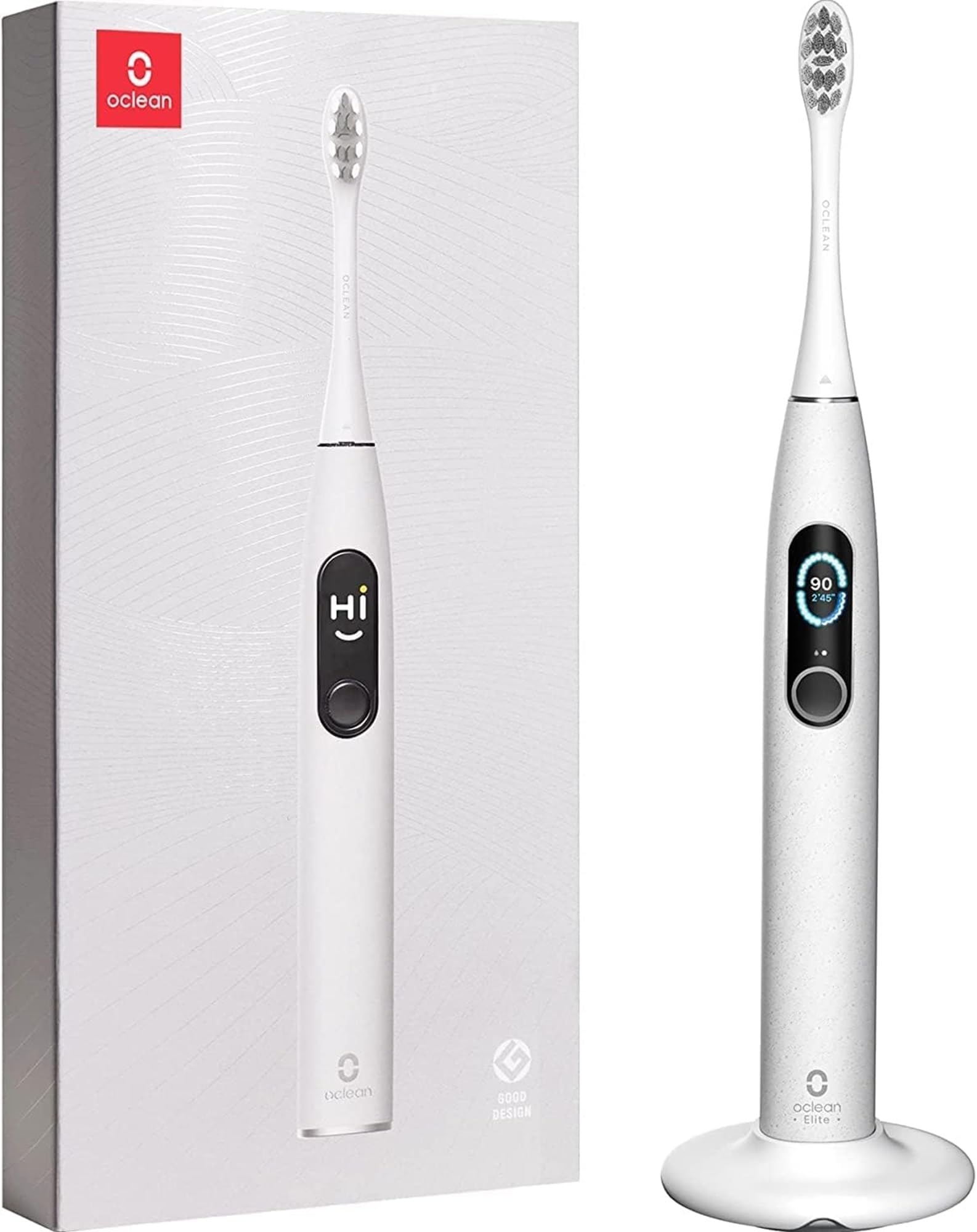
Image: The Oclean X Pro Elite electric toothbrush, showcasing its sleek design and smart display.
2. Initial Setup
- Charge the Toothbrush: Fully charge the electric toothbrush before its first use. Refer to the "Charging and Battery" section for details.
- Attach Brush Head: Securely attach a brush head to the toothbrush handle.
- Download the App: Download the Oclean app from your smartphone's app store to access advanced features and brushing analysis.
- Pair with App: Follow the in-app instructions to pair your Oclean X Pro Elite with your smartphone via Bluetooth.

Image: The Oclean X Pro Elite electric toothbrush in its packaging, showing the main unit and included accessories like the charger.
3. Operating Instructions
- Apply Toothpaste: Apply a small amount of toothpaste onto the brush head.
- Moisten Brush Head: Lightly moisten the bristles of the toothbrush before use.
- Position the Brush: Angle the toothbrush approximately 45 degrees and place it on your gum line.
- Select Mode: Select the desired mode using the touchscreen.
- Start Brushing: Turn on the toothbrush and gently brush in small circular motions, following the natural contour of your gums.
- Monitor Brushing: The built-in timer will alert you every 30 seconds to move to a different quadrant of your mouth, ensuring even cleaning. The smart screen provides instant feedback on missed areas.
- Complete Brushing: Brush for the recommended 2-3 minutes. The toothbrush will automatically stop or indicate completion.
- Turn Off: Turn off the toothbrush after completing your brushing session.
- Rinse: Rinse your mouth and the brush head thoroughly with water.

Image: The Oclean X Pro Elite toothbrush displaying real-time brushing feedback on its screen, highlighting areas that need more attention.
4. Brushing Modes and Intensity Levels
The Oclean X Pro Elite offers 4 distinct brushing modes and 32 intensity levels, allowing for a personalized brushing experience. You can select your desired mode and intensity using the smart touchscreen on the device.
- Clean Mode: Standard cleaning for daily plaque removal.
- Sensitive Mode: Gentle cleaning for sensitive teeth and gums.
- Whitening Mode: Designed to help remove surface stains for brighter teeth.
- Massage Mode: Provides a gentle massage for gum health.
The 32 intensity levels allow fine-tuning of the brushing power within each mode to suit individual comfort and cleaning needs.

Image: The Oclean X Pro Elite's touchscreen interface, illustrating the selection options for 4 brushing modes (Clean, Massage, White, Sensitive) and 32 intensity levels.
5. App Integration
The Oclean X Pro Elite connects to a dedicated mobile application, providing advanced features for monitoring and improving your brushing habits.
- Brushing Analysis: The app provides detailed reports on your brushing coverage across 8 zones of your mouth, identifying missed areas.
- Personalized Programs: Based on your brushing data, the app can recommend customized cleaning programs.
- Progress Tracking: View daily, weekly, and monthly brushing reports to track your oral hygiene progress.
- Pressure Sensor Feedback: The app, in conjunction with the toothbrush's pressure sensor, alerts you if you are brushing too hard, helping to protect your teeth and gums.

Image: A smartphone screen displaying the Oclean app interface, which shows a detailed brushing report and coverage analysis.
6. Charging and Battery Life
The Oclean X Pro Elite features efficient wireless charging and an extended battery life.
- Fast Wireless Charging: A full charge takes approximately 3.5 hours using the provided wireless charger.
- Extended Battery Life: A single full charge provides up to 35 days of continuous use, based on typical usage patterns (e.g., two 2-minute brushing sessions per day).
- Charging Indicator: The toothbrush display shows the battery percentage and charging status.
- Travel-Friendly: Compatible with multiple wireless chargers, making it convenient for travel.

Image: The Oclean X Pro Elite electric toothbrush resting on its wireless charging base, with the screen indicating charging status and battery level.
7. Maintenance and Care
Proper maintenance ensures the longevity and optimal performance of your Oclean X Pro Elite toothbrush.
- Rinse After Use: After each brushing session, rinse the brush head and the top part of the handle thoroughly under running water to remove toothpaste residue and debris.
- Clean the Handle: Wipe the toothbrush handle with a soft, damp cloth periodically to keep it clean.
- Replace Brush Head: It is recommended to replace the brush head every 3 months, or sooner if the bristles become frayed or worn.
- Charging Base Care: Keep the wireless charging base clean and dry. Avoid submerging the charging base in water.
- Storage: Store the toothbrush in a dry place. The magnetic wall mount can be used for hygienic storage and drying.
- Water Resistance: The toothbrush handle is IPX7 waterproof, meaning it can be immersed in water up to 1 meter for 30 minutes. However, avoid prolonged submersion and ensure the charging port is dry before charging.

Image: The Oclean X Pro Elite electric toothbrush attached to its magnetic wall mount, demonstrating a convenient storage solution.
8. Safety Warnings
Please read and adhere to the following safety warnings to prevent injury or damage to the product:
- Adult Use Only: This product is not intended for use by children.
- Keep Out of Reach of Children: Store the toothbrush and its accessories away from children.
- Avoid Damage: Do not use the toothbrush if it appears damaged (e.g., cracked handle, frayed bristles).
- Charging Precautions: Use only the original Oclean charging cable and base. Do not attempt to charge the toothbrush in wet conditions.
- Medical Conditions: Consult your dentist or doctor before using this product if you have severe periodontal disease, oral surgery, or other oral health concerns.
- Disposal: Do not dispose of the product in household waste. Follow local regulations for proper disposal of electronic devices and batteries.
9. Troubleshooting
| Problem | Possible Cause | Solution |
|---|---|---|
| Toothbrush does not turn on. | Low battery; device malfunction. | Charge the toothbrush fully. If the issue persists, contact customer support. |
| Toothbrush does not charge. | Improper placement on charger; faulty charger/cable; dirty charging contacts. | Ensure the toothbrush is correctly placed on the charging base. Clean charging contacts. Try a different power outlet. If problem continues, contact customer support. |
| Vibration is weak or inconsistent. | Low battery; brush head not properly attached; internal issue. | Charge the toothbrush. Re-attach the brush head securely. If the issue persists, contact customer support. |
| App not connecting to toothbrush. | Bluetooth off; app not updated; pairing issue. | Ensure Bluetooth is enabled on your phone. Update the Oclean app. Try re-pairing the device through the app settings. |
| Screen is unresponsive. | Software glitch; water on screen. | Wipe the screen dry. Restart the toothbrush (if possible, by holding the power button). If unresponsive, contact customer support. |
10. Product Specifications
| Feature | Detail |
|---|---|
| Model Name | Oclean X Pro Elite |
| Model Number | XProEliteGrey |
| Dimensions (L x W x H) | 2.5 x 2.5 x 24.5 cm |
| Weight | 98 Grams |
| Power Source | Battery Powered (1 Lithium metal battery included) |
| Battery Life | Up to 35 days |
| Charging Time | Approx. 3.5 hours (wireless fast charge) |
| Noise Level | Less than 45 dB |
| Brushing Modes | 4 (Clean, Sensitive, Whitening, Massage) |
| Intensity Levels | 32 |
| Movements per Minute | Up to 84,000 micro-vibrations |
| Waterproof Rating | IPX7 |
| Special Features | Pressure sensor, Bluetooth connectivity, Customizable, Brushing timer, Smart touchscreen |
| Bristle Material | Nylon |
| Handle Material | Plastic |
| Included Components | Charger |
11. Warranty and Support
The Oclean X Pro Elite Electric Toothbrush comes with a manufacturer's warranty.
- Warranty Period: 2-year manufacturer's warranty.
- Customer Support: For warranty claims, technical assistance, or any product-related inquiries, please contact Oclean customer support through their official website or the retailer where the product was purchased.
- Online Resources: Visit the official Oclean website for FAQs, additional product information, and support resources.


