
1. Product Overview
The ATUMTEK Selfie Stick Tripod is a versatile 3-in-1 device designed for capturing photos and videos with ease. It integrates a selfie stick and a tripod stand, featuring a premium aluminum extendable pole for exceptional stability and durability. The device includes a detachable Bluetooth wireless remote for convenient operation and a rotatable phone holder to achieve various shooting angles. Its compact and lightweight design makes it ideal for travel and everyday use.
Key Features:
- Integrated Innovative Design: Combines selfie stick and tripod functions with a stable, aviation-grade aluminum extendable pole.
- Adjustable Angle & Rotatable Phone Holder: Supports 270-degree rotation for horizontal/vertical clamping and 180-degree rotation for optimal shooting angles. Accommodates phones up to 3.42 inches wide.
- Detachable Bluetooth Remote: Wireless control up to 33ft (10m) with a built-in 50mAh rechargeable Lithium battery, capable of capturing up to 15,000 photos on a full charge via USB Type-C. Compatible with iOS 7.0+ and Android 5.0+ devices.
- Super Lightweight & Portable: Folds down to just 7.7 inches (19.5 cm) and extends up to 31.3 inches (79.5 cm), weighing only 6 ounces (170 grams), making it easy to carry in pockets or small bags.
- Simple to Use & Universally Compatible: Quick Bluetooth pairing and easy operation with a shutter control button. Can be used for self-photography, wider scenery shots, or as a desktop phone holder for live broadcasts and media viewing.

Figure 1: The ATUMTEK Selfie Stick Tripod in its compact form, extended as a selfie stick, and set up as a tripod. The detachable Bluetooth remote is also visible.
2. Package Contents
Please check the package carefully to ensure all items are present:
- 1x ATUMTEK Selfie Stick Tripod
- 1x Bluetooth Remote Shutter
- 1x USB Type-C Charging Cable
- 1x User Manual

Figure 2: All components included in the ATUMTEK Selfie Stick Tripod package.
3. Setup Guide
3.1 Pairing the Bluetooth Remote
- Ensure the Bluetooth remote is charged.
- Turn on the remote by pressing and holding the camera button until the indicator light flashes.
- On your smartphone, go to Bluetooth settings and enable Bluetooth.
- Search for "ATUMTEK" or a similar device name in the list of available devices.
- Select the device to pair. The indicator light on the remote will turn solid blue once successfully paired.
3.2 Attaching Your Smartphone
- Gently pull the phone holder clamps apart.
- Carefully place your smartphone into the holder, ensuring it is securely gripped by both clamps. The holder accommodates devices with widths up to 3.42 inches.
- Adjust the phone's position within the holder for optimal balance and camera alignment.
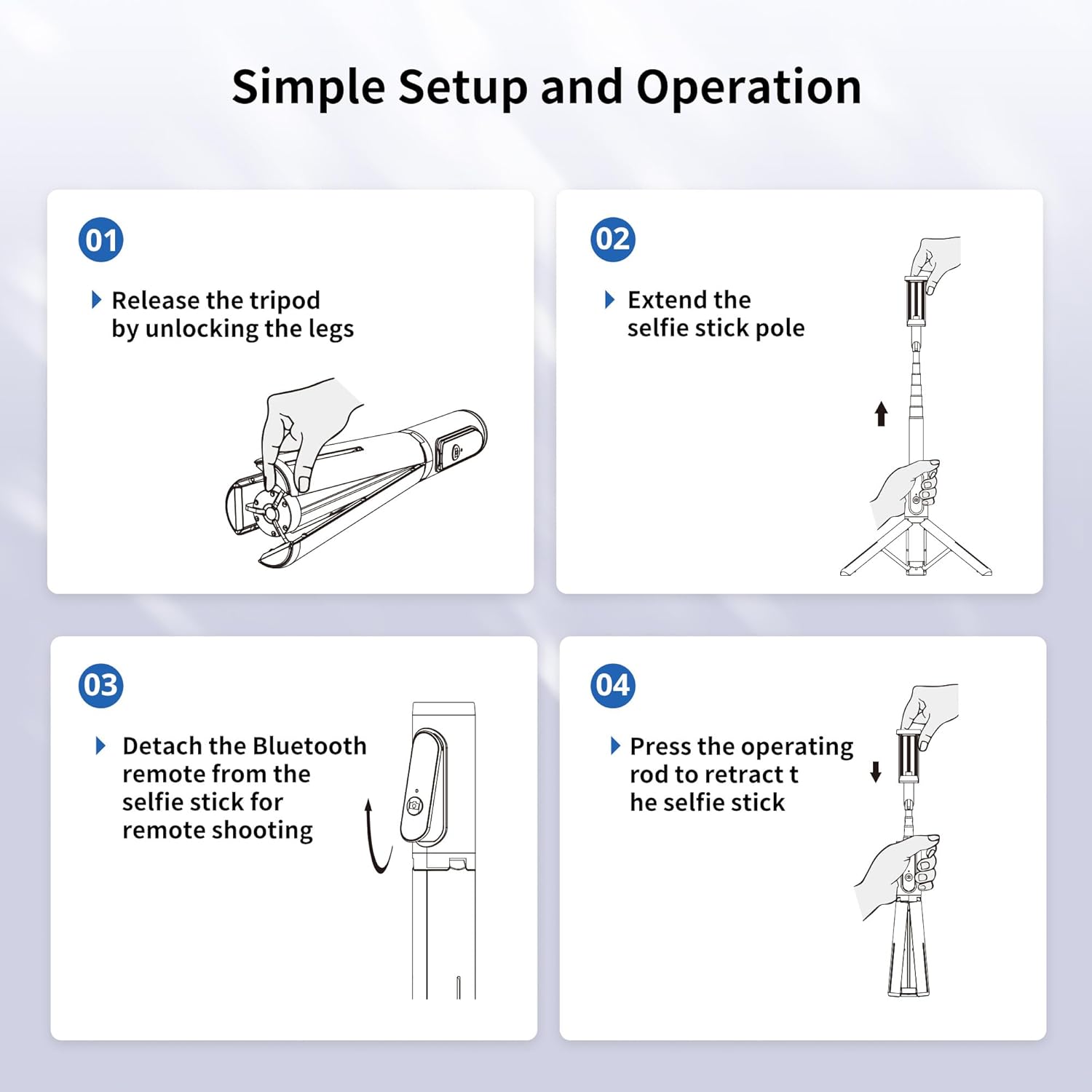
Figure 3: Visual guide for setting up the tripod and extending the selfie stick.
4. Operating Instructions
4.1 Using as a Selfie Stick
- Hold the base of the device firmly.
- Extend the aluminum pole to your desired length. The pole extends up to 31.3 inches.
- Adjust the phone holder's angle as needed.
- Use the detachable Bluetooth remote to capture photos or start/stop video recording.
4.2 Using as a Tripod Stand
- From the folded position, gently push the bottom part of the handle to release the integrated tripod legs.
- Ensure the three legs are fully spread out to form a stable base.
- Extend the aluminum pole to your desired height for tripod use.
- Place the tripod on a flat, stable surface.
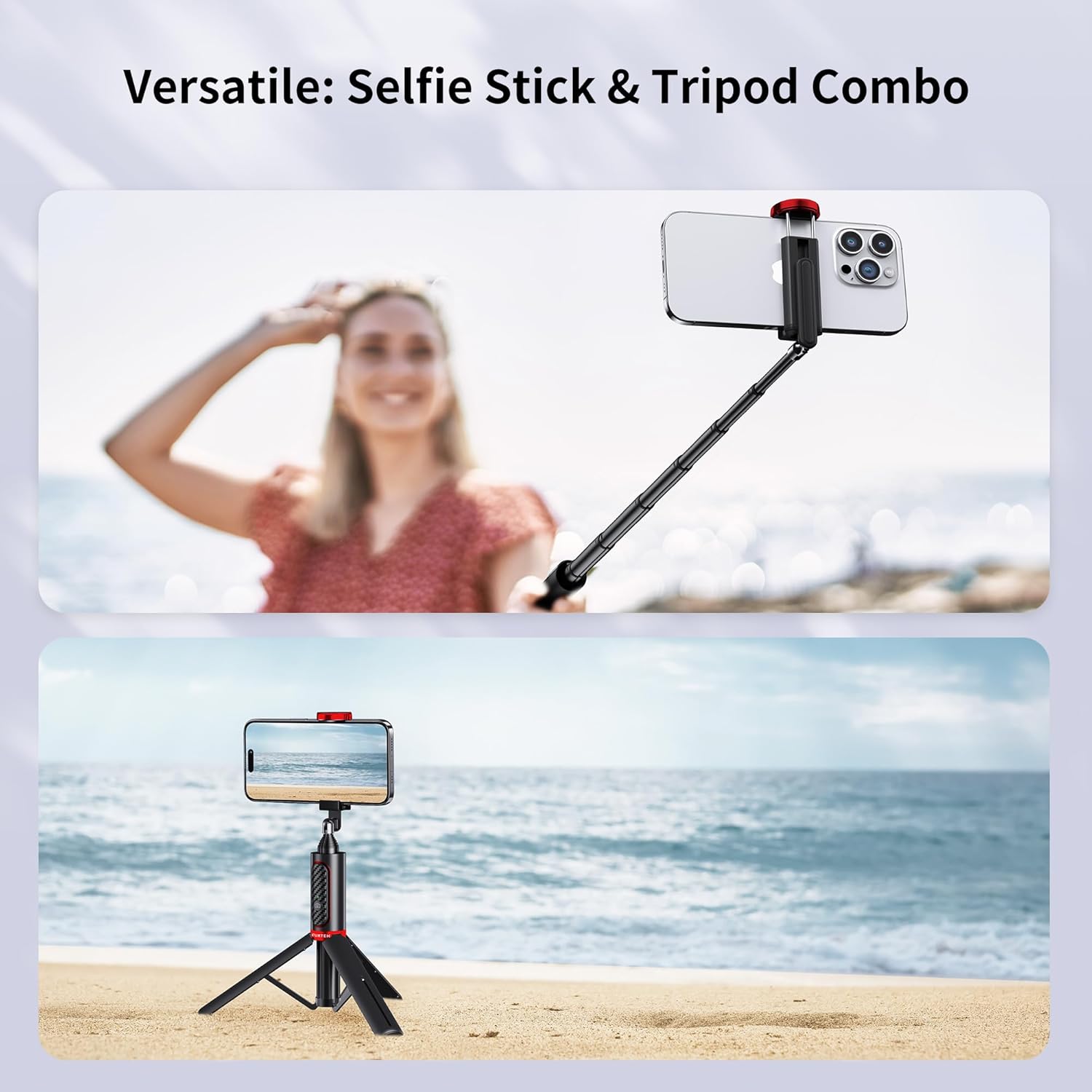
Figure 4: The versatility of the device, functioning as both a selfie stick and a tripod.
4.3 Adjusting Angle and Rotation
The phone holder features a 270-degree rotatable design, allowing you to switch between horizontal and vertical clamping of your mobile phone. Additionally, the head offers 180-degree rotation, enabling you to select the perfect angle for your photos and videos.
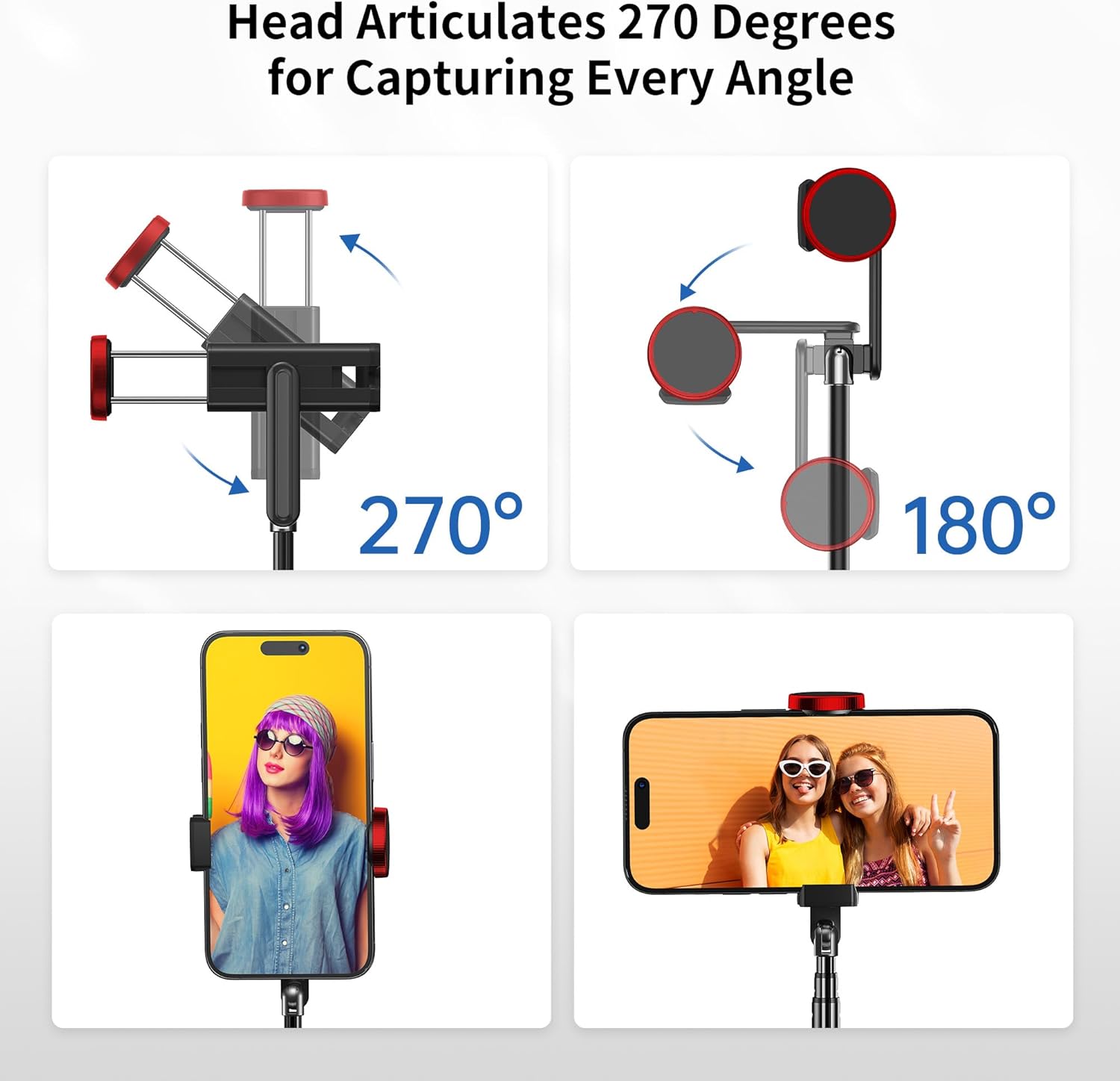
Figure 5: Illustration of the phone holder's articulation and rotation capabilities.
4.4 Using the Detachable Remote
The Bluetooth remote can be detached from the selfie stick for remote shooting. Simply slide it out from its slot. Once detached and paired, press the camera button on the remote to trigger your phone's camera shutter. This allows you to take photos or group shots from a distance of up to 33 feet (10 meters).
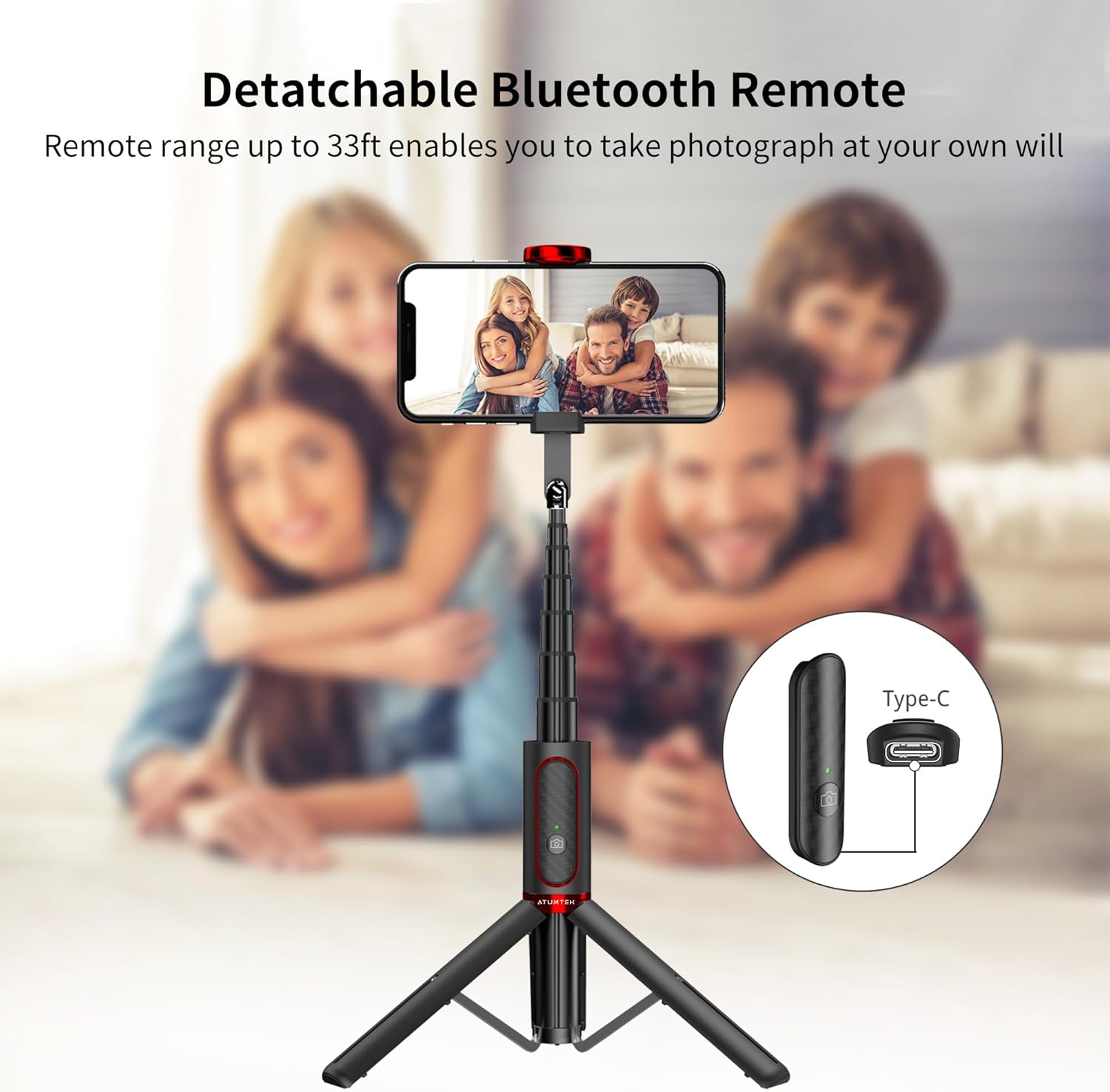
Figure 6: The detachable Bluetooth remote and its charging port.
5. Maintenance
5.1 Cleaning
To maintain the longevity and appearance of your ATUMTEK Selfie Stick Tripod, wipe it regularly with a soft, dry cloth. Avoid using abrasive cleaners or solvents, as these may damage the finish or internal components.
5.2 Battery Charging
The Bluetooth remote has a built-in 50mAh rechargeable Lithium battery. When the battery is low, connect the remote to a USB power source using the provided USB Type-C charging cable (5V/110mAh). A full charge allows for approximately 15,000 photos. Ensure the remote is fully charged before extended use.
6. Troubleshooting
6.1 Bluetooth Connection Issues
- Remote Not Pairing: Ensure the remote is fully charged. Turn off and on your phone's Bluetooth, then try pairing again.
- Remote Disconnects Frequently: Ensure the remote is within the 33ft (10m) operating range. Avoid obstacles that may interfere with the Bluetooth signal.
6.2 Remote Not Responding
- No Response When Pressing Button: Check if the remote's battery is depleted. Recharge the remote.
- Remote Paired but No Shutter Action: Ensure your phone's camera app is open and active. Some phone models may require specific camera settings for external remotes.
6.3 Tripod Stability Concerns
- Unstable Tripod: Ensure all three tripod legs are fully extended and locked into place. Place the tripod on a flat, level surface.
- Phone Too Heavy: While designed for stability, ensure your phone's weight does not exceed the recommended maximum for optimal balance, especially when extended. The maximum weight recommendation is 15 kilograms, but practical stability depends on extension and balance.
7. Specifications
| Feature | Specification |
|---|---|
| Model Number | ATSS087 |
| Brand | ATUMTEK |
| Color | Red |
| Material | Aluminum Alloy (Aviation-grade) |
| Folded Size | 7.7 inches (19.5 cm) |
| Extended Length | Up to 31.3 inches (79.5 cm) |
| Item Weight | 6 ounces (170 grams) |
| Max Weight Recommendation | 15 Kilograms |
| Phone Holder Width | Up to 3.42 inches (8.7 cm) |
| Bluetooth Remote Range | Up to 33 feet (10 meters) |
| Remote Battery Type | 50mAh Rechargeable Lithium Metal |
| Charging Port | USB Type-C |
| Remote Compatibility | iOS 7.0 and above, Android 5.0 and above |
| FCC ID | 2ASUP-ATSS055 |
8. Warranty and Support
8.1 Warranty Information
The ATUMTEK Selfie Stick Tripod comes with a 3-year warranty from the date of purchase. This warranty covers manufacturing defects and ensures the product's quality and performance under normal use. Please retain your proof of purchase for warranty claims.
8.2 FCC Compliance
This device complies with Part 15 of the FCC Rules. Operation is subject to the following two conditions: (1) This device may not cause harmful interference, and (2) This device must accept any interference received, including interference that may cause undesired operation. The FCC ID for this product is 2ASUP-ATSS055.
8.3 Customer Service
For any questions, concerns, or support needs regarding your ATUMTEK Selfie Stick Tripod, please contact our friendly customer service team. Refer to the contact information provided on the product packaging or the official ATUMTEK website for assistance.


